14 proven Facebook engagement strategies

Written by John Paul Hernandez
Published on January 9, 2026
Reading time 14 minutes

Table of Contents
Getting people to engage on Facebook is more challenging than ever. Feeds are more competitive, algorithms are smarter and users are more intentional about how they interact. Boosting engagement comes down to knowing your audience, showing up with purpose and using data to guide your Facebook marketing strategy.
This guide breaks down what Facebook engagement means today and how to increase it with proven tactics. You’ll also learn how to measure the impact of your posts and tie those results directly to tangible business outcomes.
What is Facebook engagement?
Facebook engagement refers to any interaction users have with your content, such as likes, reactions, comments, shares, clicks and video views.
Engagement isn’t a vanity metric. It’s a powerful lever for organic reach and brand growth in 2026. When people interact with your posts, it tells Facebook’s algorithm that your content is relevant. That relevance boosts your visibility and, ultimately, your business results.
And while newer platforms get plenty of buzz, Facebook remains a high-engagement channel for brands. According to Sprout Social’s 2025 Content Benchmarks Report, businesses see an average of 24 daily interactions on Facebook, compared to 27 on Instagram, 13 on X (Twitter) and 4 on TikTok.
This shows there’s still enormous opportunity on the platform, especially when you consider that 85% of brands already use Facebook and 39% of consumers turn to it for purchases.
Why post engagement on Facebook impacts your reach
According to the 2025 Sprout Social Index™, 90% of consumers have a Facebook profile. And with over 3.07 billion monthly active users, your audience is almost certainly on the network. But reaching them takes more than posting consistently.
Increasing Facebook engagement gives your brand its biggest advantage. The more interactions a post earns, the more the Facebook algorithm will amplify it to new audiences.
Real engagement comes from content that feels personal, such as real-life stories, user-generated content (UGC) and influencer marketing. These strategies help your brand build trust and stay visible in feeds.
As you increase post engagement, your business benefits from expanded reach, stronger loyalty and increased conversions. And with analytics tools and reporting, you can tie these results directly to your social media marketing efforts.
14 ways to increase engagement on Facebook
Strong Facebook engagement comes from a mix of strategic posting, conversation-driving content, responsive community management and consistent performance tracking.
Here are 14 best practices for boosting Facebook engagement:
1. Understand your target audience
Every time someone engages with your post, it signals that your content resonates with them. But that can only happen when you go beyond demographics like age and location and dig deeper into who your target audience is. This means understanding their interests, challenges and motivations so your Facebook posts feel tailor-made for them.
You can learn more about your Facebook audience by following these tips:
- Act like a real Facebook user: Have conversations on third-party posts and via DMs with customers, influencers and accounts with overlapping audiences.
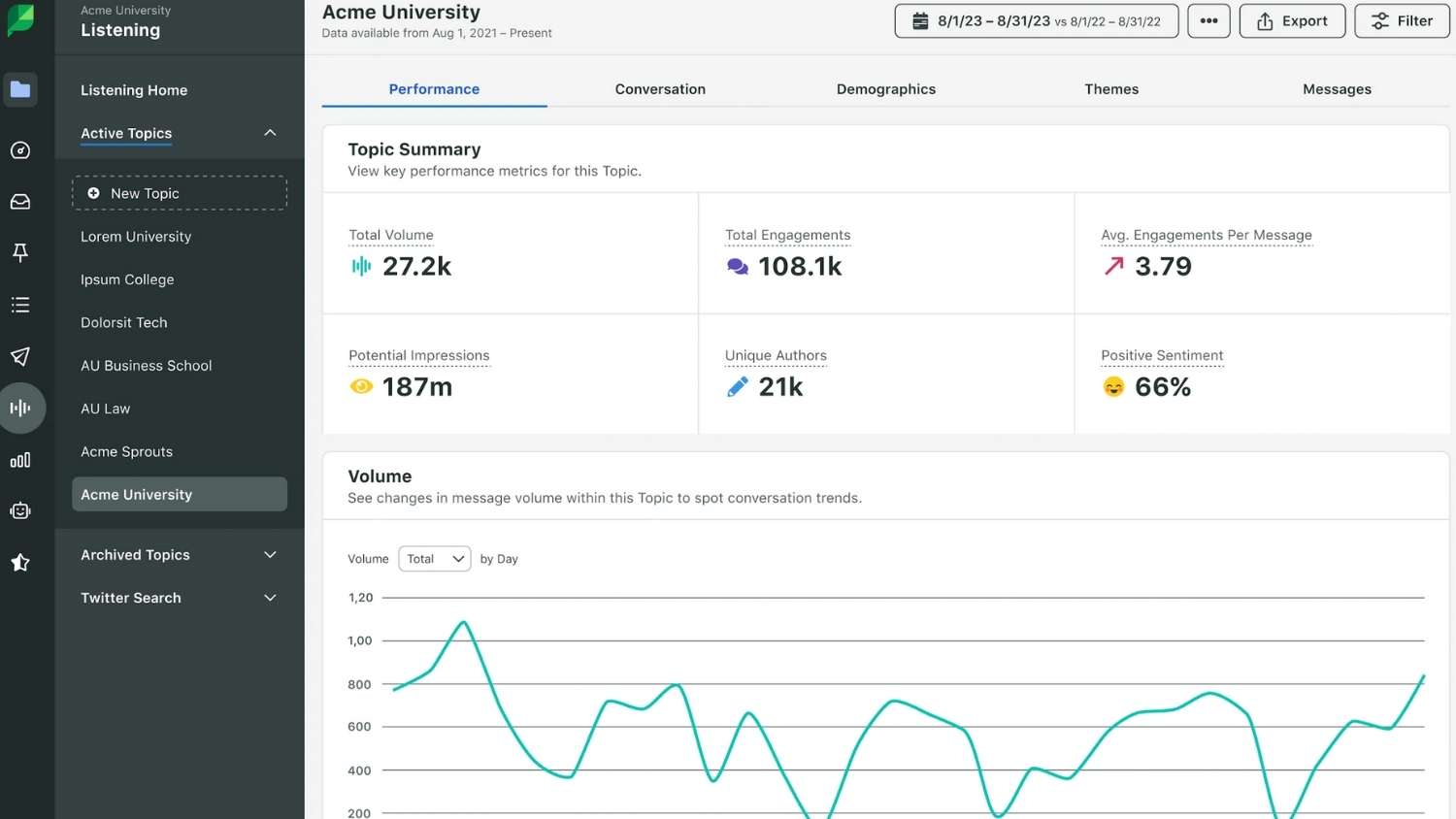
- Prioritize social listening: Stay tuned to what Facebook users say about your brand, trending topics and the market. Sprout’s Listening solution helps you keep tabs on audiences across multiple social media networks in one place.
- Network with influencers: Engage with niche influencers to discover what’s trending and what’s important to your target audience. These professionals know your audience on an emotional level and understand what drives growth on social.
In the example below, A&B Bounce Party Rentals replied warmly to comments on its Labor Day post, and consistent engagement like this using replies, questions and polls encourages conversation while building community.

Source: Facebook
2. Time your posts for maximum impact
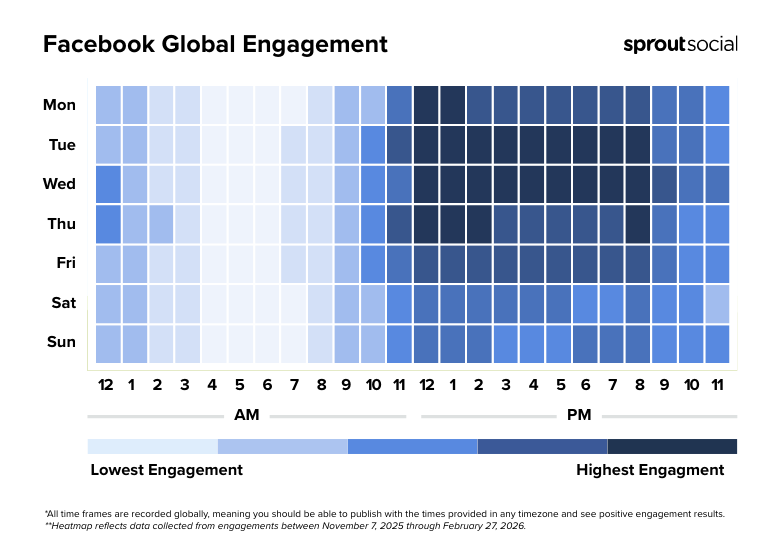
While post quality drives Facebook ROI more directly than quantity alone, there are peak hours each week when you’ll see higher engagement. Prioritize scheduling your posts during the most active times to increase their visibility across feeds:
| Metric | 2026 Data Trends |
|---|---|
| Best times to post on Facebook |
|
| Best days to post on Facebook | Mondays, Tuesdays, Wednesdays and Thursdays |
| Worst days to post on Facebook | Weekends |
3. Spark conversations with interactive content
Give Facebook users a reason to engage. Add interactive content, like videos, questions, polls or challenges, to your content calendar to spark genuine conversations and actions. Short-form videos, such as Reels, perform especially well and are one of the best ways to attract attention and views.
Along with action-driven content, focus on authenticity. Feature customer stories and community-submitted content to shine a spotlight on personal connections. This helps build trust and reminds your audience that there are real people behind your brand.
4. Show up and respond in the moment
Speedy response times can make a big difference in social media success and failure. According to the Index, 73% of buyers will take their business to a competitor if you’re slow to respond.
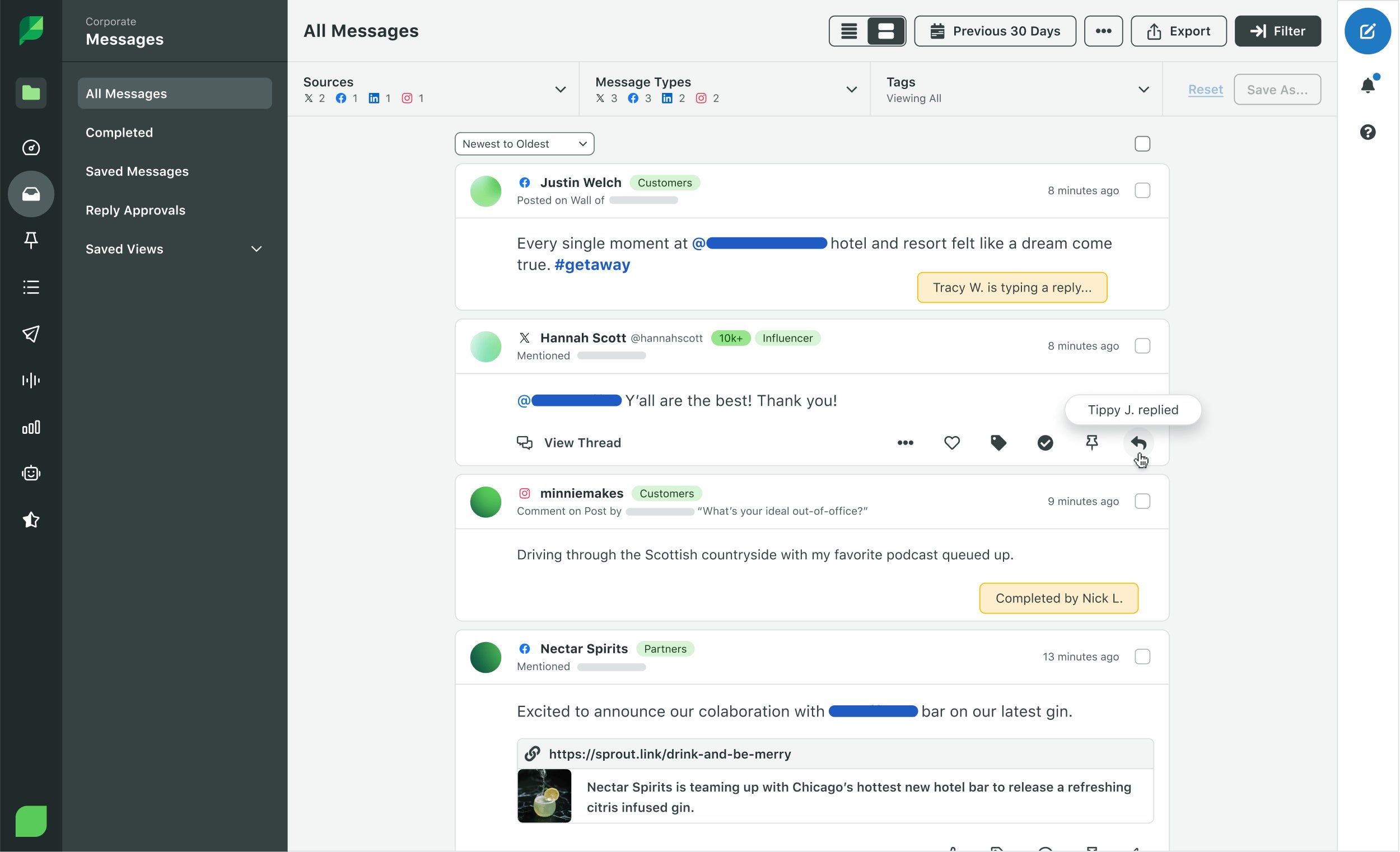
The most efficient way to improve response times is by centralizing your Facebook messages, comments and mentions with tools like Sprout’s Smart Inbox. This feature organizes incoming and outgoing messages and lets you assign team member roles and approvals for faster engagement that helps drive conversions.
5. Make your visuals impossible to scroll past
According to Wyzowl, 78% of consumers prefer to learn about products via short-form video. Since users gravitate toward videos and immersive content, your posts need to make an attention-grabbing impact.
Use bold, mobile-optimized images and videos that align with Facebook’s specs. Here’s a quick guide to sizing visual content:
- Facebook Feed:
- 1:1 aspect ratio: 1080 x 1080 pixels
- 4:5 aspect ratio: 1440 x 1800 pixels
- Facebook Stories and Reels: 1080 x 1080 pixels
These specs also work seamlessly with Instagram, eliminating the need to reformat posts when repurposing campaigns across both networks.
In this attention-grabbing post from Stanley, the brand behind the viral steel tumblers, avoids text overlays or heavy copy. Instead, it leans on a striking visual of a colorful beach picnic packed into a Stanley cooler to create a mood and evoke an emotional response.

Source: Facebook
6. Turn your customers into content creators
Add relevancy and authenticity to your Facebook strategy with user-generated content (UGC), which includes any video, text or image shared by your target audience or customers. With the poster’s permission, you can publish or share their content.
UGC adds credibility to your brand because it serves as social proof. Each post shows how your product or service fits naturally into people’s lives, which inspires others to engage, trust and take action.
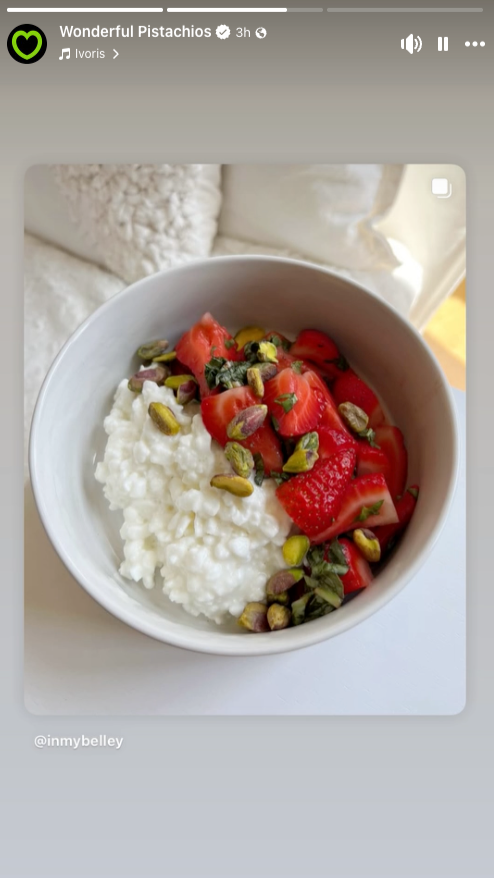
For example, Wonderful Pistachios shared another account’s post on its Story. The post features multiple photos paired with a relaxing song, which sets a cozy mood for the pistachio-topped treat. By reposting, the brand not only engages with the original poster but also subtly encourages others to post similar content.
Source: Facebook
7. Empower your team to be your biggest advocates
Your employees can be your strongest ambassadors on Facebook. Their deep knowledge of your mission and product, coupled with their genuine belief in it, makes them an invaluable asset to your brand.
Build on that enthusiasm with an employee advocacy program that helps them easily share company updates, stories and achievements. Their authentic experiences and credibility will resonate with their networks, boosting your reach and engagement.
Here’s how to create your own employee advocacy campaigns:
- Build a content toolkit: Provide your team with shareable assets—images, videos, copy and links—that make it easy to amplify posts or publish original content. For example, Sprout’s Asset Library keeps brand visuals in one central location accessible to all team members.
- Offer guidance and training: Share best practices for tone, hashtags, tagging and trending content, but always leave room for employees to share your product or service in their own authentic voice.
- Highlight employees: Celebrate team wins on your Page to encourage resharing and increase credibility and reach.
- Track and share impact with reporting: Leverage Sprout’s Tagging and Premium Analytics (paid add-on) to see which employee posts drive the most engagement. Then, reward those team members through recognition and perks.
- Lead by example: Encourage executives and managers to be active brand ambassadors, showing that brand advocacy is a priority for the entire organization.
The Figma team regularly jumps in to create engaging content. One recent post offered a funny, behind-the-scenes glimpse into employee life, showing a team member playing a game she created at the office. This post referenced the current trend of creators building games with AI, making the brand feel relevant and approachable.

Source: Facebook
8. Add Stories to your daily mix
Facebook Stories are an interactive, video-first format that taps into modern social media habits. Use Stories to share behind-the-scenes content, timely updates and live glimpses into your company culture.
By consistently adding Stories to your mix, you’ll invite engagement and encourage users to connect with your brand on a more personal level.
Here are some top tips for creating compelling Facebook Stories:
- Add interactive elements: Use polls and questions to invite quick, shareable responses and spark conversations with your audience.
- Share behind-the-scenes moments: Give followers a peek into content creation, team culture or daily operations to build authenticity.
- Keep it consistent: Post Stories regularly with a clear, branded visual style. Use templates and brand colors to maintain a recognizable presence.
- Post videos: Create more video content to offer a richer, more engaging experience for your audience.
9. Collaborate with the right influencers
Influencer marketing is a powerful way to increase Facebook engagement and expand your reach. By partnering with influencers who have earned trust and credibility among their followers, your brand can tap into their established reputation to connect with a broader audience.
Collaborate with creators who genuinely resonate with your target audience and can bring a fresh perspective to your brand. Sprout’s Influencer Marketing platform can help you find vetted, authentic creators in your niche who align with your values. It also helps you execute influencer campaigns, manage contracts and measure performance—all in one place.
10. Build trust with Facebook verification
Facebook verification signals that your brand is credible and serious about its social media presence. A verified account builds trust and encourages audiences to engage.
To start the Facebook verification process, visit the official Meta Verified page. Meta recommends the following key tips to help with verification:
- Prove that your account represents a brand.
- Make sure only one account represents the business.
- Confirm the account is public and has an about section, profile picture, bio and one published post.
- Demonstrate notability by showing users search for or recognize your brand.
When you’re ready to proceed, follow this step-by-step guide to get verified on Facebook.
11. Grow deeper connections through Facebook Groups
Facebook Groups—which often center around shared interests, locations or demographics—are active communities perfect for reaching your niche audience. Their value lies in intent: Members join to engage, connect and build community.
As a brand, you can tap into this built-in desire for community by hosting discussions, sharing exclusive insights and nurturing your most passionate advocates. Start by joining relevant Facebook Groups to observe conversations and contribute meaningfully. Once you understand the culture, consider creating your own branded Group to grow your own loyal community over time.
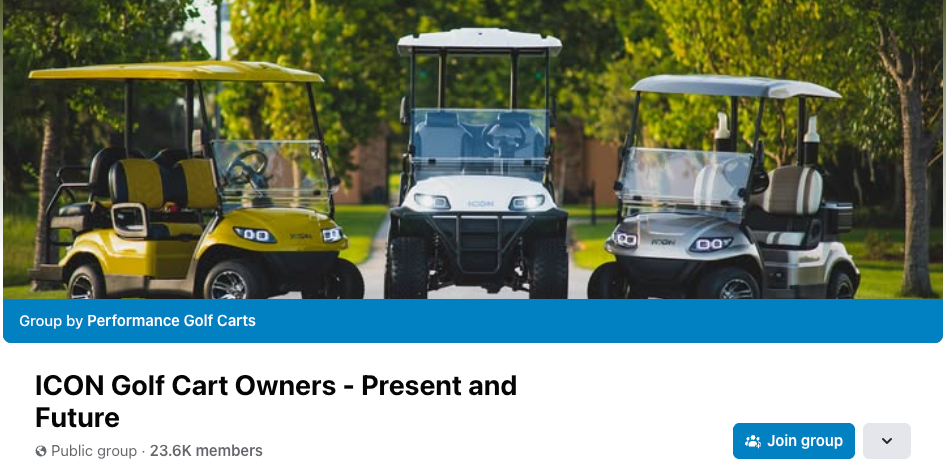
For Performance Golf Carts, leveraging Facebook Groups meant building a community around the popular golf cart brand ICON. The dealership’s Group now has more than 23k members, helping it turn customers into ambassadors.
Source: Facebook
12. Turn your Facebook Page into a go-to destination
Your official Facebook Page is your home base—a central hub for all your engagement efforts. It’s where you post content that appears in followers’ feeds and where users go to find updates, information and contact details.
To get the most value from your Page, keep it active with fresh, relevant posts, complete business info and an up-to-date About section. Consistency builds familiarity over time, helping you stay visible in feeds and encouraging users to engage directly with your content.
Learn more about how to optimize your presence on the network with our in-depth Facebook business page guide.
13. Spot trends early with social listening
Increasing engagement starts with understanding how your audience thinks, knowing what’s important to them and jumping into conversations at the perfect time.
Social media listening tools help you monitor keywords, hashtags and industry topics to spot emerging trends before your competitors do. This allows you to publish timely, relevant posts that naturally earn higher engagement.
Social listening is also useful for tracking brand mentions and sentiment. Understanding how people feel about your brand makes it easier to answer questions, address concerns and contribute to discussions in a meaningful way.
Sprout’s Listening tools (paid add-on) help you uncover trend patterns, analyze audience conversations and discover the topics driving the most engagement in your space.
14. Measure what matters and optimize often
Ultimately, improving Facebook engagement requires tracking results as you publish content and interact with users, then using those insights to refine your approach. Analyzing KPIs like engagement rates, comments per post and click-through rates, allows you to align your strategy with direct business outcomes.
In addition to monitoring engagement metrics, run A/B tests on post formats, topics and timing to see what resonates best. For example, features like Sprout’s Facebook Analytics make it easy to measure these interactions and turn them into actionable insights for your team and stakeholders.
How to boost Facebook engagement with Sprout Social
Successful Facebook engagement requires moving fast, coordinating across teams and learning from your results. Sprout’s Facebook management platform is designed to consolidate these efforts to ensure every post and reply is intentional, measurable and highly effective.
Here’s how to use Sprout to grow your Facebook engagement.
Step 1: Plan your content calendar with engagement goals in mind
Planning ahead helps you stay consistent and post with purpose. Sprout’s Publishing tools let you map posts by campaign, theme or goal to keep your team aligned and organized.
For example, imagine you’re launching a new breathable shirt for active parents. You can plan every post in one shared calendar and tag it under the relevant campaign. All team members can quickly see what’s coming, such as short demo videos or photos of parents jogging and playing with their kids.
Here’s what publishing looks like in Sprout:
Remember to share a mix of content that invites interaction. Polls, customer stories and posts on trending topics (surfaced through social listening insights) are great ways to keep your audience engaged.
Step 2: Schedule posts for optimal reach and interaction
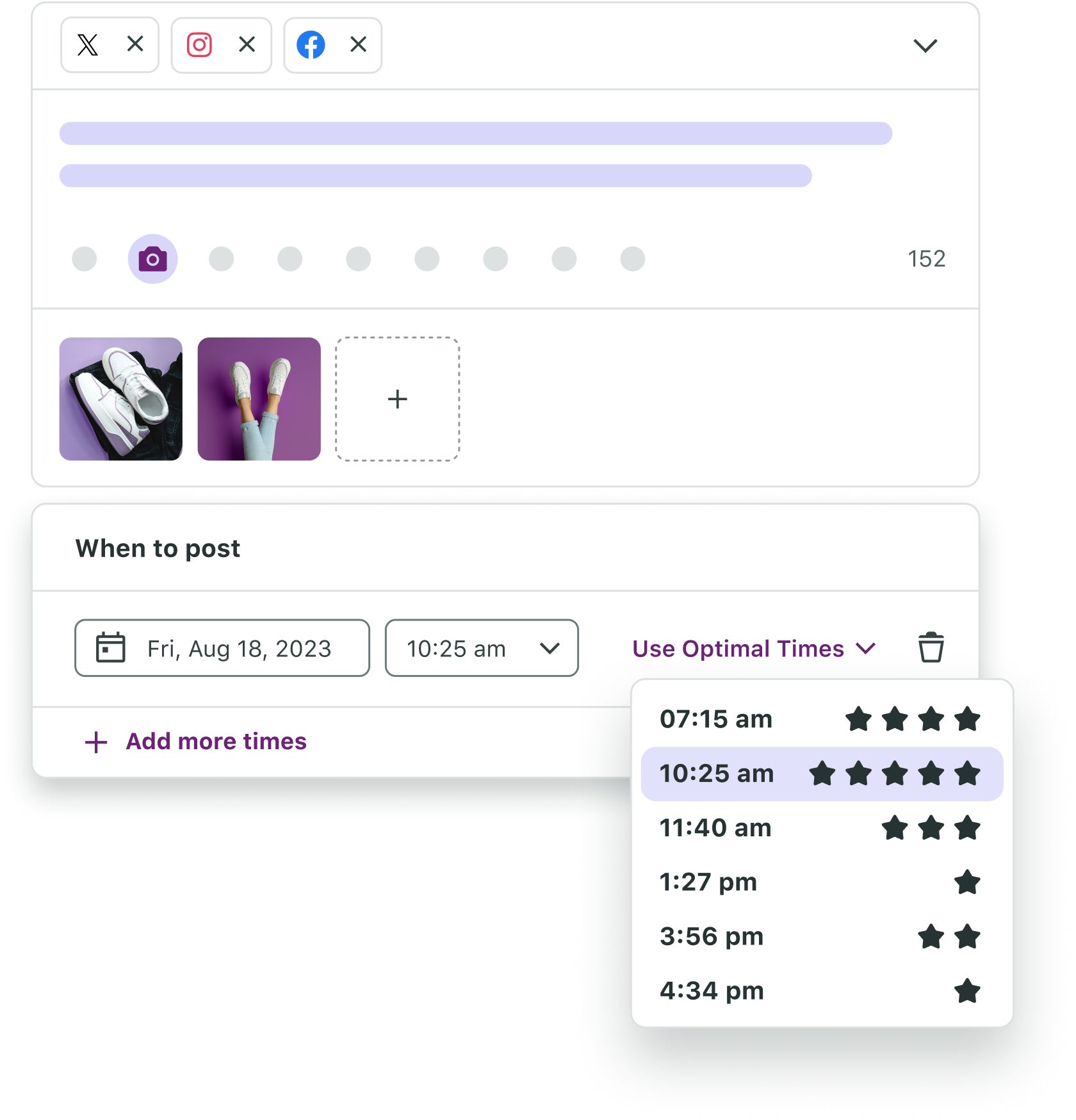
To maximize reach, you need to publish content when your target audience is most active, not just when a global benchmark suggests.
Optimal Send Times eliminates the guesswork by automatically analyzing your historical engagement data and suggesting the most effective time slots, ensuring your posts land in followers’ feeds when they’re most likely to interact.
Step 3: Monitor audience responses in real time
Responding quickly shows your audience you’re paying attention, which builds trust and strengthens loyalty.
Sprout’s Smart Inbox centralizes every comment, message and mention, making sure you never miss an opportunity to connect. It eliminates the need to switch between tabs and accounts, which leads to more timely replies and increased visibility. Because Facebook’s algorithm rewards active Pages that maintain interactions, these efforts help your content reach a wider audience.
In the active parent brand example, your team can engage with users in the moment and share those interactions in Stories or Reels to build momentum. Team members can also communicate directly with top fans through messages, turning engagement into meaningful connections. Here’s what monitoring looks like in Sprout:
Step 4: Measure your performance and identify improvement areas
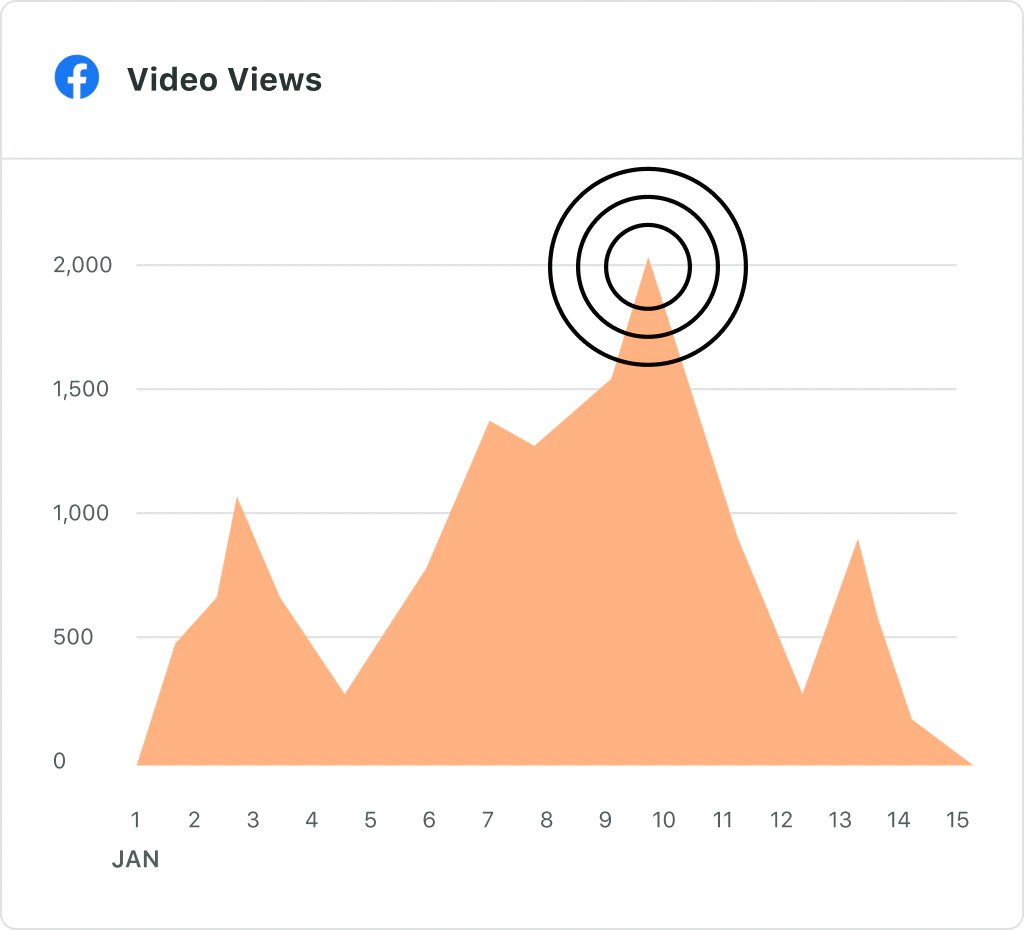
Tracking engagement shows what’s working and where you can improve. Sprout’s Facebook Analytics provides visual reports and dashboards for monitoring the metrics that matter most, such as:
- Engagement rate: The percentage of people who interact with your content, including likes, comments, clicks and saves. This rate provides a snapshot of overall Facebook engagement.
- Clicks: The number of times Facebook users tap on your posts, including post clicks, video or image clicks, profile clicks and “see more.” Clicks signal action to help Facebook determine content effectiveness.
- Shares: How often users share your posts on their own Facebook Feed, Page or Group. Shares extend your reach beyond your audience and show that your content is worth recommending.
- Comments: The direct responses users leave under a post. Comments reflect deeper engagement and provide an opportunity to strengthen connections.
As you review these Facebook KPIs, compare your results to internal benchmarks and industry standards to identify opportunities for engagement growth.
Step 5: Refine and repeat for continuous improvement
As you analyze your results and build actionable reports, adjust your strategy based on your learnings. One useful framework is the Lean Startup methodology from author Eric Ries:
- Build: Create your social media strategy and publish content.
- Measure: Analyze your results and study insights to improve.
- Learn: Adjust your social media strategy and repeat the process.
Applying this model ensures performance data and audience trends guide your ongoing decisions. And Sprout’s Premium Analytics capabilities (paid add-on) allow you to evaluate your Facebook strategy alongside organic and paid campaigns and compare performance across social media networks to see what works best on each channel.
For example, the apparel brand’s social team can analyze its top-performing organic posts to inform its paid campaign strategy, which helps expand reach to a larger audience.
How to measure your Facebook engagement rate
Facebook engagement rate measures all interactions on a post, including likes, comments, shares and clicks, relative to the number of people who saw it (reach) within a specific time frame.
To calculate it, use this formula:
Engagement rate % = (Total engagement / Reach) x 100
You can either review an individual post or your Page’s content overall using Facebook Insights. When analyzing multiple posts, be sure to calculate an average engagement first to establish a measurable benchmark.
For example, Fluffy Paws Grooming wants to measure the engagement of a successful “before-and-after” post that shows a golden retriever’s haircut. Using Sprout Analytics, the company adds up:
- Reach: 5,000
- Total engagements: 350 (200 reactions, 50 comments, 30 shares and 70 clicks)
Plugging in the numbers, they get:
(350 / 5,000) x 100 = 7% engagement rate
This means 7 out of every 100 people who saw the post engaged with it. Based on these results, the team decides to share more posts like this one, replicate the post on other platforms and use this type of content to inform paid strategies.
For a quick frame of reference, here is a graphic that can give you a general understanding of average daily engagements for brands by platform and company size:
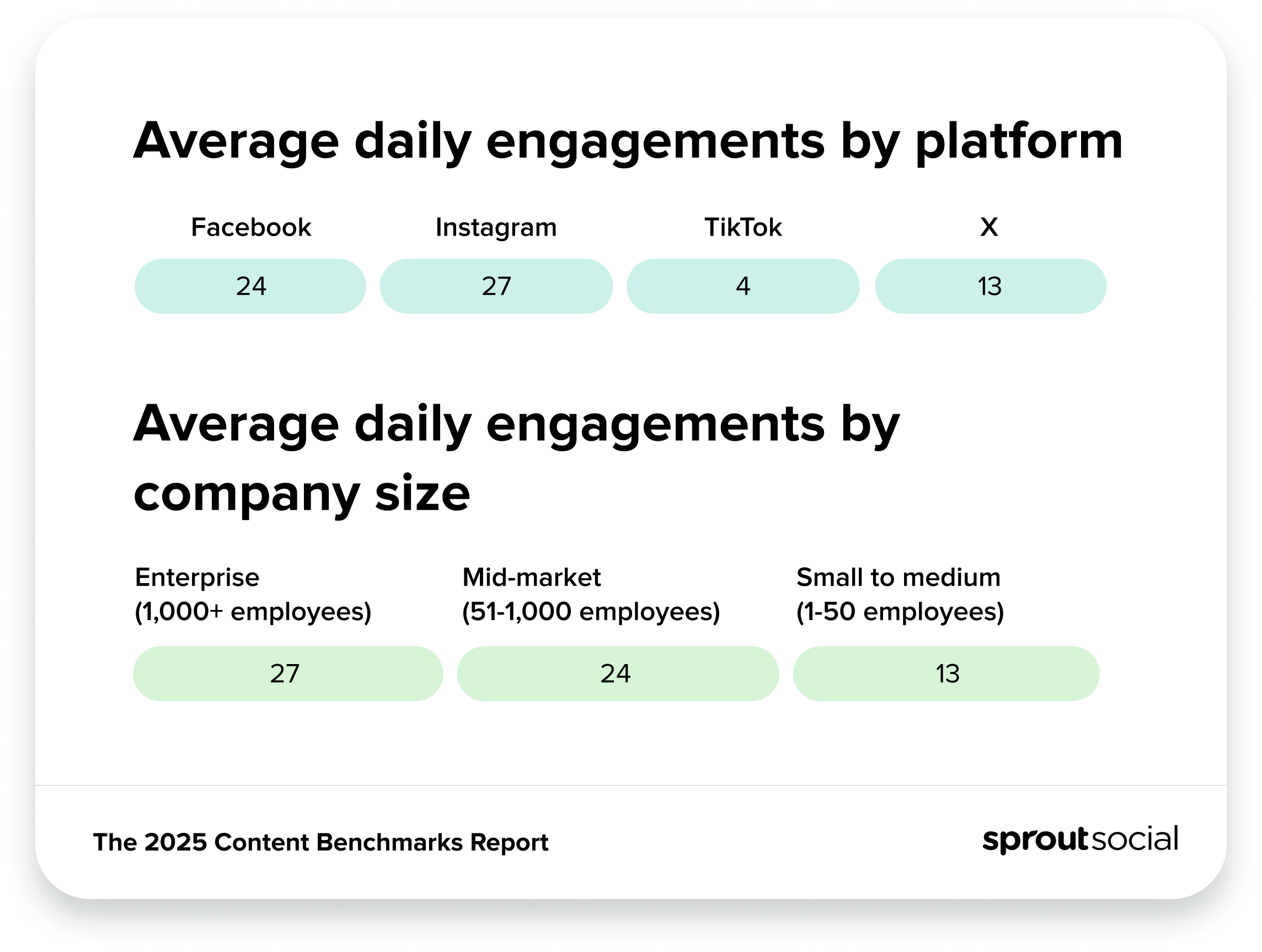
Ultimately, it’s worth diving deeper into understanding average Facebook engagement rates for your industry to get a more specified frame of reference.
2025 Facebook engagement benchmarks by industry
Each industry has its own standards for strong engagement. To identify relevant benchmarks, review industry reports and credible research that outline average performance for key metrics.
The best way to start is by downloading Sprout’s free 2025 Content Benchmarks Report for a complete analysis by industry. Here are some key benchmarks from the report:
| Industry | Average published posts daily | Average daily inbound engagements | Average outbound daily engagements per post | Average daily inbound engagements per post |
| All types | 9.5 | 83 | 2 | 14 |
| Food and beverage | 8 | 50 | 3 | 17 |
| Hospitals and healthcare | 8 | 13 | 1 | 4 |
| Travel and hospitality | 11 | 127 | 3 | 16 |
| Retail | 12.5 | 94 | 7 | 24 |
Industry benchmarks only tell part of the story. The types of posts you publish also impact how much Facebook content engagement you see. Here are some findings from the 2025 Content Benchmarks Report to consider:
- Not all companies use video: Only 24% of brands post videos on Facebook, which creates an opportunity for your brand to stand out and drive more interactions. Video use increased 3% year over year, reflecting a growing audience preference.
- Companies mostly use images and text posts: On Facebook, 48% of brand content consists of images, and 18% is text-only. Continuing to use these formats provides diverse engagement opportunities.
Make every engagement opportunity count
What matters most for a Facebook engagement strategy is making it intentional, measurable and iterative. Top brands post regularly, engage in conversations with followers and learn from popular posts to refine their approach. You can, too.
Sprout’s publishing, scheduling, Smart Inbox and analytics capabilities directly support these strategies, helping you plan and execute meaningful engagement. Start a free trial today to see how data can guide better content creation and boost your Facebook engagement.





Share