How to get verified on Facebook: A step-by-step guide to the new Meta rules

Written by Jacqueline Zote
Published on July 14, 2026
Reading time 6 minutes

Table of Contents
As you plan your broader Facebook marketing strategy, establishing long-term trust starts with a single, crucial pillar: brand credibility. A Facebook blue checkmark instantly tells your audience that your Page is the real deal, protecting your business from copycats, parody accounts and malicious impersonation.
But the path to securing that badge has fundamentally shifted. The classic, free public request form is officially gone. Today, standard verification is handled through Meta Verified for Business—a paid, tiered subscription model that gives growing brands a guaranteed, accessible path to verification without needing global news coverage. Meanwhile, the legacy free path has transitioned into a strict, invite-only route reserved for massive global enterprises and public figures.
This guide breaks down the active verification pathways, absolute requirements and step-by-step actions needed to bulletproof your brand’s presence.
What is Facebook verification?
Facebook verification is the official process by which Meta confirms that a Facebook Page, professional creator profile or broader Meta business portfolio is the authentic, authorized presence of the person, brand or organization it represents. This authenticity is signaled by a blue checkmark displayed next to the account name.
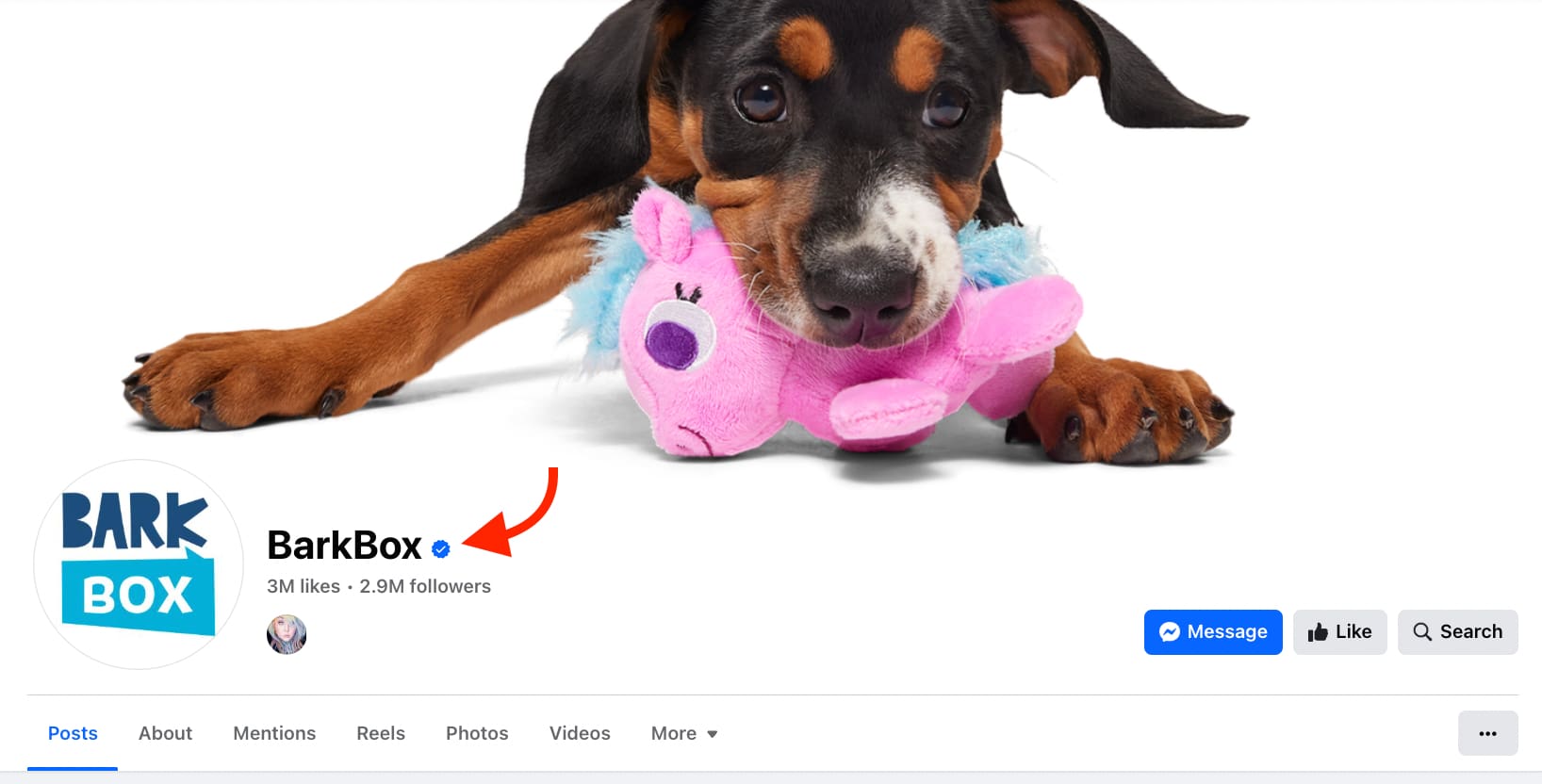
Source: BarkBox on Facebook
That checkmark is the difference between being recognized and being mistaken for an imitation. Brands and public figures regularly face copycat Pages built by fans or bad actors. Without verification, your audience has no reliable way to distinguish your official presence from an imitation, and that ambiguity costs you trust, followers and reach.
Verification also gives your Page a direct ranking advantage. Facebook prioritizes verified Pages in its search results, so your official presence surfaces at the top when people search for your brand, ahead of any lookalike accounts. That visibility compounds over time, driving more authentic connections with the right audience.
If you’re building a business case for verification, here is how those structural advantages break down at a glance:
- Instant credibility: The blue checkmark signals authenticity to every user who finds your Page.
- Search priority: Verified Pages rank higher in Facebook search, putting your brand in front of people before imposters appear.
- Audience protection: Verification reduces the risk of followers engaging with fake or fan-run accounts instead of yours.
- Expanded reach: Higher search visibility directly improves your Facebook reach and grows your audience faster.
Who gets verified on Facebook?
Facebook verification is open to individuals and businesses, but eligibility depends on which path you take and whether your account meets Meta’s standards.
Both paths require you to follow Meta’s terms of service and the Facebook Community Standards. Beyond that, the requirements are entirely different. Here’s what each path demands.
What are the two Facebook verification paths?
The verification ecosystem is divided into two distinct, rigid pathways. Understanding where your business fits prevents wasted resources and immediate rejection.
Meta Verified tiers
This is the standard operational procedure for the vast majority of brands, startups, local businesses and digital creators. Rather than relying on ambiguous algorithmic definitions of “notability,” any legitimate entity can secure verification by paying a monthly subscription and passing Meta’s stringent multi-factor identity and documentation audits.
Legacy badges
The classic, merit-based free verification badge still exists, but the public application form is entirely gone. Today, this is an invitation-only protocol managed strictly through Meta’s internal partner management programs. It is reserved exclusively for major government officials, globally recognized public figures, massive multinational brands, and vetted news outlets. If your organization does not have a dedicated Meta Account Executive or global cultural footprint, Meta Verified is your primary path.
Keep in mind that if you manage a cross-platform brand, you may also want to look into how to get verified on Instagram since Meta manages both ecosystems closely through the Account Center.
Choosing the right Meta Verified Plan for your business
To accommodate businesses of varying scales, Meta offers a structured, multi-tier subscription framework under the Meta Verified for Business program. Selecting the right tier depends on your budget, required protection level and growth goals. Here is how the four tiers compare:
| Subscription Tier | Plan Scale | Target Audience | Key Features Included |
|---|---|---|---|
| Meta Verified Standard | Entry-Level (Baseline) | Solo creators, local small businesses, and early-stage startups. | Verified blue badge, basic impersonation protection, and standard chat support. |
| Meta Verified Plus | Moderate (Mid-tier) | Growing SMBs and mid-market brands expanding their digital footprint. | Standard features plus enhanced search visibility, faster support resolution, and custom link elements. |
| Meta Verified Premium | Advanced (High-tier) | Established mid-market companies and active scaling brands. | Plus features plus advanced impersonation monitoring, direct agent callback support, and employee protections. |
| Meta Verified Max | Enterprise (Premium-tier) | Large enterprises, major agencies, and highly targeted corporate portfolios. | Premium features plus active case monitoring, multi-profile bundle options, and priority brand protection. |
Meta gives businesses the flexibility to tailor their verification footprint across their entire portfolio. You can choose a single subscription dedicated strictly to an individual app—such as your Facebook Page or WhatsApp Business number. Alternatively, if you manage a cohesive presence across the Meta ecosystem, you can opt for a bundle subscription that unifies your presence.
Note: Because Meta frequently updates its subscription packages and pricing bundles based on your region and platform selection (web vs. mobile), we recommend checking the official Meta Verified for Business landing page for the most up-to-date monthly rates.
Verification and account prerequisites for setting up your Meta Verified Plan
To begin any Meta Verified plan, you will need to provide your core business details at the start of the process—specifically your legal business name, address, phone number and website.
However, because the review process depends heavily on your specific entity type, you should be fully prepared to provide additional supporting documents during the application audit. Meta routinely requests official paperwork to confirm your identity, which can include:
- Certificates or Articles of Incorporation
- Official business registrations or local business licenses
- Government-issued business tax documents
- Business bank statements or recent utility bills
Before investing time into gathering these assets, keep in mind that Meta Verified for Business is not available in every country or territory. Availability varies widely depending on your specific region and the type of business asset you are trying to verify. You should check Meta’s global regional availability log inside your Account Center before beginning the application process.
Before you subscribe to a Meta Verified for Business Plan, check your access levels. The team member applying for verification must have full control of the Meta Business Portfolio. If your permission level does not allow you to manage all backend settings, you won’t be able to start the process.
Strategic best practices for securing and keeping your verification
Getting verified on Facebook requires more than an active payment method or a notable name. It demands consistent effort across your profile, content and community. These four practices get you verified and keep you there:
- Keep your business information flawless: A complete, accurate Facebook profile is a core verification requirement. Every time your business changes (new website, new location, updated hours), update your Facebook Page immediately. Outdated information signals neglect, which can stall your verification audit.
- Be strategic with your posting schedule: An inactive Facebook Page gives the platform no reason to prioritize you. Post consistently, prioritizing timing over volume. Check your content performance data to identify the best times to post on Facebook, or use automated scheduling tools like Sprout Social’s ViralPost® technology to publish exactly when your audience is active.
- Proactively engage with your community: A highly engaged audience on Facebook proves to Meta that your brand is worth trusting. Build that community by responding to comments, sharing valuable content, and hosting live broadcasts. Because 73% of consumers expect brands to respond within 24 hours, utilizing a centralized Smart Inbox ensures no DM or comment slips through the cracks.
- Strictly adhere to Meta’s community guidelines: Verification is entirely revocable. Consistent violations of Facebook’s community standards will cost you your badge. Beyond compliance, protect your account with robust two-factor authentication (2FA) to block unauthorized access from bad actors who could put your verified status at risk.
Build the Facebook presence that earns verification
Verification is not just about filling out a form or selecting a subscription tier. It’s about building a presence that looks credible, active and worth trusting. The brands that earn and keep that blue checkmark treat Facebook as a living platform, not a checkbox.
Sprout Social gives you the tools to build that presence with intention. Plan and schedule your Facebook content with ViralPost® to publish at the times proven to drive engagement for your specific audience. Manage every comment and DM from a centralized Smart Inbox so engagement never stalls, while tracking Facebook analytics to build a data-driven case for long-term brand authority.
Want to bulletproof your brand’s presence? Start a free 30-day Sprout Social trial and put every post to work.
Frequently asked questions about Facebook verification
How to get verified on Facebook?
To get verified on Facebook, navigate to your Account Center or Meta Business Suite, select “Meta Verified,” choose an appropriate subscription tier, verify your corporate or legal identity using a government ID or business documentation and set up your payment method.
What are the Facebook verification requirements?
Requirements depend on your path. Meta Verified requires an account owner aged 18+, enabled two-factor authentication, a profile name matching a government ID and a complete business portfolio tenure (typically 3+ months). Invitation-only legacy badges require absolute public notability and extensive press coverage.
What are the steps to apply for a Facebook verification badge?
To apply, first ensure your profile details match your legal identity, then navigate to “Meta Verified” within your Settings. From there, select your business plan tier, upload your official government ID or legal documents, and submit your payment to activate coverage.
Do you need a minimum number of followers to get verified on Facebook?
No. Facebook doesn’t set a public minimum follower count for verification. What matters is whether your account is authentic, complete, unique and securely aligned with Meta’s identity or business documentation protocols.
Is it free to get verified on Facebook?
No, the standard approach to get verified is no longer free. The public application form for the free legacy badge has been deprecated. Standard public verification is now handled via the paid Meta Verified for Business subscription plans. The free legacy badge is strictly limited to an invitation-only basis for high-profile public figures and global enterprises.
How long does Facebook verification take?
For Meta Verified subscription tiers, the identity and document review process typically takes anywhere from a few hours to a few days. During this review period, ensure your Page remains fully active, guidelines are followed and your profile details match your uploaded documentation exactly.
Do you lose your Facebook verification once you have it?
Yes, it is possible to lose your Facebook verification. Meta routinely removes verification badges from accounts that violate platform policies, fail to maintain active monthly subscriptions (for Meta Verified tiers), change their core identity details without re-verification or break the Facebook Community Standards.





Share