How to sell on Instagram: A guide for businesses

Written by McCall Lanman
Published on February 11, 2026
Reading time 12 minutes

Table of Contents
Selling on Instagram isn’t as simple as posting product photos and calling it a day. If you want to turn your fans and followers into actual customers, you’re going to need a strategy.
In this guide, we break down how to sell on Instagram, starting with the fundamentals and moving on to advanced Instagram selling strategies. You’ll learn how to use Reels, Stories and other Instagram features to capture the attention of Instagram users and drive sales of your products.
Why businesses should sell products on Instagram
Not convinced Instagram is where you need to be? These three compelling reasons should be motivation enough to start selling products on Instagram:
People are researching products on Instagram
Instagram continues to play a major role in product discovery. According to the 2025 Sprout Social Index™, consumers increasingly use social platforms as search engines, turning to Instagram to research products, compare brands and validate purchasing decisions before ever visiting a website.
For Gen Z especially, discovery starts on social. If your products aren’t visible in-feed, in Reels or in search results, you may not make it into the consideration set at all.
Having a business profile is a good first step, but you’ll also want a store that people can visit to research your products.
Younger consumers expect you to be on Instagram
When it comes to marketing to Gen Z, visibility isn’t optional.
Younger consumers expect brands to show up consistently across Reels, Stories, and via the Collab Tool. Co-authoring posts with creators allows your content to live on both profiles simultaneously, pooling engagement and doubling your potential reach in one click.
More importantly, they expect authenticity. Brands that feel overly promotional or disconnected from culture are quickly filtered out.
Your competitors are selling on Instagram
With millions of businesses on Instagram, competition for attention is high.
Instagram’s algorithm prioritizes content that drives engagement signals like saves, shares and meaningful interactions. That means brands competing for attention aren’t just competing on product quality but on content strategy. If your competitors are pairing product tags with Reels, creator partnerships and retargeting campaigns, a static shop presence won’t be enough to stand out.
It’s wise to assume your competitors are already selling products on the platform. So don’t delay in setting up your Instagram shop (which we’ll tell you how to do in the next section).
How to set up Instagram shopping
While Instagram removed the dedicated Shop tab from the main navigation, product discovery now happens across Reels, Explore and search. This shift reinforces the importance of content-led commerce rather than relying on passive storefront browsing.
To start setting up your Instagram for product discovery, you’ll need to have an Instagram business profile. You can convert your personal Instagram account to an Instagram business account in just a few steps. Only then you can create your Instagram shop (we recommend taking a look at Instagram’s commerce policies first).
Next, head over to the Meta Commerce Manager to set up your Instagram shop. You can choose to create a shop for both Instagram and Facebook, or only one of those platforms.
What are the best practices for selling on Instagram?
There is no one-size-fits-all approach to selling your products on Instagram.
That said, some strategies make more sense than others depending on your target audience and what you’re selling.
Below we’ve highlighted best practices for selling on Instagram.
Sell yourself in your bio
Your Instagram bio is valuable real estate, especially if you’re interested in sales.
After all, your bio links represent the sole avenue from your follower to your storefront if you’re not connected to Instagram Shopping.
Make sure that your bio includes a combination of the following:
- A call-to-action directing followers to your store
- A mention of your branded hashtags to encourage user-generated content
- A trackable link (think: SproutLink or a shoppable Instagram tool) to monitor traffic to your storefront
Post regularly
Instagram is a crowded medium, and if you want people to notice your brand, you need to post regularly. How often is “regularly”?
According to the 2025 Sprout Social Index™, consistency matters more than volume. Brands that maintain a predictable cadence and focus on quality content see stronger engagement over time.
Post more than just products
This might seem counterintuitive, but hear us out: One of the most effective strategies for selling on Instagram is to not focus on selling. Not all the time, anyway.
If you’re an up-and-coming brand or you’re trying to grow your audience, some non-sales-related content is a great way to warm up potential customers. After all, today’s shoppers expect brands to show off their personalities in various ways.
For example, Suavecito Pomade regularly publishes photos of its products but also sprinkles lighthearted content like photos of their Cars N’ Coffee events and memes throughout its feed.
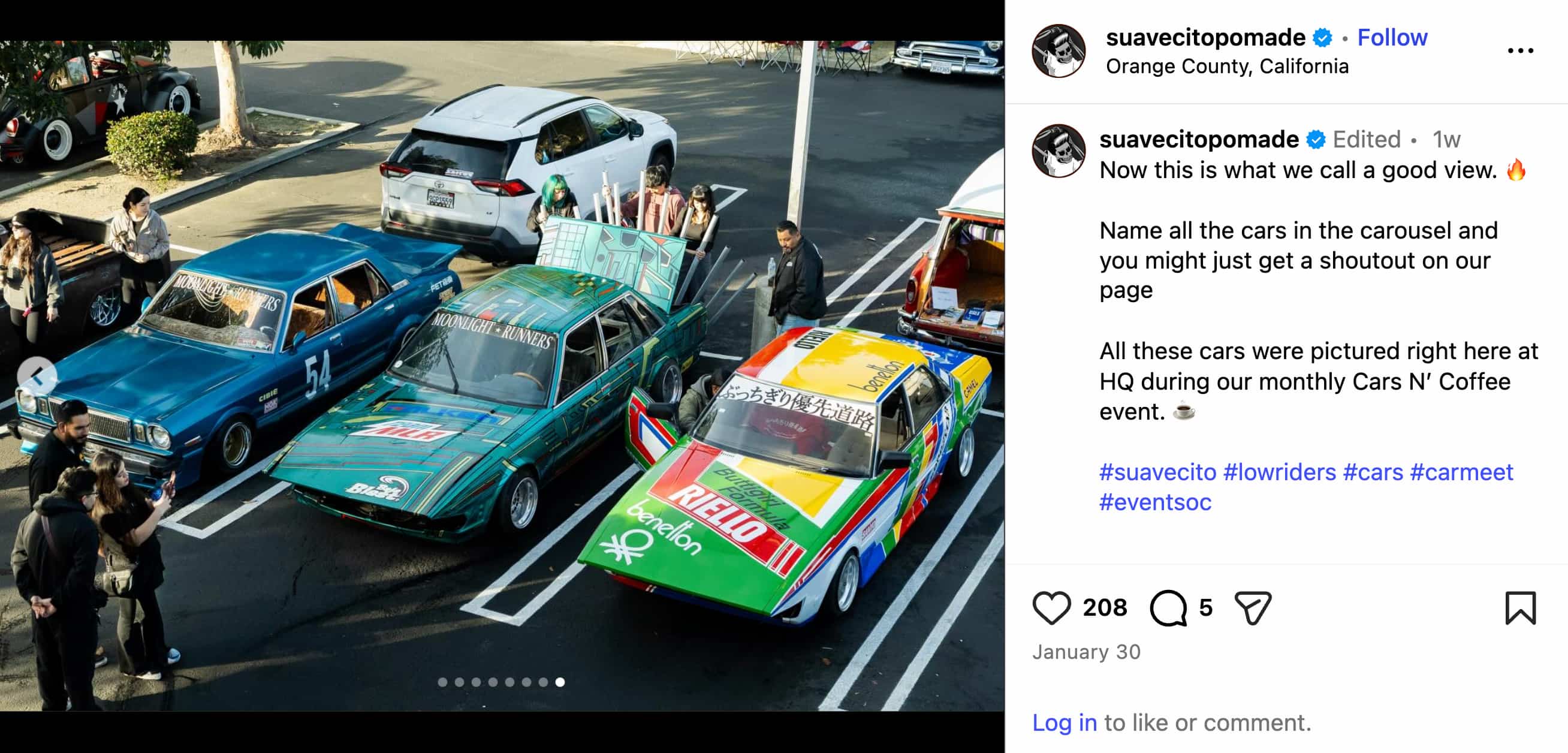
These types of posts score tons of engagement and can be a gateway for new followers to discover your brand. In our social media for retail guide, we saw that it’s crucial for brands to create content for every step of the customer journey. That includes folks who are warming up to you or might not even know you yet.
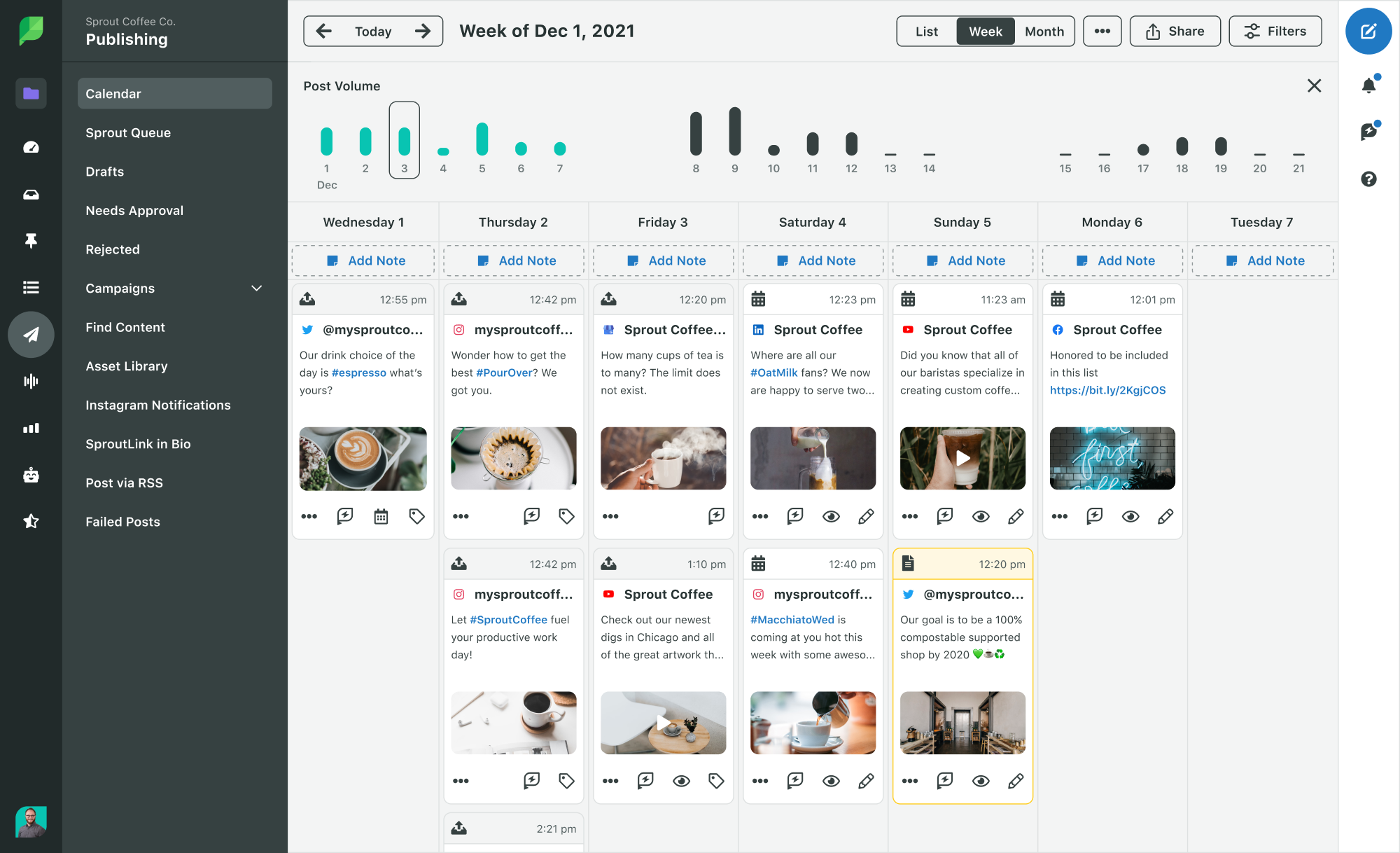
As a side note, this illustrates the importance of creating a social media content calendar. With the help of social media management tools like Sprout Social, you can find a balance between promotional and non-promotional content. Doing so ensures that your followers are consistently engaging with your marketing messages.
Publish people-centric product photos
People connect with people. Customer-centric visuals and real-world product use consistently outperform studio-only product shots. When your audience sees themselves reflected in your content, engagement increases naturally.
Instagram users want to see how people are using products in a real-world setting. For example, Camelbak shows off their products in the great outdoors rather than in a photo studio or on a kitchen counter.
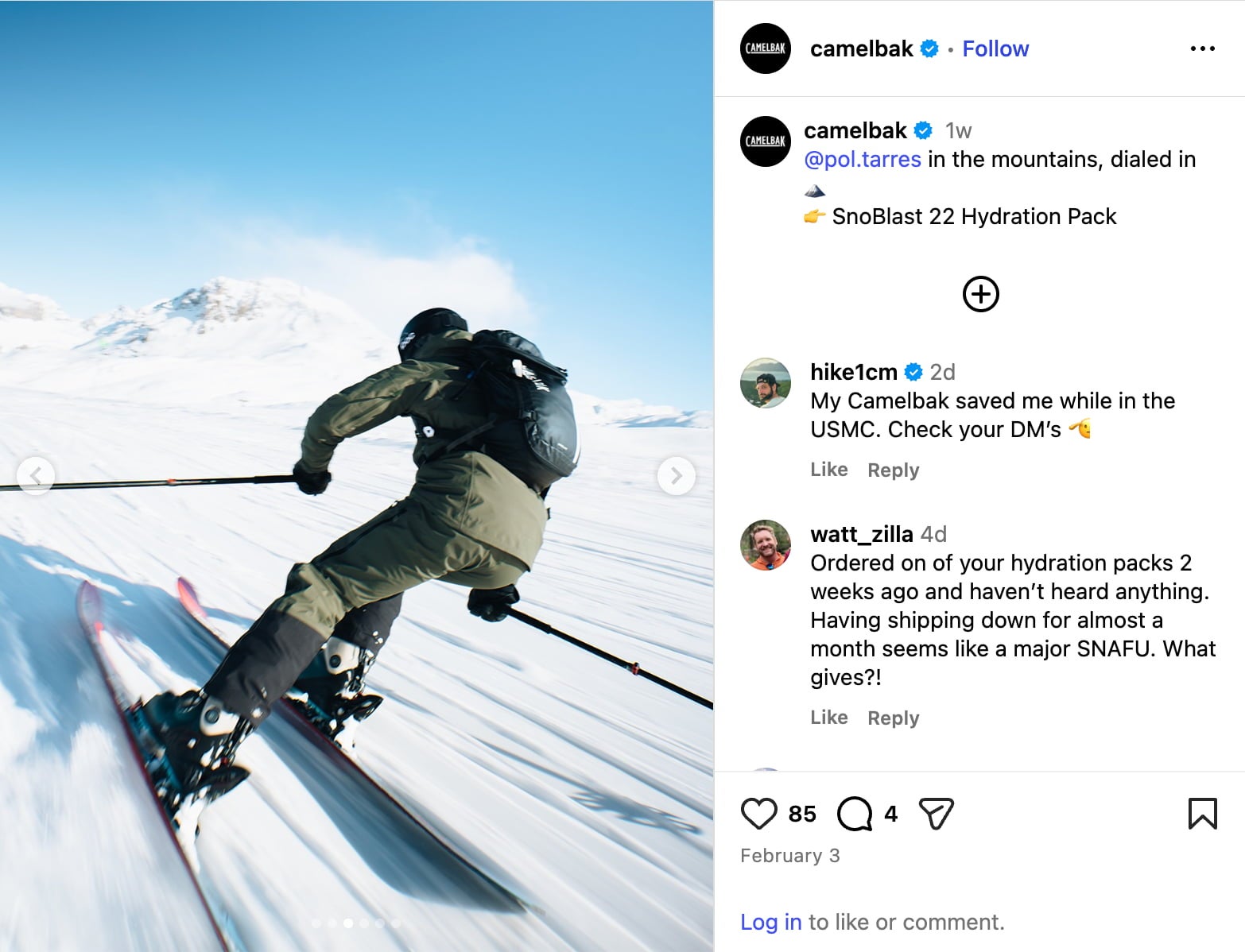
Frequently featuring photos of people, specifically user-generated content, creates a snowball effect. That is, customers will want to take their own snapshots with your product so you’ll feature them on your feed, too. This results in more engagement and reach, creating even more opportunities to win customers.
Make your product photos pop
We’ve said it before and we’ll say it again: Creativity counts on Instagram—especially if you’re trying to sell products.
Remember that you’re fighting for your customers’ attention, and they’re more than likely following competing brands on Instagram.
Here’s an awesome example from IL MAKIAGE. Although the brand has plenty of customer photos to choose from, they keep their content strategy fresh with eye-popping product shots, as well.
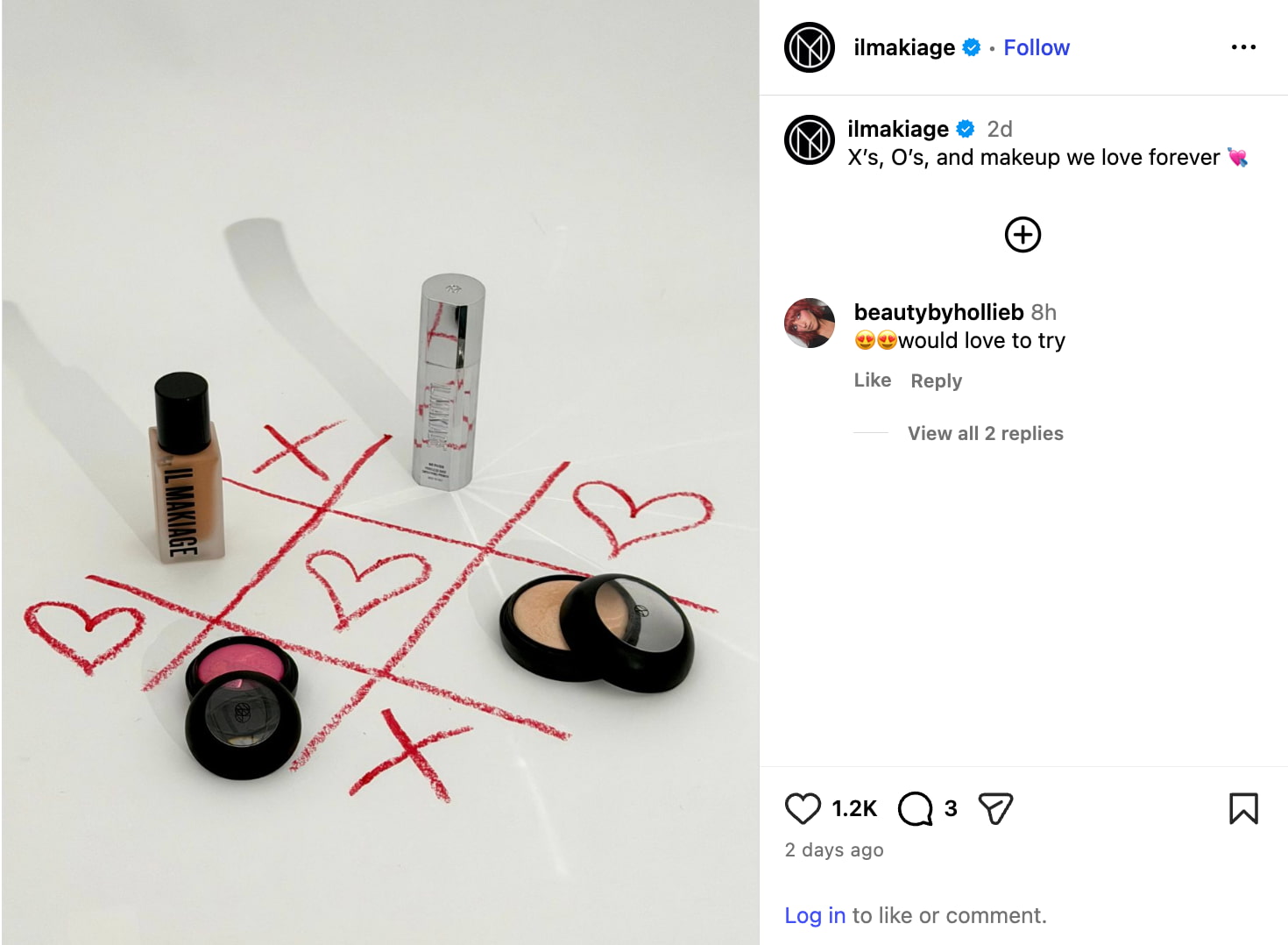
You don’t need to be a master photographer to create engaging images. Just review how to capture and format Instagram photos and explore creative filters and apps that can give your snapshots some pizazz.
Use video to showcase your products in action
Regardless of your product type, prioritize Reels as your primary discovery engine. Instagram’s algorithm leans heavily into short-form video for non-follower reach, meaning static images are best reserved for deepening the connection with your existing community via Carousels.
Craft compelling captions
Want to avoid bombarding your followers with sales offers? There are plenty of ways to write Instagram captions without coming across as too promotional.
For example, consider how you can show off your products while asking your followers a question. Here’s a great example from Paper Mate.
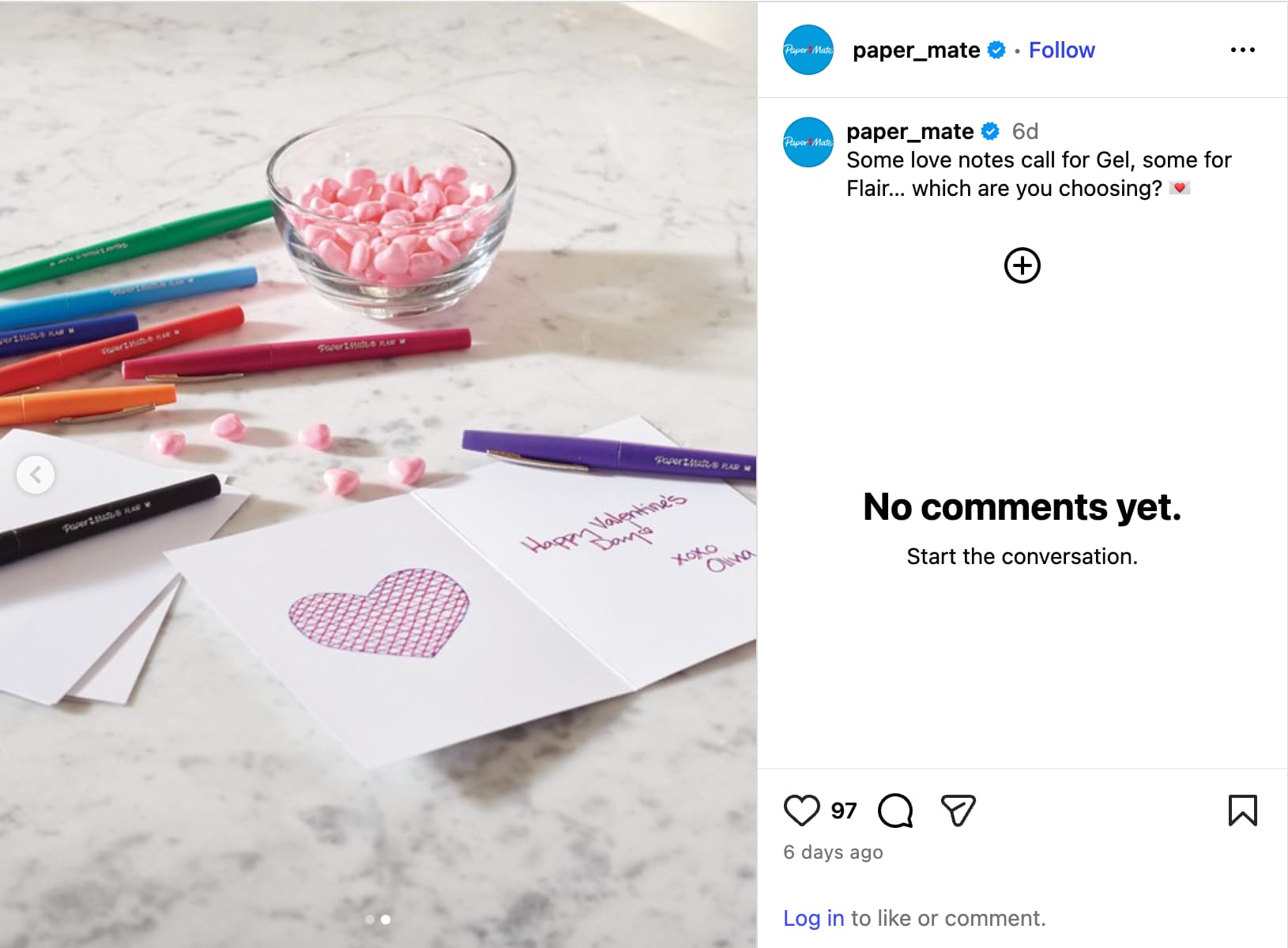
See how that works?
Instagram’s ranking system prioritizes content that drives meaningful engagement. Instagram’s ranking system now prioritizes “Send Rate” (shares via DM) and Saves. While likes are nice, the algorithm views a DM share as the strongest signal of value, pushing that content to a much wider audience on the Explore page.
To drive high-value engagement, focus on captions that spark conversation and provide value rather than relying solely on promotional language.
How to start selling on Instagram
You’ve set up your shop, created engaging images and fine-tuned your CTAs. Now it’s time to start selling!
Enable checkout on Instagram
You can use Instagram to drive people to your website’s online store, but some users may expect to shop entirely within the Instagram app.
Depending on your region and eligibility, you may be able to enable in-app checkout. However, many brands now prioritize driving users to their owned ecommerce experience while using Instagram for discovery and demand generation. The most resilient strategies balance platform convenience with first-party data capture.
Publish shoppable posts
If you have an approved product catalog connected through Meta Commerce Manager, you can create shoppable posts by tagging products directly in your image or video. Users can click on the tags to view information about each product.
If you’re running a promotion in your connected catalog, Instagram may surface promotional indicators on tagged products. Always preview posts to confirm how pricing and offers appear before publishing.
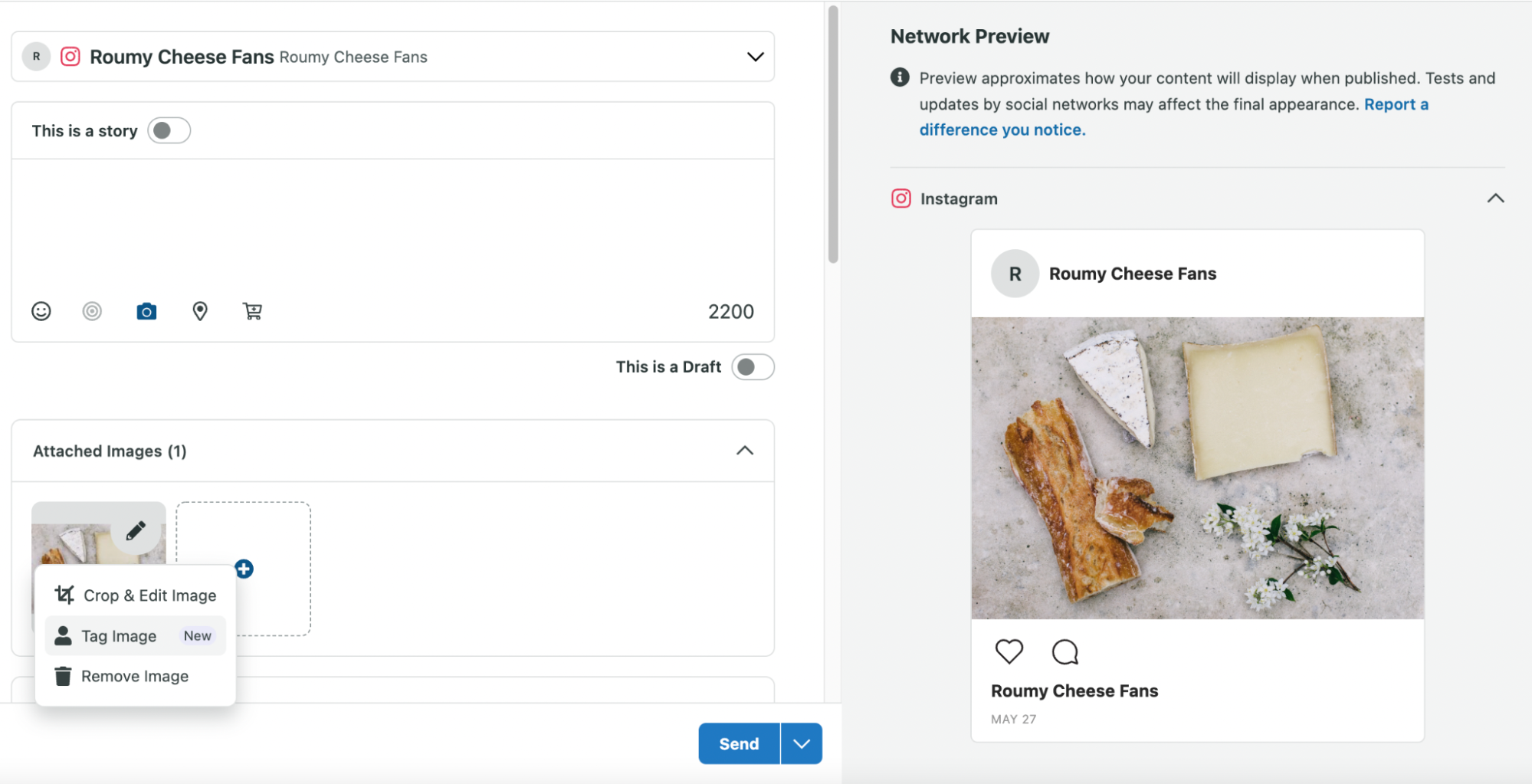
You can also tag your products if you use a social media management app such as Sprout. Once you compose your post and add an image, select Tag Image followed by the Product Tagging tab. You can search for your product by SKU or name.
Use product tags in Instagram Stories
You can tag products directly in Instagram Stories to shorten the path to purchase and reduce friction between discovery and checkout.
Stories are one of the most high-intent surfaces on Instagram. Because they feel immediate and personal, they’re ideal for showcasing products in action, highlighting limited-time offers or answering common questions in real time.
When tagging products in Stories:
- Use product tags on demo videos, tutorials and unboxings to show value before asking for the sale
- Pair product tags with interactive elements like polls, sliders or question stickers to boost engagement signals
- Highlight tagged Stories in a dedicated “Shop” or “Products” Highlight so new profile visitors can browse instantly
Stories are especially powerful for time-sensitive moments. Limited drops, restocks and flash promotions feel more urgent in a Story format than in-feed posts.
To maximize impact, review Story analytics to see which product tags drive taps and exits. Use those insights to refine how you position pricing, visuals and calls to action.
The brands winning on Instagram aren’t just tagging products—they’re telling micro-stories around them.
Set up product collections
Treat Instagram collections like a curated storefront. Instead of organizing only by product category, consider grouping by:
- Seasonal campaigns
- Bestsellers
- Limited drops
- Problem-solution bundles
- Strategic collections guide browsing behavior and increase average order value by encouraging multi-product exploration.
Go to Commerce Manager, then:
- Choose your shop and click Edit.
- Click +Add New, then Collection.
- Choose Create new collection.
- Click Confirm.
- Add these details to the Featured Collection section:
- Images — Add at least one product image (4:3 ratio, with minimum dimensions of 800 x 600 pixels).
- Title — Choose a name for your collection (30 characters max).
- Text — Add a title and subtitle (30 characters max)(this step is optional).
- Click Publish.
If you have a checkout-enabled Instagram store, you can then add your collection to your Instagram profile shop:
- From your Instagram profile, click Edit Shop.
- Tap Collections, then Add.
- Choose the collections you want to display on your profile, then click Done.
Users won’t be able to see the collection until Instagram reviews your shop and collection (usually within 24 hours).
Optimize for Instagram search
More users are searching for products and recommendations directly on Instagram. Optimize your captions, on-screen text and alt text with relevant keywords to improve discoverability.
Use descriptive language that reflects how your audience searches. For example, instead of writing “New drop,” write “Neutral fall jackets for women.”
Discovery increasingly happens through search and Explore, not just followers.
Instagram’s discovery engine increasingly relies on keyword indexing and AI-powered recommendations. Product-focused Reels, descriptive captions and on-screen text all influence how your content surfaces in search results and Explore feeds.
Brands that treat Instagram like a visual search engine, not just a social network, are seeing stronger non-follower reach and higher-intent traffic.
Host interactive live product experiences
Live video remains one of Instagram’s most direct engagement tools when used intentionally.
While live commerce features have evolved, live streams still create an opportunity for real-time product education and community building. Instead of treating Live as a sales broadcast, use it as an interactive experience.
Consider using Live to:
- Demonstrate how your product works and answer questions in real time
- Host Q&A sessions about new launches
- Partner with creators who can speak authentically about your product
- Offer limited-time incentives during the stream
To drive attendance, promote your Live session in advance through Stories, Reels and pinned posts. After the stream ends, repurpose key moments into short-form clips to extend its shelf life.
Live is most effective when it prioritizes connection over conversion. Sales follow when trust is built.
Showcase products with Reels
Reels remain Instagram’s primary discovery engine. Short-form, product-driven Reels that educate, entertain or demonstrate value are more likely to reach non-followers and drive new demand.
Promote strategically with Instagram ads
Many brands have found success selling through Instagram ads.
Paid and organic strategies work best together, not separately.
Use your organic content performance to inform your paid campaigns. Which Reels are driving saves? Which product posts are generating profile visits or comments? High-performing organic posts often reveal the messaging and visuals most likely to convert when scaled.
Instead of creating ads in isolation:
- Boost organic posts that are already resonating
- Retarget users who engaged with product tags, Reels or Stories
- Create lookalike audiences based on high-value customers
- Test short-form video ads that mirror native Reels content
This approach reduces creative guesswork and aligns paid investment with proven audience signals.
The most effective Instagram selling strategies treat organic content as real-time market research for paid growth.
Many brands now integrate affiliate tracking and creator whitelisting into their paid strategy, allowing high-performing creator content to scale through ads. This bridges trust and performance marketing in one motion.
Boost conversions with user-generated content
Many brands are making user-generated content a cornerstone of their Instagram social selling strategies.
Customer photos go hand-in-hand with high engagement rates and let your customers serve as your brand ambassadors. Given how eager consumers are to share product photos, scoring user-generated content is often just a matter of asking.
For example, Grove Collaborative encourages fans and followers to share how they use Grove products on Instagram through their branded hashtags.

Grove Collaborative regularly uses customer photos to highlight their latest products with a sense of authenticity—and to show their appreciation for their customers.
User-generated content shows your customers what your products look like in action. This also gives you a break from traditional planned posts and lets you show your products from different angles, so to speak.
Partner with creators to expand reach and trust
Creator partnerships remain one of the most effective ways to sell on Instagram but the strategy has evolved.
Today’s audiences respond more to authentic creator storytelling than traditional promotional posts. Instead of one-off sponsored content, brands are building long-term relationships with creators who genuinely use and understand their products.
When approaching creator partnerships:
- Prioritize alignment over follower count
- Focus on creators whose audience mirrors your ideal customer
- Encourage creative freedom so content feels native to their style
- Consider affiliate or performance-based compensation models
Creators can integrate your product into tutorials, routines, comparisons or lifestyle content in ways that feel organic rather than sales-driven.
You can also collaborate on product launches, co-branded drops or limited-time offers to create shared excitement between audiences.
The goal isn’t just exposure. It’s credibility.
When customers see someone they trust using your product consistently—not just once—it shortens the path to purchase and increases confidence in your brand.
Build momentum around product launches
Instead of relying on a single feature to announce a launch, use a coordinated pre-launch strategy to build anticipation and demand.
Successful Instagram product launches often follow a three-phase approach:
1. Tease the product early
Share behind-the-scenes content, development snippets or partial reveals through Reels and Stories. Early intrigue increases saves and shares, which strengthens distribution.
2. Build anticipation with countdowns and waitlists
Use countdown stickers in Stories and encourage users to turn on reminders. If possible, drive traffic to a waitlist or SMS sign-up to capture first-party data before launch day.
3. Amplify with paid support
Boost your strongest organic teaser content or run retargeting ads to users who engaged with launch content. This keeps your product top of mind when it becomes available.
On launch day, combine product-tagged Reels, Stories and in-feed posts so users can discover your product in multiple placements.
The most effective product launches on Instagram feel like an event—not just a post.
Monitor your sales performance via Instagram analytics
Lastly, don’t forget to leverage an Instagram analytics tool to dig into data insights.
So much of selling on Instagram revolves around your analytics.
For example, which product photos score the most engagement? How do your Instagram shopping posts perform versus non-promotional ones? How much of a direct ROI are you seeing from Instagram?
While engagement metrics matter, forward-thinking brands also use Instagram to strengthen first-party data strategies. Forward-thinking brands also measure save rate, share rate and product tag taps as leading indicators of purchase intent. These signals often predict conversion performance more accurately than likes alone.
Encourage users to join waitlists, subscribe to SMS updates or download gated resources before or during product launches. This allows you to build owned audiences you can retarget across email and paid campaigns, reducing long-term reliance on platform algorithms.
Instagram may drive discovery, but your owned channels drive long-term customer value. This elevates the piece from “selling on Instagram” to “building sustainable revenue from Instagram.”
Sprout’s Instagram analytics can answer those questions and then some. Our comprehensive reporting makes it a cinch to track paid and organic campaigns all in one place, including those happening beyond Instagram.

What are you selling on Instagram?
Hopefully, this guide provided some much-needed motivation and inspiration to score sales on Instagram. As long as you stick to Instagram’s best practices and keep a close eye on your analytics, you’re on the right track.
Learn how Sprout can help you take your Instagram selling strategy to the next level with a free 30-day trial today.






Share