4 free social media campaign templates you can use right now—and why you need one

Written by Ronnie Gomez
Published on November 25, 2025
Reading time 6 minutes

Table of Contents
There’s nothing more intimidating than a blank page (or spreadsheet, depending on your preference). A strategy is crystal clear in your head, but documenting it to share with others always feels like a hurdle, especially when it comes to campaign planning.
That’s where templates come in. A social media campaign template speeds up the documentation process so you can focus on bringing your team’s vision to life. If you’re looking to refine your campaign planning process, keep reading to learn more about our favorite templates, plus some tips on how to improve existing ones.
What is a social media campaign template?
A social media campaign template is a pre-built framework that guides you through planning, executing and measuring social media campaigns. It standardizes your process from goal-setting to performance tracking.
Templates provide consistency and efficiency across your marketing team. They prevent missed steps and ensure every campaign includes research, strategic planning, content calendars and measurement checkpoints.
Why you need a social media campaign template
Templates transform chaotic campaign planning into streamlined execution. Here’s why they’re essential:
- They save valuable time. Creating a new strategy document from the ground up, for every campaign, takes time. Templates let you jump into your creative process faster, without endless documentation or formatting.
- They provide a source of truth. Templates establish a predetermined set of details needed to plan and launch a successful campaign, reducing the chance of repeat questions and confusion.
- They inform meaningful reports. More than two-thirds (65%) of marketing leaders say social media teams must connect campaigns to business goals to secure more investment. Including a reporting section in your template ensures measurement—during and after your campaign—stay top of mind.
- They promote collaboration. Templates take processes out of people’s minds and put them on paper, giving junior employees a chance to get involved with more strategic initiatives.
Templates eliminate campaign chaos. Combined with a robust social media management tool, they guarantee organized, measurable campaign success.
4 free social media campaign templates you can use right now
If you’re new to the ways of template creation or if you’re looking to reset your existing process, don’t sweat it. We’ve rounded up our top downloadable social media campaign templates below for you to use as a jumping-off point or keep as-is.
1. Social media campaign brief template
What it is: Social media campaigns have a lot of moving parts. Aligning your social, paid media and creative stakeholders with a well-defined campaign brief is a great way to level-set content expectations and goals for your team. This customizable brief template supports you in providing strategic and creative direction for all involved stakeholders.
How it works: Download the free PDF and use it to document your overarching campaign strategy. This document will serve as a source of truth as you plan, launch and report on the campaign. Be sure to give all stakeholders access to the document so they can use it to guide their work as well.
2. 30-day social media plan template
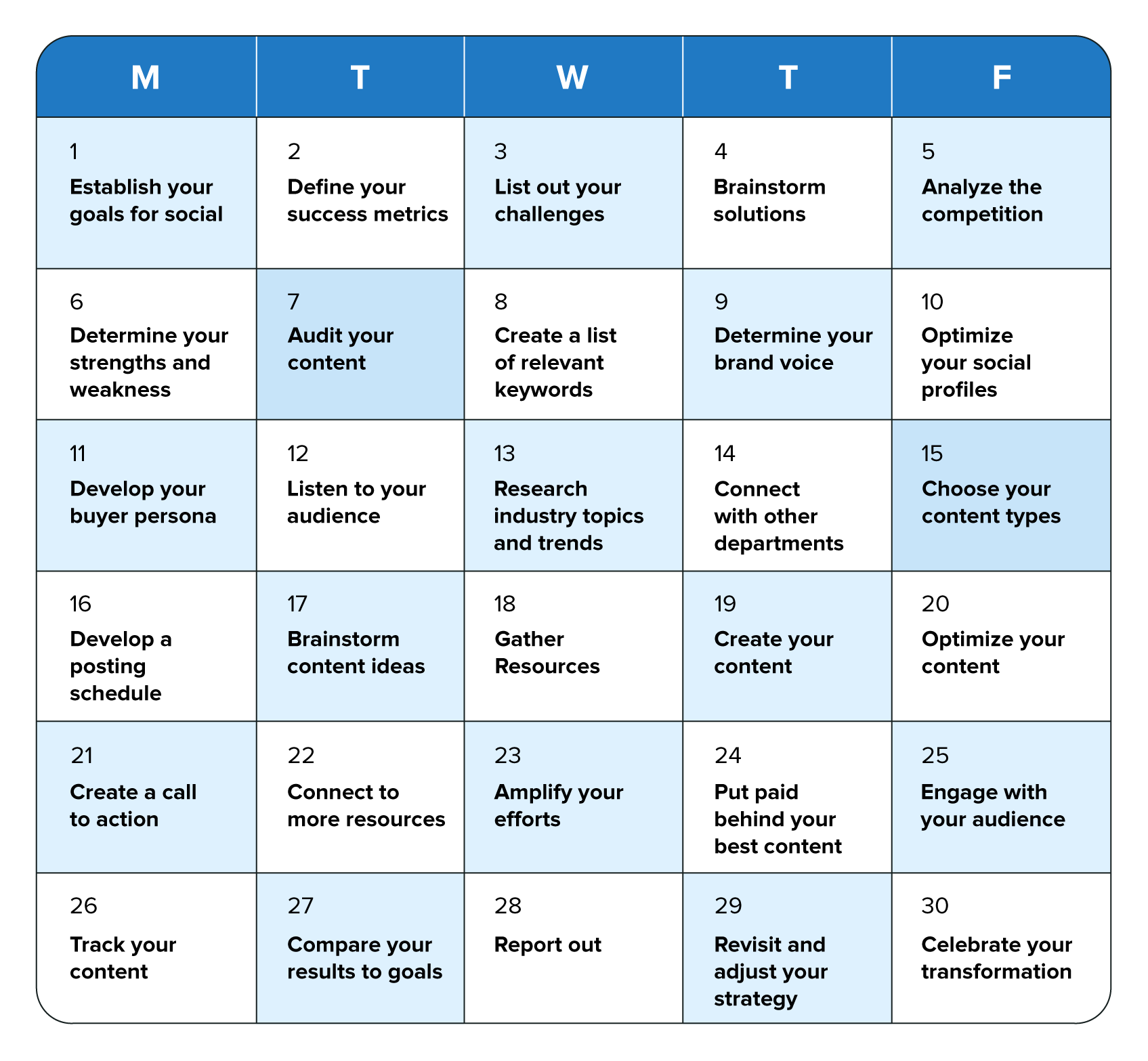
What it is: The 30-day social media plan template is great for marketers looking to switch up their strategy through focused, achievable goals. The plan gives you a week-by-week breakdown that takes you from goal-setting and brainstorming fundamentals all the way to reporting and refining. Plus, it’s packed with additional resources that level up your social marketing skills.
How it works: Save a copy of the Google Sheet and use it to track your progress and create transparency throughout the rest of your marketing org. As you work through the steps, be sure to include links to any separate planning or note documents for easy reference. For an in-depth breakdown of each task, check out this guide.
3. Social media reporting template
What it is: Simplify your campaign reporting process with this easy-to-use social media reporting template. This document organizes your social data in a digestible, actionable format that highlights your successes and lessons learned.
How it works: Download the free PDF and open it using Adobe or Apple Preview to edit. From there, you can adapt the report to your brand and plug in your social data. Be sure to share a branded, blank copy with the rest of your team as well.
4. Social media proposal template
What it is: If you’re freelancing or with an agency, this one’s for you. Use this proposal template to put together a cohesive campaign pitch that accounts for all deliverables, deadlines and costs up front. Use it to create a solid foundation for partnerships and to set reasonable client expectations from the jump.
How it works: Make a copy of the Google Doc and adapt the proposal to your brand and campaign. If you need additional inspiration, check out this comprehensive explainer on how to create a winning social media proposal.
Types of social media campaign templates
Different campaigns require specialized strategies. Choose templates designed for your specific objectives:
- Product launch template: Builds anticipation through teaser content, launch day activation and post-launch engagement tracking
- Brand awareness template: Focuses on reach, impression metrics and share of voice measurement
- Lead generation template: Emphasizes conversion tracking, CTA optimization and lead nurturing workflows
- Event promotion template: Structures pre-event buzz, live coverage and post-event follow-up
- Crisis communication template: Provides response frameworks, approval processes and monitoring protocols
Each template type serves a distinct purpose. Choose the one that aligns with your campaign objectives, or customize a master template to fit your specific needs.
4 elements of a successful social media campaign template
Effective campaign templates balance strategy with tactical execution. Include these four essential elements to ensure your template drives results:
1. Preliminary research
Research validates your campaign strategy before launch. Smart teams use data to identify winning opportunities and avoid costly mistakes.
Essential research steps include:
- Audience analysis: Identify trending topics and conversation themes
- Competitor monitoring: Analyze what resonates in your industry
- Sentiment tracking: Understand current brand perception
- Hashtag research: Find relevant, high-engagement tags
Before jumping into creating a campaign plan, use a social listening tool to validate your ideas and hypotheses. With Sprout’s Advanced Listening, you can look into keywords and hashtags associated with your brand or you can analyze a trending topic for potential brand alignment. Depending on the nature of your campaign, these insights can help you build proof of concept so you can kick off your campaign with confidence.
2. A detailed campaign brief
A campaign brief creates a centralized source of truth for your marketing department. This is where you document the campaign description, goals and objectives, messaging plans and a list of assets and deliverables.
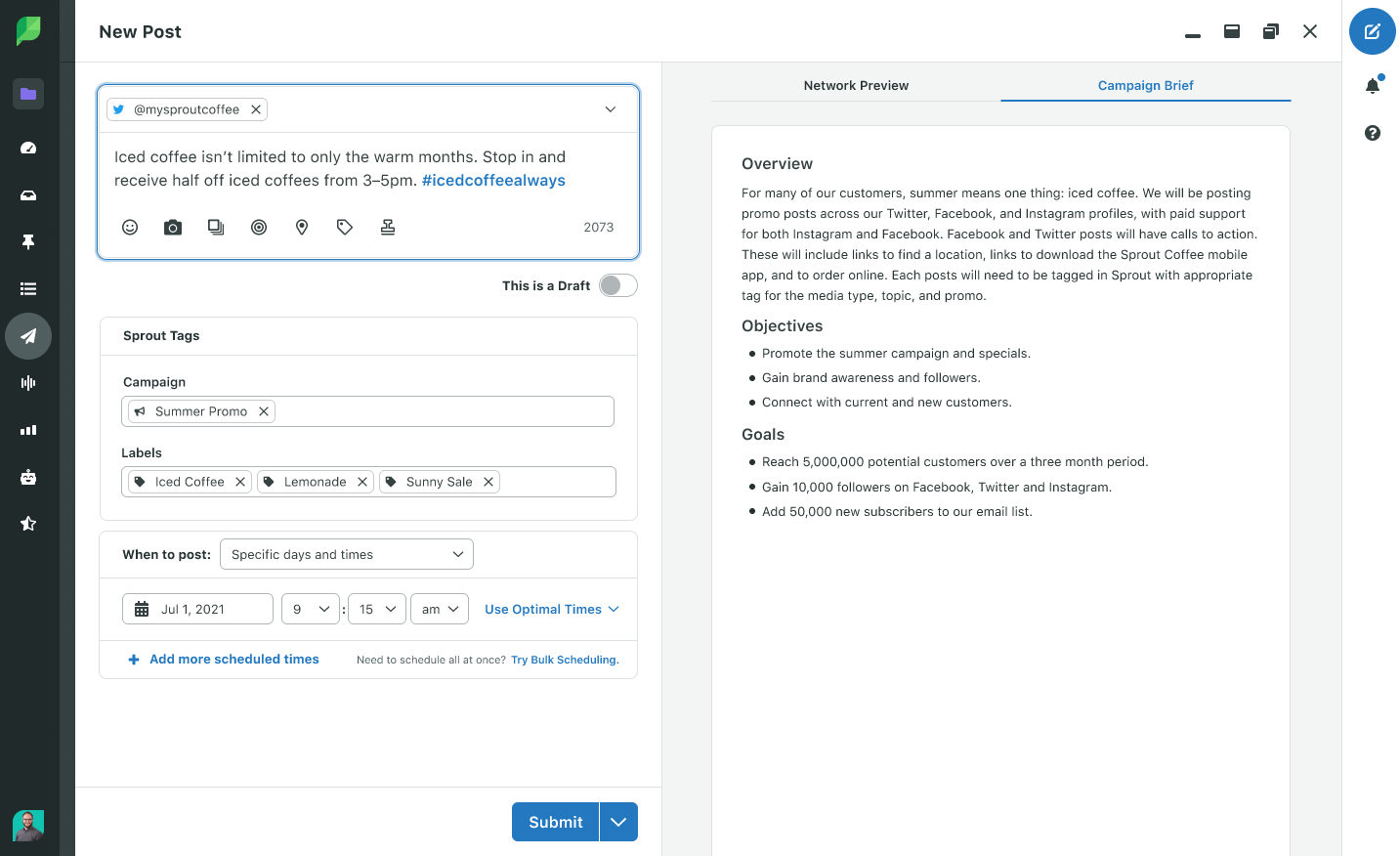
To ensure consistency, briefs should be easily accessible while planning and scheduling content. With Sprout Social Campaigns, include your brief for easy access during the campaign creation and execution process to increase visibility and alignment.
3. An easy-to-read calendar
A social media calendar is your campaign’s backbone. It provides visual oversight of content flow and publishing frequency.
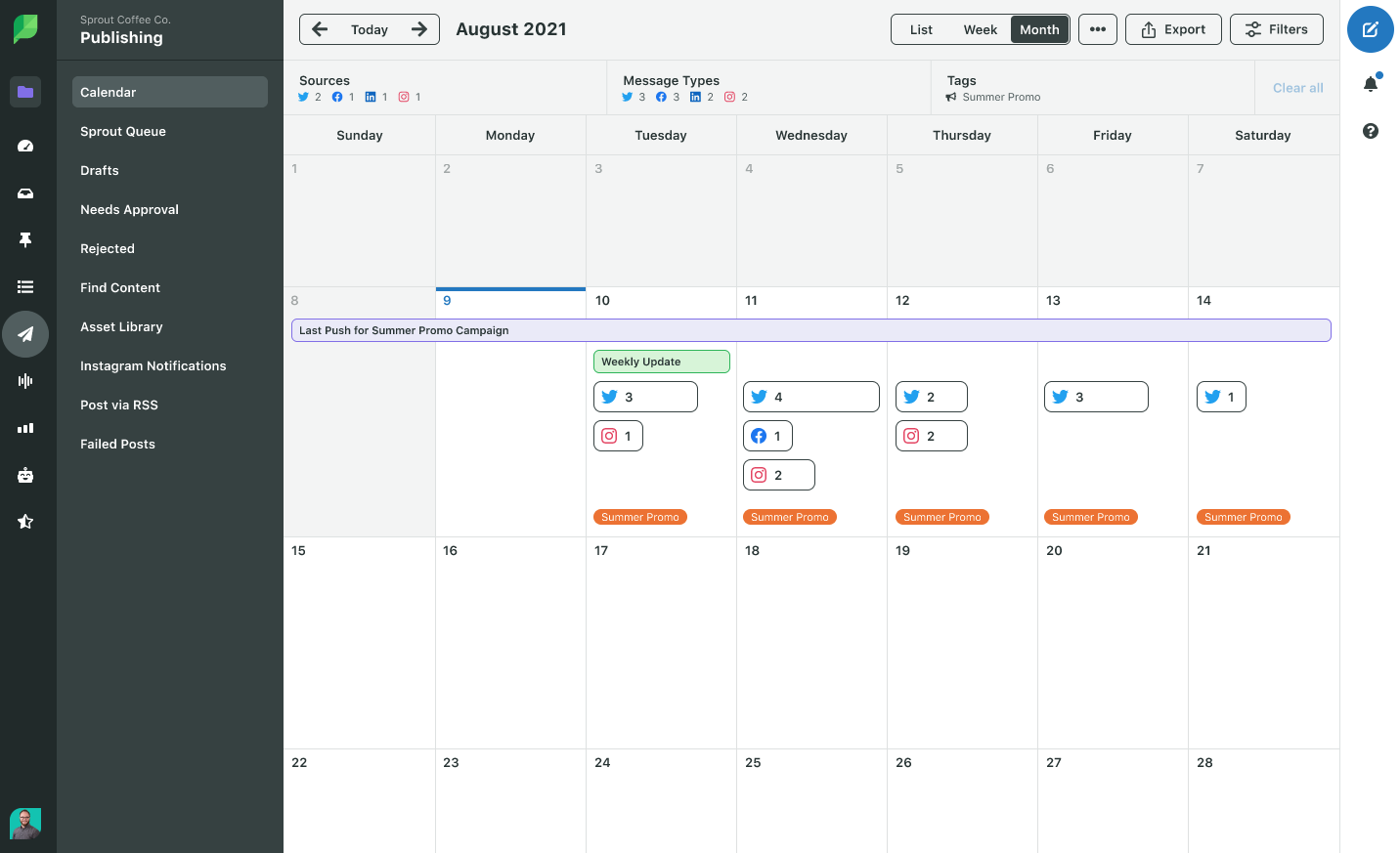
Calendar views prevent content gaps and posting conflicts. Even basic spreadsheet calendars deliver better organization than scattered planning approaches.
If you’re using Sprout Social Campaigns, use the collaborative Content Calendar. This workflow eliminates any need to jump from platform to platform, allowing you to schedule and monitor content in one unified view. Plus, you can leave internal notes on the calendar associated with your campaign for reminders, ideas and more.
4. Established checkpoints
Campaigns don’t end at launch. Decide on a (personal or team) cadence for checking in on campaign performance; the frequency will largely depend on the length of your campaign.
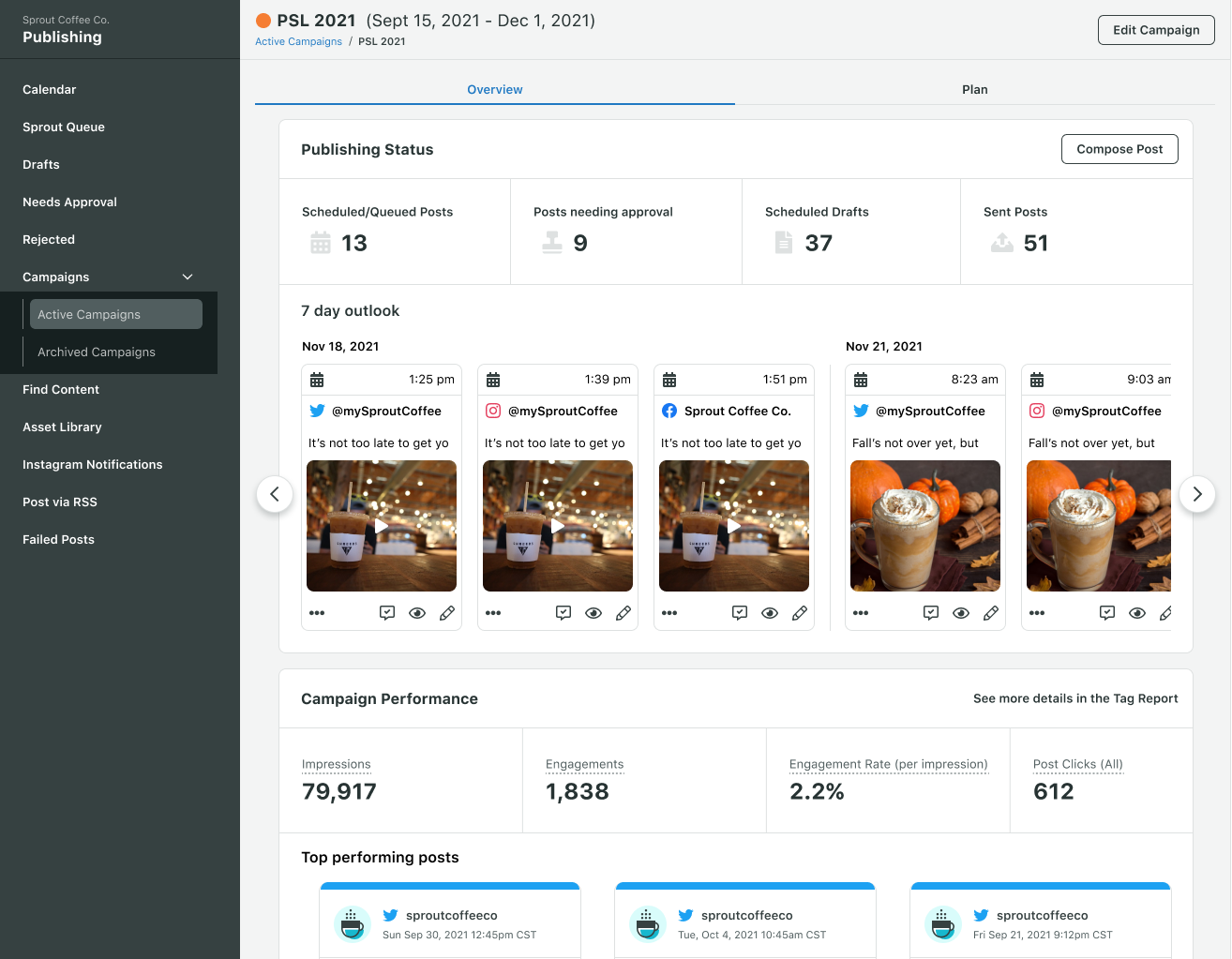
Use these checkpoints to make proactive adjustments, rather than waiting to see what worked after your campaign concludes. If you’re planning your campaign using Sprout Social, use the campaign Overview tab for a snapshot of engagement, post performance and more.
Streamline campaign management with Sprout Social
Templates provide structure, but integrated campaign management delivers results. Sprout Social combines campaign planning, content scheduling, team collaboration and performance tracking in one platform.
Key campaign management features include:
- Campaign briefs: Centralized strategic documentation
- Content Calendar: Visual campaign oversight across all social media platforms
- Asset Library: Organized creative resources and brand assets
- Performance reports: Real-time campaign analytics and insights
- Team collaboration: Assignment, approval and feedback workflows
Transform your campaign process from chaotic to systematic. Start your free Sprout Social trial and experience streamlined campaign management.
Frequently asked questions about social media campaign templates
How often should I update my campaign templates?
Review templates quarterly or after major campaigns to incorporate new learnings and platform changes. If a campaign delivered exceptional results, analyze what worked and integrate those insights back into your master template.
Should I use the same template for different social media platforms?
Start with a master template, then customize sections for platform-specific requirements and audience expectations. A campaign on TikTok requires a different content strategy than one on LinkedIn.
What's the difference between a campaign template and a content calendar?
Campaign templates define strategy and structure, while content calendars schedule specific posts and publishing times. The template is your strategic blueprint; the calendar is your tactical execution tool.
How do I get team buy-in for using templates consistently?
Demonstrate time savings and improved results with concrete examples. Involve team members in template creation to ensure it meets their needs and encourage ownership of the process.
Should I create different templates for different campaign goals?
Yes, specialized templates for awareness, lead generation and product launches deliver better results than generic strategies. This allows you to pre-populate goal-specific KPIs and strategic considerations, making your planning process faster and more effective.





Share