Social media automation: A 3-step quick start guide for 2026

Written by Jacqueline Zote
Published on August 28, 2026
Reading time 7 minutes
Table of Contents
Between all the DMs you need to answer and the posts you need to create, it’s time-consuming to maintain an active social media presence. And as you expand to more channels without increasing headcount, you get sucked into a productivity trap where you’re doing more work, but your results stagnate.
This is all too familiar for social media teams that do (almost) everything manually. The Social Media Productivity Report from Sprout Social even found that 63% of are unable to do high-impact work because they’re bogged down by manual tasks.
On the other hand, respondents who use dedicated tools to manage their social media are twice as likely to have enough time to get their work done.
This makes a strong case for marketers to start automating various aspects of their social media management. In this social media automation guide, we break down three essential steps to get started. Let’s take a look.
What social media automation means
Social media automation is the process of letting tools handle routine and repetitive tasks like scheduling posts or tracking brand mentions. This gives you back the time needed for more meaningful work that requires human input, whether that’s responding to your DMs or creating high-quality content.
Rather than “replacing you,” automation allows you to free up time by automating the routine. So you have more time to spend on personalizing the meaningful.
Step 1: Centralize your publishing
Connect your profiles to one dashboard
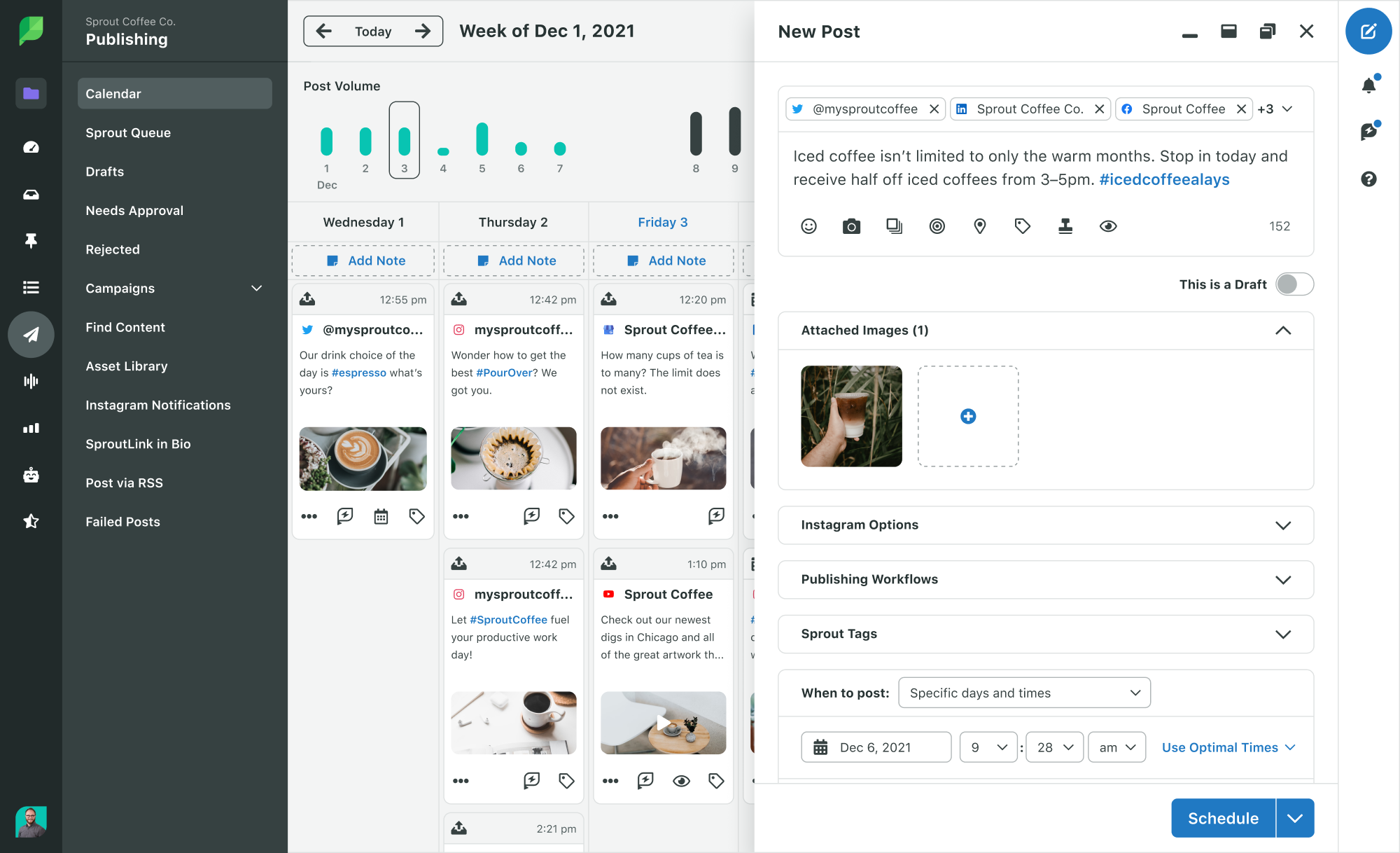
You waste time when you’re manually logging into different profiles to schedule every post individually. Streamline the process by connecting all your social media profiles to a centralized publishing dashboard.
A social media management platform like Sprout consolidates your publishing through a single dashboard. This lets you connect your profiles across different social networks and manage your publishing in one place. When you create a new post to schedule, all you have to do is select the profile(s) where you want to publish it.
Build a lightweight content calendar
Before all the automation comes the planning. And you need to plan your posts ahead of time before you can schedule them.
A content calendar makes it easy to do this and organize your publishing efforts. When you already have content planned for the entire week or month, you can quickly start creating posts without spending too much time on ideation.
And you don’t have to build an elaborate calendar, either. Keep it simple with a clear outline of the essentials:
- Publishing date and time
- Platform and profile
- Content pillar or topic
- Format
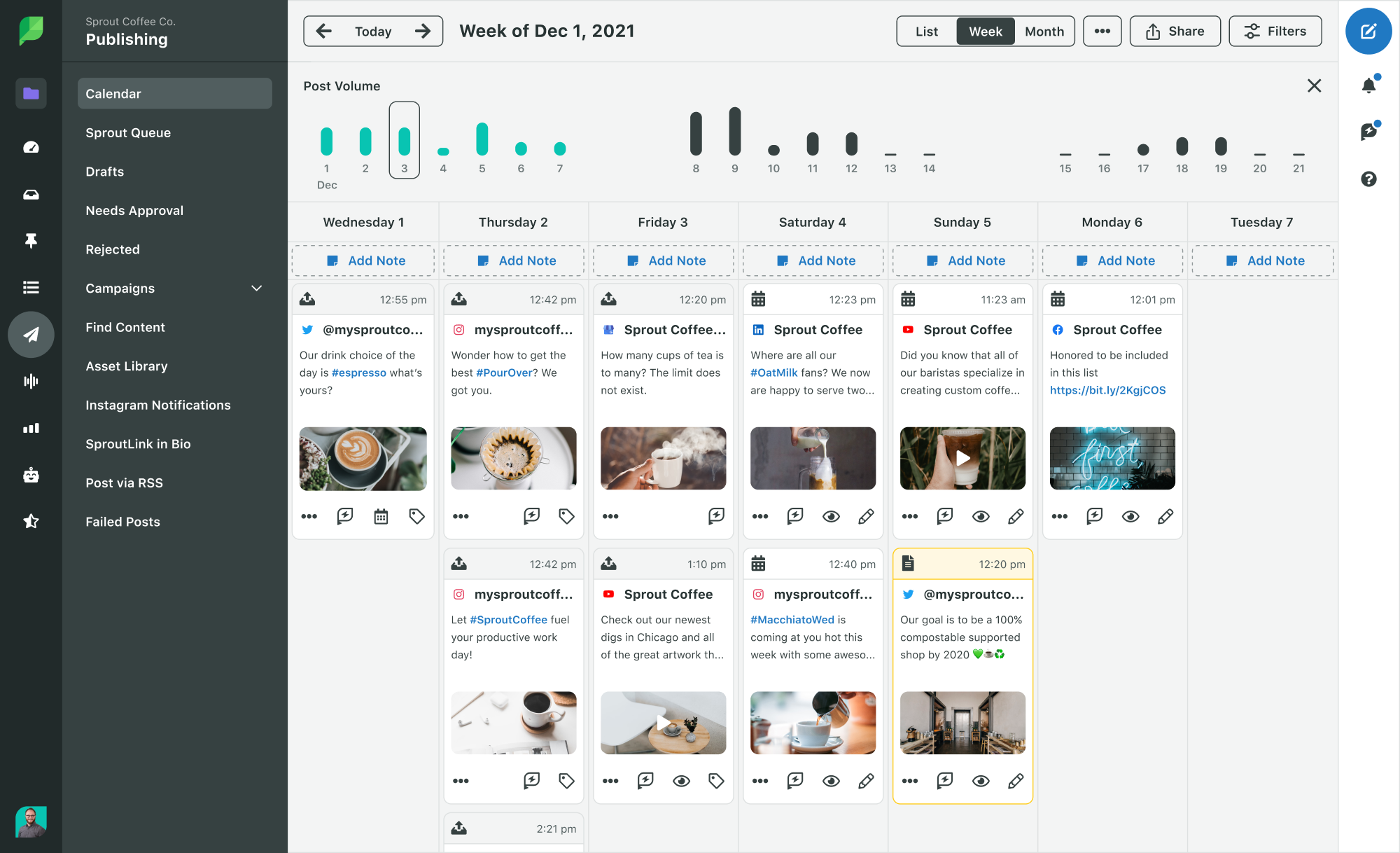
Sprout’s content calendar helps you visualize your planned posts across all your profiles. It lets you create and schedule posts directly within the calendar, which simplifies your publishing automation. You can even drag and drop posts to easily adjust your publishing cadence for optimal frequency.
Schedule around optimal send times
Effective publishing automation is highly strategic. It’s less about the publishing volume and more about the timing precision. When you schedule your posts to automatically go live, you need to time them to make sure they reach audiences when they’re most active.
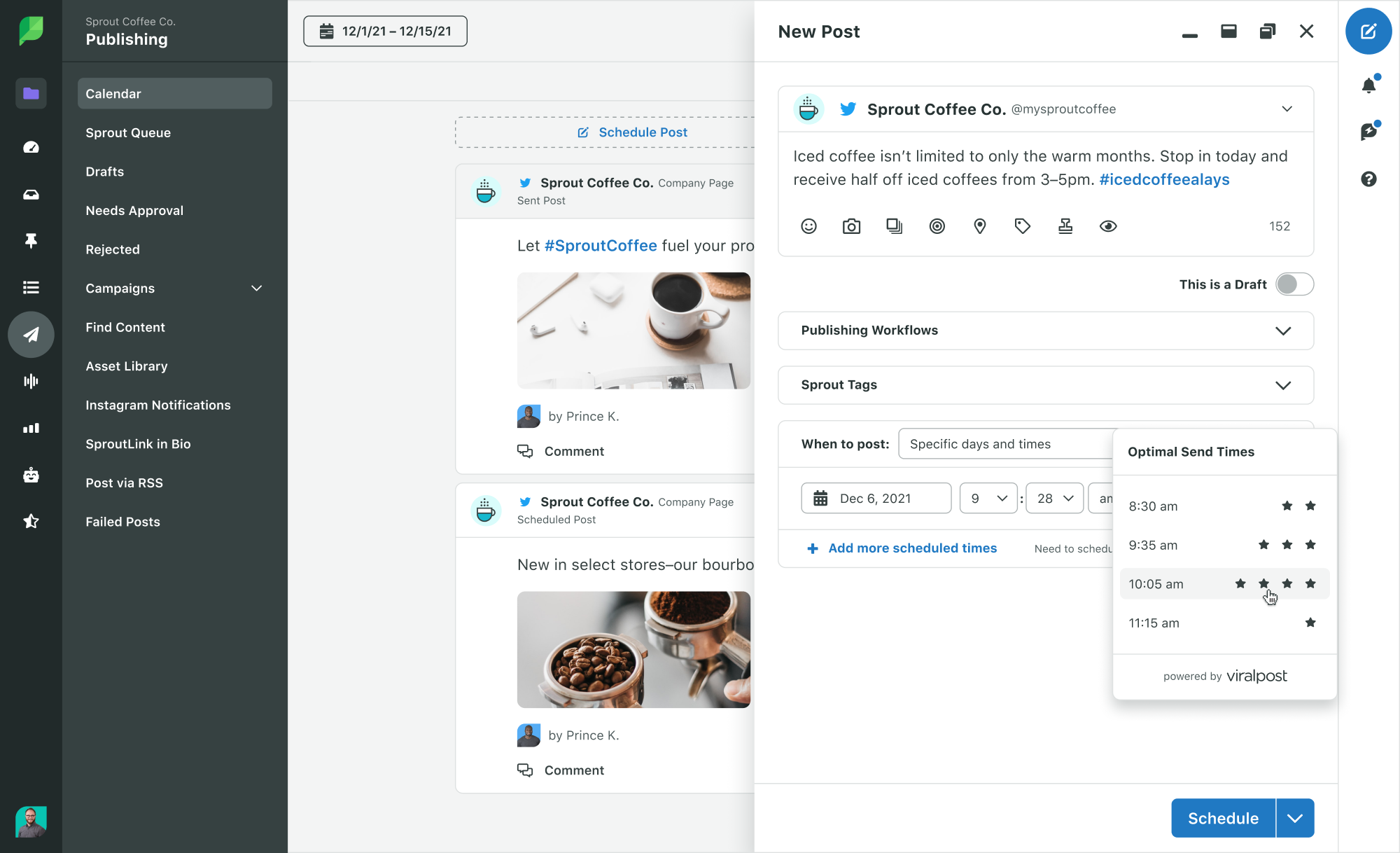
Sprout’s social media automation features like Sprout Queue let you do just that. It automatically sends out your posts at a time of your choosing, so you no longer have to set reminders to remember when it’s time to post. You can schedule posts in bulk and for the entire month, freeing up time to focus on more high-impact tasks.
ViralPost™ takes the guesswork out of scheduling with optimal send time recommendations. It analyzes your audience and their engagement patterns to figure out when to deliver content for the greatest impact.
Step 2: Set up automated engagement and response rules
Unify your inbox across platforms
Many social media managers still handle engagement manually because they want to keep it human. But there are other aspects of engagement that you can automate without losing the human touch.
This starts with the process of tracking your comments, DMs and brand mentions. Instead of tracking everything manually across different networks and profiles, you can automatically collect them in a centralized inbox. This unifies all your engagement opportunities, so nothing falls through the cracks.
Sprout’s Smart Inbox centralizes all your messages from across your connected profiles. This helps you keep up with the latest comments and DMs without having to manually open your social media app. It even lets you manage your responses directly within the inbox.
Automated Inbox Rules further help you manage your responses more efficiently by measuring and categorizing inbound messages. So it’s easy to see which messages you need to prioritize and which ones can wait for a bit.

Build FAQ-style auto-responses for common questions
Quick response times make brands stand out on social. According to the 2025 Sprout Social Index™, nearly three-quarters of consumers expect a response within 24 hours. And 73% will even buy from a competitor if a brand doesn’t respond on social.
But manually answering every message or question slows you down. While this keeps your brand human, it means people have to wait longer even for a generic question. That’s the part of engagement you can automate, giving you more time to focus on interactions that need a more tailored response.
Sprout’s Bot Builder lets you create chatbots and automate responses for frequently asked questions. This streamlines your X (Twitter) and Facebook automation efforts to speed up responses and field routine customer care enquiries.

For example, an X user asking a routine question about plans and pricing doesn’t want to wait 24 hours for your team to respond. A chatbot that instantly sends them detailed pricing information and plan coverages will speed up response times and prime them for conversion.
You can set up X (Twitter) automation rules where the chatbot refers customers to a human agent when they’re ready to purchase. So the most important aspects of your engagement remain human and personalized.
Know when to hand off to a human
While you can automate most of your routine and time-consuming social media tasks, there are some responses that call for human interaction.
Your chatbot can field routine questions about plans and pricing. But it doesn’t have the capacity to handle more complex questions, like what happens if someone decides to upgrade their plan in the middle of the month.
Set up automated workflows that clearly outline when bots should direct conversations to a human agent. Unique questions and situations will always call for human intervention.
The chatbot builder integrates with the Smart Inbox, so you can effortlessly pick up ongoing social conversations once the bot hands them over to you.

Step 3: Automate listening and reporting
Set up brand and keyword alerts
Listening is one of those social media tasks that you should always automate. Otherwise, it’ll take days to manually scour millions of conversations and identify mentions that are relevant to your brand.
Social listening tools speed up the process by automatically detecting conversations that are related to your brand or industry. Set up alerts to keep track of specific brand names and keywords. This will help you stay on top of relevant industry conversations and gauge consumer sentiment.
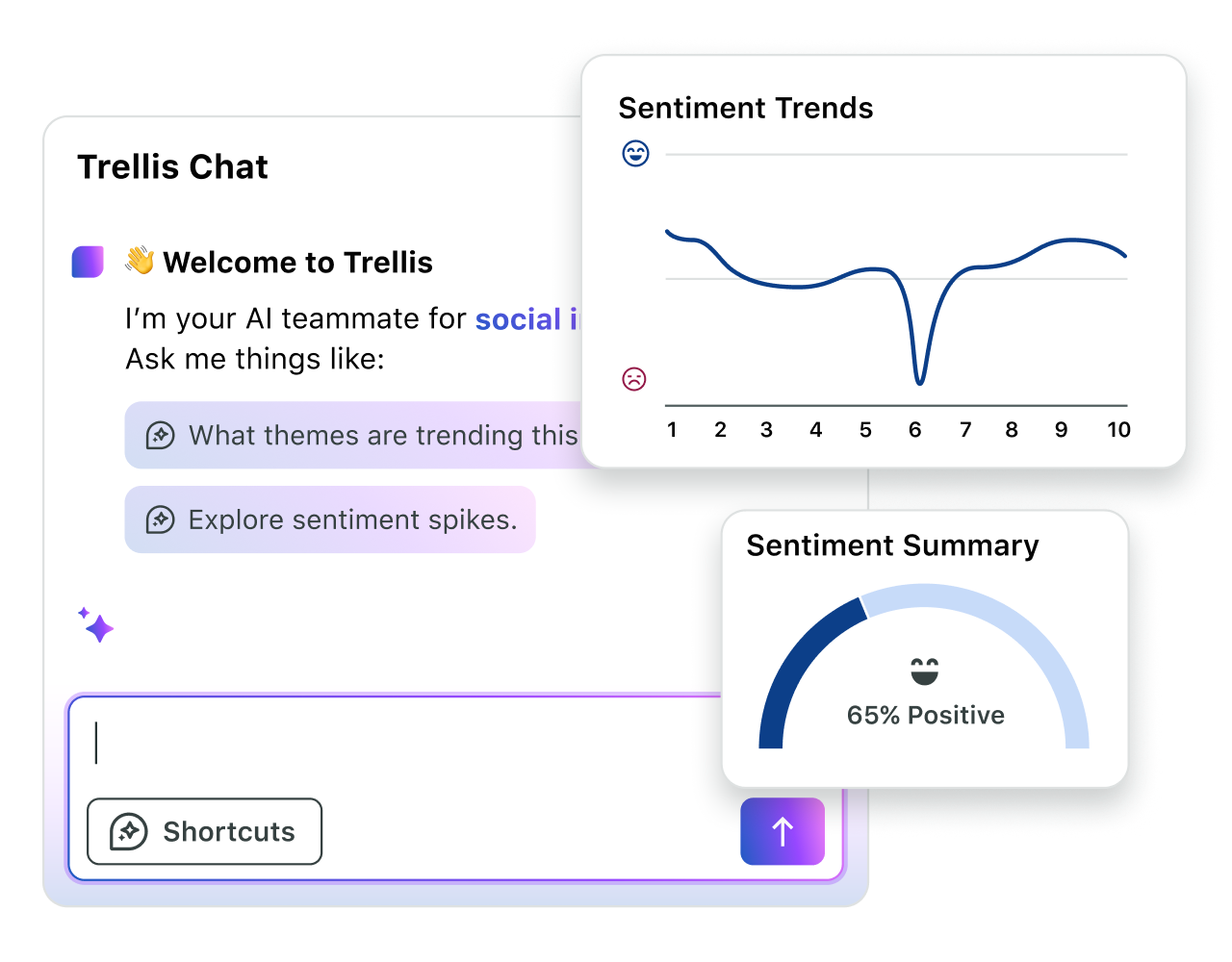
And with AI agents like Sprout’s Trellis, you can extract valuable insights from those conversations within minutes. From trending themes to sentiment spikes, it gives you tailored, data-backed answers to inform your strategy.
Schedule recurring performance reports
Reporting is another must-automate aspect of social media management. You can generate automated reports highlighting key social media metrics on your performance. This helps you visualize where you stand, what’s working and how your content is landing.
Social media automation tools will even let you set up recurring performance reports and deliver them straight to your inbox. Schedule them at regular intervals so you can always stay on top of your social media performance without the need to manually check native analytics dashboards.
Common social media automation mistakes to avoid
With 78% of companies already using marketing automation, automating social media tasks is the easiest way to catch up. But effective social media automation needs a strategic approach, or you could end up with spammy content and robotic responses. Here are some major automation mistakes you should avoid for social media:
Mistake #1: Relying on AI-generated content
As genAI becomes more advanced, many social media marketers are relying on it for content creation. In fact, 93% of practitioners in the 2025 Sprout Social Index™ believe AI can help them beat creative fatigue.
At the same time, fully AI-generated content lacks creativity and is prone to errors (AI hallucinations are a real thing).
Limit the use of generative AI to ideating content and drafting outlines or scripts. You still want to leave the actual content creation to humans, with thorough reviews and fact-checks for AI-generated data points and statements.
Mistake #2: Letting publishing queues run indefinitely
While automation is technically supposed to free up time for marketers, a total “set it and forget it” approach leaves room for ill-timed and spammy posts.
Imagine the blowback from a feel-good post that you forgot to pause in the middle of a nationwide crisis. That’s how you end up coming across as tone deaf and insensitive. So the last thing you want to do is leave your scheduled queues running indefinitely without reviewing them occasionally.
Stay on top of unexpected events and crises and double-check your publishing queue to pause anything that could be misinterpreted in those circumstances.
Mistake #3: Over-reliance on bot responses
Autoreplies can feel generic and lacking in empathy, even if they speed up response times.
Make sure to carefully craft your responses to keep the human element intact. This applies to every automated response, no matter how routine the answer might be.
Giving customers the option to speak to a human representative is another solution. Additionally, make sure to build automation workflows that direct complex questions to humans.
Gear up for social media automation success
Automation helps you streamline publishing, scale engagement and optimize reporting. And it doesn’t have to mean juggling multiple automation tools for all these management tasks.
With Sprout’s automation features, you can consolidate them all into a single platform. Automated publishing tools let you schedule your posts and recommend the best publishing times. The Smart Inbox automatically keeps track of every message across all your profiles to manage responses in one place.
Meanwhile, Sprout’s Bot Builder helps you speed up response times with automated replies for commonly asked questions. And with AI-assisted listening and reporting, extracting actionable insights from a sea of data takes just a few minutes.
Ready to automate your social media with Sprout Social? Try it free for 30 days.
39 free social media strategy templates that will elevate your workflows
Published on August 20, 2026 Reading time 15 minutes









Share