How to create AI agents for social media marketing

Written by McCall Lanman
Published on April 16, 2026
Reading time 8 minutes

Table of Contents
Social media teams face a real capacity problem: too many platforms, too many messages and never enough hours to manage it all manually. AI marketing agents solve this by handling multi-step tasks autonomously—generating content, monitoring trends and routing customer messages—without a human directing every action.
This guide breaks down exactly how to create agents for your AI marketing strategy, from choosing the right framework and architecture to connecting your agent to live social data and building the guardrails that keep it on-brand. Whether you’re a marketer exploring no-code AI marketing tools or a developer building custom workflows, you’ll find a clear path from concept to deployment here.
What is an AI agent?
What are AI agents exactly? An AI agent is a software program that uses a large language model (LLM) as its brain to autonomously complete tasks, make decisions and interact with external tools—without a human directing every step. This makes it fundamentally different from a basic chatbot, which only responds to direct questions.
Every AI agent runs on four core components:
- LLM: The reasoning engine that reads inputs and decides what to do next.
- Prompts: The instructions that define the agent’s role, tone and boundaries.
- Tools: The APIs and functions the agent calls to take real-world actions—this is known as tool calling or function calling.
- Memory: The storage system that retains context so the agent learns from past interactions.
When to use AI agents for social media work
This transition to AI-driven workflows is a growth lever for the entire department. In fact, The 2025 Sprout Social Index found that 54% of marketing leaders believe AI is what will empower them to grow their teams moving forward, highlighting how these autonomous systems help teams scale rather than just replacing them.
Traditional social media automation follows fixed rules. AI marketing automation goes further—reading context, adapting to new information and handling multi-step tasks without rigid decision trees. This level of autonomy is becoming an industry standard; according to The 2025 Sprout Social Index™, 97% of marketing leaders believe it is absolutely crucial for marketers to know how to use AI in social media in their day-to-day work.
Here is where autonomous agents outperform standard automation:
- AI customer service: Agents resolve support questions 24/7 by pulling from a live knowledge base, laying the groundwork for intelligent customer care. This satisfies a growing consumer demand; Sprout Social’s Q4 2025 Pulse Survey found that 69% of social media users are comfortable with companies using AI to deliver faster customer service.
- Trend monitoring and mental load: Agents scan platforms and surface emerging conversations in real time. This alleviates the primary pain point for social teams: burnout. The Index reports that 93% of social practitioners believe AI can help alleviate creative fatigue by bearing the mental load of monitoring social environments and performing intensive data analysis.
- Performance reporting and campaign optimization: Agents adjust strategies based on live engagement data. Real-world adoption is already high, with The 2026 Social Media Content Strategy Report noting that 40% of marketers currently use AI social media tools for performance reporting and analysis.
- Content generation: Agents analyze past performance data and write post variations at scale. This allows teams to expand their reach without increasing headcount.
The transition to an AI-driven social media workflow is a growth lever for the entire department. In fact, The 2025 Sprout Social Index™ found that 54% of marketing leaders believe AI is what will empower them to grow their teams moving forward.
Scale your strategy with Sprout’s built-in AI capabilities
If you aren’t ready to build a custom agent from scratch, you need a social intelligence platform that has these autonomous capabilities integrated directly into your workflow. Sprout Social moves beyond basic management by using agentic AI to turn real-time social signals into a coordinated business strategy.
Sprout’s AI agent, Trellis, acts as the connective tissue across your entire operation, revealing the “why” behind emerging trends and automating the path to action. Here is how you can tactically apply Sprout’s AI to solve daily capacity problems:
- Social Listening and trend detection: Instead of manually scanning for mentions, use automated listening to track share of voice and identify rising topics before they go mainstream. Trellis surfaces these signals early, allowing you to pivot your strategy before a trend peaks or a crisis escalates.
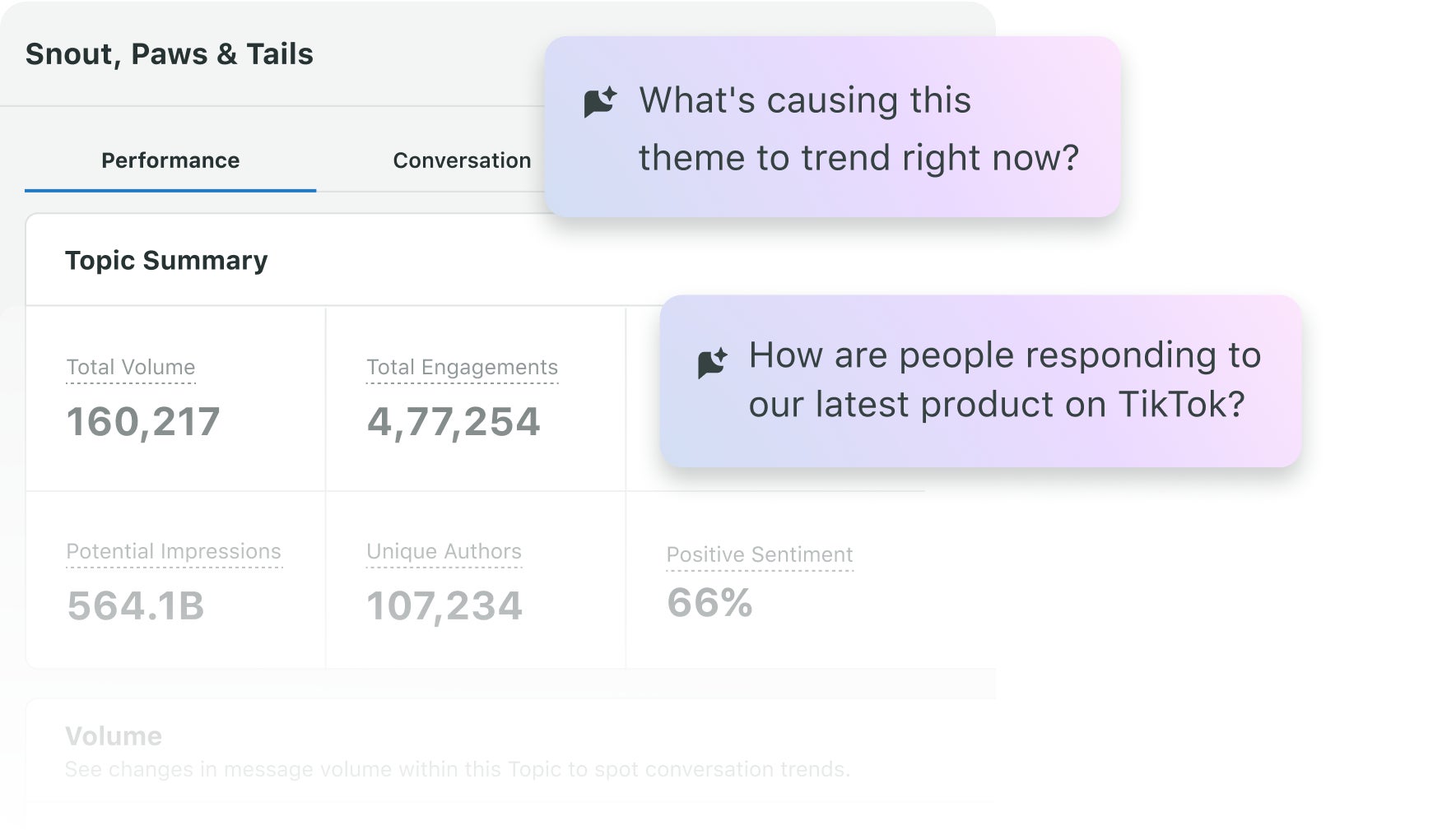
- Customer Care automation and triage: Use the Smart Inbox to automatically tag and route incoming messages based on sentiment or topic. By using AI to prioritize urgent or high-intent inquiries, your team can resolve issues faster and ensure high-impact messages never sit in a queue.
- Content generation and smart publishing: Craft captions and select visuals optimized for each network using AI-driven recommendations. Once generated, leverage Sprout’s patented ViralPost® technology to automatically schedule content when your unique audience is most active, ensuring maximum reach without manual guesswork.
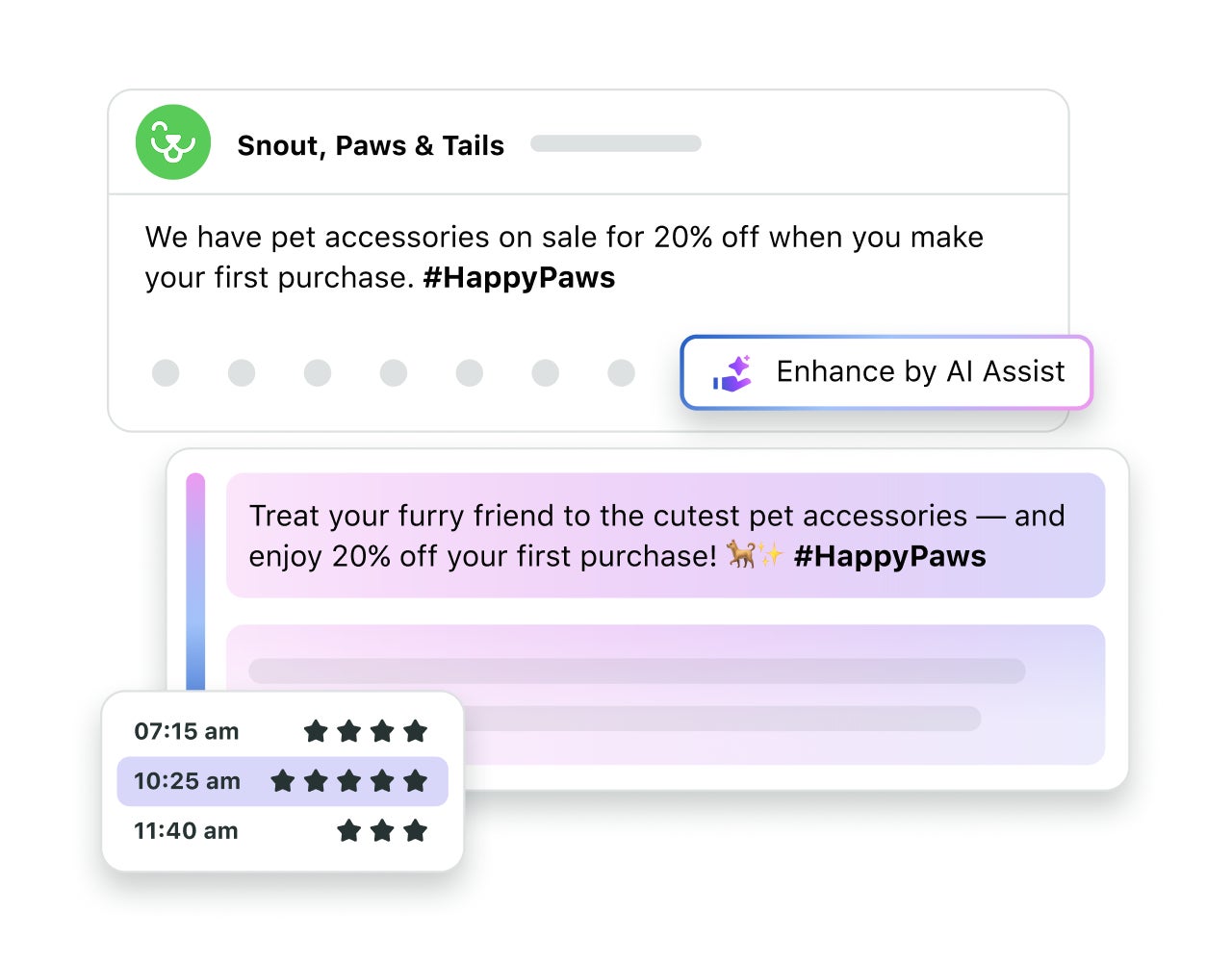
- Competitive benchmarking: Automatically compare your campaign volume and engagement against competitors. This tactical data provides the strategic context needed to adjust your messaging in real-time and win more market share.
With Sprout, you aren’t just managing social; you’re using social intelligence to drive decisive, automated action across your entire team. Ready to see how social intelligence can transform your strategy? Request a demo to see Sprout Social’s AI capabilities in action.
What are good AI agent creation tools and frameworks?
Your framework is the development environment where you build and connect your agent. The right choice for your AI marketing strategy depends on your technical skill level and whether you are utilizing no-code AI marketing tools or custom-coded solutions.
| Framework type | Best for | Examples |
|---|---|---|
| No-code platforms | Marketers without coding experience | n8n, Relevance AI, ChatGPT GPT builder |
| Low-code solutions | Teams wanting customization without full development | Flowise, LangFlow |
| Code-based frameworks | Developers who need full control | LangChain, CrewAI, AutoGen |
Each framework connects to social media platforms through a REST API—a standardized way for software to exchange data. No-code AI tools use visual drag-and-drop nodes to map this logic, while code-based frameworks give developers direct control over every API call and webhook.
Sprout Social’s API lets you pull publishing data and engagement metrics directly into your agent’s workflow, giving it accurate, real-time social data to act on.
Schedule a demo to see how Sprout’s API and social intelligence capabilities can fuel your autonomous workflows.
AI agent architectures and workflows to know
Agent architecture is the structural design that determines how your agent processes information and completes tasks. Choosing the right AI workflow pattern determines how well your system scales.
- Single agent systems: One agent handles all reasoning and execution for a focused task.
- Multi-agent workflows: Specialized agents each own a specific function and work in parallel.
- Supervisor patterns: A central orchestrator agent delegates sub-tasks to worker agents.
- Sequential workflows: Agents pass outputs down a pipeline, where each agent’s result feeds the next.
Most social media marketing teams start with a single agent for one use case, then expand into multi-agent workflows as their needs grow.
What are the steps to create a basic AI agent?
Building an autonomous system requires moving from high-level strategy to technical execution. While the logic behind these tools is sophisticated, the development process follows a structured path designed to ensure reliability and brand safety. Follow these steps to move your agent from a concept to a high-impact part of your marketing stack.
Step 1: Define the goal and constraints
Start with one specific, measurable task—responding to FAQs, generating post variations or monitoring brand mentions. Vague goals produce unreliable agents.
Effective deployment requires a strategic “crawl, walk, run” approach.
As Tatiana Holyfield, former VP of Social at SiriusXM, shared in the Sprout Social webinar Data to Dollars: Leveraging Social Data for Increased Investment, grounding your initial goals in audience data is key to long-term success. Holyfield explains that “really understanding your audience and then [setting] goals accordingly, really allows you to test and learn and be strategic with your budget. And from there, you can start small and scale up, and that allows you and your leadership team to really be locked in step on what worked and what didn’t work.”
To follow this lead, write a system prompt that defines exactly what the agent does and doesn’t do. Think of it as a digital job description: the clearer the scope, the more predictable the output.
By starting with a small, data-backed pilot—such as an agent that identifies high-intent customer queries—you can prove the value of the technology to leadership before scaling into more complex multi-agent workflows. If you already track brand keywords and campaign hashtags in your social management workflow, use those existing parameters as your agent’s initial task boundaries.
Step 2: Select the model and framework
Your model choice determines the agent’s reasoning quality and context window—the amount of information it processes at once. GPT-4 and Claude 3.5 Sonnet handle complex, nuanced tasks well. Open-source models work for simpler, high-volume jobs.
Match your framework to your team’s skill level:
- Beginners: ChatGPT custom GPTs or n8n
- Intermediate: LangChain with pre-built templates
- Advanced: Custom CrewAI implementations
Step 3: Add tools, memory and test loop
Tools are what transform your agent from a text generator into an autonomous system. Connect it to APIs, databases and search so it takes real actions.
Memory works in two layers:
- Short-term: Retains the context of the current conversation.
- Long-term: Uses a vector database and embeddings to recall past interactions and user preferences—a technique called Retrieval-Augmented Generation (RAG).
Test your agent with real message data before deploying it publicly.
Connect your agent to social data, tools and memory
Integration is where your agent gains access to the data it needs to act. You connect it to three types of sources:
- Data sources: Social APIs, analytics platforms and CRM systems that supply historical and real-time context.
- Tool connections: Publishing APIs and monitoring webhooks that let the agent take action.
- Memory storage: Vector databases for semantic search and traditional databases for structured records.
Use OAuth and API authentication to grant your agent secure, scoped access—never give it broader permissions than the task requires. Store agent-generated content in a centralized asset library so your team reviews outputs before they go live.
Guardrails and governance for safe on-brand automation
Brand governance means setting firm rules that control what your agent publishes and how it responds. Without guardrails, even a well-built agent produces off-brand or harmful outputs.
Build these safety measures in before deployment:
- Content filters: Block inappropriate language and enforce brand voice at the output level.
- Approval workflows: Route sensitive responses to a human manager before they’re sent—this is called human-in-the-loop.
- Rate limiting: Cap how many actions the agent takes per hour to prevent spam.
- Audit trails: Log every agent action for compliance and performance review.
AI safety isn’t a feature you add later. It’s a design requirement from day one.
How to test and evaluate your AI agent
Testing proves your agent works reliably before your audience sees it. Run it through four evaluation layers:
- Functional testing: Does it complete its assigned task without errors?
- Performance metrics: How fast does it respond, and how accurate are its outputs?
- User satisfaction: What’s the sentiment of the interactions it handles?
- A/B testing: How does agent-generated content perform vs. human-created posts?
Track these performance benchmarks consistently. Agents drift over time as social media platforms update their APIs and audience behavior shifts—regular evaluation keeps your system accurate.
Examples of AI agents that drive social results
These AI agent examples show what’s achievable when you connect the right model to the right data:
- Customer service agent: Resolves routine inquiries instantly by referencing a live FAQ knowledge base, freeing your team for complex issues.
- Content optimization agent: Tests multiple headline variations and surfaces the highest-performing formats based on historical engagement data.
- Trend monitoring agent: Scans social media platforms continuously and alerts your team when a conversation requires a human response.
Each of these agents works best when it has access to clean, structured social data. The richer your data pipeline, the more precise the agent’s decisions.
Summary and next steps for your first agent
Building an effective AI agent for social media marketing comes down to four things: a clear goal, the right model, secure integrations and ongoing evaluation. Start with one use case, prove it works and then scale. The teams seeing the strongest results aren’t building the most complex systems—they’re building focused agents with well-defined boundaries and reliable data.
Curious about Sprout Social’s built-in AI capabilities? Request a demo to understand what Sprout can do for your social team and business goals.
How to create AI agents FAQs
How do I build AI agents?
Start by defining a single, measurable task rooted in audience data. Choose an LLM reasoning engine and a framework that matches your skill level, then connect essential tools and memory layers to fuel autonomous action.
What is the difference between an AI agent and a chatbot?
A chatbot responds to direct questions using pre-written rules or a language model. An AI agent goes further—it plans multi-step tasks, calls external tools and takes autonomous actions without a human directing each step.
Do you need coding experience to build an AI agent for social media?
No. No-code platforms like n8n and Relevance AI let marketers build functional agents using visual interfaces. Code-based frameworks like LangChain and CrewAI give developers more control but require programming knowledge.
What LLM should a beginner use to build their first social media agent?
GPT-4 and Claude 4.6 Sonnet are strong starting points for most social media tasks. They handle nuanced language well and integrate with the most popular agent frameworks.
How do you prevent an AI agent from posting off-brand content?
You prevent off-brand outputs by writing a detailed system prompt, adding content filters at the output layer and requiring human approval for sensitive responses before anything goes live.
What is the difference between short-term and long-term agent memory?
Short-term memory holds the context of the current conversation. Long-term memory uses a vector database to store and retrieve past interactions, so the agent recalls user preferences and history across sessions.
39 free social media strategy templates that will elevate your workflows
Published on August 20, 2026 Reading time 15 minutes





Share