How to batch 30 days of Instagram content in one day

Written by Mahnoor Sheikh
Published on August 12, 2026
Reading time 8 minutes

Table of Contents
Summary
- Streamlined workflow: Instagram content batching allows small teams to plan, create and schedule a full month's worth of posts in a single dedicated session.
- Strategic alignment: Grouping tasks like scripting, visual production and scheduling ensures a cohesive brand aesthetic and aligns individual posts with broader goals.
- Tool consolidation: Utilizing a comprehensive platform like Sprout Social Essentials eliminates context switching by combining design integrations, optimal send times, and cross-network reporting.
Trying to post on Instagram every day from scratch? You’re on a fast track to burnout.
Coming up with ideas, filming Reels, designing carousels, editing photos and posting Stories, all while keeping your feed on-brand, is a lot. Doing that work from scratch every day is not sustainable, especially for solo marketers and small businesses.
The solution: batch your content. If you prepare a month’s worth of Instagram posts in one dedicated production day, you can spend the rest of your time strategizing, engaging with your audience and analyzing performance.
This guide walks you through a practical one-day workflow for Instagram content batching. We’ll also share what social media content batching is, why it matters and which tools you can use to batch 30 days of Instagram content each month.
What is Instagram content batching? The 60-second summary
Instagram content batching is a high-efficiency workflow designed for small teams to plan, create and schedule multiple Instagram posts in one dedicated time block. The goal is to complete similar tasks together, such as writing several Instagram captions in one sitting, filming all your Reels back-to-back and scheduling 20 or 30 finished posts in one session.
What are the benefits of batching Instagram content for small businesses?
Here’s how batching helps you post consistently on Instagram:
- It protects your bandwidth. You make your content decisions in one sitting instead of using time and energy to start from zero each day.
- It helps maintain your algorithm presence. Instagram rewards consistent publishing. Batching lets you publish posts regularly all month, even if work gets hectic.
- It keeps your feed visually cohesive. Planning a bunch of posts together makes it easier to balance colors, formats, compositions, cover images and product shots.
- It makes every post more purposeful. You can match each concept with a goal, call-to-action and destination link before you start creating.
- It frees you up for high-impact work. With content creation out of the way, you can spend more time on strategy, community-building and performance tracking.
How do you prepare a 30-day Instagram content calendar?
A productive batching day starts with preparation. If you arrive with no priorities or source material in mind, you’ll spend most of the day deciding what to make.
Organize your ideas into three to five content pillars: the various themes or categories your brand can credibly create content around. For a retail brand, these might include education, behind-the-scenes content, social proof and product promos.
Then, match each idea to the best Instagram format for it. For example:
- Reels are great for sharing videos and adding personality
- Carousels showcase product shots or break down a process
- Stories are excellent for timely updates or interactive content
Here’s a sample weekly layout for Instagram content batching:
| Content pillar | Instagram format | Example post concept |
|---|---|---|
| Behind-the-scenes | Reel + Stories | Show how you pack an online order |
| Educational | Carousel | Five ways to choose the right size or material |
| Product spotlight | Reel or image post | Show three ways to style a bestselling product |
| Customer proof | Carousel + Stories | Pair a customer quote with their photo and the product they chose |
Next, set a realistic cadence. A month of content doesn’t always mean 30 feed posts. A sustainable month for a lean team might include three or four feed posts per week, a bank of pre-designed Stories and open slots for live updates.
What is the step-by-step workflow to batch Instagram posts in one day?
The best way to batch Instagram content for your small business is to group similar tasks together.
Instead of taking one post from idea to publication before starting the next, write everything first, produce all your visuals together, then edit and schedule everything in one final go.
This entire process is more realistic when you use the right social media management tool, such as Sprout Social. Let’s walk you through each time-blocked step to batching a month of Instagram content in one day.
Step 1: Brain-dumping and scripting (9:00 AM to 10:30 AM)
In a single document, map out what every post needs to say before you start creating it. This gives your content purpose so you’re not just posting for the sake of filling your calendar.
Start with a pure brain dump: jot down every idea, question a customer has asked you, product you want to push or review worth resharing. Then sort what’s on the page into your four pillars and cut down to 16-20.
Next, write down the following for each post:
- Opening hook
- Core message or rough outline
- Call-to-action
- Destination URL (optional)
We recommend drafting in batches. Create all your Reel hooks together, outline your carousels and jot down the captions and Story prompts. When you have everything in front of you, you spot repetitive ideas, weak openers or too many posts with the same CTA.
Sprout Social Essentials Pro Tip: If you get stuck on a caption, type 10+ characters in Sprout’s Compose window and use Enhance by AI Assist to instantly generate three alternatives or change the tone. Editing a caption can often be faster than staring at an empty field.
Step 2: Visual production and sourcing (10:45 AM to 1:15 PM)
Now, move into production. Film your content back-to-back by setup instead of calendar order so you’re not constantly moving around lights and tripods.
For instance, record all your face-to-camera clips first, then product demos, voiceovers and B-roll. Make small changes between posts like moving to a different background or switching up layers (e.g., jackets or tops) so it doesn’t look like you filmed a month of content in one hour.
Shoot your stills next while the light is still set, such as product close-ups, flat lays and workspace or BTS shots. Make sure you grab extra frames you have no immediate plan for. They can come in handy later if a concept needs to change at the last minute.
If you don’t have them already, set up templates for your quote cards, promo graphics and carousels in Canva. Upload your brand kit, including colors, fonts and logo. This will help you design your assets faster in the next step.
Learn more about using Canva for small business Instagram.
By the end of this block, you should have all your footage, photos, graphics and customer-supplied assets ready to edit.
Step 3: Editing and polishing (2:00 PM to 3:45 PM)
Now it’s time to make everything come together. Edit your raw clips and photos using your favorite editing tools and the Instagram app:
- Trim dead air
- Crop and color-correct
- Apply on-screen captions and alt text
- Add voiceovers, music and sound effects
- Design Reel and carousel covers
Sprout Social Essentials Pro Tip: Use Sprout’s built-in image editor to crop, resize and clean up your visuals before scheduling them. Writing alt text for your Instagram posts? Speed up this accessibility task with Sprout’s unlimited AI alt text generator.
This is also the time to finish designing your quote, promo and carousel graphics in Canva. Do it in one session using your saved brand kit and templates so your visuals stay consistent.
Step 4: Automated scheduling (3:45 PM to 4:30 PM)
Upload your finished posts to the publishing calendar. This is also where you pull in your assets from Canva. Then, scan the month as a whole. Look at it on three levels:
- Strategy: Do you have a healthy mix of educational, community-building and promotional content?
- Format: Are your Reels, carousels, images and Stories spread out naturally?
- Visuals: Can you spot any similar colors, products or compositions accidentally clustered together?
If anything feels repetitive or crowded, rearrange it on the drag-and-drop calendar till you’re happy with your monthly schedule. You can also view everything alongside content you’ve scheduled for other social networks, like TikTok or Facebook.
Next, choose the best time to post on Instagram for each day. Smart move: let Sprout’s Optimal Send Times take over. This AI feature recommends publishing windows based on your audience’s engagement patterns so your posts always go live at peak times.
Finally, preview every post and check the caption, creative, first comment, tags, collaborators and links. Set up mobile publishing notifications for any Reels or Stories that need Instagram’s native music, stickers or editing tools.
Don’t fill every slot. Leave room for trends, timely updates and spontaneous Stories. You want your core content automated, not your entire Instagram presence.
Sprout Social Essentials Pro Tip: Sprout’s Canva integration lets you pull designs directly from Canva into the Compose window. You can also send finished graphics from Canva to Sprout’s drafts. No exporting to your desktop and re-uploading.
How can you batch Instagram content with a social media marketing tool?
The hardest part of batching isn’t making the content itself. It’s the constant context switching between design tools, folders, a scheduling platform and an Instagram analytics dashboard.
Sprout Social’s Essentials plan simplifies your batching strategy by bringing planning, publishing and reporting in one place. Upload, edit, schedule and track an entire month’s worth of posts not just on Instagram, but across all your social media profiles.
Here’s exactly how Essentials enables seamless Instagram content batching:
Visualize your posts with a collaborative content calendar
Batch-scheduling 30 days of content gets messy fast. Sprout’s social media calendar gives you a visual view of the entire month. You can even switch between month, week and list view to see how everything fits together.
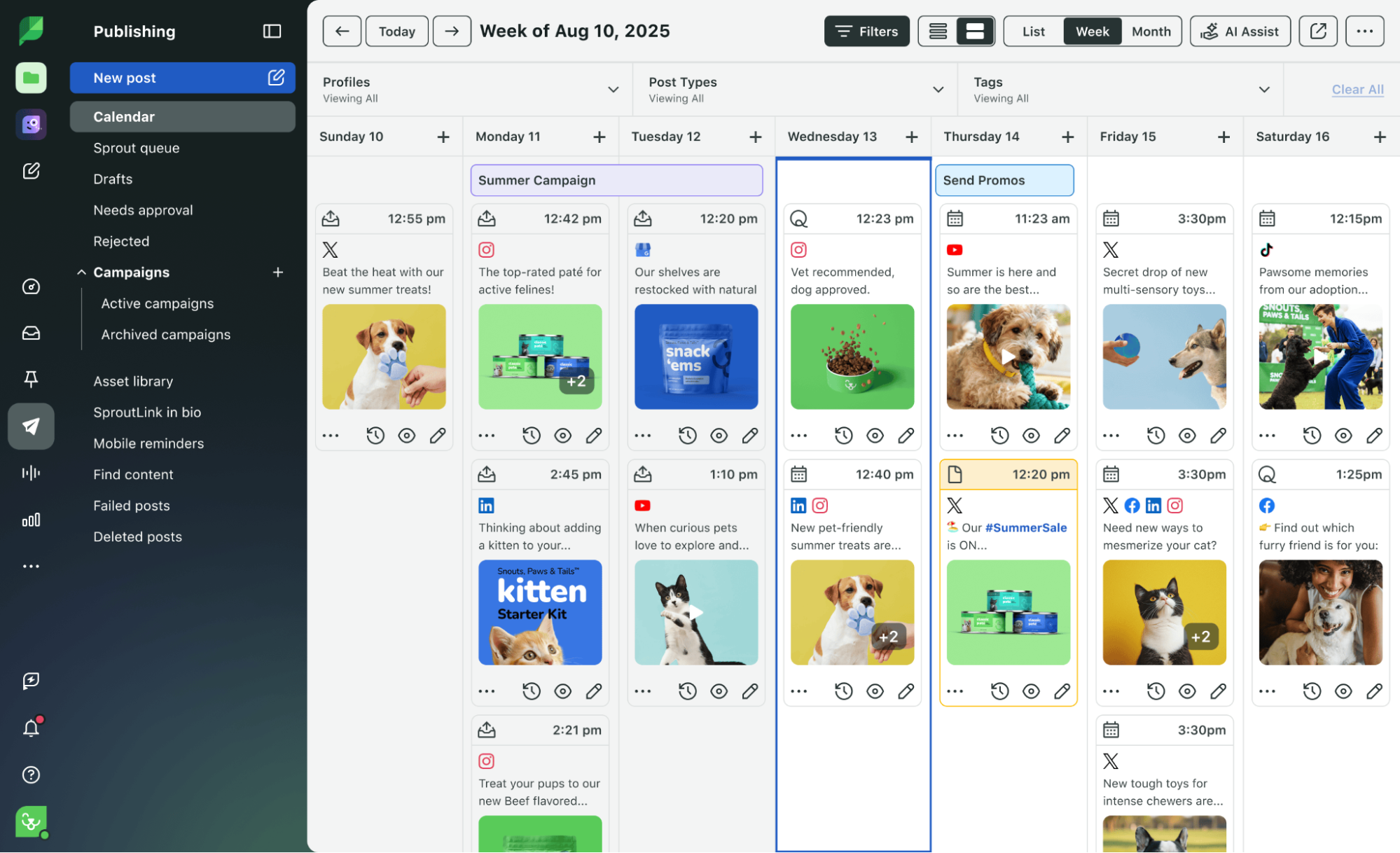
This top-down view of the calendar makes it simple to spot accidental gaps or clusters before your batched content goes live. You can also drag and drop posts to quickly adjust your schedule without rebuilding it from scratch.
Use AI-powered send times to publish at peak engagement hours
Lean teams don’t have time to cross-reference daily algorithm charts and manually post from their phones. Sprout’s Optimal Send Times (ViralPost®) takes out the guesswork by analyzing when your audience is most active and recommending the perfect windows.
You can also add posts to the Sprout Queue and let the AI automatically release them during strong engagement times.
Integrate with Canva to skip downloads and import assets directly
Sprout’s Canva integration saves you time in two ways:
- Design your month of graphics in Canva, then import them directly into the Compose window without saving everything to your computer first.
- Send finished designs from Canva Pro to your Sprout Publishing Calendar as drafts, then review the copy, links and timing before scheduling.
Drive Instagram traffic to your website using Sprout’s link in bio tool
With SproutLink, you can create a custom link-in-bio landing page that connects your Instagram posts to products, articles, signup pages and other destinations.

Add each destination URL while scheduling its post, so the content and conversion path are set up at the same time. You can also track which linked posts generate the most clicks.
Measure the performance of your batched content across profiles
An Instagram content batching workflow is most powerful when you can use performance data from the previous month to inform your next month’s content.
Sprout enables this with platform-specific and cross-network reporting, such as with the Instagram Business Profiles Report or the Post Performance Report.
The Post Performance Report report helps you compare individual posts and formats across all your profiles, including Instagram, Facebook and TikTok. Track metrics like reach, impressions, engagement, saves, video views and SproutLink clicks to understand what worked.
Bring those insights into your next batching session to choose stronger topics, hooks, formats and calls-to-action.
Start batching your Instagram content today with Essentials
You don’t need a large content team to build a consistent Instagram presence. Batching is possible (and effective) with a small team, if you have the right tools.
Sprout Social Essentials helps SMBs plan, publish and measure their content in one place. It has everything you need at an affordable price, with image editing, calendar views, automated scheduling, integrations, AI send times and post-level reporting built into the workflow.
Try Sprout Social Essentials free for 30 days. No credit card is required.
FAQs about Instagram content batching
Can I schedule Instagram videos and carousels ahead of time?
Yes. Sprout Social’s Essentials plan supports scheduling image posts, videos, Reels, carousels and Stories days or weeks in advance. Instagram carousels can contain up to 10 images or eligible mixed media when scheduled through Sprout.
Posts that use certain native Instagram features (e.g., music from Instagram’s sound library or interactive Story editing) may require a mobile publishing notification to finish the post in Instagram.
What is the benefit of using AI for Instagram posting times?
AI-powered timing tools, like Sprout’s Optimal Send Times, eliminate the trial-and-error of manual scheduling. The platform automatically analyzes your audience’s active engagement windows to pinpoint exactly when to drop your batched content for maximum visibility.
Can I bulk-schedule an entire month of Instagram posts via CSV?
If you’re using the Sprout Social Essentials plan, scheduling is done post-by-post using the advanced scheduler, while bulk scheduling via a CSV import requires the Professional plan.
However, you can use the Sprout Queue to automatically schedule up to 10 messages a day to fill publishing gaps.
39 free social media strategy templates that will elevate your workflows
Published on August 20, 2026 Reading time 15 minutes









Share