How to build a social media calendar that actually drives strategy

Written by Jamia Kenan
Published on May 13, 2026
Reading time 14 minutes

Table of Contents
Managing multiple social media accounts means constant decisions: what to post, when to post and how to keep every platform aligned with your broader strategy. That’s why creating a social media plan and maintaining a strategic, organized social media calendar is so essential.
This guide covers everything you need to build a high-impact social calendar from scratch: what it is, what to include, how to choose the right format for your team and how to manage your calendar end-to-end in Sprout Social. A free template is included so you can get started immediately.
What is a social media calendar?
A social media calendar is a forward-looking plan of all scheduled posts across your social media platforms, organized by publish date, time and network. It captures every element of a post, including copy, links, tags, @-mentions and media like images and video, so your team publishes with precision and consistency. Unlike a general content calendar, which maps all marketing content across every channel, a social media calendar focuses specifically on social: what goes out, where it goes and who owns every step of the process.
You can build one using a spreadsheet, a digital calendar or a social media management platform like Sprout Social, which gives you an interactive publishing dashboard, post scheduling and team collaboration in one place.
Ready to streamline your social media planning? See how Sprout Social can help.
Try Sprout Social for 30-days free
Benefits of using a social media calendar
A social media content calendar gives your team a strategic foundation for every post, campaign and collaboration, turning reactive publishing into intentional, high-impact content execution. The core benefits include saving time, maintaining a consistent posting schedule, protecting brand quality, streamlining approvals, supporting campaign planning, enabling content repurposing and improving performance tracking.
1. Saves time and widens team bandwidth
Planning core content ahead of time reduces the daily scramble while leaving room for timely, reactive posts. This eliminates the rush for ideas and frees your team to focus on what moves the needle: creating high-quality content and testing strategies that resonate with your audience.
Teams using Sprout Social have realized $1.1M in time savings from core platform capabilities over three years, according to a Forrester Total Economic Impact™ study.
2. Maintains a consistent posting schedule
Consistency builds audience trust. A social calendar lets teams prioritize quality over volume, ensuring your brand voice and style stay cohesive rather than reactive. According to Sprout Social’s Q2 2025 Consumer Pulse Survey Analysis, 57% of people on social media say posting original content series is the most important thing brands can prioritize.
3. Ensures quality and protects brand reputation
Proactive scheduling gives your team the space to review content before it goes live. The right social scheduling tools build approval workflows directly into the process, catching errors, preventing PR missteps, and keeping your brand’s reputation intact. Proactive scheduling gives your team the space to review content before it goes live. On top of that, approval workflows catch errors, prevent PR missteps, and keep your brand’s reputation intact before a post ever reaches your audience. And if a crisis hits, Sprout Social’s Pause All feature lets you stop all outgoing posts across every connected profile with one click, giving your team time to respond thoughtfully instead of reactively.
4. Streamlines cross-functional collaboration
A shared calendar gives every stakeholder, from social to product to legal, visibility into upcoming content. Teams align around key deadlines and campaigns, messaging stays cohesive across departments and last-minute scrambles disappear.
5. Optimizes approval workflows
A centralized content calendar creates simultaneous visibility for contributors and stakeholders, so everyone understands the review and approval process. The result: faster sign-offs, fewer bottlenecks and a consistent flow of quality content.
6. Supports planning for product launches, campaigns and events
Social content calendars make it easy to sync posts with larger campaigns, product launches and events. Teams align on timing, content types and key milestones, keeping messaging consistent and every phase of a launch fully supported.
7. Supports strategic content repurposing
A calendar creates a living record of past posts and performance data, making it easy to identify high-performing content worth repurposing. Recycling and adapting proven content saves time while sustaining engagement over time.
8. Improves engagement and performance tracking
When your content calendar and reporting live in the same platform, performance insights become immediately actionable. Sprout Social’s Post Performance Report surfaces your top-performing content alongside exact publish times, so you can identify engagement spikes and refine your strategy with confidence.
A social media calendar doesn’t just keep your team organized. It transforms how you plan, create and measure content at every stage.
Try Sprout Social for 30-days free
What to include in a social media calendar
A social media calendar must show your team what is going out, where it is going out and what needs to happen next. Your calendar needs more structure if you don’t understand the plan in seconds.
Core fields every social media content calendar needs
Track the details that keep publishing organized and your team aligned across every post and platform.
- Publish date: The day the post goes live.
- Publish time: The exact time the post is scheduled.
- Platform: The social media platform the post is built for.
- Post format: Reel, carousel, video, image, Story, text post or another format.
- Caption or copy: The final approved message.
- Creative asset: The image, video or design attached to the post.
- Link and CTA: The destination URL and the action you want people to take. Use Sprout Social’s URL Tracking to append UTM parameters automatically so every link feeds clean attribution data into Google Analytics.
- Campaign or content pillar: The theme, initiative or launch the post supports.
- Owner: The person responsible for creating, reviewing or publishing the post.
- Status: Draft, in review, approved, scheduled or published.
- Approval notes: Feedback, edits or legal and brand guidance tied to the post.
- Tags: Labels that support sorting and reporting on content later.
How to organize your content calendar by platform
Every platform plays a different role in your strategy and your calendar should reflect that. Don’t force the same planning fields onto every network.
| Platform | Key fields to track |
|---|---|
| Visual format, caption, hashtags, collaborators and product tags | |
| Topic, point of view, campaign tie-in and final approvals | |
| TikTok | Concept, hook, creator notes, sound direction and publishing owner |
| Copy variations, links, audience targeting needs and supporting assets | |
| Pin title, description, destination link and creative dimensions |
Build one calendar that gives you a full cross-network view while making room for platform-specific details. That’s how you stay organized without flattening your strategy.
Types of social media content calendars (and a template)
Not all social media calendars serve the same purpose. The right format depends on your team size, publishing cadence and how many networks you manage. Here are the key types to know, plus a template to get started.
Sprout’s social media calendar
Sprout Social’s Publishing Calendar centralizes your entire content operation in one place. Plan, schedule and publish across multiple networks using weekly and monthly views, with no more toggling between separate tools or spreadsheets.
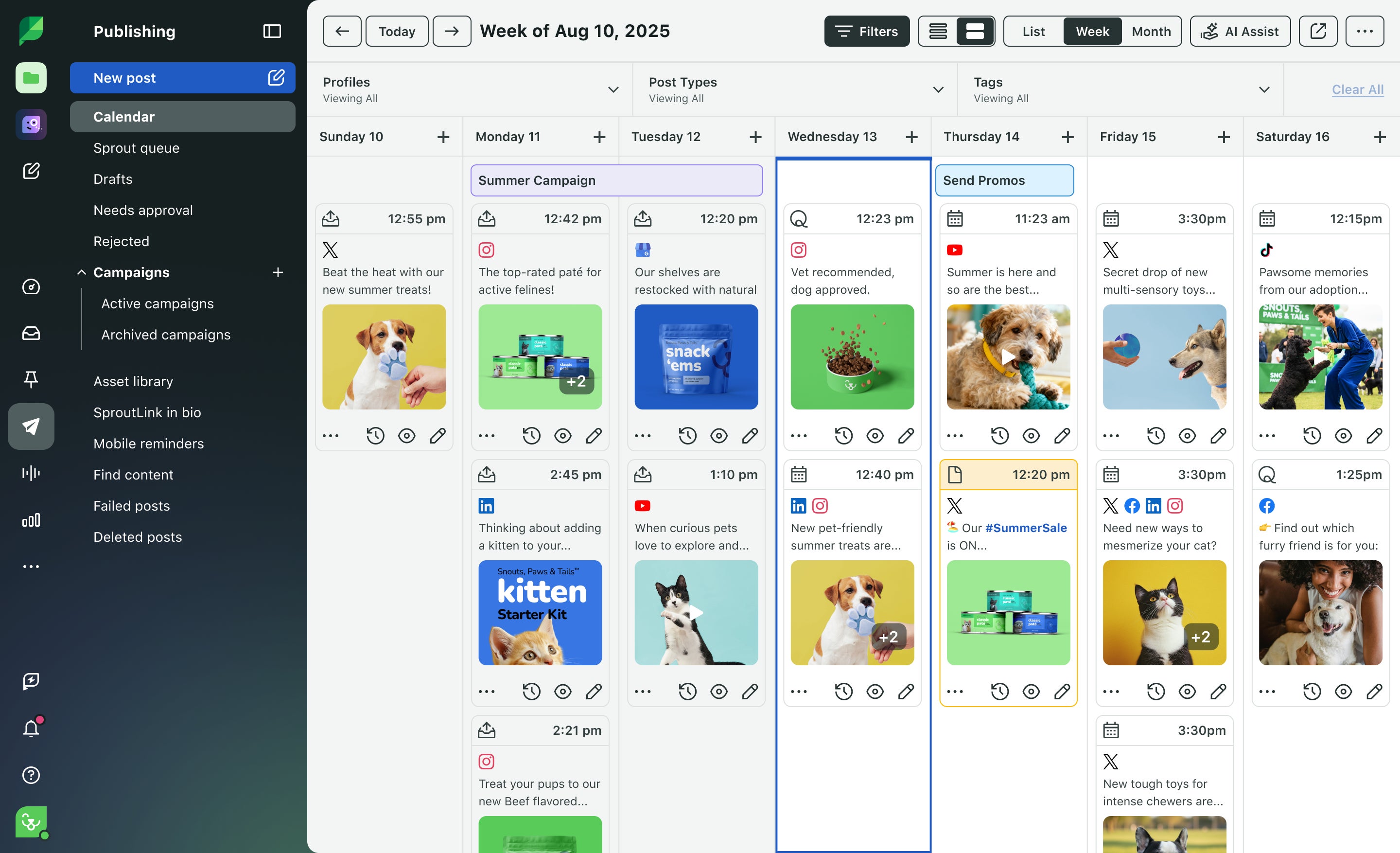
- Cross-network visibility: See every scheduled post across all connected networks in a single view.
- Flexible planning: Switch between daily, weekly and monthly views to match your planning horizon.
- Real-time adjustments: Drag, reschedule or edit posts without disrupting your broader content strategy.
Best time to post social media calendar
Publishing consistently matters, and timing posts around audience activity can improve engagement opportunities. The best times to post on social media differ by network and audience behavior. Build a weekly calendar that maps your content to peak activity windows for each platform.
Social media calendar templates
Templates eliminate the setup work so your team focuses on strategy, not formatting. Sprout Social’s downloadable social media calendar template includes pre-built fields for publish date, platform, post format, copy, creative assets, campaign tags, approval status and post owner—everything covered in the “What to include” section above, ready to use from day one. Customize it to match your brand’s workflow, then align your publishing schedule with your KPIs.

How to create a social media calendar
Building an effective social media calendar means aligning content with your goals, keeping your team in sync and publishing consistently without scrambling at the last minute. With Sprout Social, you build and manage a content calendar that takes your social media content from planning to publishing to performance tracking.
Here’s the process, step by step:
- Connect your social media accounts to Sprout Social
- Conduct a social media audit
- Use social listening to fuel your content calendar
- Select your platforms, content types and posting cadence
- Organize your campaigns with Sprout Social’s Asset Library
- Automate content approval workflows
- Schedule and automate posts in Sprout Social
- Track performance in Sprout Social’s dashboard
Connect your social media accounts to Sprout Social
Start by connecting your brand’s social profiles to Sprout Social. Once connected, Sprout Social centralizes your efforts, letting you plan, publish and monitor content across all your social platforms from a single dashboard.
Here’s how to connect your social media profiles:
1.) Go to Account and settings > Connect a Profile.

2.) Choose the networks you want to connect—Facebook, Instagram, LinkedIn, Pinterest, TikTok or X (formerly known as Twitter).
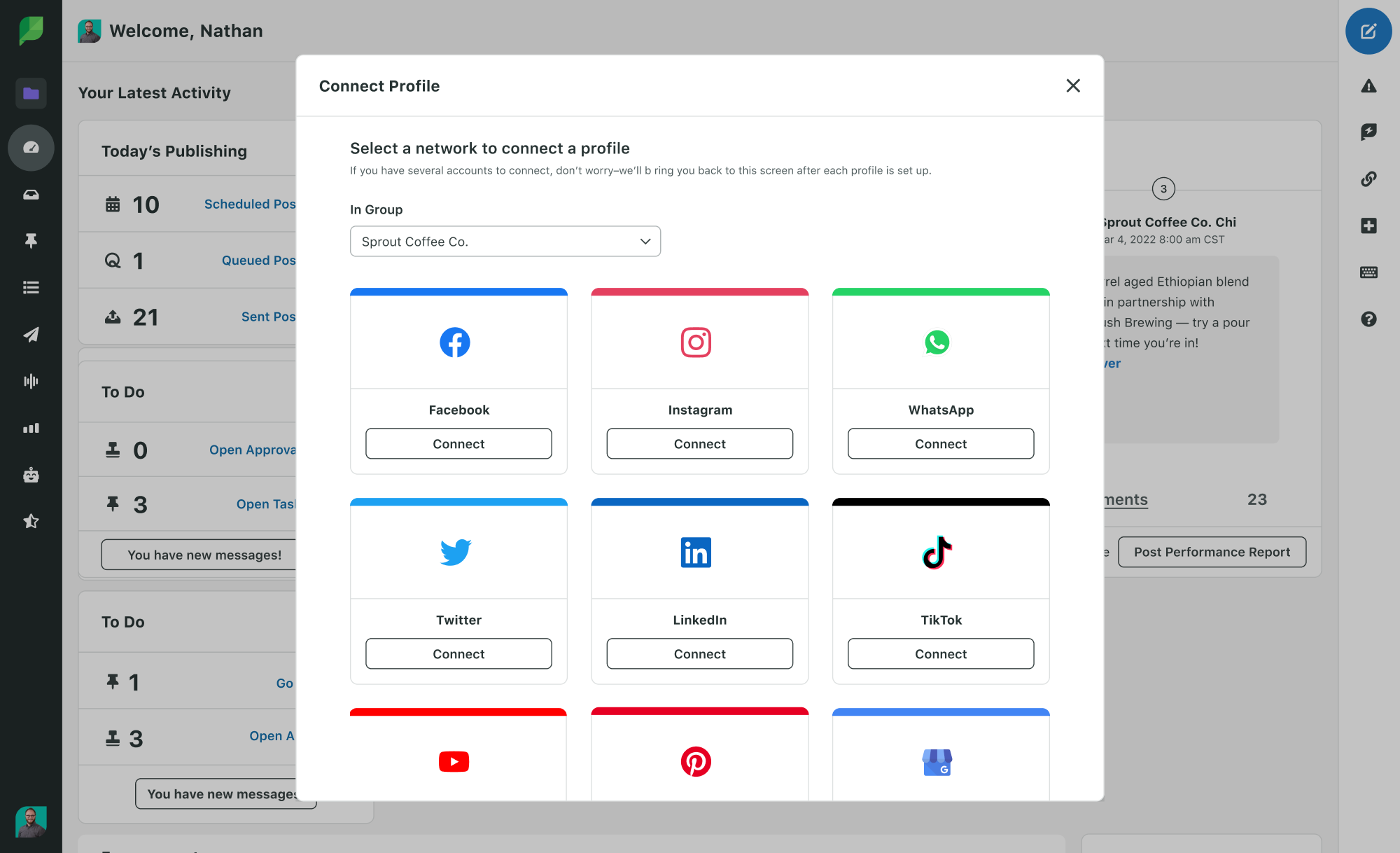
3.) Follow the prompts to authorize access.
A unified publishing strategy saves time, reduces manual tasks and drives seamless team collaboration across every social media account you manage.
Conduct a social media audit
Before you schedule a single post, assess your current content and its performance. Identify what’s working, what needs a refresh and what’s missing entirely.
Open Sprout Social’s Post Performance Report and surface insights like behind-the-scenes Reels outperforming product photos on Instagram or LinkedIn engagement dropping every Friday. These findings tell you exactly what to keep, what to change and where to fill gaps.
Navigate to the Reports tab in the left-hand navigation bar to access all account and profile performance data. Here’s what to audit:
- Metrics per network: Define success for each platform—clicks and conversions on Instagram, impressions on X or shares on LinkedIn.
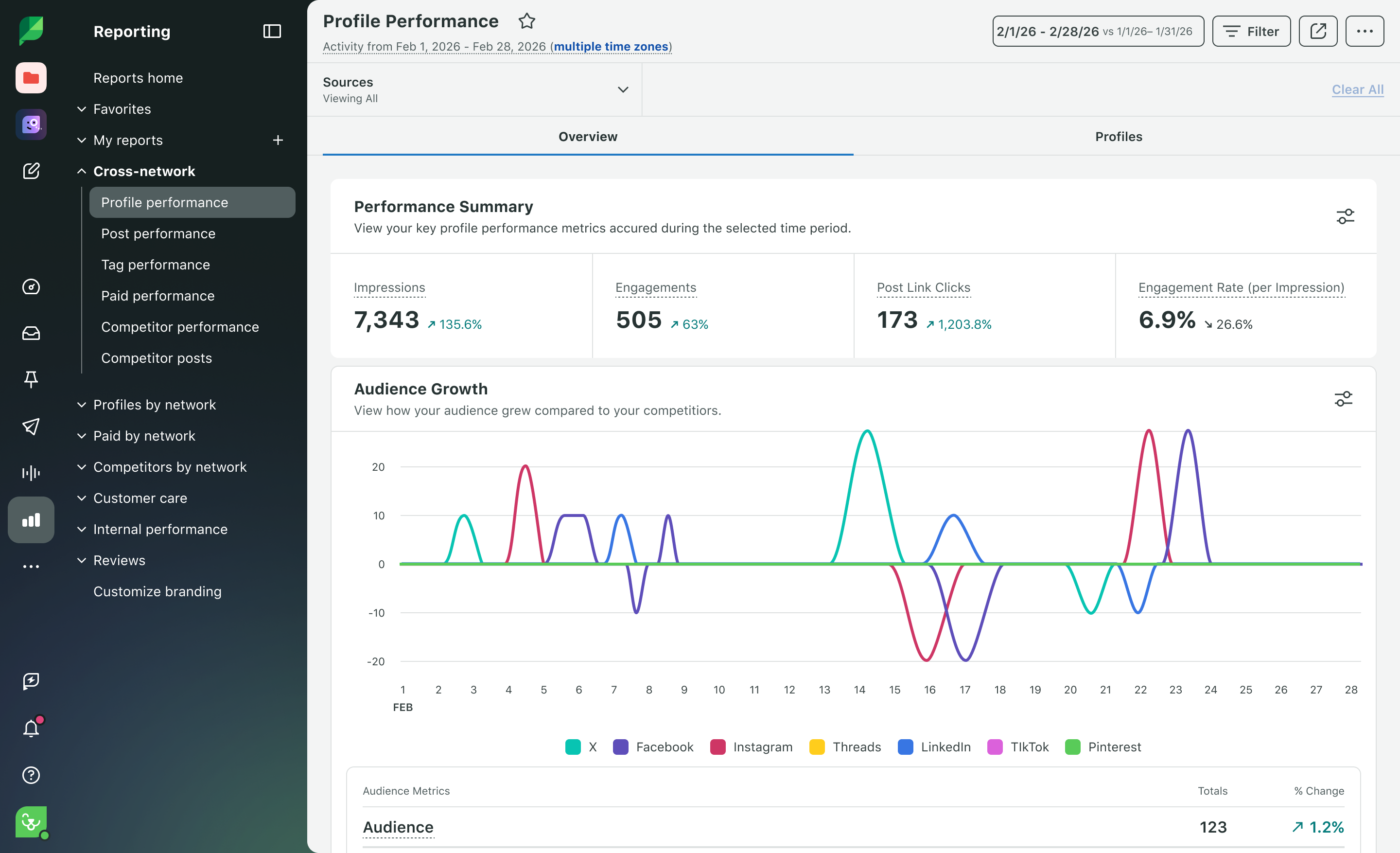
- Profile performance: Track follower growth, impressions, clicks and engagement per profile with Sprout Social’s Profile Performance Report.
- Post performance: Use the Post Performance Report to analyze which posts performed best and worst across your accounts.
- Tag performance: Evaluate how content categories like “campaign,” “product” or “event” perform using Sprout Social’s Tag Performance Report.
- Publishing behavior: Visualize post frequency by day, time and social platform to identify gaps and fine-tune your cadence.
Audit your competitors at the same time. Sprout Social’s Competitor Posts Report shows top-performing posts, side-by-side engagement metrics and content strategy trends from a single view—so you spot what’s working in your industry fast.
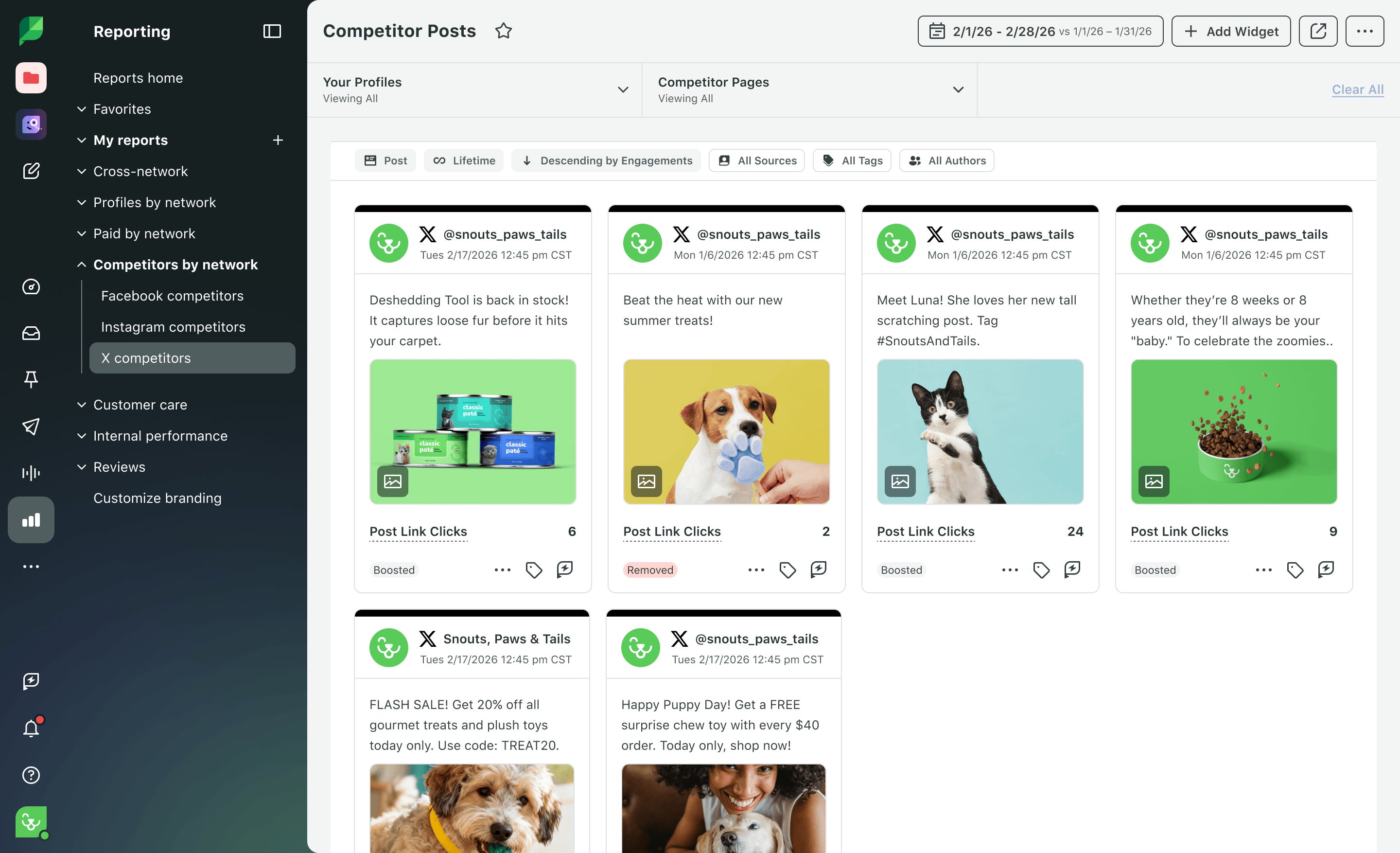
Sprout Social Tip: Export PDF reports to share with your team or stakeholders, turning your audit into a data-backed case for what to keep creating and what to cut.
Not sure where to start? Download our free social media audit template to guide you through the process step by step.

Use social listening to fuel your content calendar
The hardest part of building a social calendar isn’t the structure. It’s knowing what to put in it. Social listening solves that problem before it starts.
Sprout Social’s Listening tool surfaces the topics, keywords and conversations your audience is already having across networks. Feed those insights directly into your calendar so every post connects to something your audience cares about right now. Pair Listening with Sprout Social’s Content Suggestions to discover brand-relevant articles and content your audience is engaging with, then slot them directly into your calendar.
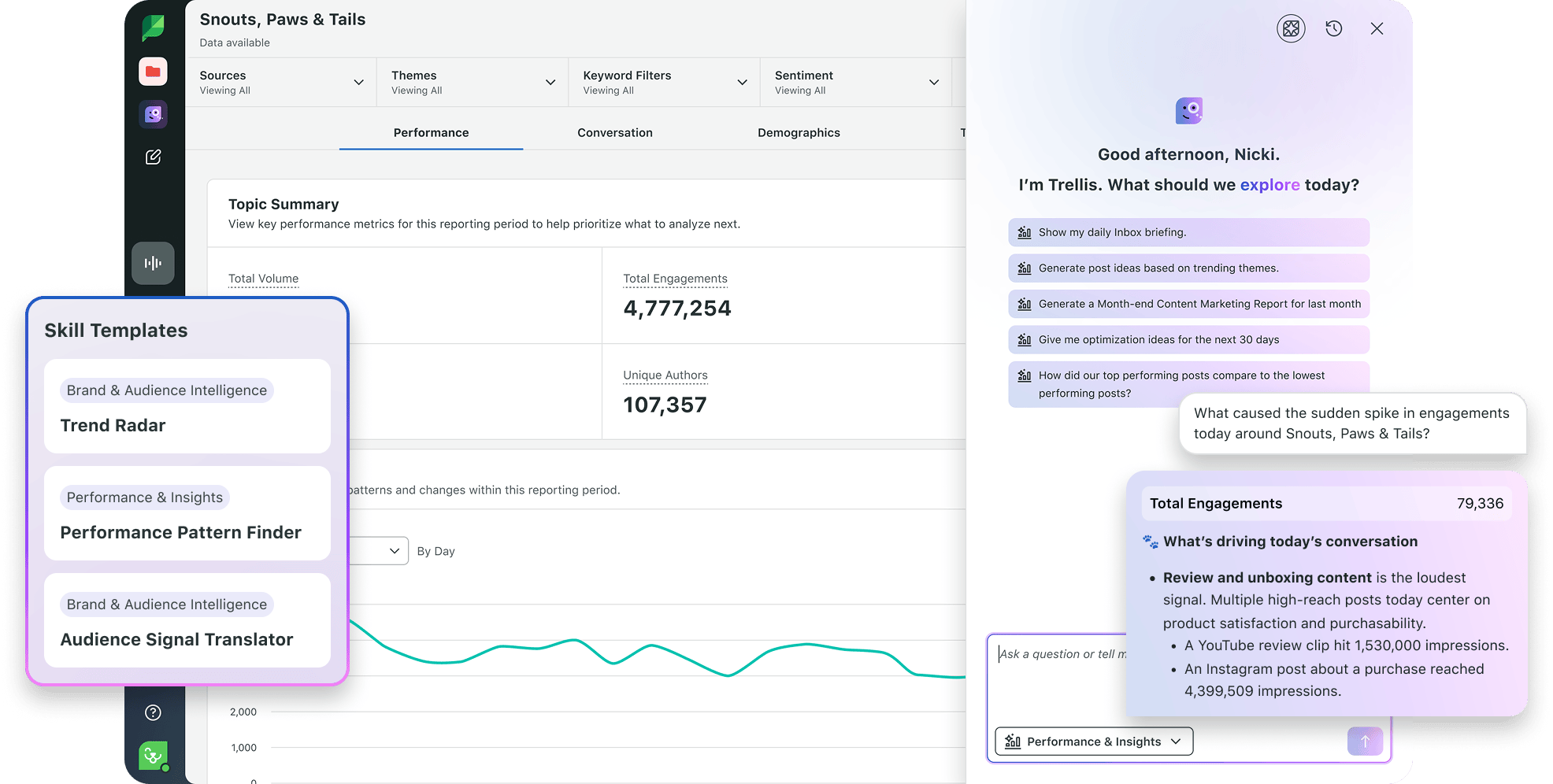
Here’s how to use social listening to drive content planning:
- Identify trending topics in your industry: Use Sprout Social’s Topic Builder to track conversations relevant to your brand. Trending themes become content pillars. High-volume keywords become caption hooks and hashtag strategies.
- Spot content gaps your competitors aren’t filling: Sprout Social’s Listening tool surfaces share of voice data so you can see where competitor content falls short—and schedule posts that fill those gaps.
- Time content to cultural moments: Spike alerts notify you when conversation volume around a topic surges. Use that signal to fast-track relevant content into your calendar before the moment passes.
- Validate content pillars with audience sentiment: Before locking in a content theme for the quarter, use sentiment analysis to confirm your audience responds positively to that topic—not just that they talk about it.
A calendar informed by listening data helps turn your publishing schedule into a stronger, audience-led strategy. Use social media content pillars to structure your themes, then let Sprout Social’s listening data tell you which themes deserve the most calendar space.
Select your social media platforms, content types and posting cadence
Consumers aren’t just scrolling. They’re buying.
According to the 2025 Sprout Social Index™, 81% of consumers say social media compels them to make spontaneous purchases multiple times per year or more. Your content strategy must meet your audience where they already shop and engage.
Focus on the platforms where your audience is most active. Choose platforms based on where your audience is most active:
- Instagram and TikTok are built for visual storytelling and short-form video.
- LinkedIn drives B2B brands and thought leadership.
- Pinterest powers discovery and evergreen content.
Your social media calendar needs a mix of content formats to serve different objectives and keep your feed from going stale. Match content types directly to your goals:

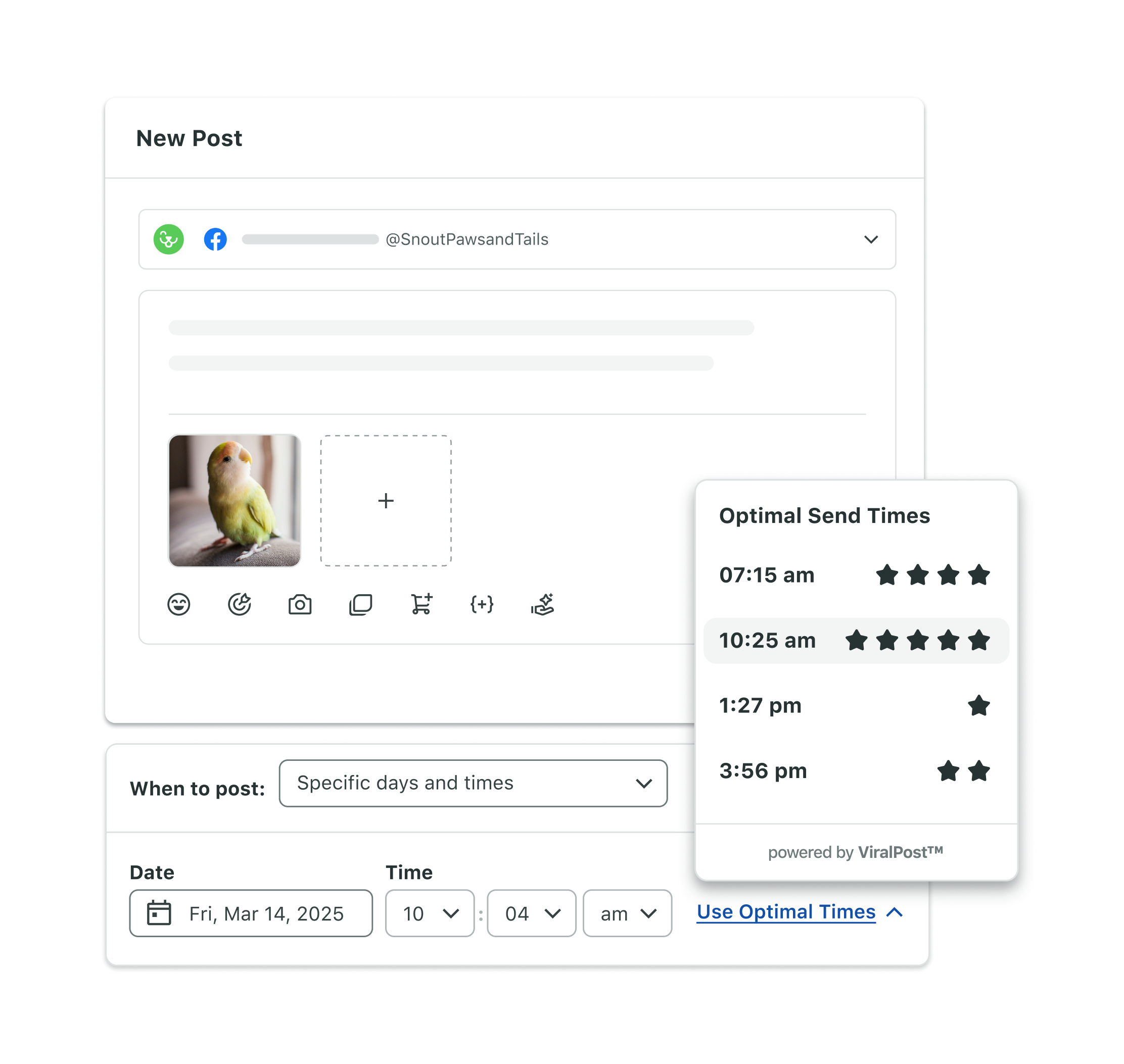
The right posting frequency is unique to your audience, platform and team bandwidth. Your audience, platform norms and team bandwidth determine the right cadence. Sprout Social’s patented ViralPost® technology analyzes your audience’s engagement patterns and recommends optimal send times for each network—so you stop guessing and start publishing with precision.
Organize your campaigns with Sprout Social’s Asset Library
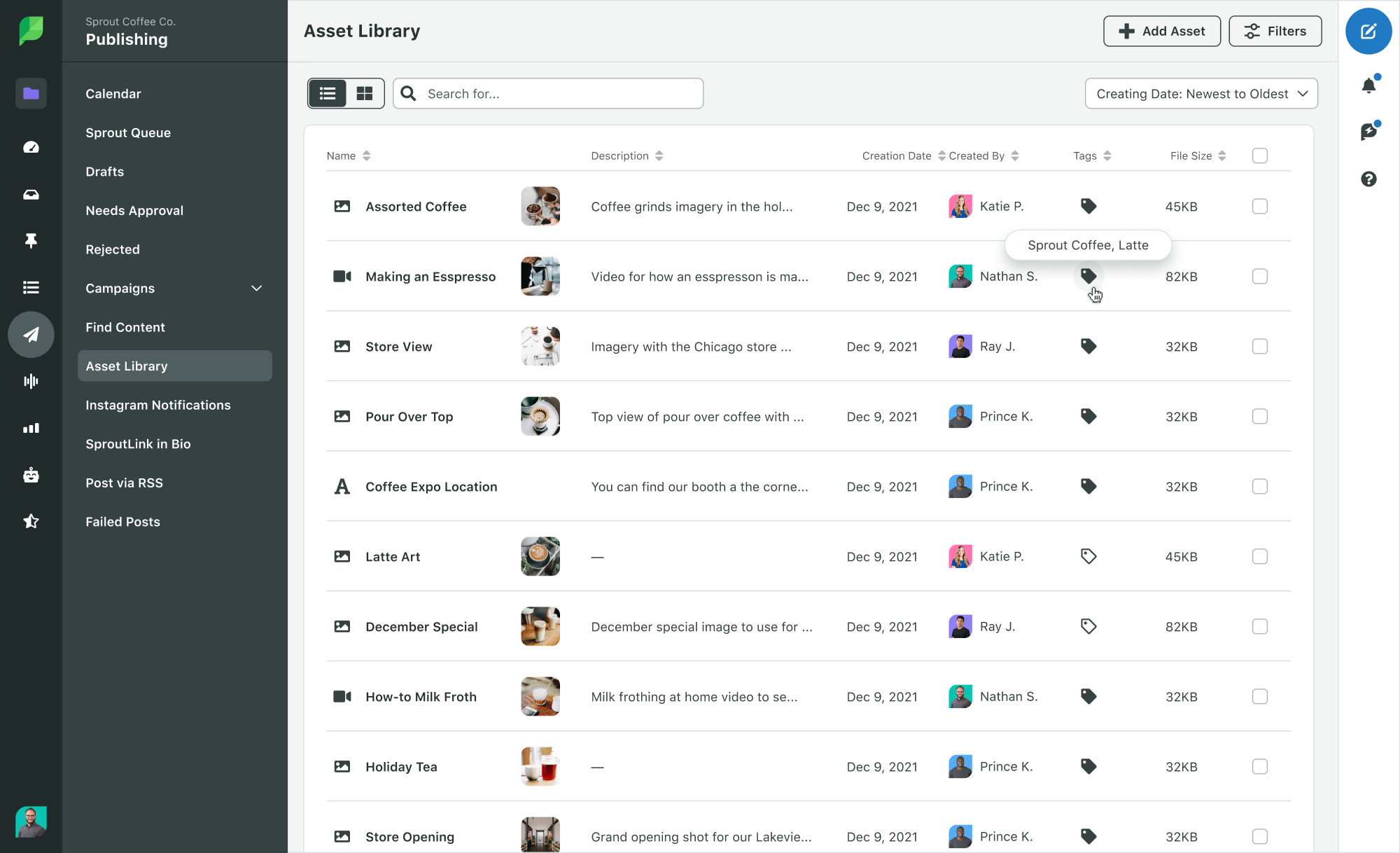
In the core fields section above, two of the most important calendar columns are Creative asset and Campaign or content pillar. Sprout Social’s Asset Library powers both. It gives your team a centralized repository of approved, on-brand images, videos and text snippets, so the right creative is always one click away when you’re filling in those fields. No more last-minute scrambles or outdated files making it into your feed. Consistent branded visuals and messaging build audience trust and drive campaign ROI.
To upload an asset, follow these steps:
- Head to Publishing > Asset Library.
- Click + Add New and select the asset type (image, video or text).
- Fill in asset details, including title, description and any relevant tags.
- Click Add Asset to upload.
Sprout Social supports JPEG, PNG, GIF (up to 20MB), MP4 and MOV (up to 3GB).
Keep your library organized by creating folders based on campaigns, content types or themes:
- In the Asset Library, click the folder icon in the top-right corner.
- Select Add Folder.
- Name your folder (for example, “Spring Launch 2026”).
- Click Create Folder.
To add assets to a folder:
- Select the assets you want to move by checking the boxes next to them.
- Click Move to Folder at the top.
- Choose the appropriate folder and confirm.
Tag assets with campaign identifiers to make them instantly discoverable and automatically surface the right materials when building new campaigns. Here’s how to tag assets for campaign categorization:
- Create a campaign: Navigate to Publishing > Campaigns > Active Campaigns. Click Create Campaign, fill in the name, description and relevant tags, then click Create Campaign to save.
- Tag assets within the campaign: Go to Publishing > Asset Library, click the asset you want to tag, find the Campaign dropdown in the asset details pane, select the appropriate campaign and click Save Asset.
- Filter assets by campaign: In the Asset Library, use the Filter option and select the campaign you need from the Campaign filter.
Automate content approval workflows
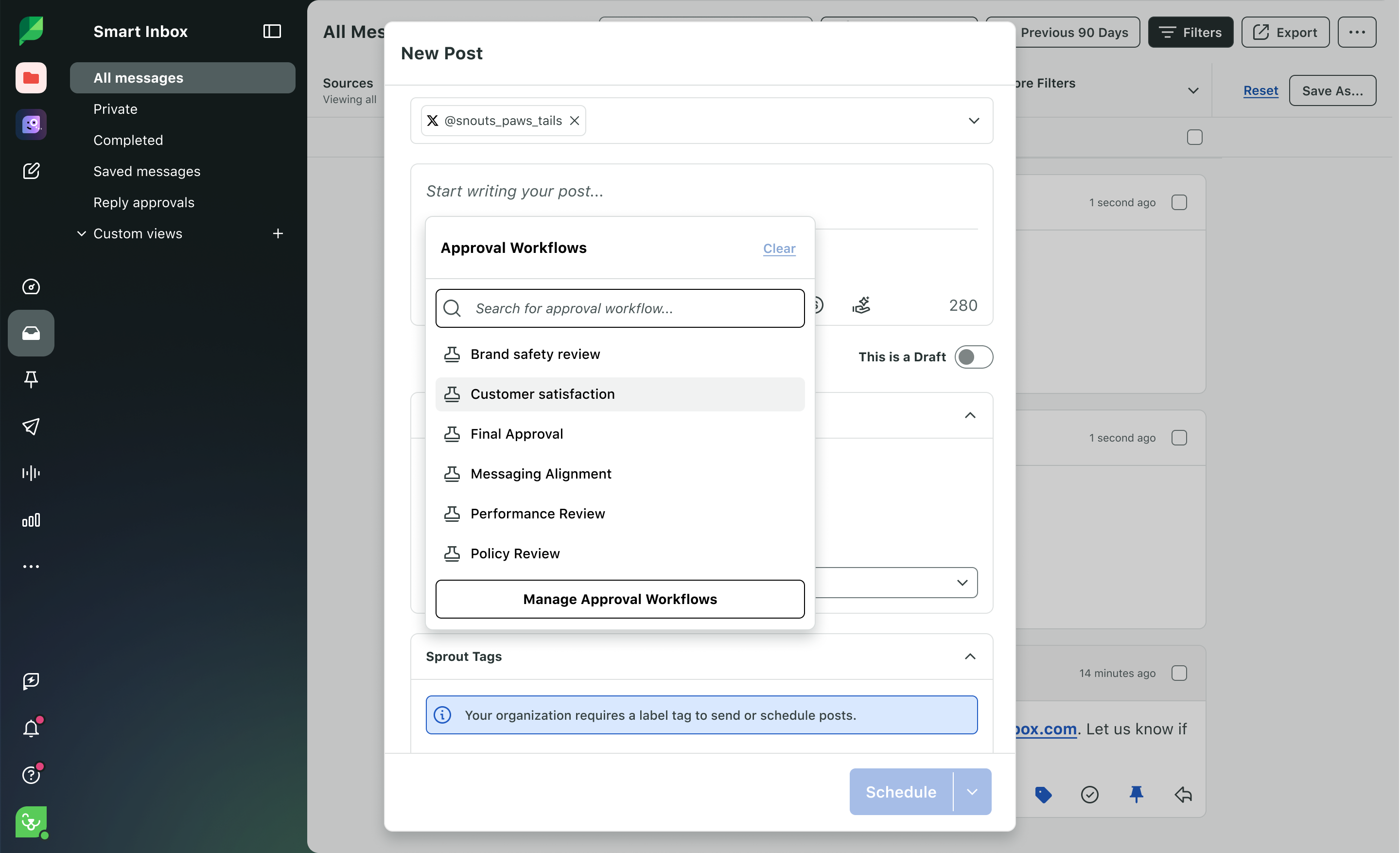
Approval bottlenecks kill publishing momentum. A structured approval process keeps content moving from draft to live, consistently and on time. According to the 2025 Sprout Social Index™, production efficiency is the number one way social teams measure internal success.
Here’s how to set up an approval workflow in Sprout Social:
- Go to Settings > Approval Workflows.
- Click Create New Workflow.
- Give it a name (like “Marketing Team” or “Legal Review”).
- Assign relevant approvers.
- Choose whether all approvers must approve a step or if any one approver is sufficient.
- Click Save.
Need sign-off from legal, a client or someone outside your Sprout Social workflow? Sprout Social’s External Approvers capability lets you email them a review link so they can approve, reject or leave comments, with no login required.
Head to the Needs Approval section under Publishing to see posts awaiting review, remaining approvers and any feedback or change requests. Instant notifications of approvals or rejections eliminate delays and keep publishing on track.
Schedule and automate posts in Sprout Social
Once your content is ready, schedule it instead of posting on the fly. Scheduling ahead keeps you consistent, protects your audience relationships and ensures every post goes out at the right moment.
Here’s how to queue up your posts in Sprout Social:
- Click the green Compose button in the top-right corner.
- Choose which profiles to post to (Instagram, LinkedIn, X, etc.).
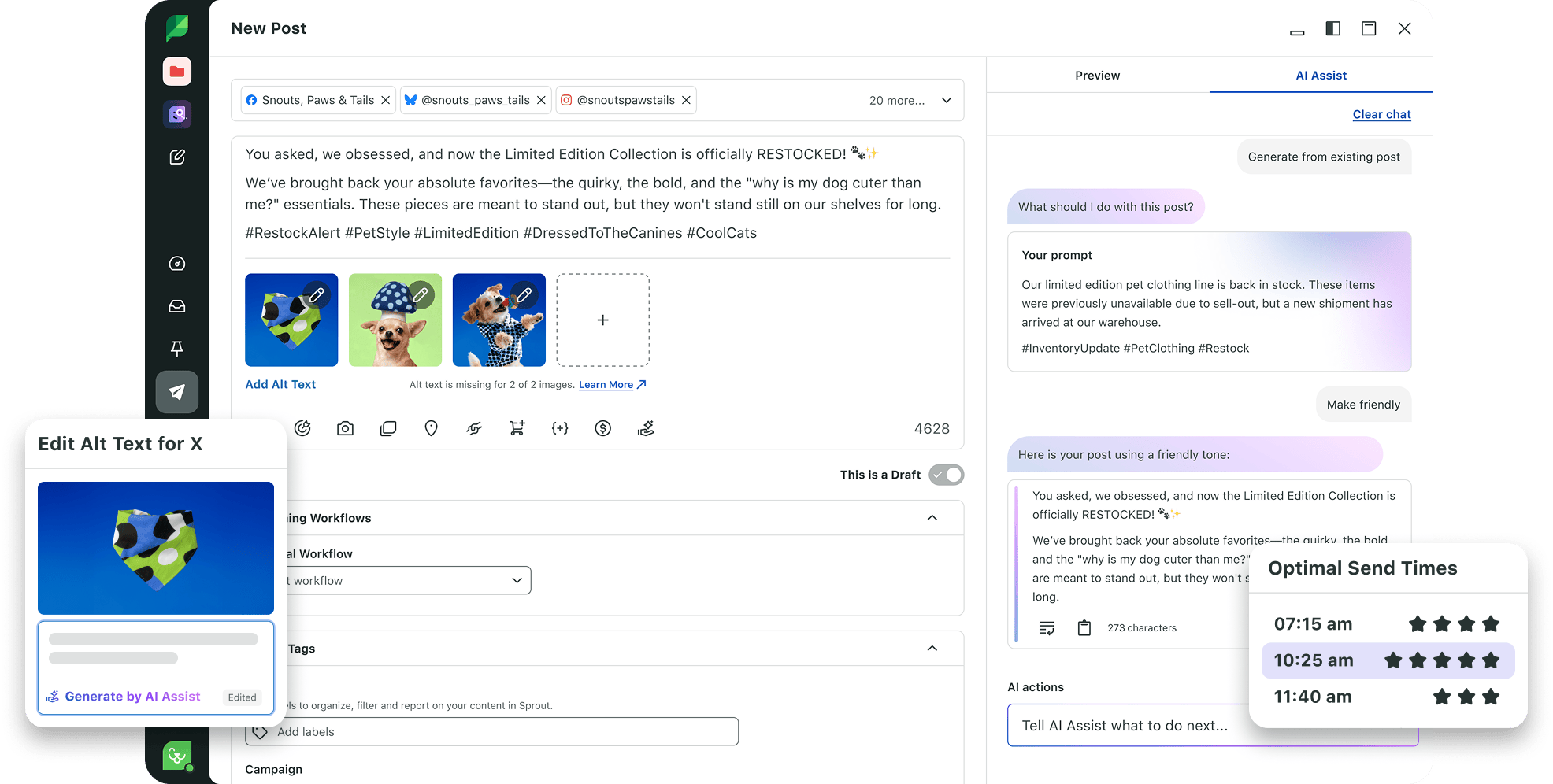
- Add your text, upload your image or video and preview the post on each selected network. Need a starting point? Use Suggestions by AI Assist to generate draft captions, then edit to match your brand voice.
- Manually set the posting time or click Use Optimal Send Times to let Sprout Social pick the best time based on your audience data.
- Click Schedule.
Sprout Tip: Set a default schedule using patented ViralPost® technology in your Publishing Settings so your team never has to think about timing every time they hit Schedule.
Want to drive traffic from your Instagram bio? Use SproutLink to create a custom, shoppable landing page linked directly from your Instagram profile — no third-party link-in-bio tool required.
Track performance in Sprout Social’s dashboard
Your social media calendar is also your performance engine. Use it to analyze what’s working, what’s not and how to continuously sharpen your strategy. Focus on key performance indicators like engagement rates, impressions, clicks, conversions and audience growth.
Sprout Social’s suite of social media reports gives you the right lens for every question:
- Post Performance Report: Identifies your top and bottom-performing content.
- Campaign Report: Shows how individual campaigns drive results at a high level.
- Profile Performance Report: Surfaces network-specific trends across your connected accounts.
- Tag Performance Report: Tracks content by themes or goals for deeper strategic insight.
To go deeper on campaign measurement, explore this detailed guide on creating a campaign performance report.
Social media calendar tools
Most social media calendars start in a spreadsheet. That’s a reasonable place to begin, but it’s not where serious teams stay. The right social media calendar tool takes you from scattered planning in rows and columns to a coordinated publishing engine with built-in scheduling, approvals and analytics. Here’s a breakdown of the most common options and when each one makes sense.
| Tool | Best for | Key strengths |
|---|---|---|
| Sprout Social | Teams managing multiple profiles and networks | AI-powered publishing calendar with patented ViralPost® timing, Suggestions by AI Assist for content creation, approval workflows and integrated analytics.
Customers have seen as much as a 60% lift in reach using Optimal Send Times and 268% ROI over three years (Forrester TEI). |
| Google Calendar & Sheets | Small teams or freelancers getting started | Free, collaborative and template-ready |
| Notion | Teams that want a customizable workspace | Database-driven, highly flexible, built-in commenting |
Sprout Social
Sprout Social’s interactive content calendar gives your team end-to-end control over the social media publishing process, from scheduling to engagement. The platform’s publishing tools increase visibility across campaigns, streamline approval workflows and free up bandwidth for creative strategy.
Sprout Social’s patented ViralPost® technology identifies the best moments to publish based on your unique audience data, so your content reaches people when they’re most active. Suggestions by AI Assist help your team draft captions faster, while Content Suggestions surface brand-relevant content to fill your calendar. Once posts go live, the Smart Inbox centralizes every incoming message across networks so your team responds faster and builds stronger audience relationships.
Google Calendar and Sheets
Google Calendar and Sheets are free tools that support basic social media calendar planning. Both apps make it easy to view upcoming posts and collaborate through comments and shared access, making them a solid starting point for teams without a dedicated platform. When your strategy grows beyond a handful of profiles or your approval process involves more than one reviewer, a spreadsheet creates more friction than it removes.

Notion
Notion’s database feature turns a note-taking app into a fully customizable content calendar. Teams use it to track content status, leave feedback via comments and build templates that match their exact workflow, all in one place. Like Google Sheets, Notion works well for planning but doesn’t connect to your social profiles, meaning publishing still requires a separate tool.

Ground your planning with a social media calendar
A social media calendar transforms reactive posting into a deliberate, forward-looking content strategy–eliminating guesswork, freeing your team for high-impact work and keeping your brand consistent across every platform.
Sprout Social brings social intelligence to every stage, from AI-powered content creation and patented send-time optimization to integrated listening, analytics and employee advocacy. The result is a publishing operation that continuously sharpens your strategy.
Try Sprout Social free for 30 days–or request a demo to see how enterprise teams manage multi-network content calendars at scale.
Frequently asked questions about social media calendars
How to create a social media content calendar?
Creating a social media content calendar transforms your publishing from reactive to intentional. By centralizing your strategy, you ensure brand consistency while freeing up bandwidth for high-impact creative work. Follow these steps to build your calendar:
- Conduct an audit and listen to your audience: Use performance reports to identify high-performing content series and leverage social listening to uncover the topics your audience actually wants to consume.
- Select your platforms and cadence: Identify where your audience is most active and determine a sustainable posting frequency. While 85% of consumers have Facebook profiles, platform preferences are shifting, with younger generations increasingly prioritizing Instagram and TikTok.
- Define core fields and choose a format: Establish the essential details for every post—such as copy, creative assets, and campaign tags—and organize them in a shared template or a management platform like Sprout Social for better team visibility.
- Centralize creative assets: Store approved, on-brand media in a centralized library so your team can quickly populate the calendar without last-minute scrambles.
- Automate approval workflows: Set up structured review processes to ensure every post is vetted for quality and brand safety before it goes live.
- Schedule and optimize: Queue your content in advance to maintain a consistent presence. Use data-driven insights to publish at optimal send times when your specific audience is most likely to engage.
What are the essential features of a social media calendar tool?
An essential social media calendar tool centralizes your content planning and scheduling, streamlining your strategy. Here are 5 essential features to consider:
- Unified Content Calendar and Scheduling: A visual interface to plan, schedule, and view all posts across multiple platforms in one place, ensuring consistent frequency.
- Collaboration and Approval Workflows: Features that allow teams to review, comment, and approve content, maintaining brand quality and facilitating smooth teamwork regardless of business size.
- Asset Management and Content Organization: A repository for media, copy, and campaigns, enabling easy access and efficient content repurposing.
- Performance Tracking with Analytics Integration: The ability to link posts to key metrics and insights, helping you understand what’s working and optimize future content.
- Scalability and Customization: Tools that can adapt to your business size, budget, and posting frequency, offering flexibility from basic scheduling to complex campaign management and integrations.
How far in advance should I plan my social media calendar?
Plan your core calendar two to four weeks ahead so your team has time to create assets, run approvals and stay aligned on campaigns. Reserve space for reactive posts because social moves fast and your calendar needs to move with it.
How far in advance should I plan my social media calendar?
Plan your core calendar two to four weeks ahead so your team has time to create assets, run approvals and stay aligned on campaigns. Reserve space for reactive posts because social moves fast and your calendar needs to move with it.
How many posts should I schedule per week in my social media calendar?
The right cadence depends on your audience, your platforms and your team’s capacity to produce strong content consistently. Start with a realistic rhythm and adjust based on performance data. Consistency usually matters more than volume, especially when your team can maintain quality and adjust based on performance data.
What's the difference between a social media calendar and a content calendar?
A content calendar covers all marketing content across every channel. A social media calendar is execution-focused, tracking posts, timing, assets and approvals tied specifically to your social strategy.
Can I manage a social media calendar without a dedicated tool?
A spreadsheet works when your strategy is small, but once you manage multiple networks, campaigns or reviewers, manual planning creates bottlenecks. A dedicated platform like Sprout Social gives you one place to plan, approve, schedule and measure performance without chasing updates across tabs and threads.






Share