How to use Pinterest to grow your brand in 2026

Written by John Paul Hernandez
Published on January 7, 2026
Reading time 19 minutes

Table of Contents
Pinterest is home to a creative, buyer-ready community, making it an ideal network to include in your social media marketing strategy. Pinners save 1.5 billion posts weekly, and over 50% of these users see Pinterest as a network they can shop on.
That makes Pinterest a strategic place to position yourself as the go-to solution at the moment of purchase intent. Find out how to set up an account with actionable data, and how the network can help your brand connect with users to drive growth.
What is Pinterest?
Pinterest ranks as the 16th largest social media network in 2025, but it’s far more than that. It’s also a visual search platform where users can find creative ideas and inspiration, and plan for purchases.
With its high-intent environment, Pinterest is the perfect place for a brand to build a presence and feature its products. Think of Pinterest as a digital bulletin board where inspiration meets action.
For example, users can search for a term like “best running shoes” and discover visual posts. They can then collect these posts by saving them in a Board. They can also purchase an item by clicking on the post’s link for more information.
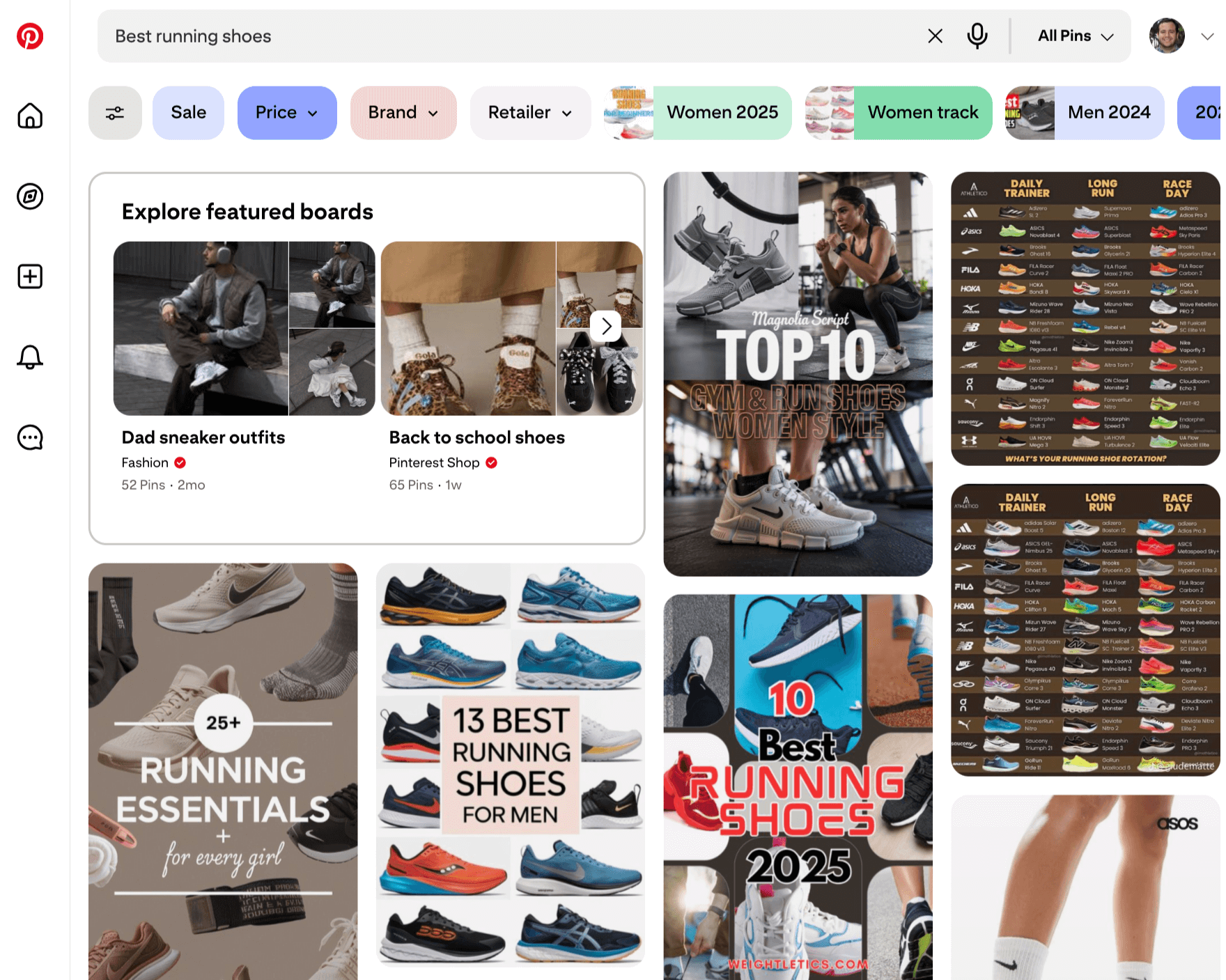
Source: Pinterest
Who uses Pinterest (and what are they looking for)?
Pinterest users log in with a purpose: to plan, shop and take action, not just browse. But that’s just one part of understanding its community.
One unique trait, for example, is that the Pinterest user base skews female and has a big influence on younger generations. Here are some key statistics about Pinterest’s users:
- Engaged community: As of August 2025, 578 million active users use Pinterest each month.
- Large female audience: Data from February 2025 shows that 70.3% of Pinterest users are female and 22.4% are male.
- Purchasing intent: According to the 2025 Sprout Social Index™, 42% of consumers have a profile on Pinterest.
- Active Gen Z base: Pinterest’s own data shows that 42% of users are Gen Z, and they’re the fastest-growing group.
In the data below, Pinterest provides even more details:
- US influence: Pinterest reaches 46% of US users 18–24 years old, 40% of 25–34 year olds and 39% of 35–44 year olds.
- High-income demographic: The platform has reached 40% of US homes with a yearly income of $150,000 or more.
- Positive purchasing experience: According to users who post weekly, 80% get their inspiration from shopping on the platform.
- Brand discoverability: Findings show that 96% of the most popular searches don’t include a brand.
As the platform continues to grow, brands on Pinterest can increase their discoverability for buyer-intent communities by investing in keyword-rich purchasing search terms.
Pinterest terms you should know
Pinterest’s bulletin board–style setup has shaped its own culture, and with it, generated a few unique terms you’ll want to know. Here are a few of them:
- Pins: All posts within the platform
- Video Pins: Content in the form of videos
- Pinners: Active Pinterest users who share and post on the platform
- Boards: A user’s collection of Pins
- Save (formerly Repin): When a Pinner visits another user’s Board and Pins a post
- Idea Pins: A multi-page, video-focused post that works like social media stories
- Rich Pins: A Pin with synced information from your website to add more context to the post (with three types: product, recipe and article)––for business accounts only
- Group Board: A collaborative collection of Pins with multiple contributors
- Board Section: Sub-boards for large Boards with thousands of Pins that need more organization
- Home Feed: A personalized feed with Pins based on users’ interests and engagement
The best way to get a feel for Pinterest’s culture is to dive in, set up an account and start engaging with other Pinners.
How to create a Pinterest account
Getting started with Pinterest is quick and simple. Visit Pinterest, and on the right side of the page, you’ll see the login widget.
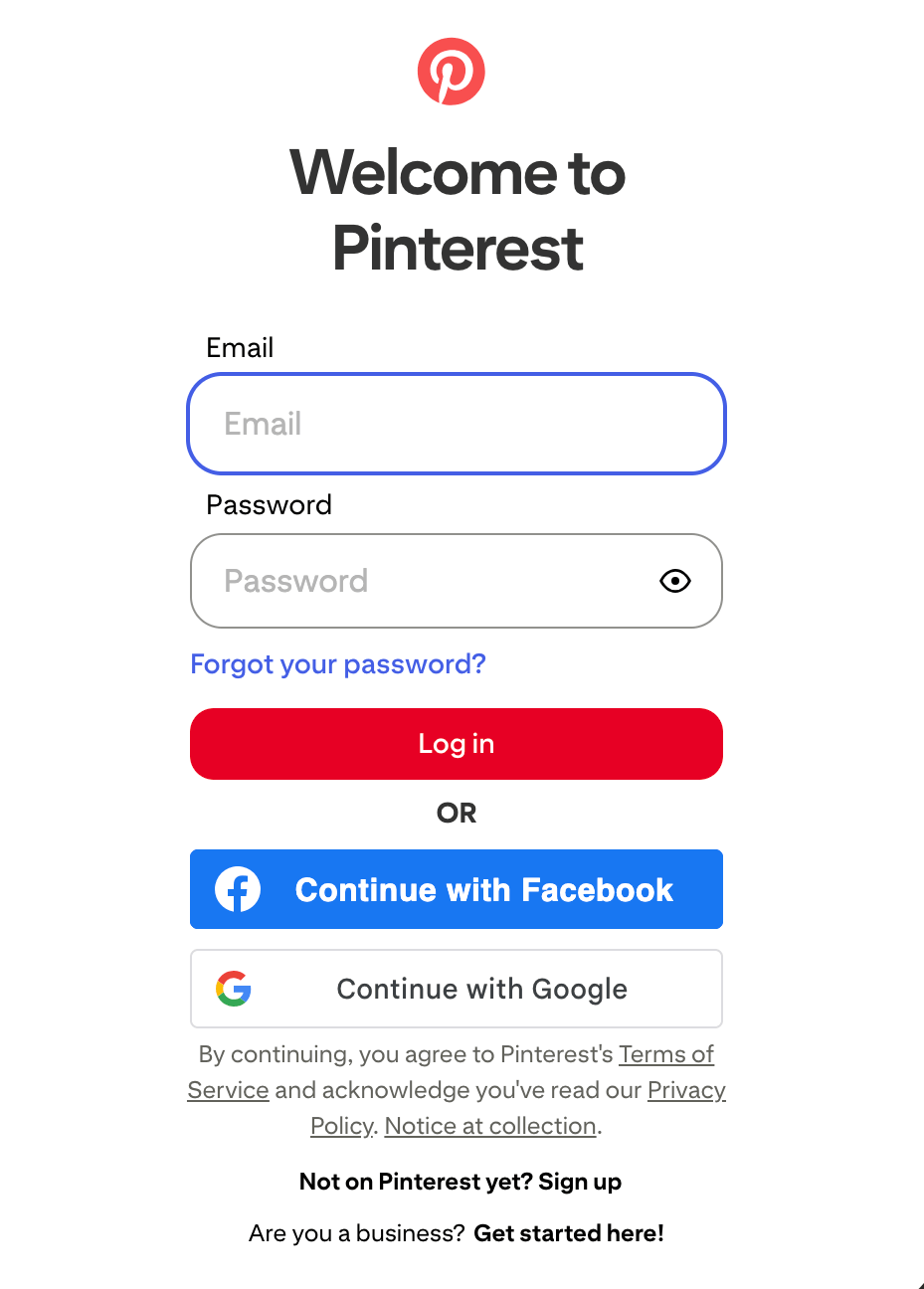
Source: Pinterest
If you want to open a personal account to get to know the network and audience, follow these steps:
- Under the login options, choose Not on Pinterest yet? Sign up.
- Add in your email, password and birthdate.
- Press Continue.
- Pick your interests.
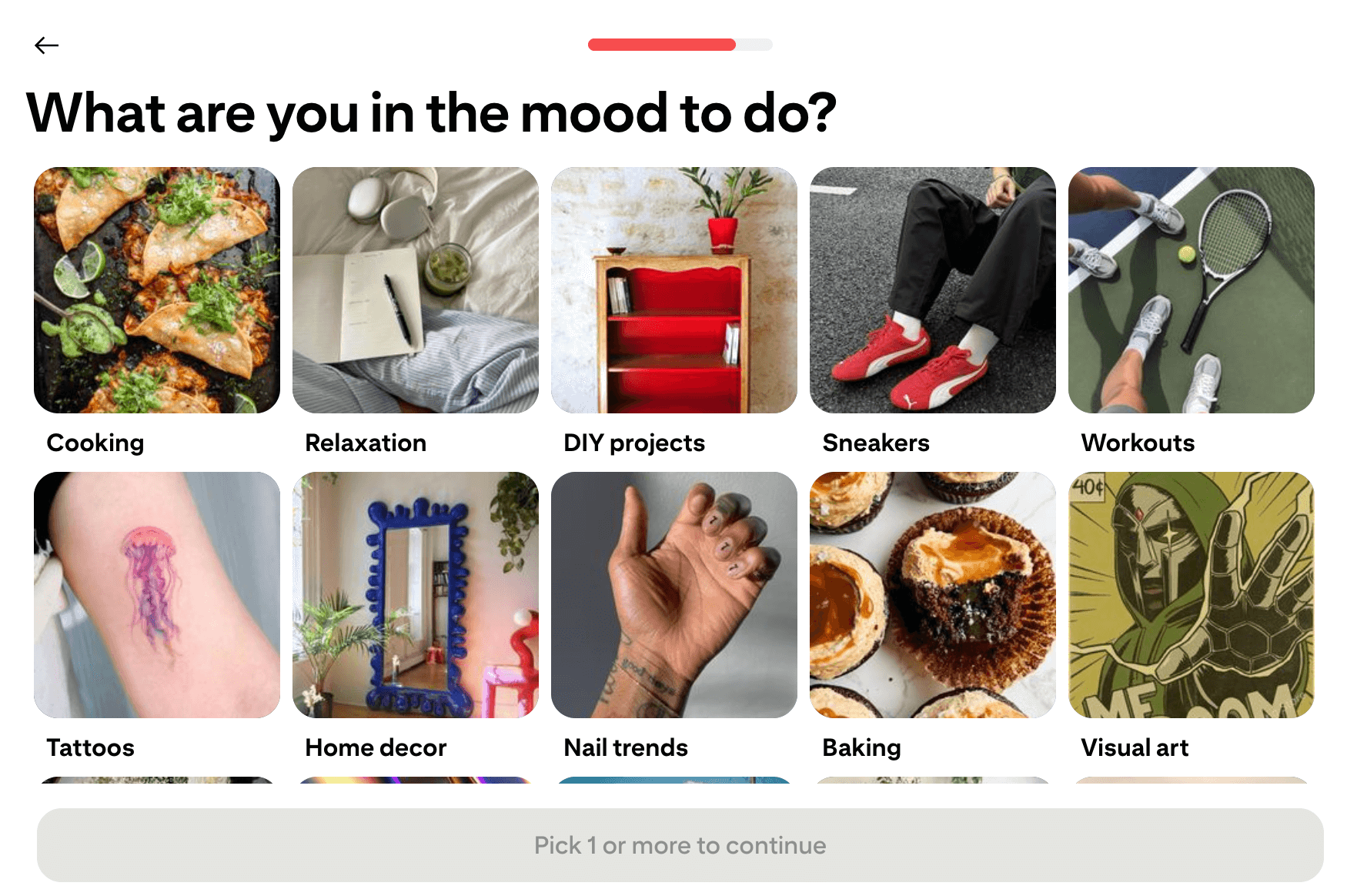
Source: Pinterest
- Select three Pins you like so Pinterest can build a feed for you.
- Review your Home Feed and engage with Pins.
How to create a Pinterest business account
Unlike personal accounts, Pinterest business accounts give you access to advanced analytics and more brand visibility.
Here are some key advantages of a business account:
- Ability to claim your domain to boost credibility and increase your visibility
- Improved discoverability with keyword insights that help you reach your audience
- Power to promote your content with Pinterest ads while collecting audience insights like interests and locations
- Access to analytics on clicks, saves and impressions to refine your content strategy for better results
- Ability to integrate your account with Etsy, Shopify and other shops to optimize sales
- Access to Rich Pins to create more engaging, interactive content that drives action
These business features put you in charge of how your brand gets discovered, builds credibility and drives growth on Pinterest.
Creating a business Pinterest account is similar to a regular account, but there’s a small difference. When you go to the standard sign-up page as before (see above), instead of clicking on Not on Pinterest yet? Sign up, choose Are you a business? Get started here! Then, follow these steps:
- Fill in your email, password and birthdate.
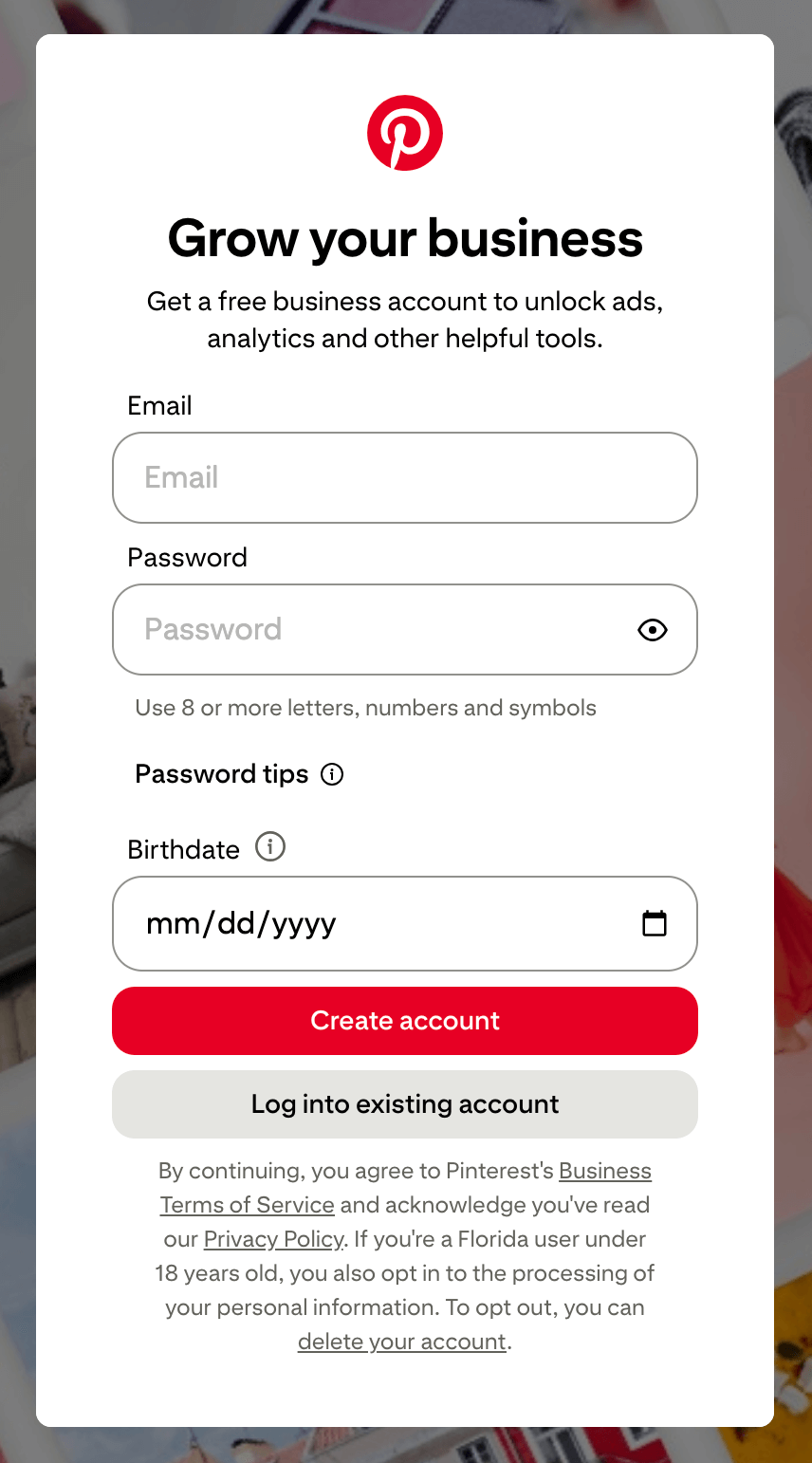
Source: Pinterest
- Answer the questions Pinterest asks about your business.
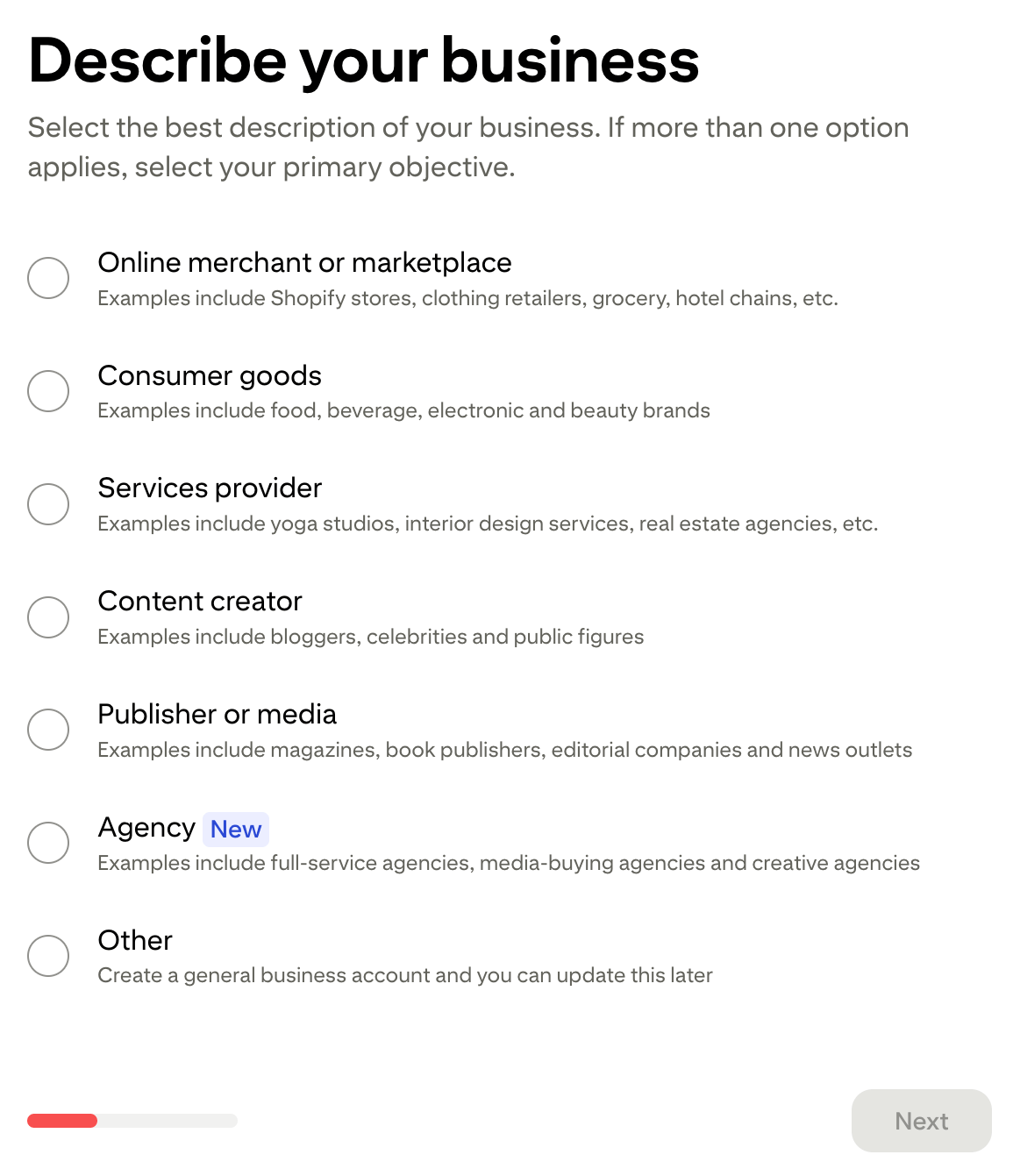
Source: Pinterest
- Follow the prompts to enter your business name, country and website. Pinterest will then ask you for your business goals (like increasing sales), your focus and if you’re interested in running ads.
- Afterward, you can choose a strategy, such as sharing ideas, expanding your audience or showcasing your brand.
If you’re new to Pinterest, start by sharing your ideas. This step will help you get to know the visual search platform and engage with Pinners.
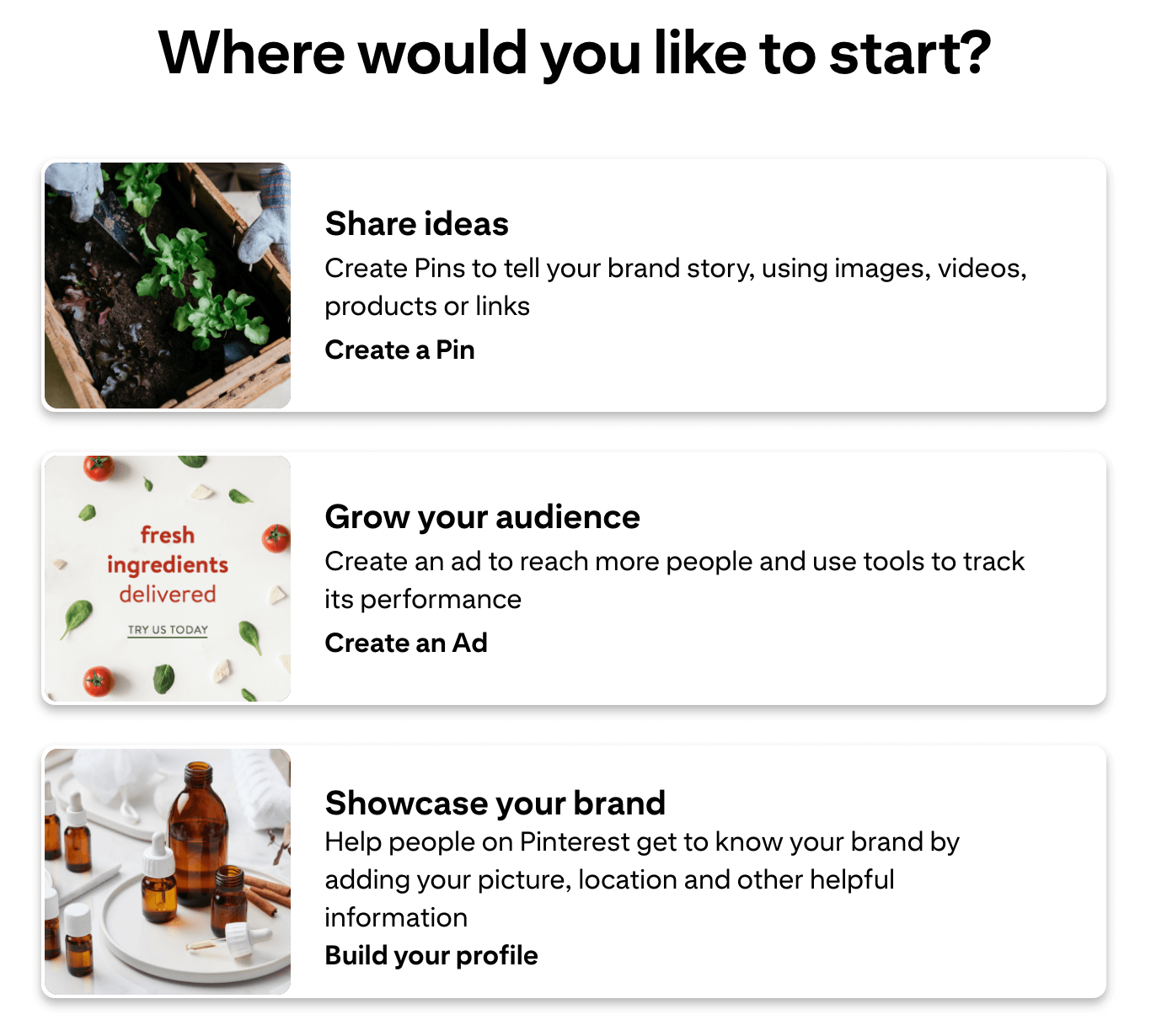
Source: Pinterest
How to convert a personal Pinterest account to a business account
If you’re already a Pinner with a personal profile, don’t let that hard-earned credibility go to waste. Converting your personal account into a business account lets you keep your Boards and following while unlocking tools that amplify your reach and results.
Here’s how to convert your personal account to a business version:
- Log in to your Pinterest profile.
- Choose the More options link at the bottom left of the home page.
- Click Settings and then Account management.
- Choose Convert to a business account and then click Convert.
- Answer Pinterest’s questions about your business.
- Confirm and verify the conversion.
How to link your Pinterest account to Sprout Social
Sprout brings your Pinterest strategy to life by connecting publishing, collaboration, listening and reporting in one place, helping your team move from ideas to execution quickly.
Once you have a Pinterest business account, you can connect it to Sprout to manage your Pinterest marketing strategy. Here’s how:
- Log in to your Sprout Social account and click on Account and Settings, then Connect a Profile.
- Choose the Group your profile belongs to within the In Group dropdown.
- Connect your Pinterest account.
- Choose the Go to Pinterest option.
- Answer the questions to finalize your connection to Sprout.
How to use Pinterest for beginners
By tapping into curiosity and contributing to the platform, you can connect with your target audience and grow your brand. Here’s a guide on how to become a true Pinner and engage with your target audience.
How to search and browse on Pinterest
On your home screen, use the search bar at the top to look for content. For example, you might type in “dog treats” to find products and ideas for your pet. After searching, you’ll see dozens of Pins.
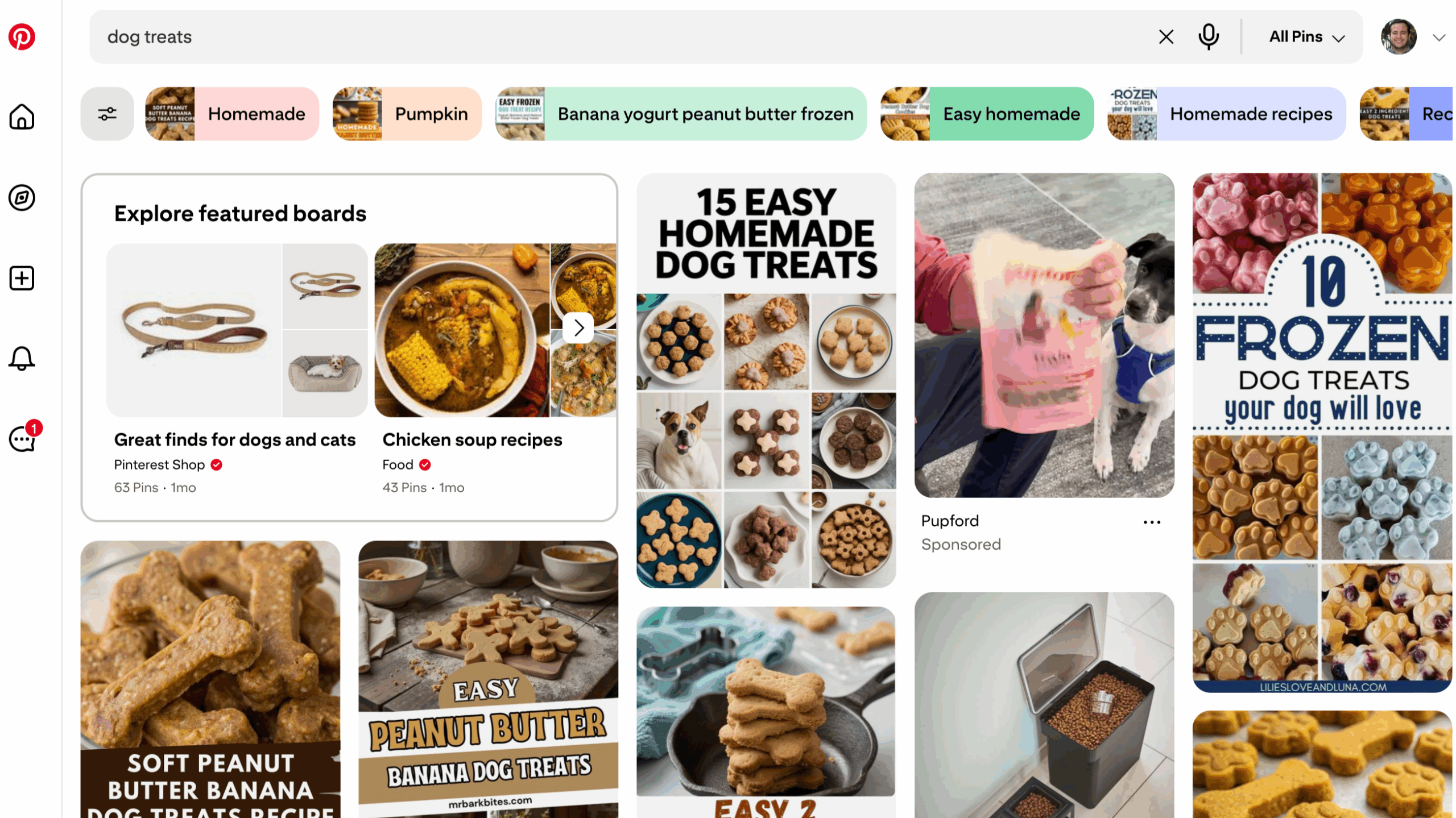
Source: Pinterest
For more precision, filter your options by videos, Boards or products.
You can also select additional keywords under your search bar. For example, for dog treats, you could select “homemade,” “pumpkin” or “banana yogurt peanut butter frozen.” These segmented search terms highlight popular niches you can target.
If you see a post you like, Pin it. You can also click on each Pin and engage with the post by commenting on or liking it.
How to create a Board and organize your Pins
As you collect and post dozens of Pins, your experience may begin to feel messy. Thankfully, there’s a better way to organize your Pins: Boards.
These groupings help you categorize Pins for your followers. Pinners enjoy Boards because they can explore their niche interests in a single, curated place.
Follow these steps to build your own Boards:
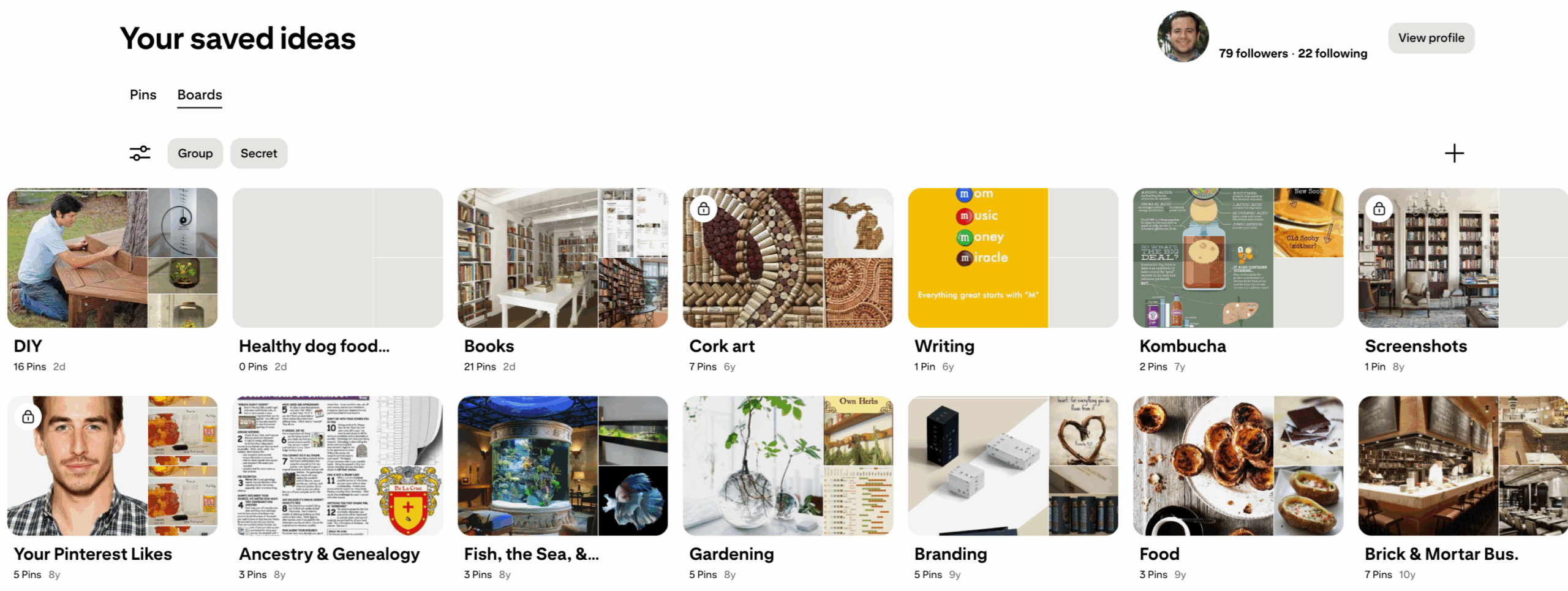
- Click on your profile picture on the top right of your home page. On the profile page, you’ll see your saved Pins.
- Look for the + sign on the right side of your page, toward the top.
Source: Pinterest
- Choose Board.
- Add the title. Make sure the name is keyword-specific to attract your target audience.
- Add collaborators for influencers, social media team members and ambassadors to contribute to the Board.
- Respond to the prompt: Pinterest will ask you to pick some of your Pins to start the Board. You’ll then see your Board page.
- Click on the three-dotted menu line to Edit the Board. Then, add a keyword-rich description.
For your more complex Pinterest Boards, you can create Board Sections. Here’s how:
- Click the + icon and choose Section at the bottom of your Board
- Enter the name of the subcategory and click Add.
- You can now organize your Board by choosing key Pins and moving them into the appropriate section.
How to save and create your first Pin
Pins let you save your favorite ideas and build your own library of inspiration. Here’s how to create (and save) your first one.
Saving a pin
When you see a Pin you like, choose the Board you want to add it to by using the drop-down menu next to Save. Then click Save.

Source: Pinterest
Creating a pin
- Click the + button on the left menu of your home page.
- Choose or drag the file you want to add.
- Include the title, description, a link, your specific Board and targeted topics and products.
When you add your title and description, keep keywords in mind. Pinterest is a visual search engine, so users will use popular terms to find your content. Your posts should include relevant terms to increase their discoverability.
Now that you know your way around Pinterest, you can embed it into your search and social media strategy.
Why Pinterest matters for your social strategy
Sprout’s Social Index shows that 93% of consumers want brands to keep up with internet culture. Pinterest is where those trends take shape, making it a strategic space for social teams to stay relevant and connect with their audience.

Another trend to watch is how Pinterest plays a role in evolving social media habits. According to Sprout’s 2025 Content Benchmarks Report, 86% of social media users will increase or maintain how much time they spend on social media.
Unlike many other platforms, Pinterest’s content doesn’t fade away after the first few days you post. It’s a long-term growth channel with search-driven discovery. Each Pin is an evergreen asset. Your posts remain relevant not only in search results but also in Pinners’ Boards and curated selections.
Because the platform acts more like a search engine than a chronological feed, your content strategy should focus on building a library of Pins that surface over time. When you schedule Pinterest posts to go out at a consistent cadence, you maximize the lifespan of your assets and ensure your brand is constantly feeding the visual search algorithm with fresh, discoverable content.
Because these posts have such a long shelf life, monitoring your Pinterest engagement rate is essential for identifying which evergreen trends continue to drive interactions months after the initial publish date.
As users spend more time on social media, your evergreen Pins serve as potential touchpoints. When someone searches for an idea, pain point or product category, you’re likely to show up for your targeted terms with those Pins.
Pinterest also provides KPIs that you can use to measure success. Here’s how it can directly support your core business objectives:
- Brand awareness: Track impressions and reach to see how many Pinners discover your content in feeds, search and related content.
- Website traffic: Analyze Pin clicks and outbound link clicks to measure how effectively your content drives traffic to your website.
- Lead generation: Treat saves as an intent signal. It’s proof that your content impacted users.
- Sales and conversions: Measure Pinterest conversions to see how many purchases, sign-ups and other actions occur after users interact with a Pin.
How to craft Pinterest content that converts
Pinterest content creation is a growth lever. Each post should focus on quality and relevance even more than volume. To improve your success, when you’re designing your Pinterest content calendar, ask yourself what would provide the most value first. Avoid focusing on how many posts you can push out.
Here’s what the best brands on Pinterest do:
1. Build Boards that reflect your brand and SEO strategy
New accounts benefit from focus. To get the most out of your strategy, start with a set of Boards built around your highest-value keywords—no more than 10.
Also, work with your SEO team to unify the top keywords with your overall strategic goals. Focusing on Boards with search intent helps you get the most ROI out of your effort.
Pro tip: Use Pinterest Trends to find popular keywords and products on the platform.
2. Write descriptions with search in mind
To align with search intent and keywords, strategically craft all your titles and descriptions for Pinterest SEO for both Boards and Pins.
For example, if you sell ergonomic computer accessories like keyboards, mice and monitor arms and your target audience is remote-work employees, you should keep descriptions short, specific and relevant. Here’s an example:
- Board name: Comfortable Keyboards for Work from Home
- Description: Explore our collection of keyboards for remote work offices. These keyboards reduce wrist strain and improve productivity so you can work like a pro. Discover every style: old world, minimalist, vibrant colors and more.
The Board’s key focus is keyboards for remote work employees, and it highlights buyer-intent keywords like “keyboards for remote work” and keyboards with minimal “wrist strain” that improve “productivity” and feel “comfortable.” These terms often appear when users search for comfortable remote work keyboards.
Additionally, include relevant hashtags to improve discoverability and align your content with trending searches. Each post should also have a clear CTA to your product, website or gated content. That way, you can drive users down your marketing funnel.
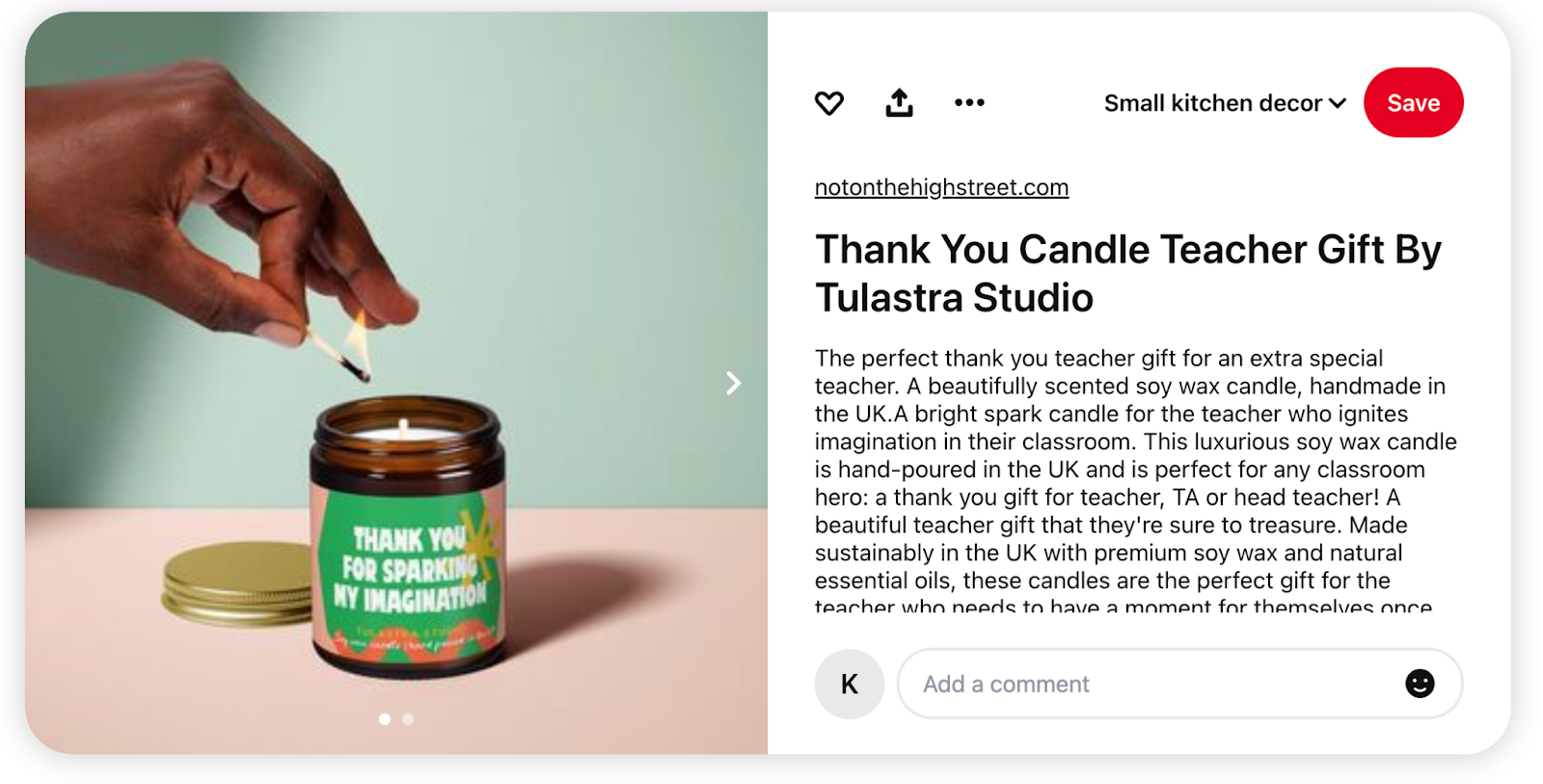
Here’s a good example from a personalized gift company:
Source: Pinterest
The search intent, keywords and description clearly show that this Pin is for students or parents who want to give a candle to their teacher in the UK.
In contrast, here’s a weak example from a lifestyle brand:

Source: Pinterest
This post has a few missed opportunities:
- Generalization: “Candles to sell” isn’t specific enough. The target audience is also unclear (what kind of candles, what style and who would you sell them to?).
- Poor description: There are grammatical errors, and the description doesn’t include keywords other than “sell” and “candle.”
- No compelling CTA: Besides a button, the post gives readers no reason to learn more.
A better option would be posting something like this:
- Title: How to Make and Sell Luxury Beeswax Candles on a Budget
- Description: Create beeswax candles to sell at your local farmer’s market, to neighbors and online. We’ll show you the ingredients and tools you need, plus 35 different recipes and a business plan. Get the free ebook today and start selling candles as a side business.
In this improved approach, the focus is on luxury beeswax candles for people on a budget who want to sell in their community. Keywords like “side business,” “beeswax candle,” “recipes” and “business plan” increase the chances of discoverability.
3. Design Pins that stand out
Design matters just as much as your copy, and that’s especially true with Pinterest. The social network offers many different styles and formats for your Pins. It’s important to use best practices both for Pinterest and social media marketing trends.
Create Pins for successful performance by following these best practices:
- Use videos: Sprout’s Content Benchmarks Report found that “across networks and industries, the percentage of video content is increasing overall.” Make sure to use Video Pins to benefit from these trends.
- Focus on quality and connections more than post frequency: The Benchmark Report also found that social media teams slightly decreased posts in 2024, but average engagements increased by nearly 20%. This divergence shows that creating meaningful content, rather than increasing frequency, produces more impact.
- Implement recommended Pin dimensions: Best practices aim for 1000 x 1500px for images and a 2:3 vertical aspect (Pinterest’s preferred format, particularly for ads) for successful results.
- Create Pins with modern designs: Each design should be clean and legible, with brand-aligned colors and bold, easy-to-read letters and typography.
4. Post during the best times
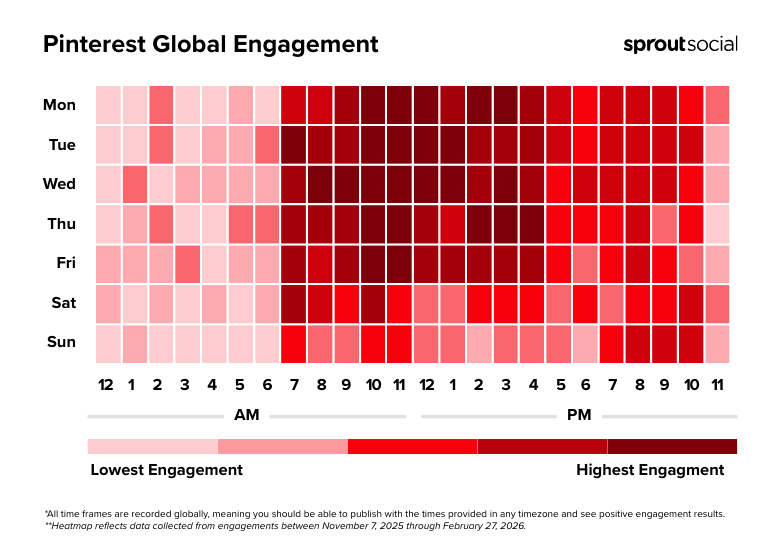
While Pins are typically evergreen, the time you post on social media can also help you get that first boost of impressions and reach. The best times to post on Pinterest are Tuesdays, Wednesdays and Thursdays 10 a.m. – 1 p.m. For specific days, post on weekdays for best results and expect lower engagement on the weekends.
5. Use Idea Pins and product tagging for engagement
Idea Pins leverage social trends like video-first content, voiceovers and step-by-step topics, like in a typical social media “story.” Mixing formats like video, voiceovers and step-by-step visuals turns your Pins into immersive experiences—perfect for tutorials, unboxings and how-to content.
For example, a coffee shop could post an Idea Pin on how to make a latte with a maple leaf design in the milk.
Here’s another example by Solid Starts, a brand and app focused on infants and eating:

Source: Pinterest
Product tagging also helps with conversion. These tags contain information like product details, pricing and availability, all within the same post. Using both Idea Pins and product tagging, you can blend narrative posts with reality and commerce tactics, like featuring a product and promoting purchases.
How to use Pinterest efficiently with Sprout Social
Using a social media management tool can help you build your Pinterest campaigns, measure them and tie your results to business growth. Sprout, for instance, simplifies collaboration and consistency for your brand on Pinterest. Here’s how:
1. Schedule and publish Pins
With Sprout, publishing a Pin is simple. Click Compose and choose your Pinterest profile. Then, add your image, the Board and URL for your Pin. If you don’t have a Board for that target topic yet, no worries. You can create one with Sprout.
Once you fill in your information, you can queue and automate your Pins using the same form. Sprout’s optimal send times lets you post at the best times for maximum reach.
These Pinterest publishing steps help you implement best practices automatically and provide multi-platform contextual reporting that ties to real business outcomes.
2. Collaborate across teams
Pinterest marketing is a team effort, which is why Sprout makes sure you have all the features you need to publish winning Pins.
Use Sprout’s shared Publishing Calendar and Asset Library to schedule and plan your campaign. Sprout’s Message Approval Workflows also streamline the management process for your team by simplifying the submission and review of all messages. That way, it’s simple to review and approve messages before they go live.
You can also set permissions and roles so each team member has access to the right profiles and actions. Here’s what assignments look like:
3. Repurpose content for Pinterest
If a post performs well on your blog, Instagram, TikTok or other social media network, chances are it’ll resonate on Pinterest too.
Here’s how you can use Sprout’s Asset Library and cross-posting capabilities to repurpose your content and tailor it for Pinterest:
1. Identify a top-performing post, then open Compose and select your Pinterest profile.
2. Click to customize the post per network to tailor the copy and crop media just for Pinterest.
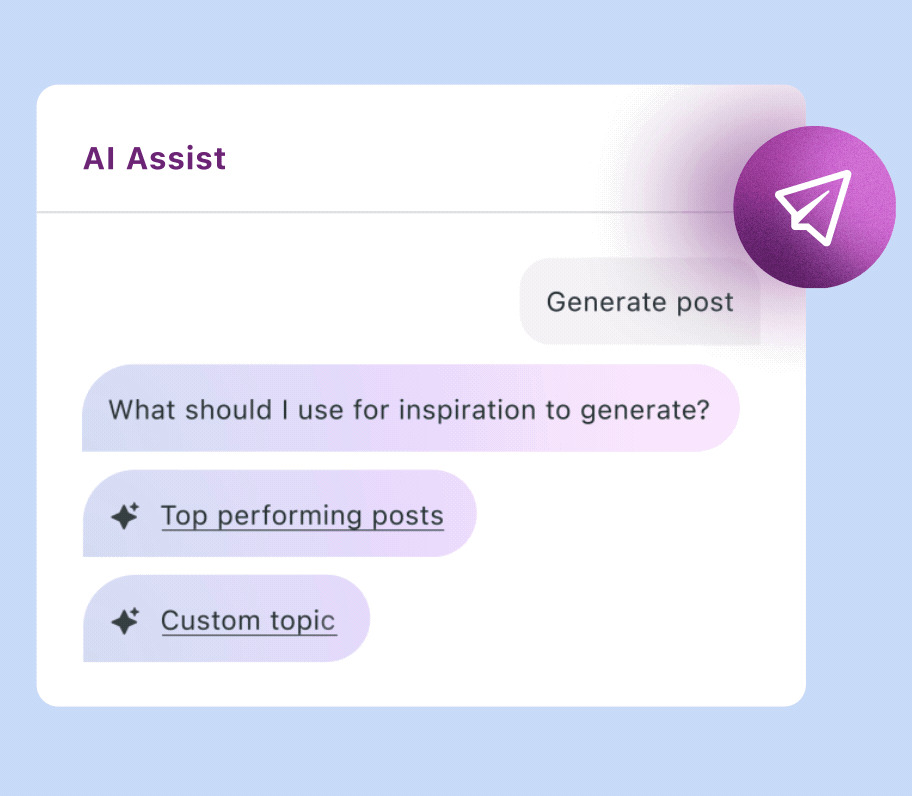
3. Use Generate by AI Assist (on the Professional plan) to write a caption from a top-performing or existing post in your brand voice for Pinterest’s audience.
4. Before publishing, Preview how it will look, then choose Schedule by Network and use Optimal Times to time it right.
5. Add Tags to track performance in the Tag Performance Report and double down on what works.
4. Integrate AI insights into your Pinterest strategy
Sprout pulls all your data and turns it into actionable insights. Its AI-powered recommendations reveal what’s working so you can refine your Pinterest content for measurable growth. At the same time, AI Assist takes care of manual tasks within compositions to save you time.
Here’s a snapshot of how Sprout works with your insights.
- Pinterest integration: You can connect your Pinterest business profile with Sprout. This allows you to easily publish Pins, as well as measure the performance of each post and overall account. Additionally, you can compare Pinterest results with your other social media channels.
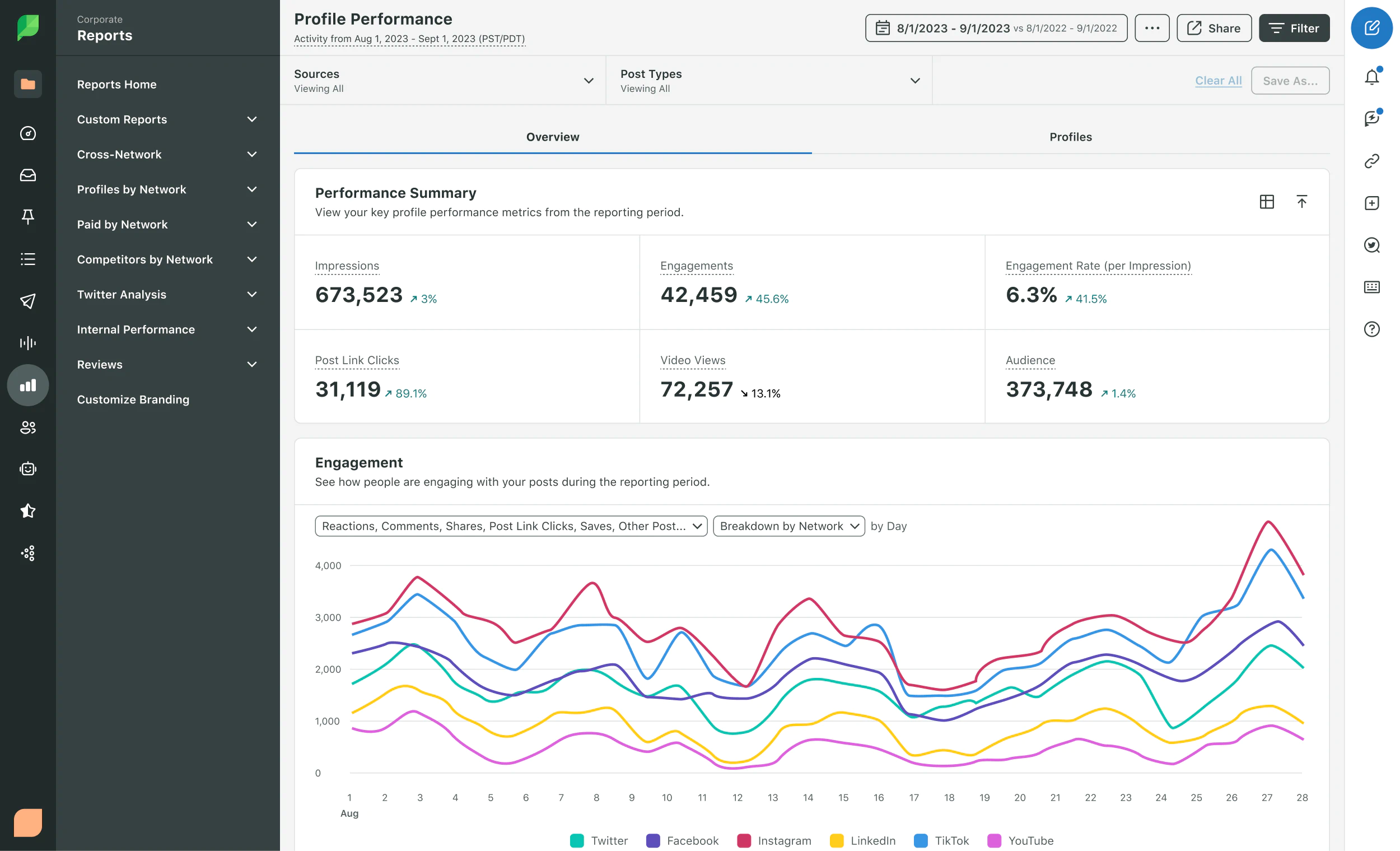
- Reporting and metrics: Sprout’s Pinterest Profile Report gives you a performance overview with various metrics like engagement and reach over time. You get these results all in one place, which makes reporting and proving ROI to stakeholders much easier and more accurate.
- Publishing tools and scheduling: Use Sprout to compose Pins, attach images, set Board and destination URLs, and schedule content. With these features, you can easily collaborate with your team across social channels.
- AI and automation tools: Sprout offers AI Assist to help you craft attention-grabbing copy. Plus, its AI automation solution pulls from historical data and uses large-language models (LLMs) to optimize insights, content suggestions and trends.
Measuring success with Pinterest analytics
Pinterest analytics inform how well you’re reaching your audience and what you can do to improve. Below are some key best practices to help you measure Pinterest success.
Use key Pinterest metrics to track results
As a social media professional, you have a unique opportunity to prove ROI with accurate data and insights. If you have a business account on the platform, you can track your metrics through Pinterest analytics. The dashboard provides valuable insights to track your following and pinning success.
To access Pinterest analytics, follow these steps:
- Log in to your business Pinterest account, then click the accordion menu icon on the left of your screen.
- Go to Analytics and choose the Overview option.
While Pinterest’s analytics feature offers a helpful foundation for social media tracking, it doesn’t give you a holistic view that ties all your platform initiatives to business goals. However, Sprout’s Premium Analytics does, with a more in-depth view of your data in the context of your entire social media strategy.
For example, easily analyze profiles by network, build cross-network dashboards and custom reports, and use interactive charts and graphs for detailed insights.
With Premium Analytics, you can tailor your reports for stakeholders, use AI Assist to inform your strategy and choose the specific metrics you want to track. The example below shows how you can filter and analyze your data:
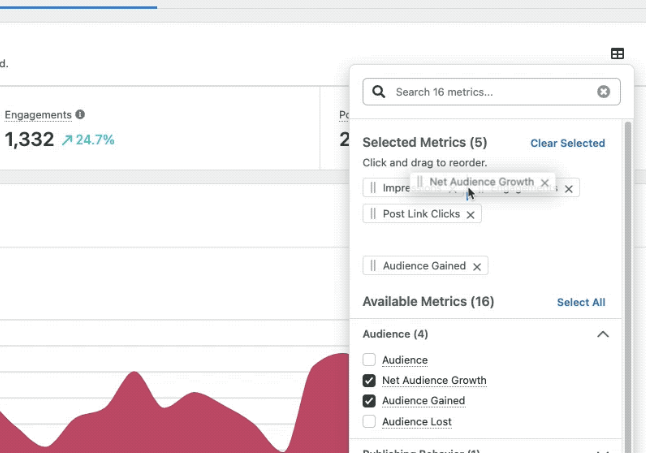
Pinterest analytics show how your content performs, and Sprout’s Premium Analytics takes it further by tying your strategy to real business impact. Here are the key metrics to track:
- Impressions: The number of times your content shows in users’ feeds or searches (which indicates strong visibility and SEO effectiveness)
- Video views: How many times users watch your videos (the higher the duration, the more it proves deep engagement)
- Clicks: The number of times users click on your Pins or links (which suggests effective user interest)
- Saves: How many times users Pin your content to their Board (which shows proof of interest and offers insight that shows you’ve inspired users and provided useful information)
- Conversions: Actions your users take because of your social media content, like a purchase or sign-up (a sign that you’re achieving business goals)
You can access these metrics and more data within Sprout’s Pinterest Profile Report. Then, compare all your platform-specific reports with the Profile Performance, Post Performance and Tag Performance reports.
Identify what resonates with your audience
Analytics guide your strategy when you compare which Pins, Boards and comments resonate most with your audience.
While Sprout’s Listening doesn’t use Pinterest as a source, you can discover content themes from other platforms and use them to inform your Pinterest content. This tactic saves you hours of manual tracking and research.
Report ROI to leadership
Pinterest insights are powerful on their own, but when you combine them with real-time data from other social networks, you get the full picture to shape your strategy. With clear reports, you can tie your social media efforts to business outcomes.
For example, you can use a customized dashboard and export-ready visuals to win stakeholder buy-in and attribute your content to metrics like leads, conversions and reach.
Here’s what the Profile Performance report looks like:
Pinterest trends to watch in 2026
Pinterest is already a powerful way to connect with your audience, and new trends are shaping where it’s headed next. Here’s what to watch.
The rise of visual search
The search landscape has expanded beyond traditional engines like Google to include LLMs, social networks and platforms like Pinterest.
Not only has the where people search changed, but it’s the how too. According to Amazon’s visual search data, the company has seen a 70% year-over-year rise in visual searches. With these trends, Pinterest becomes a uniquely positioned platform to meet visual and social media search demand.
Because Pinners use the platform to search visually for ideas and products, social media marketers can leverage these community habits to share engaging content (like videos, infographics and images), meet search intent and drive connections.
Video-first content
Build your Pinterest strategy with video-first content in mind to meet rising video consumption trends. Idea Pins and Video Pins are great options to meet this video demand and connect with your audience.
Ideas include product unboxings, social media influencers trying out your product and marketing campaigns that focus on showing DIY or trendy use cases for your products.
Shoppable content and in-app commerce
Sprout’s Social Index states that 28% of consumers make impulse purchases each month because of social media. And since 81% feel compelled to buy several times a year, in-platform shopping looks to be the trend in the coming years.
As a result, your brand needs to show up where consumers are, especially when they’re ready to buy. By engaging with Pinners, posting your Pins and curating Boards with keyword-rich, buyer-intent strategies, you’ll meet Pinterest shoppers where they are.
Turn Pinterest into a growth engine for your brand
As Pinterest continues to meet the growing demand for visual search and community, you can meet target audience demand and engage with your community. But you don’t have to try new strategies in the dark.
Sprout gives you the tools to publish and analyze your Pins, all within collaborative workflows and dashboards. Using Sprout’s all-in-one social media management features, you can grow your reach on Pinterest, along with your other social media platforms, and meet business goals for a positive ROI.

Sign up for Sprout Social’s free trial today to see how you can tap into Pinterest’s visual discovery potential and drive your social media efforts to trackable business results.
FAQs about how to use Pinterest
How do I use Pinterest for marketing a business?
First, sign up for a Pinterest business account. Then, become a Pinner by actively contributing to the community. Use Pinterest to grow brand awareness and reach through your Pins, Boards and engagement. Your team can also use Pinterest for social media ad campaigns.
What types of content perform best on Pinterest?
Pinterest prioritizes new content but also continues to push evergreen Pins. With its longer shelf-life for content, focus on quality and relevancy. When posting on Pinterest, use these popular formats: Vertical visuals at 2:3 (1000 x 1500px), Idea Pins, Video Pins and keyword-optimized Pins perform well on the platform.
How do I organize my Boards on Pinterest?
Use the Board feature to categorize your saved Pins by topic or category. Make sure to use descriptive language for diversity and keyword marketing. Additionally, use Board Sections to organize larger Boards into subtopics. For example, a Board about facial makeup can have a section focused on cleansing, moisturizing and priming.
37 free social media strategy templates that will elevate your workflows
Published on December 5, 2025 Reading time 15 minutes









Share