How to master your brand’s Facebook link in bio

Written by Mahnoor Sheikh
Published on May 18, 2026
Reading time 7 minutes
Table of Contents
The Facebook Link in Bio is your brand’s “home base” on the platform, with the primary purpose of directing high-intent traffic to your website.
Posts and Reels get buried under the scroll and Stories disappear in 24 hours. But people can always come back to the link in your bio to learn more, sign up or buy.
When you treat that link strategically, it can support lead generation, sales, campaigns and broader business goals.
This guide will explain what the Facebook link in bio is, how to set one up and how to maximize it for your Facebook marketing strategy.
What is a Facebook link in bio?
Your Facebook link in bio is the blue action button at the top of your Business Page, just below your cover photo. It’s the most prominent, clickable destination on your entire profile, and it’s what most people mean when they talk about a “link in bio” on Facebook.

You can label the button to match your goal. Some common options include:
- Sign Up
- Shop Now
- Book Now
- Contact Us
- Learn More
- Watch Video
Whichever label you choose, the button points to a URL you control. Your Page can only have one action button at a time, so its destination matters.
Alternatively, you can add up to 10 URLs under the “Links” section, which appears in a block below your Page name and photo, as well as in your About tab.
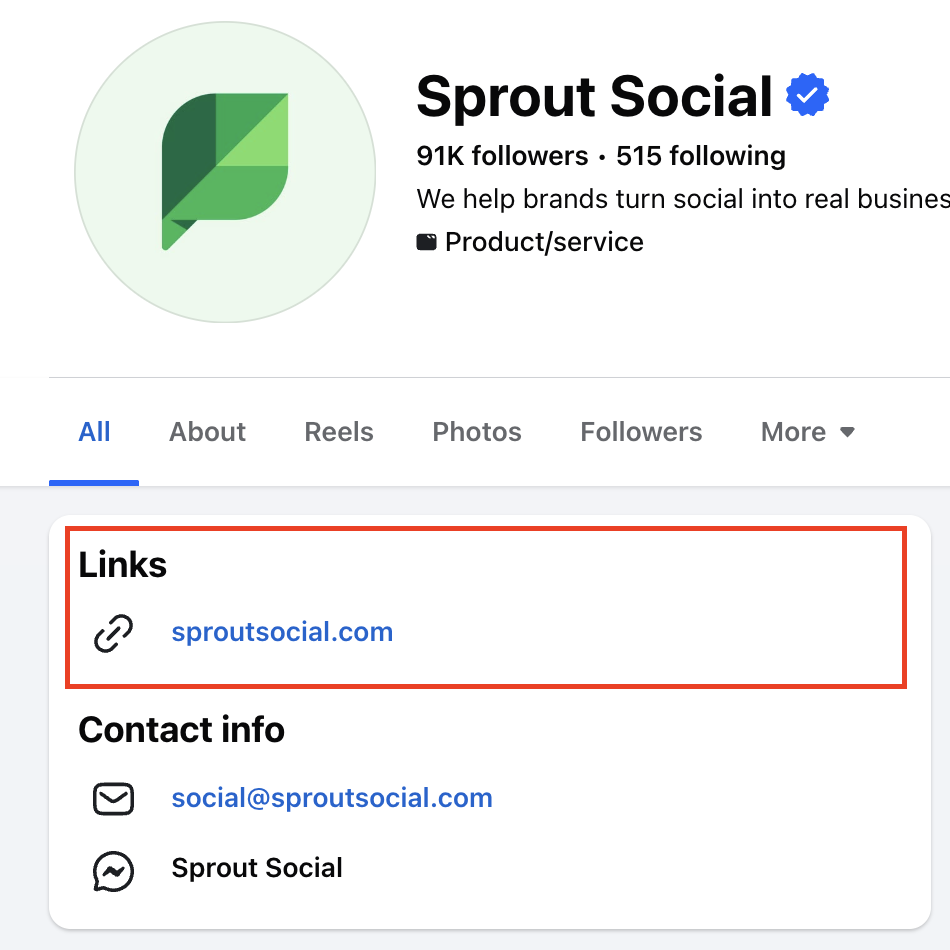
Most brands use these links to drive clicks to their website homepage or product pages. You can also create a multi-link landing page to send people to different destinations from a single URL. More on that later.
Why the bio link matters for your Facebook strategy
Unlike feed posts that come and go, your bio link is a permanent home for evergreen content, such as your website, newsletter opt-in, podcast or booking page.
A beauty salon, for instance, might choose “Book Now” as its action button. This means the brand’s Facebook link in bio would take visitors directly to their appointment scheduling page.
A bio link is also one of the easiest ways to tie your Facebook activity to business results. Since every click goes through one trackable URL, you can see exactly how many Page visits turn into signups, sales or bookings.
The difference between personal profiles and Business Pages
Personal Facebook profiles don’t have an action button. The closest equivalent is the “Links” section buried below other sections like “Personal Details”, “Work” and “Education”.
Facebook Business Pages get the action button. It lives front and center on both desktop and mobile, right next to your follow and message options. Facebook deliberately surfaces it because Business Pages are built for visibility and conversions.
Business Pages also have the “Links” section, and it shows up at the top of any other sections you might have, such as “Contact Info”. If you’re a brand still operating from a personal profile, consider switching as you’re leaving conversions on the table.
How to add a link in bio to your Facebook business page
Adding a link in bio to your Facebook Business Page takes about a minute. You’ll choose an action button type (e.g., Shop Now or Book Now), then connect it to the URL you want.
Here’s how to do it on desktop and mobile.
Adding your link via desktop
- Log in to Facebook and switch to the Business Page you want to edit.
- Open your Page profile.
- Click the three dots on the right side of the screen, just above your feed.
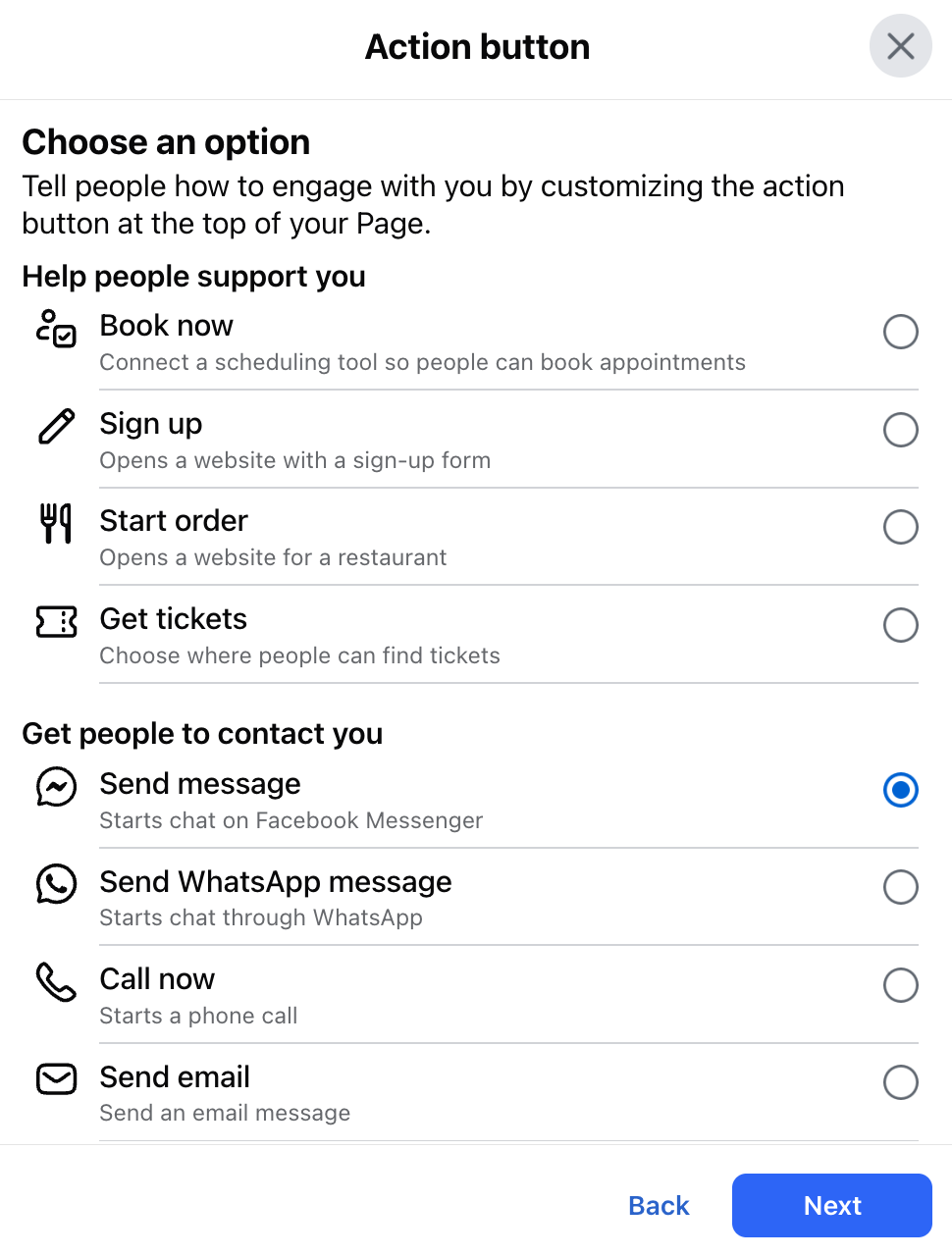
- Click Action Button to add (or edit) your link in bio.
- Choose an option from the list that pops up and click Next.
- Add your URL and hit Save.
Adding your link via the Facebook mobile app
- Open the Facebook app on your phone.
- Log in and switch to your Business Page.
- Go to your Page profile.
- Tap the three dots at the top right of your screen, next to the pencil icon.
- Tap Action button and then tap Edit buttons.
- Check an option from the list and add your URL.
- Tap Save.
Test your bio link from another profile to make sure it goes to the right place, and you’re done!
Adding more links to your Facebook Business Page
To add more links to your Page (other than the action button), you can edit the “Links” section on your profile, which now supports up to 10 different URLs.
Follow the steps below to add more links.
- Log in to Facebook and switch to the Business Page you want to edit.
- Open your Page profile.
- Click the Edit button right below your cover photo to edit your page information. You can also click the About tab below your profile photo to get there.
- Find and click Links from the list of tabs that show up under “About”.
- Click Add link.
- Paste in the full URL you want to add (along with an optional link ).
- Add more links if you need them.
- Save your changes.
Best practices for optimizing your Facebook bio links
Setting up your bio link is the easy part. Getting it to drive sign-ups, sales and bookings is a different story. A few small tweaks, from the label you pick to the page you point at, decide whether your bio link converts or gets ignored.
Here are some Facebook link in bio best practices to keep in mind.
Choose a clear CTA
Match your button label to the action on the other side. Mismatched or unclear buttons create friction before anyone has even clicked.
If your destination is a product page, Shop Now sets the right expectation. If it’s an event registration, Sign Up or Book Now is more actionable than a vague Learn More.
Avoid outdated campaign URLs
If your Facebook link in bio is still taking visitors to last quarter’s holiday landing page, you’re sending fresh traffic to a stale destination.
Refresh it as soon as your campaign ends or lean on evergreen URLs (e.g., your homepage, main product page, booking calendar) so the button doesn’t need constant updates.
Leverage multi-link landing pages
You only get one action button, which is fine if you have one clear priority. But what if you’re trying to support a product launch, newsletter, podcast and store locator at the same time?
In that case, you could pick a flexible label like Learn More and connect it to a multi-link landing page, which lets different audience segments self-select their next step.
Maintain brand consistency
Your bio link is part of your brand experience. That means wherever people land when they click on it, they should see consistent logos, fonts, colors and voice from your Facebook Page.
A scrappy landing page that doesn’t look like it belongs to you can undo the trust your Page worked to build. Even small details, such as your favicon, your URL slug and your page title in the browser tab, signal whether a visitor has landed somewhere legitimate.
How to track and measure your Facebook link in bio performance
Tracking your Facebook bio link is the easiest analytics setup you’ll find on social. One URL, one button and one clean line of data flowing into the tools you already use. Here’s how to measure your action button’s performance.
Add UTM parameters for tracking
UTM parameters are tags you add to the end of your URL that tell your analytics platform exactly where a visitor came from.
For a Facebook action button, a basic UTM string might look like this:
https://yourbrand.com/shop?utm_source=facebook&utm_medium=social&utm_campaign=bio_link
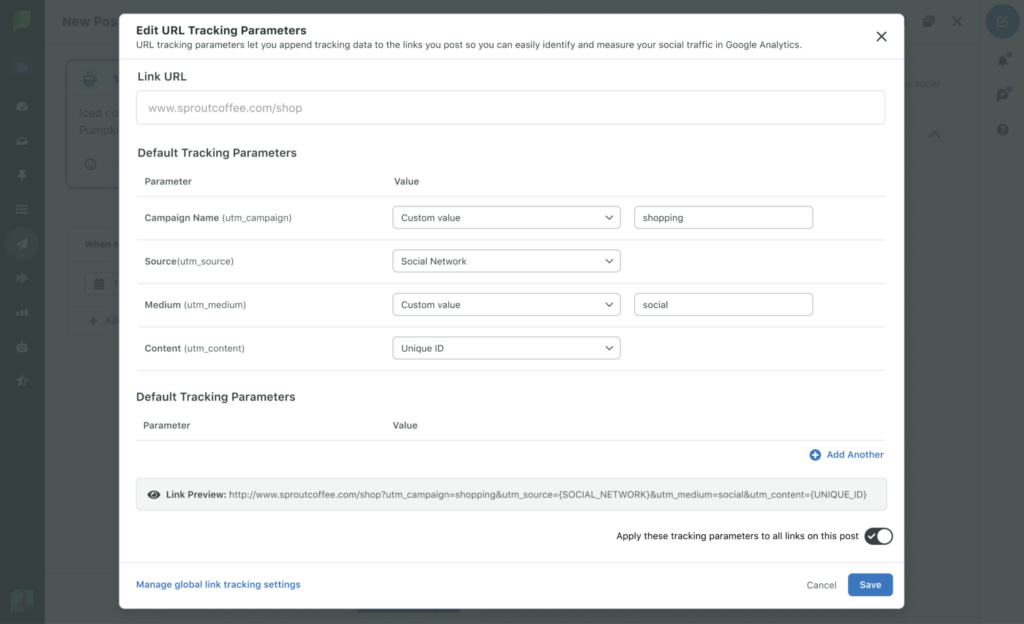
Once tagged, every click flows into Google Analytics (or your analytics tool of choice) labeled and ready to analyze. Standardize your UTM conventions across your team so the data stays clean and comparable over time.
Analyze click-through rates
Click-through rate (CTR) on your bio link tells you two things:
- How many people are visiting your Page
- How compelling your destination feels to them
A low CTR with high Page views usually means your button label or destination isn’t pulling its weight. A high CTR with low Page views means it’s time to drive more traffic to the Page itself.
Track your click-through rate weekly, and watch for trends over time instead of single-day spikes for a more accurate picture.
Identify high-value traffic sources
Not every click results in a purchase or sign-up. Some visitors bounce, while others buy. The point of tracking is to figure out which campaigns, posts and audiences send the kind of traffic that actually converts.
Layer your UTM data with conversion events (purchases, signups, demo requests) to see which touchpoints are driving the most high-intent traffic, and which ones are just generating noise. Then double down on what works.
Facebook link in bio tools for brands and agencies
If you’re managing multiple brands, campaigns or destinations, the right link in bio tool will save you hours and give you data you can act on.
Standalone link aggregators like Linktree, Beacons and Bio.fm are great for solopreneurs and small businesses. They’re cheap (often free), easy to set up and let you build a simple multi-link landing page in minutes.
The trade-off: they live outside your broader social workflow, so reporting and content planning happen in separate tools.
Integrated social media management platforms, such as Sprout Social, bring link management into the same workspace as your publishing, listening and analytics.

This is important for agencies and brands running social at scale. When your link performance sits next to your post performance, audience insights and campaign reporting, you stop stitching together five dashboards to answer one question.
Elevate your Facebook link in bio strategy with Sprout Social
Your Facebook bio link might be a small button, but it has a large impact on your overall strategy and business goals.
Sprout Social’s Essentials plan brings your link management, publishing and analytics into a single platform at an affordable cost. Sign up for a free 30-day trial so your team can stop tab-hopping and start making confident, data-backed decisions.
39 free social media strategy templates that will elevate your workflows
Published on August 20, 2026 Reading time 15 minutes







Share