29 Sprout Social features you might not know about

Written by Rebecca MacFarlane
Published on July 30, 2026
Reading time 15 minutes

Table of Contents
Sprout Social features are designed to help you move at the speed of social.
Instead of juggling disconnected tools, Sprout offers teams a centralized system where they can gather social insights, learn from live audience behavior and act across areas like publishing, influencer marketing, customer care and crisis response.
But Sprout goes beyond social media management, delving deeper into the realm of social intelligence. The AI-powered platform enriches CRM and BI systems with real‑time sentiment, cultural context and predictive analyses. The result? A comprehensive customer journey that explores what people are thinking, feeling and doing right now—and where those conversations are headed next.
In this article, we’re highlighting Sprout Social features you might not know about. These tools help teams turn real-time social signals into smart, strategic business decisions.
What does Sprout Social do?
Sprout Social is an AI-powered social intelligence platform, backed by the belief that all business is social. With Trellis, Sprout’s proprietary AI agent, the platform translates real-time social media trends and signals into actionable business insights.
With a suite of solutions across publishing, engagement, analytics, social listening, customer care, influencer marketing, advocacy and media monitoring, Sprout empowers brands to make smarter moves across all major social networks and drive stronger business impact.
Sprout AI features
AI and automation is embedded across Sprout’s entire platform, enabling your team to unlock creativity while increasing social media’s business impact. By automating data curation and analysis, these capabilities empower you to turn passive data into immediate action.
1. Turn social data into strategic decisions with Trellis, Sprout’s agentic AI
When you’re wading through a sea of metrics, it’s difficult to zoom out and see the big picture of what’s working, what’s not and how to adjust your tactics accordingly.
That’s where Trellis comes in. Simply ask it a question, and it queries billions of data points to return executive-ready intelligence.
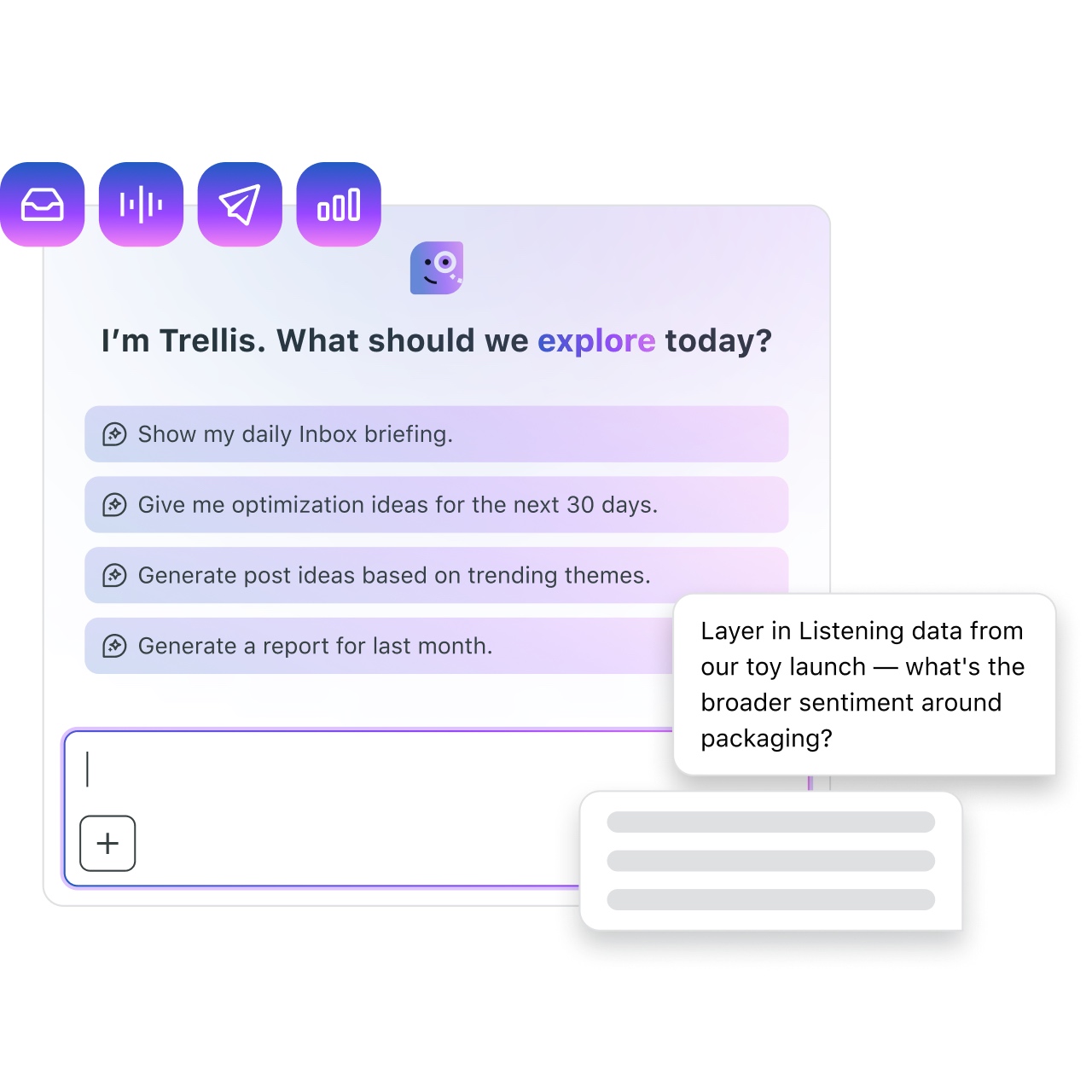
For instance, Trellis can help you break down a trend. Say you submit the query “Where did it start (e.g., niche subreddit, TikTok subculture)? Is it a “Micro-trend” (fleeting), a “Macro-trend” (seasonal) or a “Cultural Shift” (permanent change in behavior)?” In a matter of seconds, Trellis will use its social listening abilities to generate engagement trends, sentiment shifts and audience signals. Better still, it will translate those insights into actionable recommendations you can apply to your next campaign—bridging the gap between raw signals and business impact.
2. Automate your analyses with Trellis Studio
Trellis Studio automates your recurring social analyses. It also uses pre-set conversation starters—known as skills—to ensure your team stays abreast of key performance and audience insights.
For example, you could create a ‘Generate Post Ideas’ skill to support social content ideation. You can then customize this skill, choosing your preferred cadence, data sources and topics (if applicable). When that skill runs, you’ll receive a notification. By clicking on the alert, you’ll open a new Trellis Chat with details on the analysis.
Rather than reactively searching for data, you can rely on Trellis Studio’s proactive approach. Set it and have social intelligence insights delivered directly to your inbox.
3. Keep your messaging fresh and on brand with AI Assist
Sprout’s AI Assist is built into every part of the platform, optimizing everyday activities from content creation to engagement and customer care.
For example, Generate by AI Assist produces alt text suggestions to increase the accessibility of your image-focused posts. With it, a previously tedious task is handled in seconds—a level of convenience Sprout customers love.
“The AI alt text for images is extremely helpful,” says Jarod, Social Media Coordinator at The Born Group. “It saves me a bunch of time thinking of that and creates less work for me.”
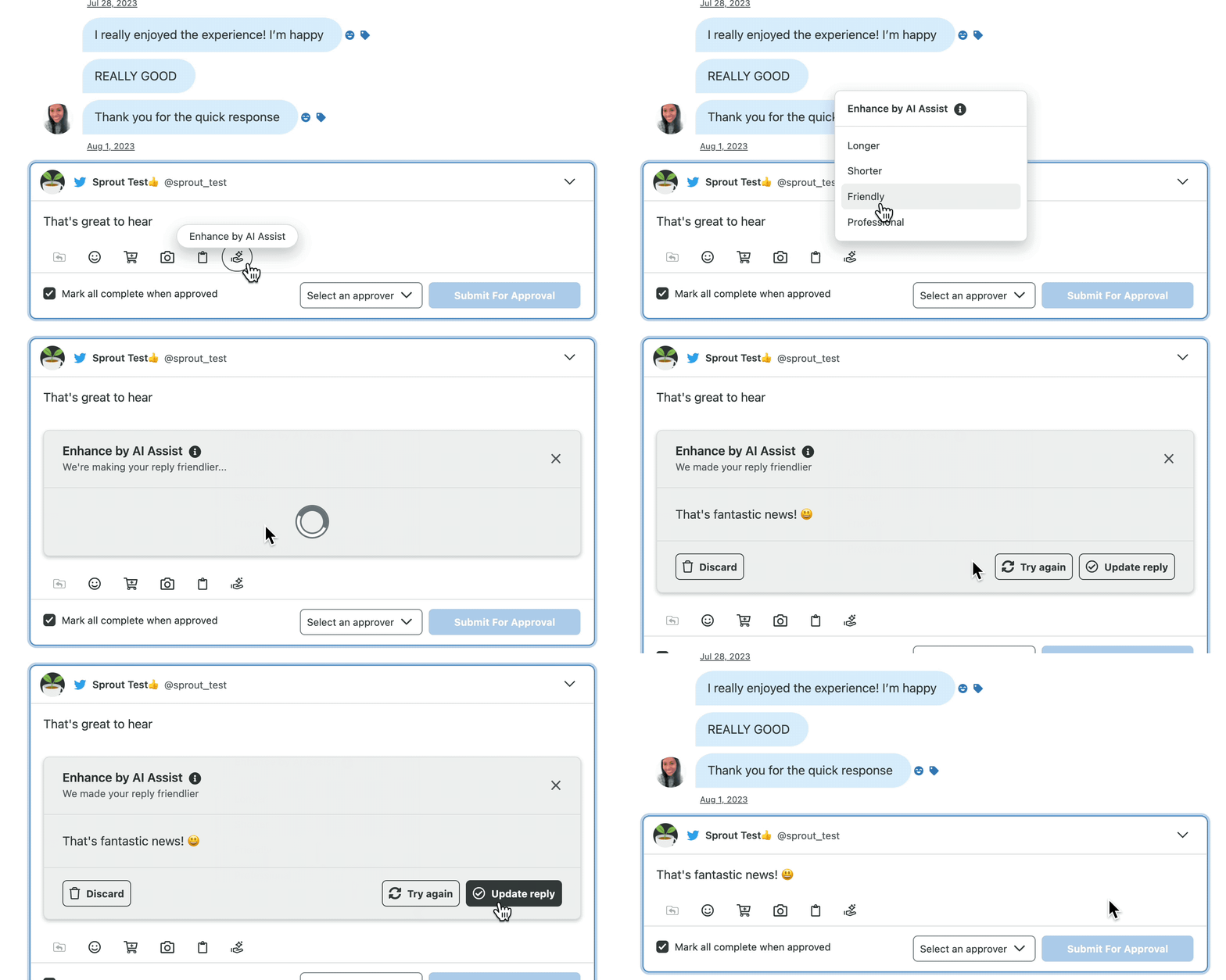
There’s also Enhance by AI Assist, which lets you choose from four different stylistic tones in the Smart Inbox. Draft a message, select your desired tone and the tool will tailor it accordingly. By keeping your messaging consistent and on brand, you’ll preserve brand credibility and foster trust while enabling your care team to scale their social media customer service.
Sprout Social publishing features
You can find everything you need to develop, manage and optimize your posts across all major platforms in Sprout’s Publishing. If you want to streamline your publishing workflow, try these must-know Sprout Social features.
4. Share critical context with Calendar Notes
Picture this: You know a major promotion or event is coming, but you haven’t received the details needed to craft the perfect post. Now, your publishing calendar has several blank spots you know you’re holding for the promotion—but no one else does.
Calendar Notes democratize that information by acting as a placeholder in your Publishing Calendar. This prevents your colleagues from scheduling additional content because they see a gap in your publishing queue. It also gives business leaders a more accurate view of your publishing cadence.
You can use Calendar Notes to share ideas with your team, or to share reminders to amplify content from influencers and business partners.
5. Schedule directly from your browser with the Sprout browser extension
If you rely on curating industry-specific news to boost thought leadership on your brand’s social accounts, you need to use the Sprout Social browser extension.
This tool brings the Compose Window with you as you browse the web for relevant articles to share. When you find something that would appeal to or intrigue your audience, simply click on the extension to add it to your Sprout Queue.
6. Drive Instagram traffic with SproutLink
Link in bio tools empower marketers to promote as many links as their strategy demands on Instagram, but there are trade-offs. For example, jumping between a social media management tool, a link in bio tool and Instagram to make sure everything is consistent can quickly become a tedious task.
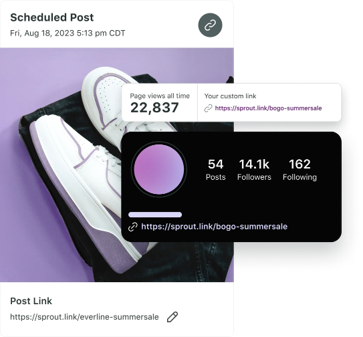
That’s why we created SproutLink. SproutLink consolidates your Instagram publishing workflow by creating posts, managing and reporting on associated links all within Sprout Social. SproutLink creates a clickable version of your Instagram grid that gives your audience more content choices and ways to explore your brand.
7. Keep content production on track with External Approvals
Sprout’s Message Approval workflow is a game-changer for social media teams navigating multi-step content review processes. But did you know it’s not limited to individuals with seats in Sprout?
Brands using the Sprout Social Advanced Plan can add external approvers simply by adding the individual’s email address to their Message Approval workflow. Once the user verifies their email address, they can review assigned posts, provide feedback and give their stamp of approval.
Plus, Sprout will send external approvers automated reminder emails leading up to their deadline if an approval hasn’t come through yet. This not only saves time and effort, but it alleviates the common pain point of remembering to follow up.
8. Use Custom Variables to manage posts across multiple profiles
When managing multiple social profiles, you may want to include unique locations or URLs across different networks. For example, you may want to use URLs with UTM codes tailored to each network so you can seamlessly track where your site traffic is coming from.
That process is made simple with Sprout’s Custom Variables. Create up to 10 custom variables for networks like Facebook, Instagram Business, LinkedIn and TikTok. Once set up, you can simply insert the dynamic variable into your posts—making it easy to adapt your content across networks without the extra manual effort.
9. Easily customize content posted across different networks
While it’s common to publish the same content across multiple networks, each has its own requirements and constraints, such as caption character limits and image dimensions.
With Sprout’s Network Preview, you can see exactly how your post will look across networks. You can then toggle back and forth between channels and make adjustments in the composer, tweaking copy, tags or visuals.
Instead of jumping between native schedulers and guessing how each network will format your content, you can make all your customizations in one place. According to small business owner, Jon, this is one of Sprout’s top traits:
“The most helpful aspect of Sprout Social is its ability to publish posts across multiple social media platforms. I can customize each scheduled post to meet the specific standards of each platform and tailor the content to fit each account.”
Sprout Social engagement & customer care features
On social media, engagement is everything—it’s how you connect, support and build relationships with your target audience.
With Sprout, you can scale these engagements as you grow. Use the features below to help your team spot high-priority conversations, jump in when customers need help and deliver the right tone in every response.
10. Moderate and engage in owned subreddits on Reddit
With Sprout’s Reddit integration you have the ability to connect moderated subreddits and user profiles to your account.
When you link a subreddit, Sprout will pull posts and comments from that specific forum into the Smart Inbox. You can then use your user profile to engage with that content, whether it’s replying, upvoting, hiding or deleting posts.
With this integration, it’s far easier to stay in touch with the communities you own in one place. You can review Reddit activity, respond faster and keep threads appropriate without bouncing between platforms.
11. Keep customer data safe with data masking and secure forms
Guardian by Sprout Social takes the guesswork and intimidation out of compliance. By offering enterprise-grade control functions, it provides your team with the power to execute social strategy and build trust at scale.
One way it does this is by protecting users’ personally identifiable information (PII). For instance, Predefined Data Masking identifies and masks sensitive information—like phone number, email address or credit card number—from networks like Facebook, Instagram, X, WhatsApp and LinkedIn.
Sprout’s Secure Forms also enable you to handle sensitive queries and collect PII and protected health information (PHI) in a PCI-compliant way without having to leave the platform.
12. Revisit social customer care activity and conversations with Contact Profile Views
One of the most unique Sprout Social features is Contact Profile Views, which provide a peek into customers’ social media activity. Using this view, you can see users’ behaviors and also add custom contact notes, reply to their messages and see message history between you and the individual. Contact Profile Views are available on Instagram, Facebook, LinkedIn and X.
These views give you a more human look at the people you’re trying to sell to, support and connect with. Social activity, past interactions and internal notes create invaluable context as to who’s on the other side of the screen. Your team can then use these details to personalize responses and maintain consistent care.
13. Automatically complete @mentions only comments
While followers tagging their friends in a comment boost your brand’s visibility, these comments can crowd your Inbox. To save time, you can enable Complete @mention Comments in Sprout’s Inbox Settings.

Little tools like these make a big difference when it comes to reducing the amount of noise going on in your social media inbox. Less noise means social customer care agents can stay focused on the messages that matter most.
14. Automatically complete @mentions only comments
Sprout’s AI-powered sentiment analysis tools help marketers and customer service agents monitor brand health in both messages and reviews, which improves efficiency and mitigates risk.

Creating a custom inbox view based on negative sentiment will give you a bird’s-eye view of the less-than-glowing feedback your business has received within a given time period. It’s not always fun to look at, but it’s a crucial way to keep an eye on potential social media crises. If several complaints share similar themes, you can also use this intel to pitch necessary customer experience improvements to the rest of your team.
Sprout Social reporting & analytics features
Reporting is often the most important—and most time-consuming—aspect of a social media manager’s job. Consolidating several network-specific metrics into one comprehensive report without a sophisticated reporting tool can take hours, if not days.
Sprout’s reporting and analytics tools are designed to help users uncover the deeper why behind performance and craft compelling stories with that data. The following Sprout Social features make quantifying the impact of your social media performance easy:
15. Track KPIs that matter most to your business with Custom Metrics
Sprout’s Custom Metrics enable you to create, manage and apply your own formulas across post-level reporting. To create one, simply use basic mathematical functions (e.g. +, -, ×, ÷) in combination with existing post-level metrics. You can also apply Custom Metrics to specific networks or across all channels.
Custom Metrics give you a closer look at important KPIs and make it easier to cut through the sea of stats touncover the performance signals that drive real business impact.
16. Keep stakeholders informed with scheduled PDF reports
Automating report delivery is an easy way to take a recurring task off your to-do list. With Sprout, you can schedule reports to send to up to 25 people weekly or monthly.
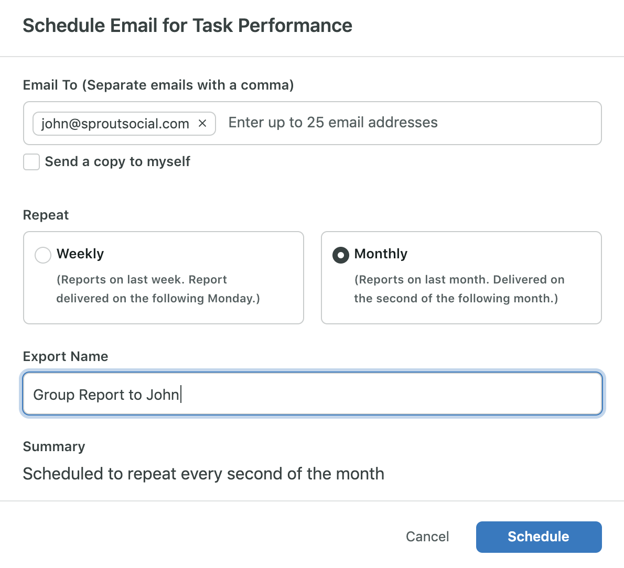
Customers with our Premium Analytics add-on can easily share reports with anyone using direct links, even if they don’t have a Sprout account. These links update automatically, strengthening alignment between teams and internal stakeholders.
17. Get granular insights with Tagging
Tags are a game-changing Sprout feature that helps marketers group and categorize posts for flexible reporting on content by theme, type, campaign—the opportunities really are endless.

For more detailed reporting options, we recommend setting up Tag Collections. These let you organize Tags with similar themes. For example, a retail brand might set up a customer support Tag Collection that groups all of their issue-specific Tags, like “Shipping Delay”, “Damaged Product” and “Negative In-Store Experience”.
You can analyze Collections and drill down into specific Tags within Collections using the Tag Performance Report. This report offers easy-to-follow data visualizations and post-level insights that demystify the performance of tagged posts and messages.
18. Expand your reporting capabilities with My Reports
If you want to truly maximize your social media reporting options, then you need My Reports, available in Sprout’s Premium Analytics tool.
With My Reports, you can build customizable reports complete with multiple tables and dynamic visualizations—like bar and line charts—to compare performance across a number of networks. Filtering options allow teams to go broad to granular in just a few clicks, sorting data by metric, Tag, content type and more.

Once you’ve organized the data to your liking, you can add critical context using annotation widgets that are perfect for executive summaries and miscellaneous notes. All these tools work together to help teams understand social’s impact at a glance, in a format that resonates.
Sprout Social Listening features
Social Listening is a Sprout Social premium solution that allows brands to uncover trends and actionable insights from social. This AI-powered tool scales the process of premium data ingestion, delivering actionable insights needed to guide your future strategy.
Because Listening is a premium add-on, trial accounts don’t have access to the tool. However, you can still see it in action by scheduling a demo. If you do, here are three features to ask about:
19. Focus on the most relevant discussions with Sprout’s advanced Reddit listening
With Sprout, your team can cut through Reddit noise and focus on the forums that matter for your brand.
Its tools enable you to isolate key subreddits, filter out high‑noise communities and track every single post from your most critical communities. In turn, you get cleaner listening data, sharper sentiment insights and complete confidence that you’re capturing the full context of how people perceive your brand, even when they don’t mention you by name.
20. Reduce unnecessary noise with spam filtration
Spam posts on social media are like taxes or traffic jams—they’re annoying, but inevitable. That’s why it’s important to invest in tools that tune them out.
Sprout Social’s Listening tool has built-in filtering technology that excludes common noise categories like sweepstakes, sales listings, coupons and adult content. If your Listening Topic is pulling spam messages that don’t fall into those categories, you can set up custom filtration options using the spam publisher’s location or website information.
These tools increase the accuracy of your listening data, so you’re left with insights driven by real people—not bots.
21. Get real-time alerts when conversation volume spikes
Stay ahead of unexpected conversation surges with Listening Spike Alerts. These real-time notifications automatically flag significant increases in message volume within your Listening topics, so you can respond quickly to emerging trends, viral moments or potential issues.
Customize alert thresholds based on your brand’s baseline activity to ensure you’re only notified when it matters most. Whether it’s a sudden influx of customer feedback, a PR moment gaining traction or a competitor making headlines, Spike Alerts help you act fast and stay informed—without having to constantly monitor dashboards.
Spike Alerts are delivered via email and integrated into your Smart Inbox, keeping your team connected to the moments that matter most.
Sprout Social influencer marketing & advocacy features
Sprout Social Influencer Marketing and Employee Advocacy by Sprout Social enable authentic brand amplification. The former gives you the tools to find the right creators, manage partnerships with ease and measure the impact of your campaigns. The latter empowers employees to share brand content while staying compliant with pre-approved copy.
From discovery to reporting, these features help you scale your program and drive meaningful results.
22. Evaluate creators with confidence using Brand Safety and Brand Fit Score
Protect your brand reputation before partnerships begin with Brand Safety, a feature that scans public posts from the past year and assigns a risk level based on customizable criteria.

Sprout Social Influencer Marketing includes a set of default safety categories, which include alcohol, adult content, gambling and more. Admins have the power to customize these rules or add new ones to reflect brand-specific sensitivities.
Additionally, the Brand Fit Score gives creators a percentage score based on how well their content aligns with your messaging and values. At a glance, you can assess which influencers to prioritize for your campaigns.
Whether you’re working with creators at scale or navigating high-stakes campaigns, Brand Safety and Brand Fit Score help you partner with peace of mind.
23. Build polished campaign summaries in minutes
Influencer Marketing’s One-Sheet Builder automatically generates a polished, shareable snapshot of key campaign details, highlighting creator profile summaries, deliverables, performance metrics and more. With just a few clicks, you can customize your one-sheet and export it as a polished PDF to share with stakeholders or clients.
Users can choose from one of five default templates or create a new One-Sheet from scratch. It’s a fast, effective way to communicate results, reinforce the value of your influencer strategy and keep teams aligned on what success looks like.
24. Execute creator payments within your campaign workflow
Rather than using external payment channels, use compatible integrations to issue creator payments within Sprout. Whether you opt for Lumanu or PayPal, this solution offers complete visibility into your spend while assuring timely and accurate payment for your creators.
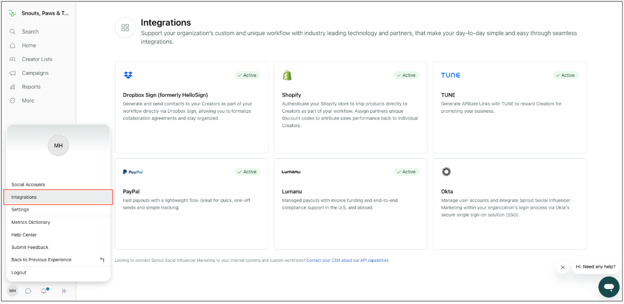
For executives like Allison, that centralization is extremely beneficial: “I love that literally EVERYTHING you could need is easily available within the platform. You are able to vet influencers, keep in contact with them, exchange payments/contracts and everything in between!”
25. Automatically halt off-brand messages before employees share them
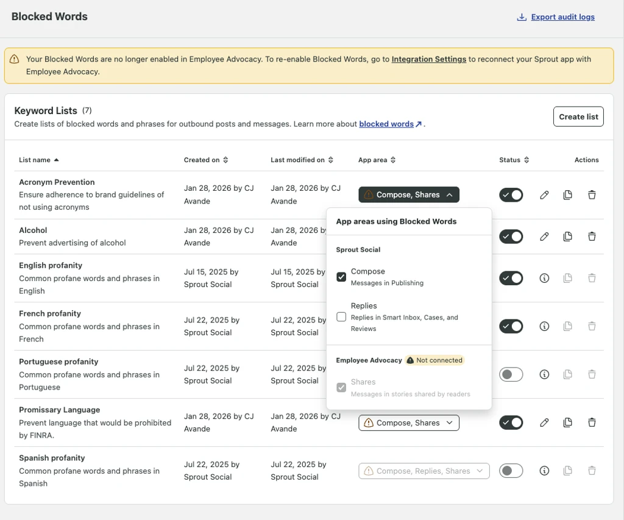
Stop risky messaging in its tracks with Sprout’s Blocked Words feature. Admins can create lists of off-brand, unsafe or non-compliant words. Once set, any content that contains them will be blocked from dissemination. With quick and simple automation, you can maintain control of your brand’s social presence and protect its credibility.
Sprout Social predictive media monitoring features
NewsWhip by Sprout Social is an AI-powered media monitoring tool that tracks millions of real-time news and social signals. Backed by patented predictive algorithms, NewsWhip is designed to forecast which stories will drive attention next. These are its top features and how they can support your team:
26. Protect your brand with Trellis Monitoring Agent
The Trellis Monitoring Agent is an always-on system that detects meaningful media shifts early. It then delivers analyst-quality updates on these trends so you can forecast developing issues with no manual effort.
Given that news cycles move quicker than ever, this kind of automated tool is essential for keeping pace. Plus, with its structured, contextual updates, you won’t just keep up, you’ll stay ahead.
27. Stay on top of the latest trends and situations with Alerts
NewsWhip enables real-time and scheduled alerts; both deliver important information from your searches to you via email or Slack.
Alerts eliminate the need to jump into NewsWhip to manually review engagement spikes and emerging narratives. Instead, the most important updates land directly in your inbox. This model empowers teams to remain proactive, make timely decisions and respond faster.
28. Keep your team informed on the most important topics with Digests
NewsWhip’s AI Digest gives you instant context on broad media coverage. Think of it as your fast lane to understanding what’s happening without compromising on accuracy or depth. You can set up weekly or daily digests, which will break down engagement data on specific topics.

Like standard alerts, these summaries provide ultimate convenience because they get delivered straight to you.
29. Monitor how stories spread, gain traction and evolve across the internet
NewsWhip’s predictive algorithms map the full trajectory of any narrative, so you can see the exact moment a conversation starts to shift or intensify. This early visibility empowers brands to intervene before backlash snowballs, addressing small-scale issues and protecting reputation while the story is still forming.
According to one Sprout user, NewsWhip is “invaluable” for crisis management.
“The ability to see engagement velocity—how quickly a story or narrative is spreading—gives us the early warning signals we need to assess the situation and mobilize our team before something escalates. It’s helped us move from reactive to proactive in high-pressure moments.”
Experience these Sprout Social features firsthand
With a system that marries comprehensive social media management with social intelligence, you can maximize business-wide impact. Sprout’s capabilities—including AI-powered technology and predictive insights—help you win today and build for tomorrow all at once.
And you can experience many of these features for yourself, even if you’re not already a Sprout customer. Simply schedule a demo to see these features in action.
Need a little more information before taking the leap? Consult our social media management buyer’s guide to learn more about how Sprout can help you unlock the full value of social.
Frequently Asked Questions
What are the main features of Sprout Social?
Some of Sprout’s key features across its main capabilities include:
- Engagement: Smart Inbox, Message Tagging, Message Spike Alerts.
- Publishing: Advanced Post Scheduling, Multi-Profile Publishing, ViralPost® Send Time Optimization.
- Analytics: Post Performance Report, Social Network Reports, Tag Report.
- Influencer Marketing & Employee Advocacy: Brand Safety, Brand Fit Score, Blocked Words.
- Listening: Query Builder, Listener Insights, Listener Dashboards.
How often does Sprout Social update its features?
Sprout releases product updates continuously. For instance, some of Sprout’s recent product updates include brand-owned subreddit engagement and predictive tools, Snapchat content publication and streamlined Canva publishing workflows.






Share