How to start selling with YouTube Shopping and turn viewers into customers

Written by Mahnoor Sheikh
Published on May 27, 2026
Reading time 9 minutes
Table of Contents
Billions of people use YouTube daily as an entertainment hub, classroom and search engine. Now, they also use it for finding and buying products.
A Google survey showed YouTube is 1.6 times more likely to influence buying decisions than any other social platform. With YouTube Shopping, the platform converts that high-intent attention directly into purchases, moving beyond mere influence.
Currently, over 500,000 creators and brands are enrolled in the YouTube Shopping program. If you want to be part of the experience, this guide will break down all you need to know.
Read on to learn what YouTube Shopping is, who qualifies for it, how to set it up and measure it, and tips for maximizing your sales on the platform.
What is YouTube Shopping?
YouTube Shopping is an e-commerce affiliate program that allows eligible brands and creators to promote products directly within their YouTube content.
Viewers can browse and buy products without leaving the video player with features like product tagging, channel storefronts and integrations with platforms like Shopify.
YouTube Shopping benefits brands, creators and consumers in different ways:
- Brands: Turn long-form videos, Shorts and livestreams into sales touchpoints
- Creators: Open a monetization path beyond ad revenue and brand sponsorships
- Consumers: Remove the friction of jumping from tutorial to search to product page
The audience to sell to is enormous, too: Sprout Social’s 2026 Content Strategy Report shows 63% of all social media users have a YouTube account. Even niche product categories can find a lucrative market here.
What are the eligibility requirements for YouTube Shopping?
To join the YouTube Shopping affiliate program, your channel must already be in the YouTube Partner Program (YPP). That’s the baseline requirement because YouTube Shopping is tied to monetization access instead of just channel size.
Additional eligibility requirements:
- Meet the subscriber threshold. In countries where expanded YPP is available, creators may qualify with 500 subscribers plus the required uploads and watch hours or Shorts views. In other eligible YPP regions, creators generally need the standard 1,000 subscribers threshold, plus the required watch hours or Shorts views.
- Operate in an eligible country. YouTube Shopping is currently available in the United States, Korea, Indonesia, Thailand, Vietnam, Malaysia, the Philippines, India, Singapore, Brazil, Taiwan and Japan. Creators outside these regions are not eligible for the affiliate program yet, even if they’re already in YPP.
- Avoid restricted channel categories. Music channels, Official Artist Channels and channels associated with music partners aren’t eligible for the affiliate program. This may include channels linked to music labels, distributors, publishers or VEVO.
- Make sure your channel isn’t Made for Kids. Your channel audience can’t be set as “Made for Kids”. YouTube also excludes channels with a significant number of videos marked as made for kids, since Shopping features are commercial tools.
YouTube’s eligibility bar for Shopping is higher than for many other features. That’s because the platform wants to protect viewers from low-quality or misleading promotions, and it wants to reward channels that have invested in building audience trust over time.
Why set up YouTube Shopping for your business?
If you’re already publishing on YouTube, Shopping features turn product interest into immediate action. Stop burying links in the description or hoping viewers search for your product later. Bring the checkout directly to the content they’re watching.
YouTube Shopping can help your business by:
- Creating a frictionless path to purchase. By tapping product tags in a video, viewers can quickly see pricing and details, and move to checkout right away while their interest is still high. No need for extra steps and clicks away from the site.
- Capitalizing on high-intent video engagement. YouTube is where people watch demos, reviews, comparisons, tutorials and hauls before making a decision. Shopping features let you place relevant products directly inside that research experience, making purchase more likely.
- Centralizing your social commerce analytics. Connect YouTube Shopping to your store and social media management platform to better understand which videos, formats and products drive revenue, and where you’re getting true return on investment (ROI).
- Creating more revenue opportunities from your content. Shopping adds another way to generate value from your videos beyond ads, views or brand awareness. Evergreen videos can continue introducing people to your products long after they’re published.
How to optimize your YouTube Shopping strategy for maximum sales?
Turning eligibility into revenue takes more than turning the Shopping feature on. Here are five ways to consistently drive brand sales through the platform.
1. Sync and tag relentlessly
Don’t make people hunt for a link in the description. In 2026, friction is the enemy of conversion, and half of your potential buyers won’t bother to scroll.
Instead:
- Connect your store. Make sure your Shopify storefront or Google Merchant Center is directly synced with your YouTube channel so your full catalogue is available for tagging.
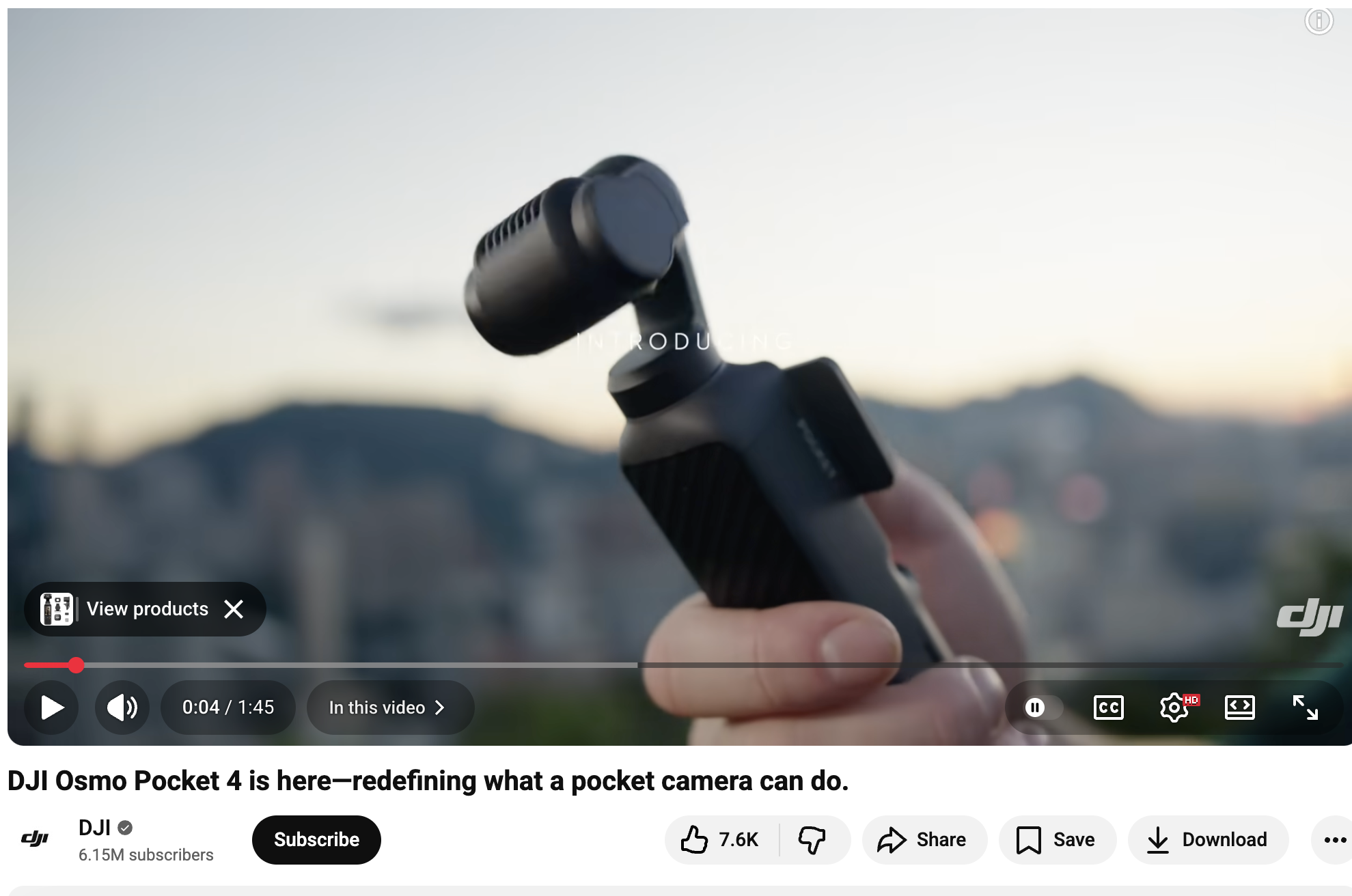
- Overlay tags. Use YouTube’s product tagging feature across every format you publish, including long-form videos, Shorts and livestreams. Viewers can tap the “View products” overlay that appears on screen to see product details and pricing, then hit “Buy” without leaving the player.
Check out this example of a tagged video from DJI:
Sprout Social Essentials Pro Tip: Find your top 10 performing evergreen videos and retroactively tag the featured products in them today. Most of your existing watch time lives in older videos, so monetizing those already earning attention is the fastest way to compound results.
2. Lean into the “Human Premium”
You don’t need a RED camera and a soundstage to create videos that sell. The most persuasive content today often looks like a friend filming on their kitchen counter, under normal lighting, on a normal day.
What to do:
- Show, don’t tell. Create more comparisons, unboxing videos and unfiltered reviews or demonstrations. Let the product do the talking through actual use instead of voiceovers.
- Be honest to build trust. If your product has a limitation, mention it. Counterintuitive as it sounds, transparency about what your product isn’t builds confidence in what it is.
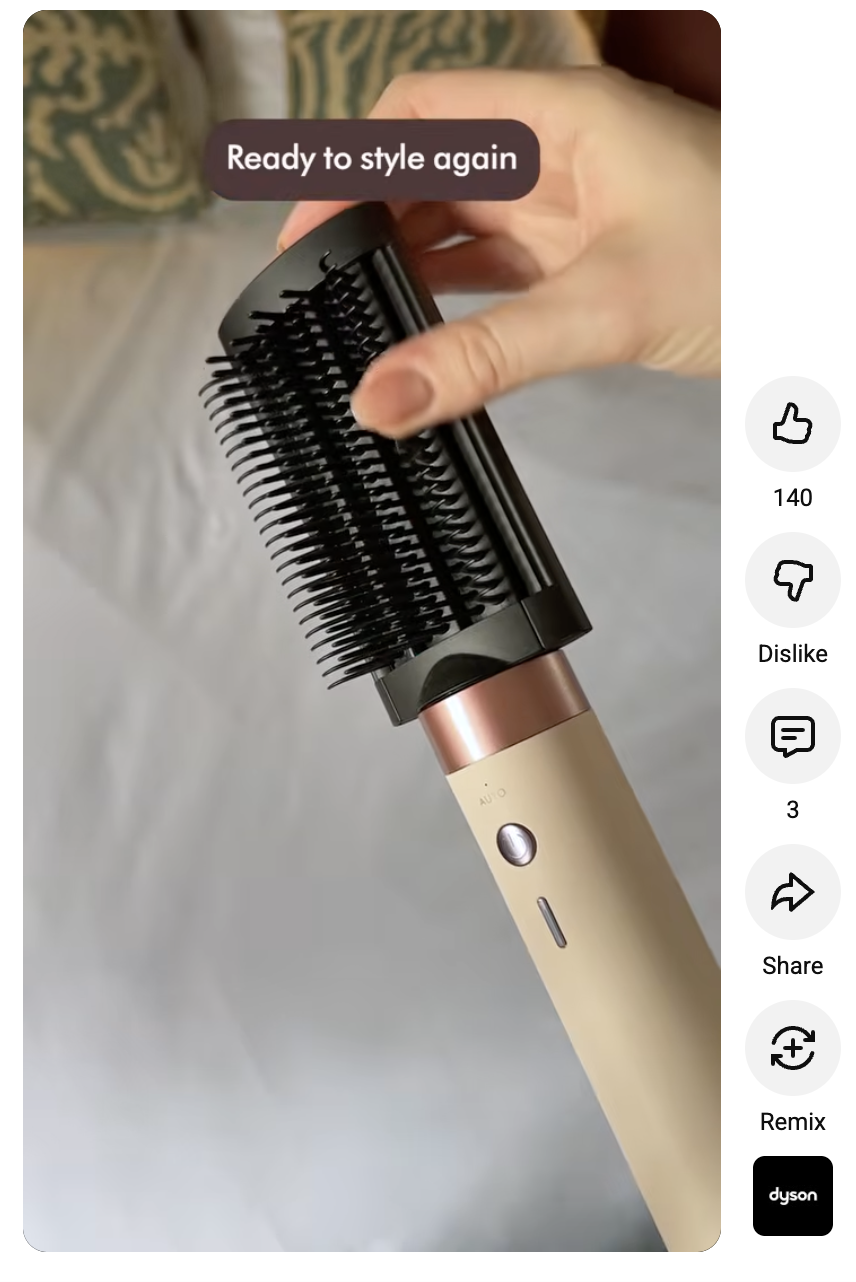
For example, here’s an ASMR video from Dyson with a human feel:
3. Master the “Hybrid Funnel” (Shorts to Sales)
According to Sprout Social’s research, slightly more YouTube users prefer videos under 60 seconds over longer content, making Shorts a powerful discovery format.
But long-form is still where deep trust and high-ticket conversions happen. The best YouTube strategies connect the two to create a “hybrid funnel’.
Two ways to put that into action:
- The LIFT method. Create a comprehensive, shoppable long-form video that answers every meaningful customer objection. Then cut 3 to 5 Shorts from that single video or shoot fresh vertical clips that each highlight one specific pain point.
- The bridge. Use the Shorts to capture attention, then funnel viewers directly to the long-form video using the Related Video link. The long-form is where your main product tags, chapters and storefront live, and Shorts are where you get the traffic.
This pairing also protects you against algorithmic fluctuations. Shorts may surge or cool, but a strong long-form video can sell consistently for years.
4. Host high-urgency live shopping “drops”
Live shopping isn’t just for massive influencers. It works especially well when two things are true: your community is engaged and your inventory is limited.
For small brands, both are often built into the business. Turn your live streams into sales by:
- Pinning your products. Feature specific items in your stream and pin them to the top of the live chat so viewers can buy instantly, without scrolling away from the broadcast.
- Creating scarcity. Offer flash sales, exclusive bundles or limited-time discount codes that expire the moment your live video ends to encourage swift action.
- Prioritizing engagement over production. Run with two people if you can: one host who demonstrates the product on camera, and one team member moderating the chat and answering buyer questions in real time. Removing hesitation on the spot is worth more than better lighting or polished scripts.
5. Optimize for “zero-click” search and AI discovery
YouTube videos are increasingly showing up on Google’s AI Overviews and search results, especially for product-led or how-to queries. Most people don’t even have to click to get the answer they’re looking for (also known as “zero click” search).
Treat your videos as landing pages so AI tools, search engines and buyers can find you. Follow the tips below to stay visible:
- Entity SEO. Train the algorithm on exactly what you sell. Use highly descriptive, keyword-rich titles (e.g., “Best Sustainable Skincare Routine for Dry Skin”) instead of vague ones (e.g., “Our New Products”). Include your product, category and use case in the description and on-screen text.
- Timestamps and chapters. Break videos into clearly labelled chapters (e.g., “02:15 – How to apply the serum”). Google uses these timestamps to serve specific product topics directly inside search results, sending high-intent buyers straight to your shoppable tags instead of into a generic results page.
Here’s an example of a YouTube Shopping video from Sephora optimized for search:
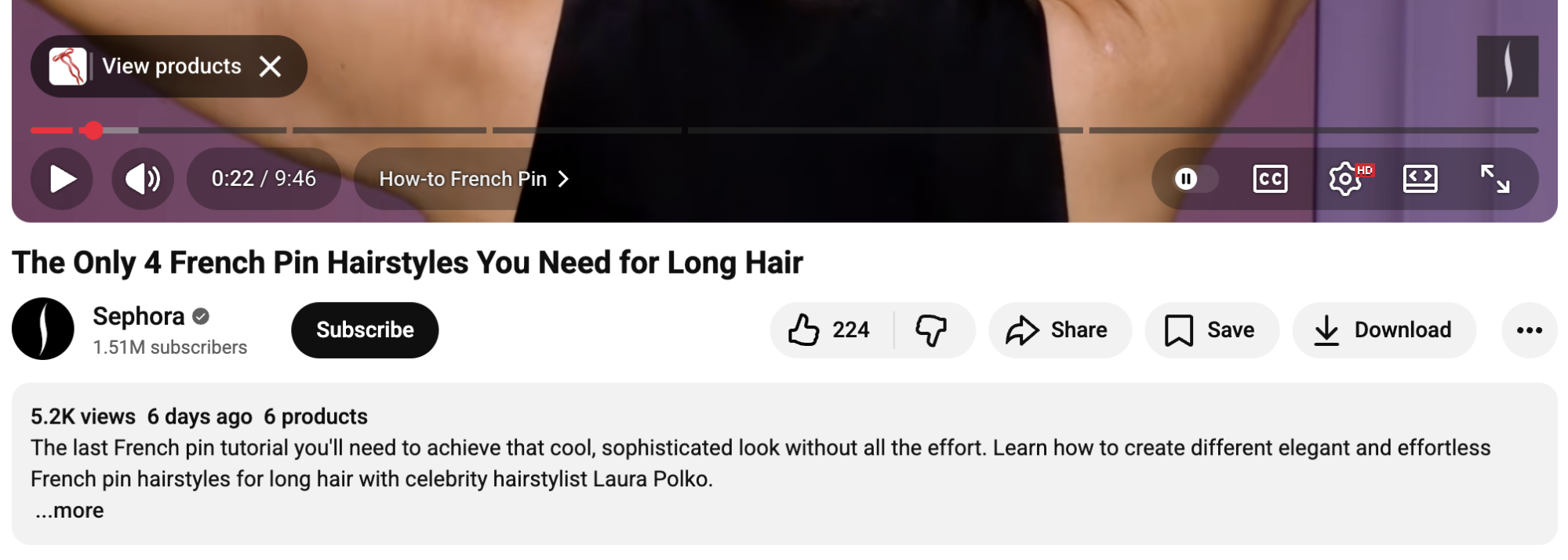
Notice the keywords in the title and description, as well as the clearly labelled chapters.
Instead of spending on production, invest in engineering your video metadata to be machine-readable and helpful to humans at the same time.
How to set up YouTube Shopping for your brand
Once you’re eligible, setting up YouTube Shopping for your brand is more straightforward than you’d expect. The workflow looks like this:
- Open YouTube Studio and head to the ‘Earn’ tab: This is your control panel for all monetization features, including Shopping. If Shopping is available, you’ll see it as a card here.
- Connect a supported e-commerce platform: Next, link an online store (e.g., on Shopify) directly. Alternatively, you can connect via Google Merchant Center, which is a good fit if you’re already running Google Shopping ads and want a single product feed powering both.
- Sync your product catalogue and resolve any initial disapprovals: Once connected, your products will start populating in YouTube Studio. Expect a handful of disapprovals on the first sync, usually due to image quality, missing attributes or restricted categories. Fix these at the source in your store, and they’ll refresh in YouTube within a day or two.
- Organize your channel storefront. Curate which products appear (and in what order) on your channel’s Store tab. Lead with hero products, current promotions and seasonal priorities so buyers see your best items first.
From there, you can start tagging products inside individual videos, Shorts and livestreams, and your shoppable infrastructure on YouTube is officially live.
How to track the performance of YouTube Shopping?
Vanity metrics like views and likes will tell you whether people are watching your content. But they won’t tell you whether your content is selling. Follow the steps below to measure the true return on investment on your YouTube Shopping strategy:
- Start with retention, not reach. Look at the average view duration, audience retention curve and re-watches to understand your viewers’ watching patterns. A video that holds attention through five minutes of demo time is doing more for your pipeline than one that racks up impressions in the first 10 seconds.
- Track metrics that tie back to revenue. Pay attention to the number of direct product clicks, the click-through rate on tagged products, the total revenue attributed to specific videos and your per-product conversion patterns. This data separates content that entertains from content that earns you money.
- Segment by format. Compare conversion behavior across Shorts, long-form videos and live streams to understand what purpose each format serves and where you need to allocate more budget and production time. For example, you might discover your live streams drive spikes but long-form videos generate steady revenue.
While you can track most of these metrics inside YouTube’s native analytics, using a third-party tool like Sprout Social lets you tap into additional features that elevate your strategy across all your social media channels, not just YouTube.
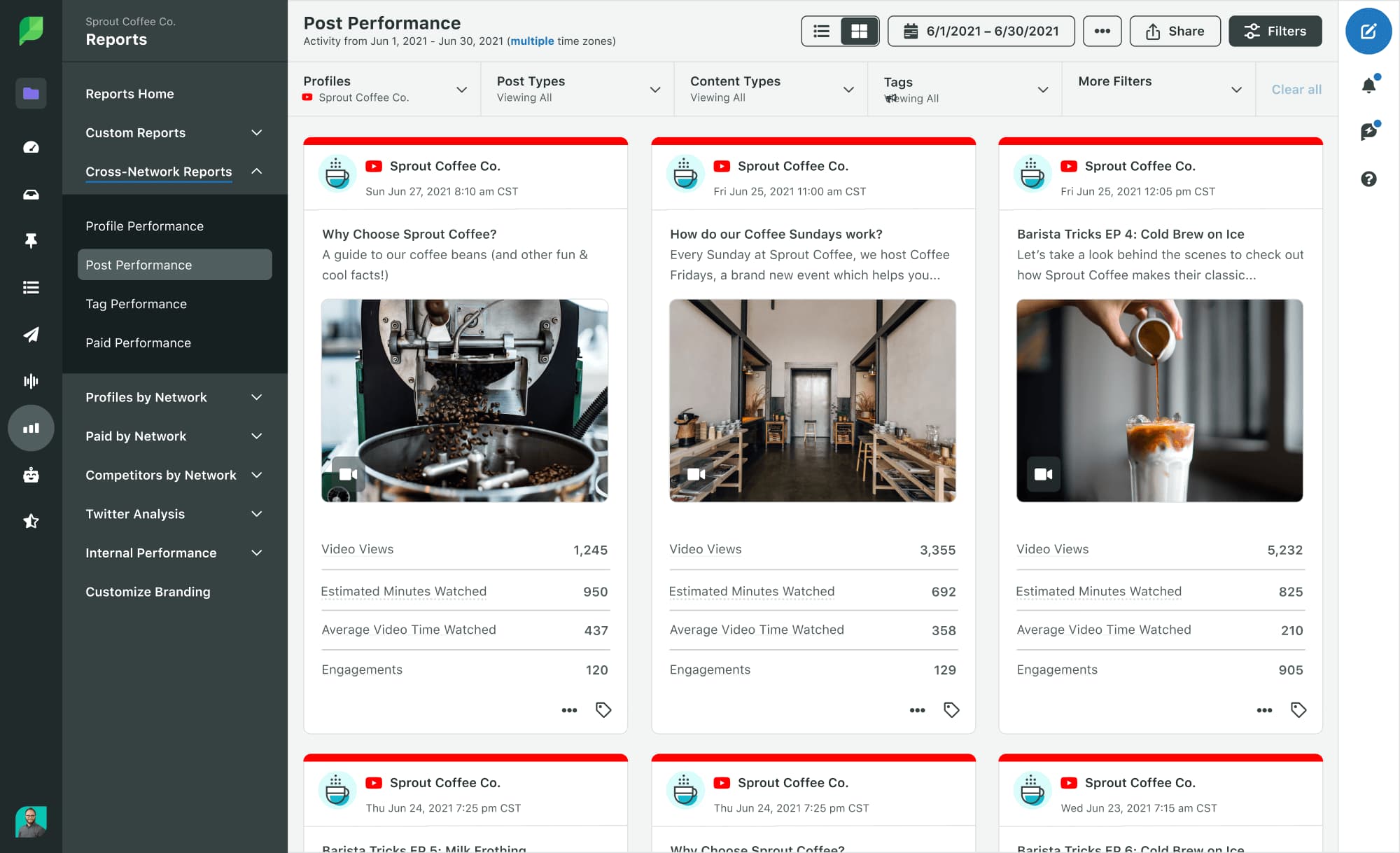
For example, you can use Sprout to analyze engagement metrics, schedule content, manage audience interactions and offer customer care across multiple networks from one place.
You’ll also see where YouTube sits within your broader social strategy and exactly how much YouTube Shopping contributes to overall revenue.
Use YouTube Shopping to drive sales with your videos
YouTube Shopping is one of the best examples of where content and commerce overlap. Luckily, there’s still plenty of time and space for brands to build trust, tag products and sell on the platform before it gets crowded.
Sprout Social helps you do all of that and connect your performance to revenue. From scheduling and audience insights to engagement and reporting across YouTube and other channels, Sprout enables you to grow your brand with shoppable content.
Get started for free with Essentials by Sprout Social.
39 free social media strategy templates that will elevate your workflows
Published on August 20, 2026 Reading time 15 minutes







Share