How to calculate and boost your Pinterest engagement rate

Written by Kimberly Steele
Published on February 23, 2026
Reading time 10 minutes

Table of Contents
Pinterest is a discovery-first platform where people search, plan and save ideas over time. Engagement often builds slowly, which is different from social media networks designed around recency and fast-moving feeds.
Add in shifting algorithms and tricky attribution, and measuring Pinterest ROI becomes even more challenging. To understand performance, you need to go beyond vanity metrics and look at your true engagement rate.
Below, you’ll learn what a Pinterest engagement rate is as it relates to Pinterest marketing and the different ways to calculate it. We’ll also share benchmarks and strategies for improving your engagement rate.
What is the Pinterest engagement rate?
Your Pinterest engagement rate measures how often people interact with your Pins compared to how many times they see them. It goes beyond visibility to show how useful or inspiring your content is to your audience.
Unlike other networks where ‘likes’ dominate, interactions such as saves, outbound clicks and video views carry more weight on Pinterest, as they show genuine user intent.
To get the full picture of your content’s health, you need to understand the multiple types of engagement rates: per impression, per audience and per Pin.
Each type offers a distinct view of your performance, from visibility to the quality of interactions. We’ll show you how to calculate each one later in the article.
What counts as engagement on Pinterest?
Pinterest engagement is a direct action a user takes, signaling intent or value. These actions are what the algorithm prioritizes because they indicate the Pin is useful for planning and discovery. Here’s what counts as ‘engagement’ on Pinterest:
- Saves (formerly repins)
- Outbound clicks
- Pin clicks (viewing the Pin in full)
- Carousel swipes
- Video views (for Idea Pins and video content)
The number of total engagements divided by a metric like impressions or audience size gives you the engagement rate.
How to calculate your Pinterest engagement rate
Calculating your Pinterest engagement rate gives you a concrete, measurable way to understand the impact of your content. Here are two ways to calculate this metric—by impressions and by audience.
Engagement rate by impressions
Engagement rate by impressions measures how often people interact with your Pin compared to how many times it was shown in feeds or search results. Here’s the formula:
ER (by impressions) = (Total engagements / Number of impressions) x 100
This metric is critical for understanding how well your visuals and Pin descriptions convert passive views into active engagement like clicks and saves.
Engagement rate by audience
This formula measures the depth of your connection with your audience. It helps you understand the percentage of your followers who are actively interacting with your content.
ER (by audience) = (Total engagements / Total audience) x 100
This number is often higher for smaller, highly niche Pinterest account profiles and is a powerful indicator of community health. For social media marketers, comparing these two rates helps diagnose if the issue is reach (impressions) or relevance (audience).
What’s a good Pinterest engagement rate?
As a general benchmark for most brands, the average engagement rate on Pinterest hovers between 2–5%. This is a strong, healthy range that indicates your content is resonating and driving intent-based actions like saves and clicks.
However, this number shifts based on content type and industry. Pins that leverage strong visual storytelling often push past the average. Here are some specific benchmarks:
- Idea Pins and video Pins regularly exceed engagement rates of 8–10%. This reflects Pinterest’s ongoing push to reward high-production, narrative-driven content.
- High-engagement industries like food recipes, home decor and DIY often see elevated rates, sometimes peaking closer to 7–9%. These verticals align perfectly with the platform’s core mission as a planning and inspiration tool.
That said, a good engagement rate is subjective. It depends on your niche, your content style and even your business maturity. Smaller or newer accounts often see higher engagement because their audiences are more focused and active.
If your engagement rate is consistently above the average for your niche, your content is performing well. Ultimately, a good rate is one that moves you toward your primary goal, whether that’s driving website traffic or product discovery.
A good rate is also one you can consistently benchmark against your other channels. Sprout’s multi-network dashboard helps you diagnose if your Pinterest audience is outperforming other visual platforms, allowing you to reallocate resources quickly.
Why your Pinterest engagement rate is low (and how to fix it)
If your engagement metrics are flatlining, your issue likely falls into one of three critical areas:
- Visual optimization
- Trend alignment
- Posting consistency
Addressing these pain points is the fastest route to improving your Pinterest engagement rate and realizing the full potential of your Pinterest marketing strategy.
Visuals not optimized for discovery
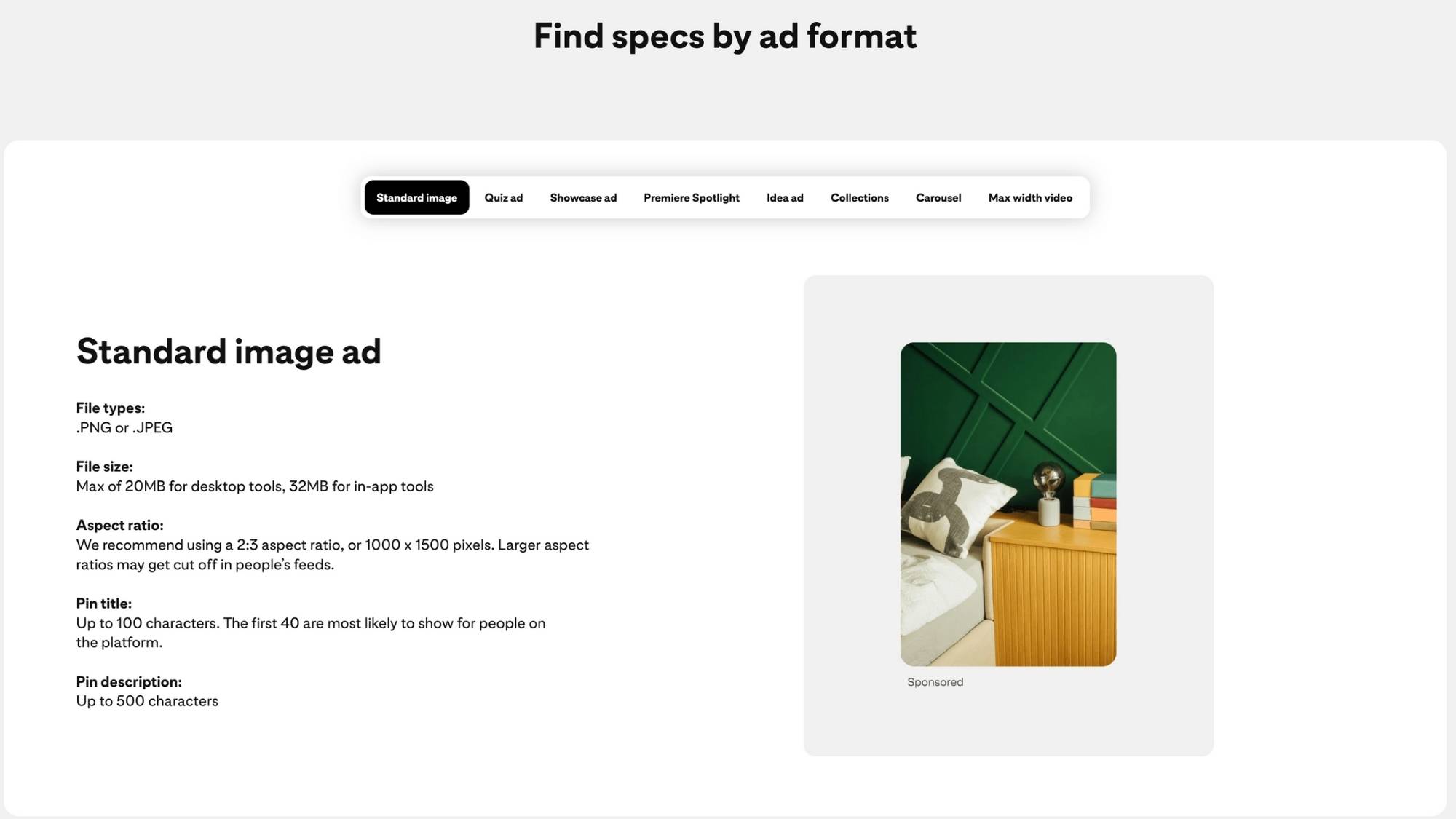
Pinterest is a visual search engine; if your Pins don’t look right, your audience won’t stop scrolling. Pinterest Pin failure often comes down to incorrect aspect ratios and poor resolution.
Stick to the standard 2:3 aspect ratio (e.g., 1000×1500 pixels) for best results. This vertical format dominates the mobile feed, which is where 85%+ of Pinterest usage happens. Here are some additional tips for visual optimization:
- Be authentic: Prioritize authentic, in-context visuals over sterile stock photos. Users on Pinterest are looking for inspiration they can act on, not high-quality corporate imagery.
- Control the text: Limit text overlay to under 10% of the image space. The title and description carry the keyword load; the image’s job is to be an eye-catching hook.
Here are some guidelines from Pinterest for optimizing your content—specifically image ads.
Not capitalizing on key trends
Pinterest trends follow a long-tail engagement cycle. A Pin you post today can resurface for months, which is unlike the fast-paced nature of platforms like TikTok, where content fades quickly.
Pinterest users also come to the platform with a positive, intentional mindset. In fact, Sprout’s research shows over half of consumers feel Pinterest is more positive than other platforms.

To stay relevant, you need to plan early and create content that matches what users expect and are searching for. Below are some ways to do that:
- Use Pinterest Predicts: The platform’s annual report is one of the best resources for shaping your upcoming content strategy and pillars. These early insights help you target keywords that have yet to peak.
- Target unbranded searches: The majority of top Pinterest queries are unbranded. Your trend alignment must include non-branded, relevant keywords that align with user search intent. Engagement drops instantly when Pin titles and descriptions don’t perfectly align with what the user is searching for.
- Inspire with Sprout Listening: To keep you on the pulse of emerging topics, use Sprout Listening, a paid add-on. While Listening is primarily for conversation monitoring, it helps you inspire evergreen Pinterest content ideas and keep your strategy on trend. You can research conversation volume and sentiment around your niche, giving you a competitive edge. This listening capability helps you uncover topics before they hit peak volume.

Source: Pinterest Predicts
Infrequent or inconsistent posting
The Pinterest algorithm rewards consistency and fresh content. It’s not enough to post a burst of Pins and then disappear. You need a reliable, consistent publishing schedule. Pinterest values new Pins, even if they link back to an existing URL, because it shows your Pinterest profile is active and adding value to the platform. The most effective way to maintain this momentum is to schedule Pinterest posts during your weekly planning sessions, ensuring a steady stream of fresh content even when your team is focused on other tasks.
- Establish a rhythm: The best practice recommendation is to post three to five fresh Pins per day, which can include both new content and re-Pins from your own domain.
- Simplify publishing: Sprout’s scheduling tools simplify maintaining this consistency across multiple group boards and campaigns.
- Optimize posting times: Use Sprout’s ViralPost feature to analyze your audience’s behavior and determine the best times to post on Pinterest for maximum interaction. This ensures your quality content is delivered exactly when your audience is most active and ready to engage.
Dig deeper into Pinterest insights with Sprout’s analytics and reporting
To turn Pinterest into a stronger part of your social strategy, you need one reliable place to track and understand your Pinterest analytics. Sprout Social centralizes your data, allowing you to track, compare and optimize your performance across all networks.
With Sprout’s Pinterest management tools, it’s easier to answer strategic questions, show results and demonstrate <a href=”https://sproutsocial.com/roi/social-media-roi/”social media ROI to your stakeholders.
Here’s a quick summary of what you can do with Sprout.
Track key metrics in one dashboard
Stop jumping between native dashboards. Sprout’s Profile Performance Report centralizes your Pinterest data alongside other channels, such as Instagram and TikTok. This multi-network view helps you see all your metrics in one place.
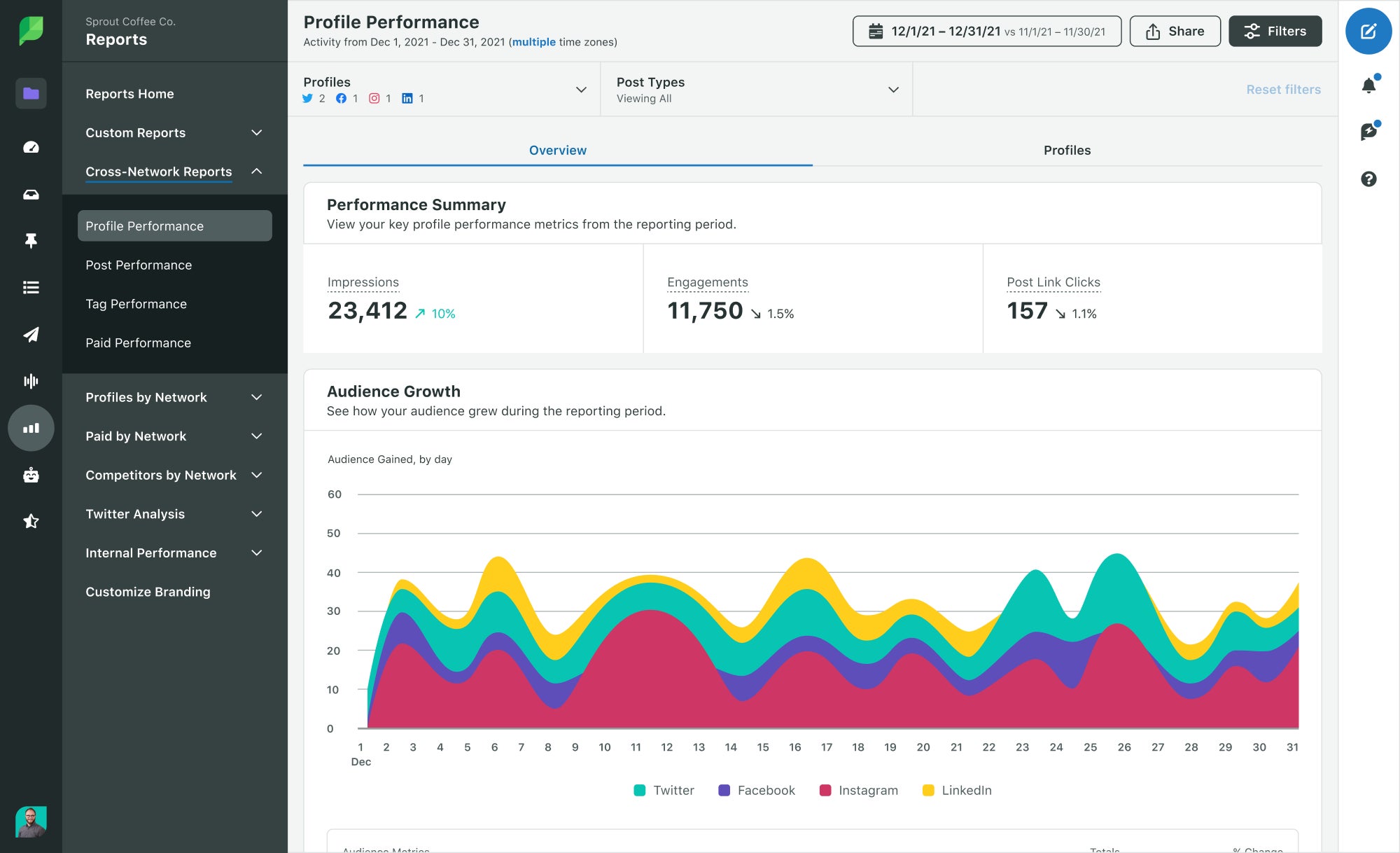
Here’s how that provides a unique advantage.
- Clear comparison: See how your Pinterest engagement metrics stack up against your performance on other platforms so you can focus resources where they matter the most.
- Pin-level analysis: Track granular data, including the total number of times your Pins were saved, the number of clicks they received and the video completion rate for your video pins.
Identify top-performing content
Sprout’s Post Performance Report analyzes exactly which content types and themes are driving the highest Pinterest engagement rate. You can slice the data by board, format and even tags to quickly spot trends in your own performance.
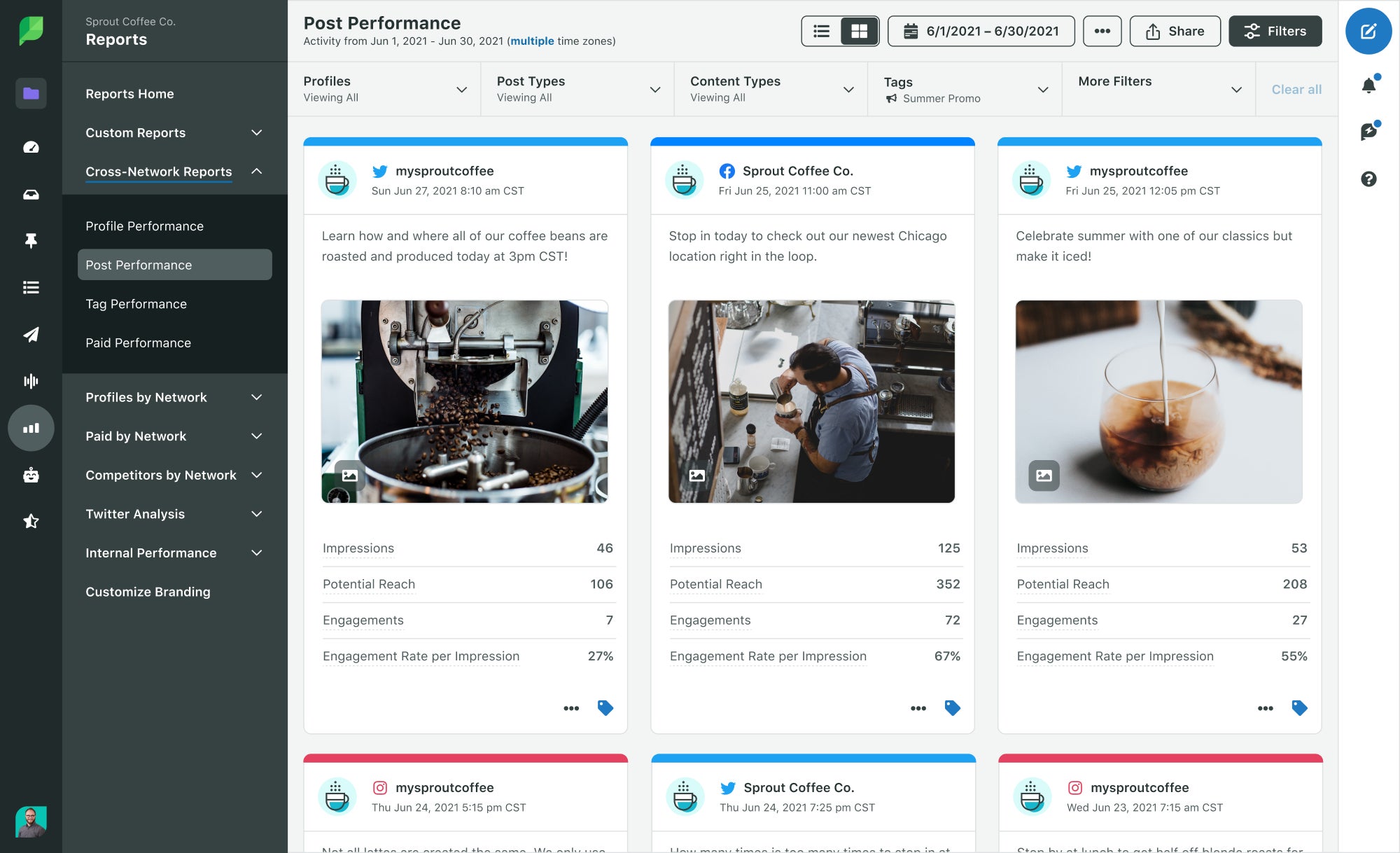
Below are some specific ways to use this report:
- Focus on saves and clicks: By sorting your top Pins by outbound clicks and saves, you instantly identify the topics that fulfill user intent. This informs your future content strategy.
- Compare the number of impressions to engagement: A high impression count with low engagement signals a weak visual hook or misaligned Pin description. Sprout helps you diagnose these issues instantly.
Proving ROI to stakeholders
In a problem-aware customer journey stage, you need to prove the investment in social media is worthwhile. Sprout helps you do this by turning raw data into clear, shareable visuals.
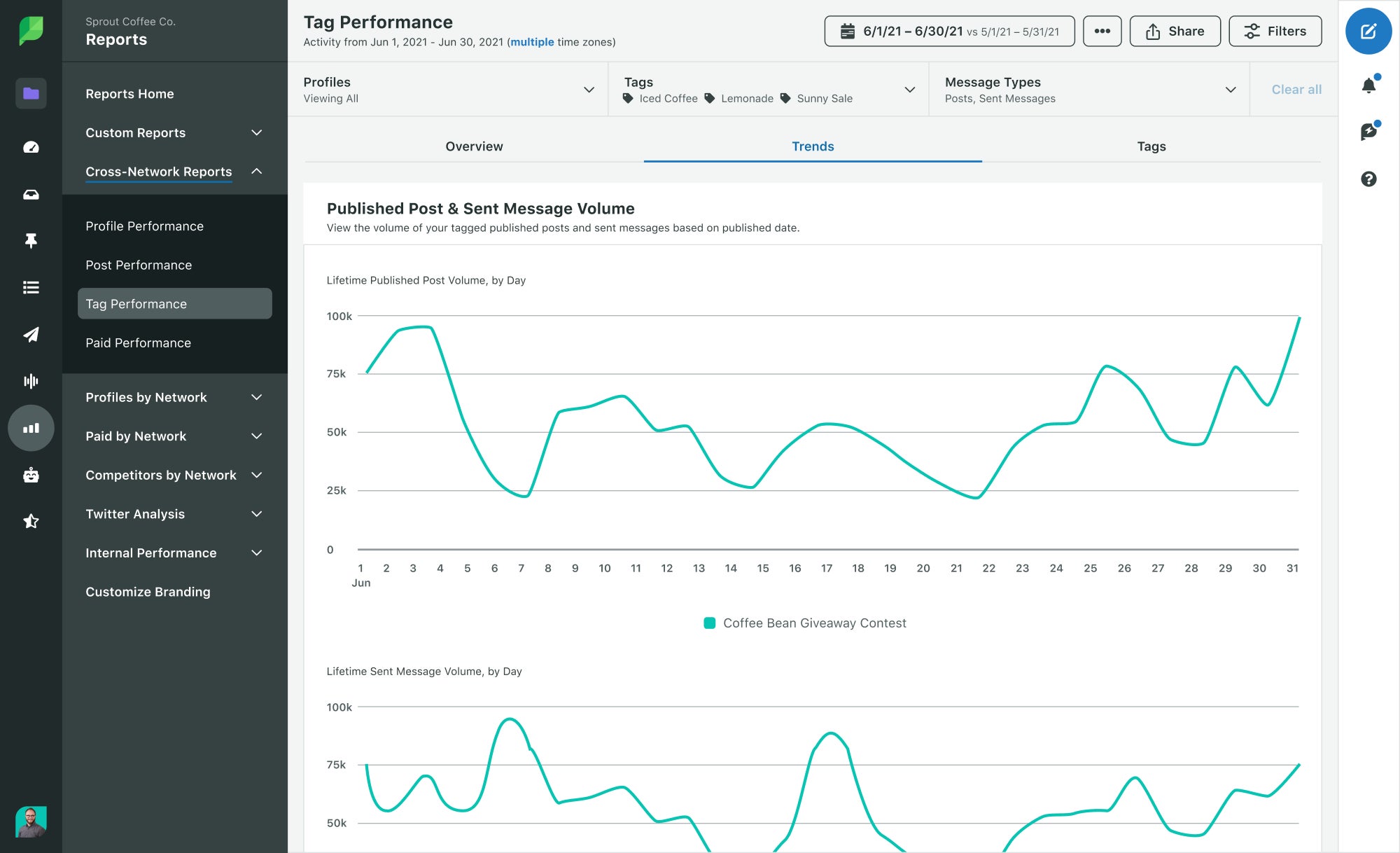
- Campaign and tag tracking: You can use tag tracking and campaign reporting, available on Advanced plans and higher, to tie specific content initiatives (e.g., a promoted Pins campaign or a new product launch) directly to your engagement results.
- Scheduled reporting: Social media reports can be scheduled and exported in ready-to-present formats, providing marketing leaders with a crystal-clear understanding of the impact of your Pinterest marketing strategy. Sprout’s reporting and analytics tools empowers you to focus less on data gathering and more on strategic planning.
Curious about how Sprout’s Pinterest analytics can support your Pinterest marketing campaigns?
Sign up for a free trial today
5 strategies to improve your Pinterest engagement rate
Improving your engagement rate requires a tactical shift focused on discoverability, content diversification and audience connection. Here are five actionable strategies you can implement right now.
1. Master keyword research to boost discoverability
Pinterest is a visual search engine, not a social network built on friendships. You must approach your Pinterest content with an SEO mindset. This means using keywords naturally in your titles, descriptions and alt text.
Follow these tips to boost your visibility on the platform.
- Use Pinterest’s tools: Leverage the platform’s search prediction bar and the native Trends tool as your primary research sources. They show you exactly what users are looking for in real time.
- Focus on context: Avoid keyword dumps in Pin descriptions. Instead, use long-tail keywords that naturally describe the image and the user’s intent—for example, “minimalist living room home decor ideas” instead of just “decor.” This ensures your content serves the user’s planning phase, not just the algorithm.
2. Diversify your content mix with video and Idea Pins
Pinterest’s strongest engagement now comes from content that’s visual, dynamic and story-driven. To keep up, brands need to go beyond static Pins and lean into newer formats—especially video. Here’s what to keep in mind.
- Use more Video Pins: Auto-play video Pins consistently outperform static Pins by engagement rate.This is a major signal that brands need to invest more in motion graphics and short-form video.
- Use Idea Pins for storytelling: Idea Pins (multi-page video or image stories) are built for inspiration and step-by-step content. They don’t link out, but they drive saves, comments and profile discovery, helping more people find your brand on Pinterest.
- Adopt a ratio: Aim for a balanced content mix that reserves a significant portion of your output for new formats, such as 60% static Pins, 30% idea Pins and 10% video Pins.
3. Use compelling calls to action
Most Pinterest users visit the platform with the intention to research, plan or buy. This makes strong, relevant calls to action (CTAs) crucial for moving them down the funnel.
- Fulfill intent: Because the platform is built for planning and shopping, your CTA must directly fulfill that user intent.
- Align visuals and text: Ensure your visual CTAs (text overlay) and your description’s call to action are consistent. For an e-commerce brand, a visual overlay that says “Shop Now” could be paired with a description that explains the product and links to it.
- Drive action: Use action-oriented phrases like “Shop the look,” “Plan your next project” or “Get inspired by this new design” to motivate users to click.
4. Engage proactively with comments and questions
Community interaction on Pinterest is often underutilized, yet it’s a strong signal of relevance to the platform’s algorithm. Engagement metrics are not just a measure of clicks; they’re a measure of conversation.
- Build community: Responding to comments and questions not only builds loyalty, but also encourages further interaction. This proactive engagement tells Pinterest your content is generating a conversation.
- Pin user content: Where appropriate, featuring responses or pinning high-quality user-generated content strengthens community ties and provides fresh content. Remember that engagement signals relevance to Pinterest’s algorithm.
5. Leverage rich Pins for more information
Rich Pins automatically pull key information from your website into your Pins. That added context makes them more useful for boosting SEO and clicks.
Here are some tips to remember:
- Choose the right type: There are three main types of rich Pins: Product, Recipe and Article. Each format adds useful information—like pricing, ingredients or headlines—so your Pins feel more complete and helpful in search.
- Boost click-through rates (CTR): By auto-syncing metadata, you provide more information upfront. This makes your Pin more valuable to the user and increases their confidence in clicking.
- Audit for errors: Regularly audit your rich Pins to ensure there are no schema errors or missing metadata. The goal is to make every Pin a highly-contextualized asset that drives Pin clicks and saves.
Transform passive scrolling into active planning
The real power of Pinterest shows up when people do more than scroll—they save ideas, click through and start planning. Your engagement rate is an early signal that this is happening and shows your content has ROI potential.
Strong engagement means your Pins are discoverable, relevant and useful. When your visuals and search strategy align with what people want, you turn inspiration into action that supports your business goals.
Your next step: make every Pin count
A high Pinterest engagement rate reflects authentic, valuable Pinterest content that serves your audience’s need for planning and discovery.
Ready to put these strategies into action? Try a demo and see how Sprout Social amplifies your social media presence.
FAQs for Pinterest engagement rate
How is Pinterest engagement rate calculated?
Pinterest engagement rate is calculated by dividing your total engagements by your total impressions and multiplying by 100. The primary formula is: ER (by impressions) = (Engagements / Impressions) x 100. Engagements include saves, outbound clicks, Pin clicks and video views.
Which types of Pins have the highest engagement on Pinterest?
Idea Pins and vertical video Pins typically have the highest Pinterest engagement rate because the Pinterest algorithm favors visual, narrative and immersive content. For many brands, these formats see engagement rates that are double or even triple the average rate of a static image Pin.
39 free social media strategy templates that will elevate your workflows
Published on August 20, 2026 Reading time 15 minutes










Share