A guide to crafting seamless Instagram carousel posts

Written by Jacqueline Zote
Published on May 13, 2026
Reading time 11 minutes

Table of Contents
One image captures a moment. An Instagram carousel post tells the whole story—and keeps your audience swiping for more.
Instagram carousel posts let you share up to 20 images or videos in a single post, driving deeper engagement than static content alone. While single-image posts have declined by seven percentage points since 2023, according to the Sprout Social 2025 Content Benchmarks Report, carousel and Reels posts have seen steady growth. This makes carousel posts one of the most effective formats for brands building their Instagram marketing strategy.
This guide breaks down what is a carousel post, why they work and how to use them to drive real results—from creation and sizing to content ideas, best practices and scheduling.
What is an Instagram carousel?
An Instagram carousel is a post containing up to 20 photos or videos that users swipe through sequentially, giving brands a scrollable, story-driven format that consistently outperforms single-image posts in engagement.
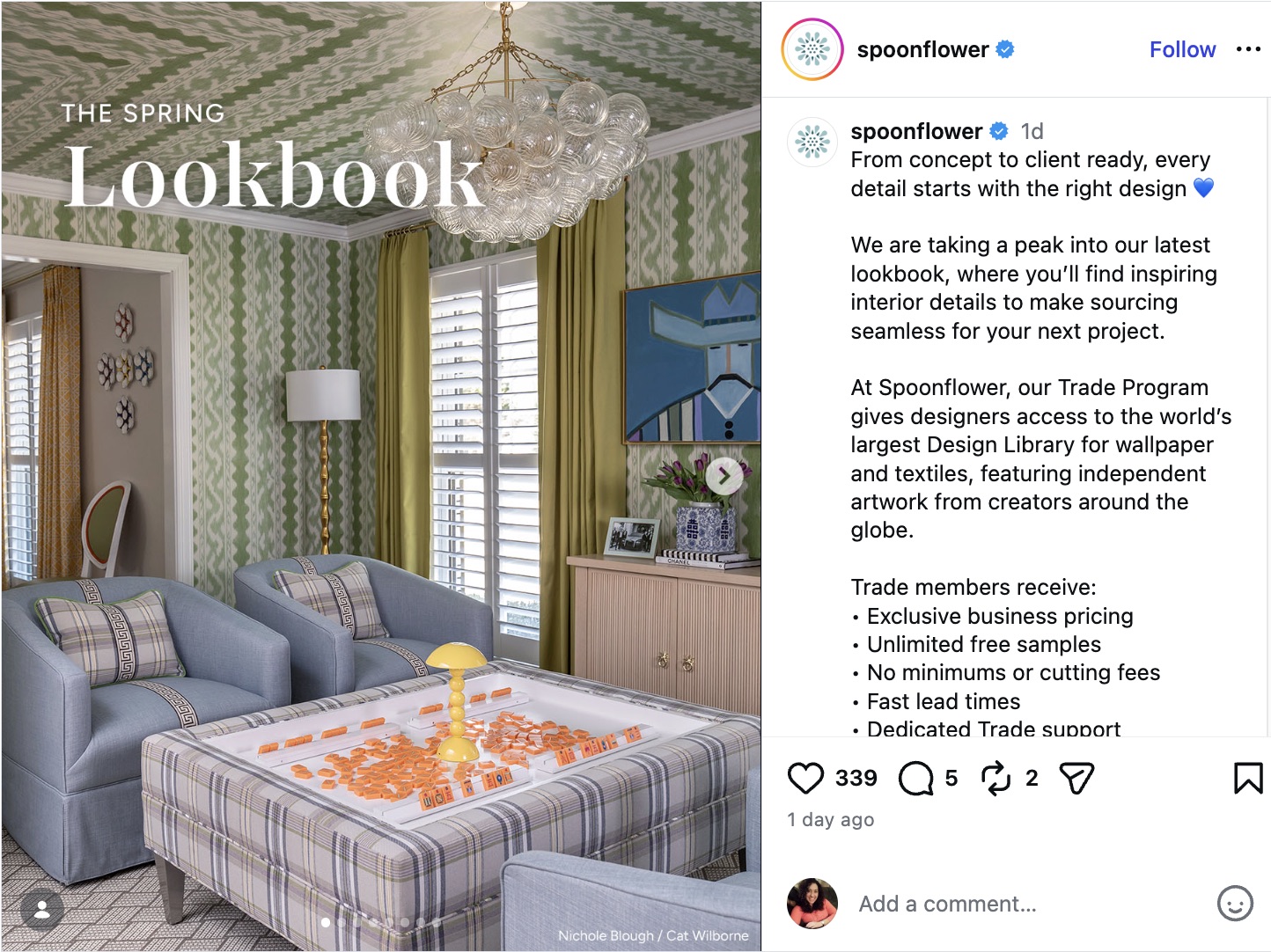
On mobile, viewers swipe left to move through each slide. On desktop, they click the arrow on the right side of the post. The result is a controlled, slide-by-slide experience that keeps audiences engaged longer than a static image does.

Source: Instagram
This format doesn’t just invite interaction—it demands it. Instagram carousels earn an average engagement rate of 0.55% per individual post, outpacing both Reels (0.50%) and single images (0.45%). Even in influencer content, carousels pull ahead: influencer carousel posts average a 1.36% engagement rate compared to 1.04% for single-image posts, according to recent stats.
With up to 20 slides at your disposal, the carousel format is built for depth. Each of those use cases, including brand storytelling, product launches, educational content and more, gets its own dedicated section later in this guide.
Why Instagram carousels outperform other formats
Instagram carousel posts consistently outperform single-image posts because they transform passive scrolling into active engagement. Where a single image gets one shot to stop someone mid-scroll, a carousel gives you multiple frames to pull them in, build your story and drive them toward a clear action.
Multi-frame formats hold attention in ways static images no longer can.
Carousels work because they match how people consume content, one compelling frame at a time. Open with a strong hook, build context slide by slide and close with a takeaway that sticks.
- They reward curiosity: Each swipe is a micro-commitment that deepens engagement.
- They simplify complexity: Tutorials, frameworks and product reveals land harder when broken into steps.
- They extend reach: Instagram re-serves carousels to users who didn’t engage on the first swipe, giving your content a second chance at visibility.
- They flex across campaigns: One format that works for education, storytelling, product launches and social proof.
As short-form video production demands increase, carousels give your team a high-performing alternative that doesn’t require a full video workflow. Give the Instagram carousel a permanent place in your content strategy.
How to create a carousel post on Instagram
Creating an Instagram carousel post takes just a few steps. Follow this process to build and publish your carousel directly in the app.
Step 1. Tap the + button at the bottom of your screen.
Step 2. Select Post from the content type options.
Step 3. Choose your first slide image, then tap the multiple-images icon to add more.
Step 4. Select your images or videos in the order you want them to appear, then tap Next.
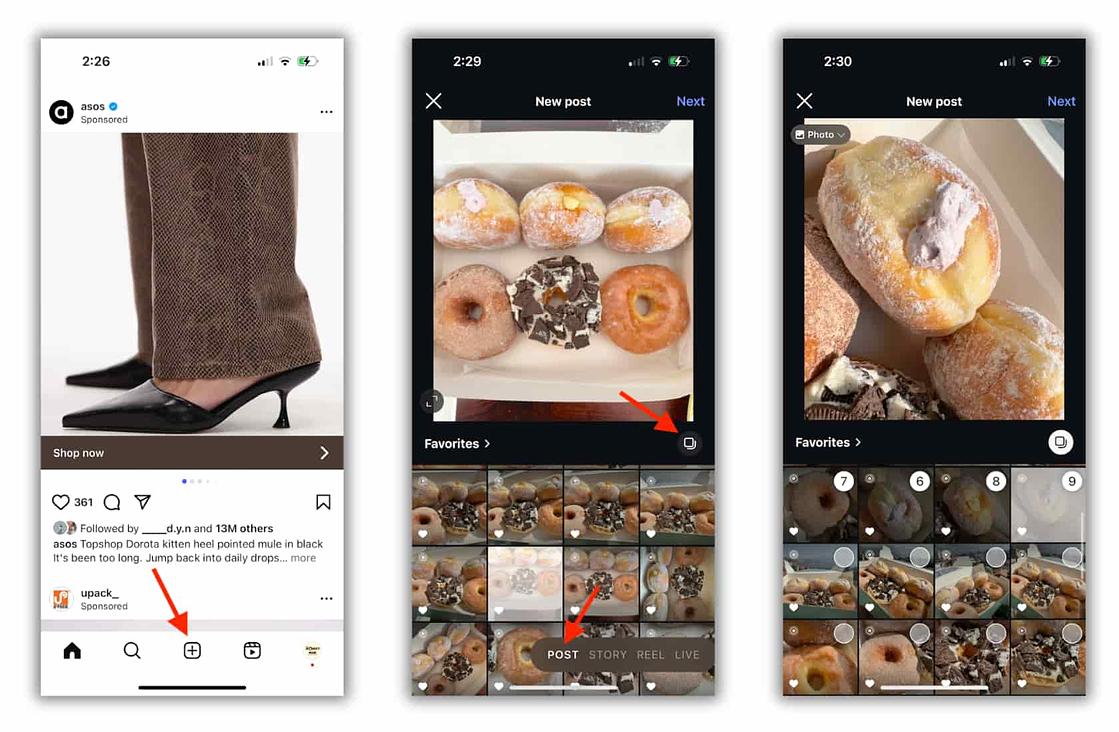
Step 5. Edit your photos and videos. Apply filters, add music and layer text overlays. Use the same filter across every slide to create a cohesive visual identity, then tap Next.
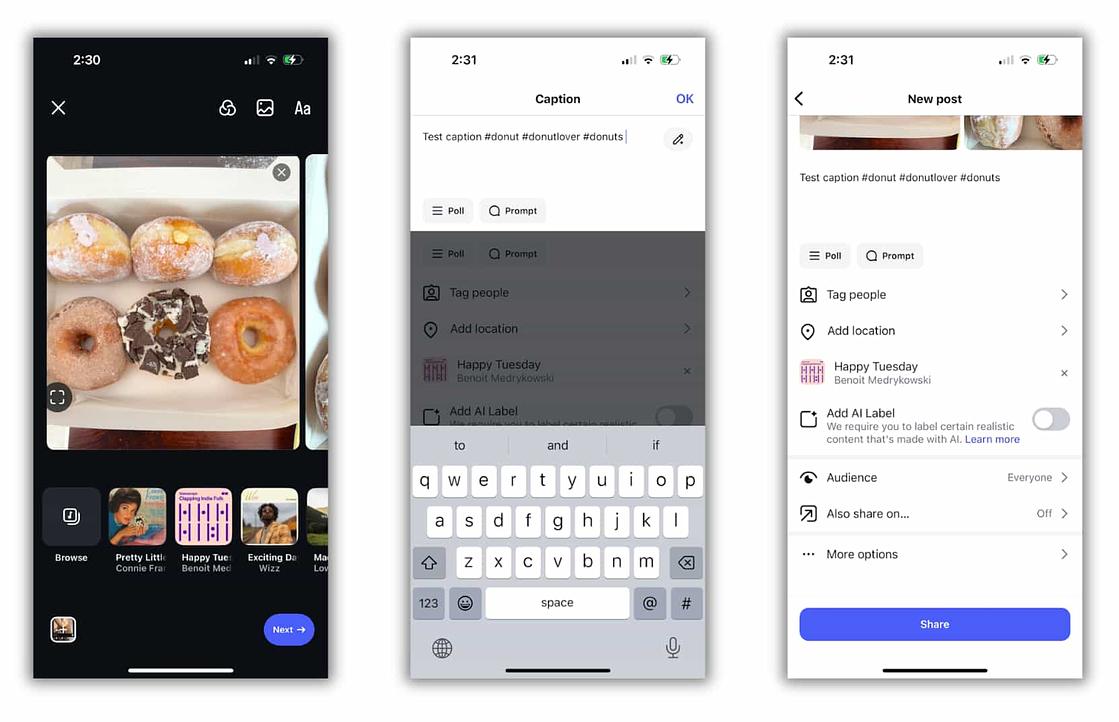
Step 6. Add your post details. Write a caption that drives engagement, include relevant Instagram hashtags to increase visibility and tag people, add a location or set a reminder as needed.
Step 7. Tap Share. Your Instagram carousel post is live.
Instagram carousel size requirements
Instagram carousel posts support three aspect ratios: square (1:1), horizontal (1.91:1) and vertical (4:5). For images, use a resolution of 1080 x 1080 pixels. Videos require a minimum resolution of 600 x 600 pixels and a maximum of 1080 x 1080 pixels.
Source: Instagram
Instagram uses the first slide as the reference for aspect ratio and automatically crops every subsequent image to match it. Set a consistent aspect ratio across all slides before you upload. This prevents distorted visuals and unintentional cropping of key elements.
Here’s a quick reference for carousel specifications:
| Specification | Requirement |
|---|---|
| Supported aspect ratios | 1:1 (square), 1.91:1 (horizontal), 4:5 (vertical) |
| Image resolution | 1080 x 1080 px (recommended) |
| Video resolution (min) | 600 x 600 px |
| Video resolution (max) | 1080 x 1080 px |
| Aspect ratio reference | First slide sets the crop for all subsequent slides |
Creating Instagram carousel post templates
Instagram carousel templates are pre-built design frameworks that apply consistent color schemes, fonts and visual elements across every slide. The result? Cohesive and on-brand without starting from scratch.
You can source ready-made templates from design platforms like Canva and PicMonkey, available free or for a small fee. These work best when your team needs to move fast without sacrificing visual quality. If you use Canva, Sprout Social’s integration lets you design your carousel templates and publish them directly from the same workflow—no downloading, re-uploading or switching between tools.
If your brand has a distinct visual identity, build your own templates from scratch. Custom templates give you full control over design decisions and ensure every Instagram carousel post reinforces your brand, not someone else’s. Whether you start with a Canva template or build from the ground up, the Sprout Social and Canva integration keeps your design and publishing process connected.
Whichever route you choose, keep these template essentials consistent across every carousel:
- Color palette: Stick to your brand’s core colors on every slide.
- Typography: Use the same font family and hierarchy throughout.
- Layout structure: Align text blocks, image placement and spacing so slides flow naturally.
- Visual style: Match photography treatment, illustration style or graphic elements across the set.
Instagram carousel post ideas
The best Instagram carousel ideas give each slide a distinct job. Use the format when a single image falls short and your audience benefits from a clear, deliberate sequence.
Brand storytelling
Walk people through your brand story, mission or point of view one slide at a time. This format builds connection without overwhelming the viewer and gives your brand a voice that feels earned, not broadcast.
Educational content and tutorials
Turn tips, frameworks and step-by-step advice into swipeable lessons. Educational carousels drive saves and shares, making them one of the highest-value formats for organic reach.
Product reveals and launches
Show a new product from multiple angles. Start with the hook, then move into features, benefits and details that support people in understanding the value fast.
User-generated content
According to the 2026 Social Media Content Strategy Report, while consumers are most likely to interact with short-form video on Instagram (52%), user-generated (25%) and influencer content (23%) closely follow as the second and third most popular formats. Because audiences heavily favor these authentic formats, leveraging a carousel lets you showcase multiple customer voices in one post, turning real experiences into social proof that converts.
Event highlights and recaps
Bring your audience into the moment with a recap that feels comprehensive. Share standout moments, behind-the-scenes shots and key takeaways in one cohesive post.
Before-and-after reveals
This format is built for transformation stories. Use it to show progress, results or comparisons that hit harder when seen side by side.
Behind-the-scenes content
Give your audience a closer look at how your team works, creates or prepares for launches. It adds personality and makes your brand feel human, which is exactly what Instagram’s algorithm rewards.
Data and infographics
Break down stats, trends or research into simple visuals that people move through at their own pace. One insight per slide keeps the story sharp and the message clear.
Instagram carousel best practices
Every slide in a high-performing Instagram carousel earns its place. Apply these best practices to build carousels that drive saves, shares and comments, the engagement signals that expand your reach.
Start with a strong first slide
Your first slide does the heavy lifting. Lead with a bold visual, a clear promise or a headline that makes the next swipe feel worth it. If the first frame doesn’t earn attention, the rest of the carousel doesn’t get seen.
Keep one idea per slide
Give each slide a single role so the story stays easy to follow. Clarity beats density every time.
Create a clear visual flow
Use consistent colors, fonts and spacing so the carousel feels connected from start to finish. The experience should read as one cohesive post, not a stack of unrelated assets.
Design for mobile first
Most people see your post on a small screen. Make text readable, keep layouts clean and avoid clutter. If it’s hard to read on a phone, it’s not working.
Build momentum as people swipe
Reveal information in stages, raise curiosity early and save part of the payoff for the end. Each slide should earn the next one. Momentum keeps people moving forward.
Finish with a direct call to action
Tell people exactly what to do next: save the post, share it, comment or visit your profile. Your final slide is your strongest conversion opportunity. Don’t waste it.
Track what earns saves, shares and comments
Instagram maintains an overall 0.55% engagement rate across the platform for carousel posts, among the highest of any content format. That number is an average across all carousel posts. Your ceiling is higher. Look at which topics, hooks and layouts drive saves, shares and comments in your own account, then build from what’s already working.
Focus on intent signals: saves, shares, comments and profile visits. These tell you which carousel topics, hooks and layouts your audience values enough to act on. Track those patterns across your posts, then build from what’s already working.
Sprout Social’s Post Performance Report gives you that view in one place, breaking down engagement by post type so you can compare carousel performance against Reels and single images without manually pulling data from multiple screens. Use the full breakdown of Instagram metrics to understand which signals matter most for your goals.
8 Instagram carousel post examples to inspire you
Carousel posts drive more engagement than any other Instagram format, yet brands still underuse them. The 2025 Content Benchmarks Report found that multi-image posts make up just 25% of branded Instagram content, ranking third behind single-image posts and Reels. That gap is your opportunity.
Here are eight real-world Instagram carousel examples to spark your next post:
1. Sprout Social: Sharing insightful stats
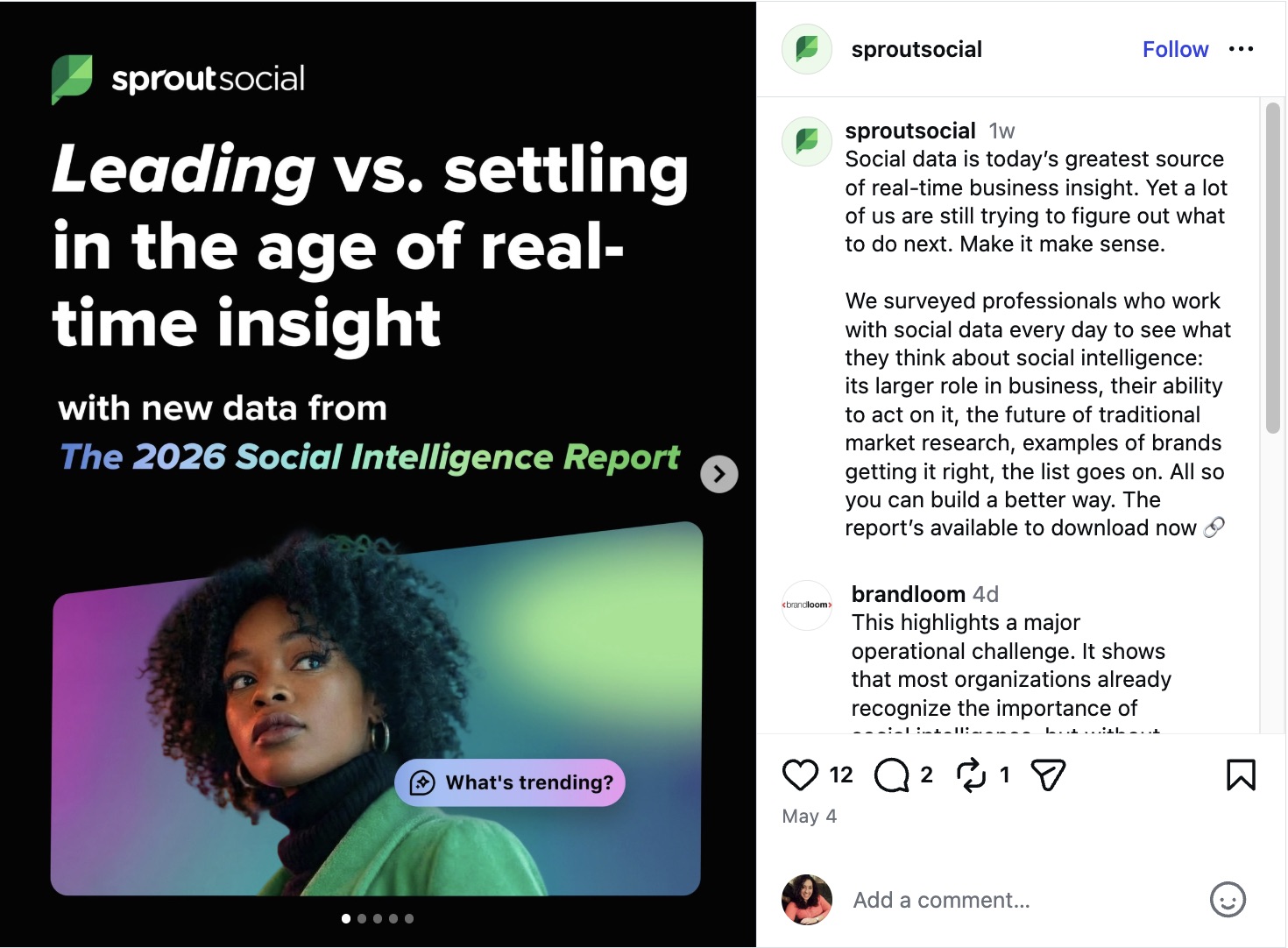
Sprout Social uses Instagram carousels to surface key findings from data reports, giving social media practitioners actionable insights while driving downloads of the full report. Each slide delivers standalone value, and together, they build a compelling case to go deeper.
Source: Instagram
2. Canva: Bite-sized visual guides
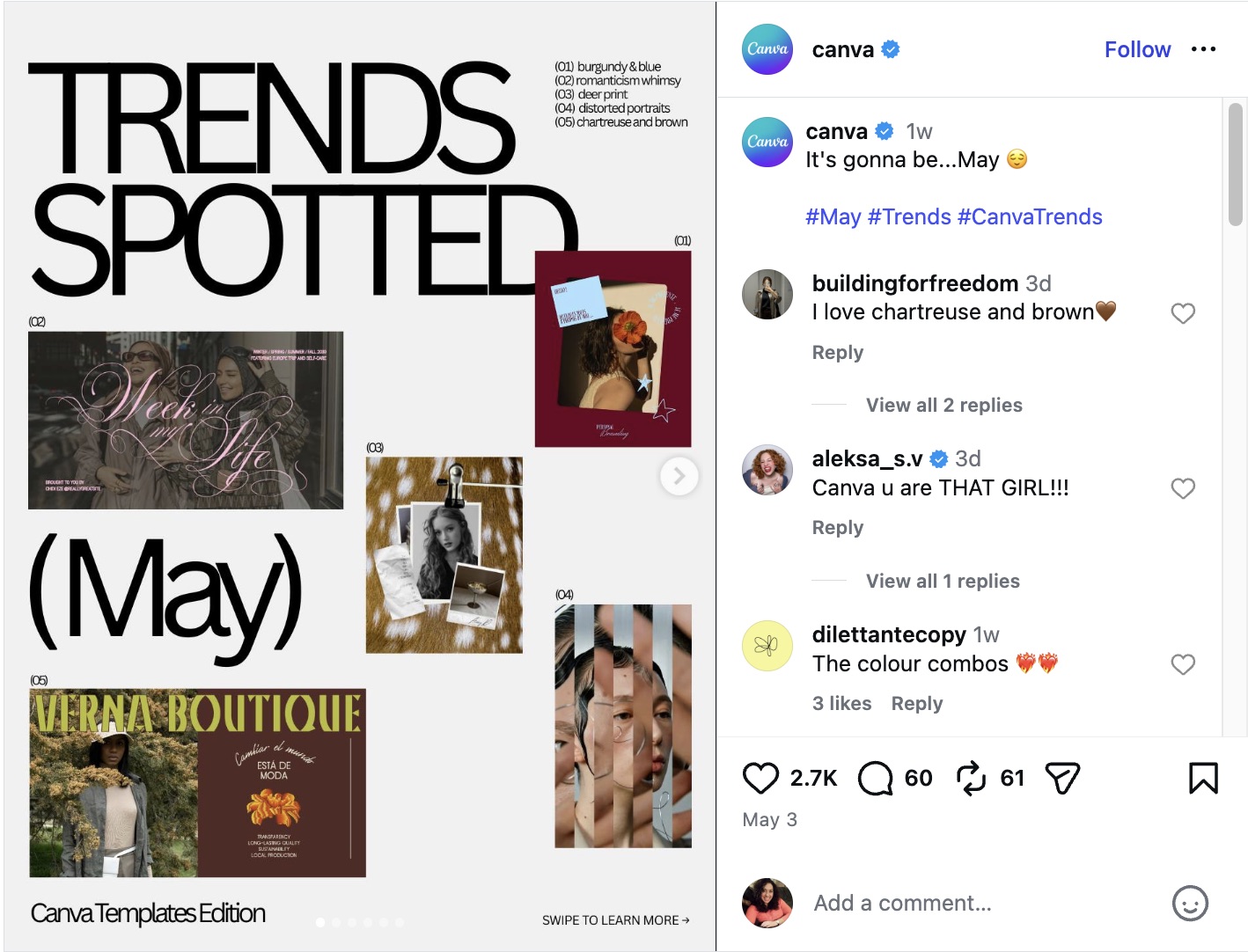
Canva turns carousel posts into actionable visual guides that double as design inspiration. Each slide teaches users something practical, reinforcing the platform’s value while keeping audiences coming back for more.
Source: Instagram
3. ColourPop Cosmetics: Revealing a new collection
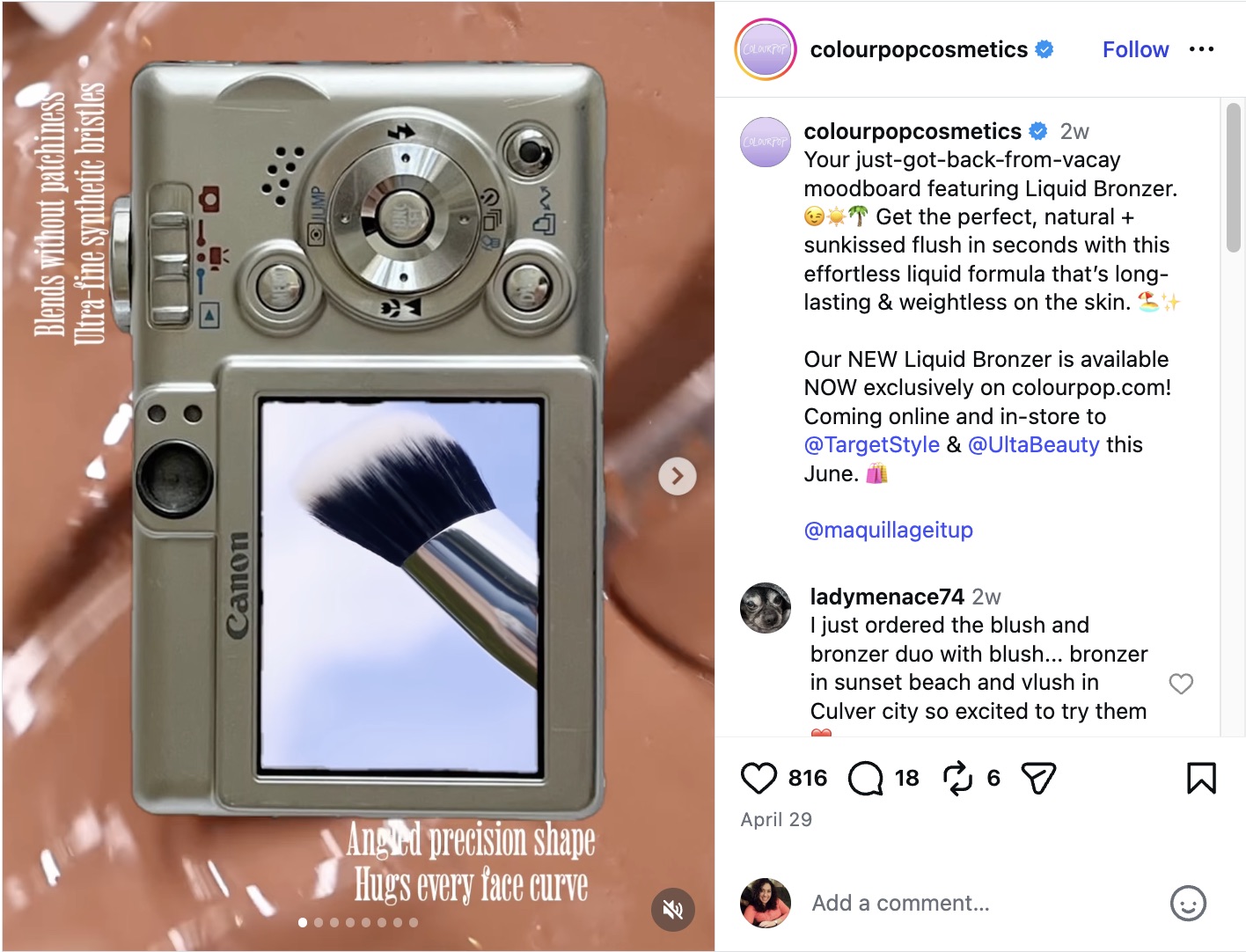
Instagram is a top platform for product discovery—over a quarter of consumers from every generation scroll it to find their next purchase, per the 2026 Social Media Content Strategy Report. ColourPop Cosmetics capitalizes on this by using carousels to reveal new collections, dedicating each slide to product shades and ingredients, and building purchase intent one swipe at a time.
Source: Instagram
4. Fabletics Scrubs: Teasing new product drops
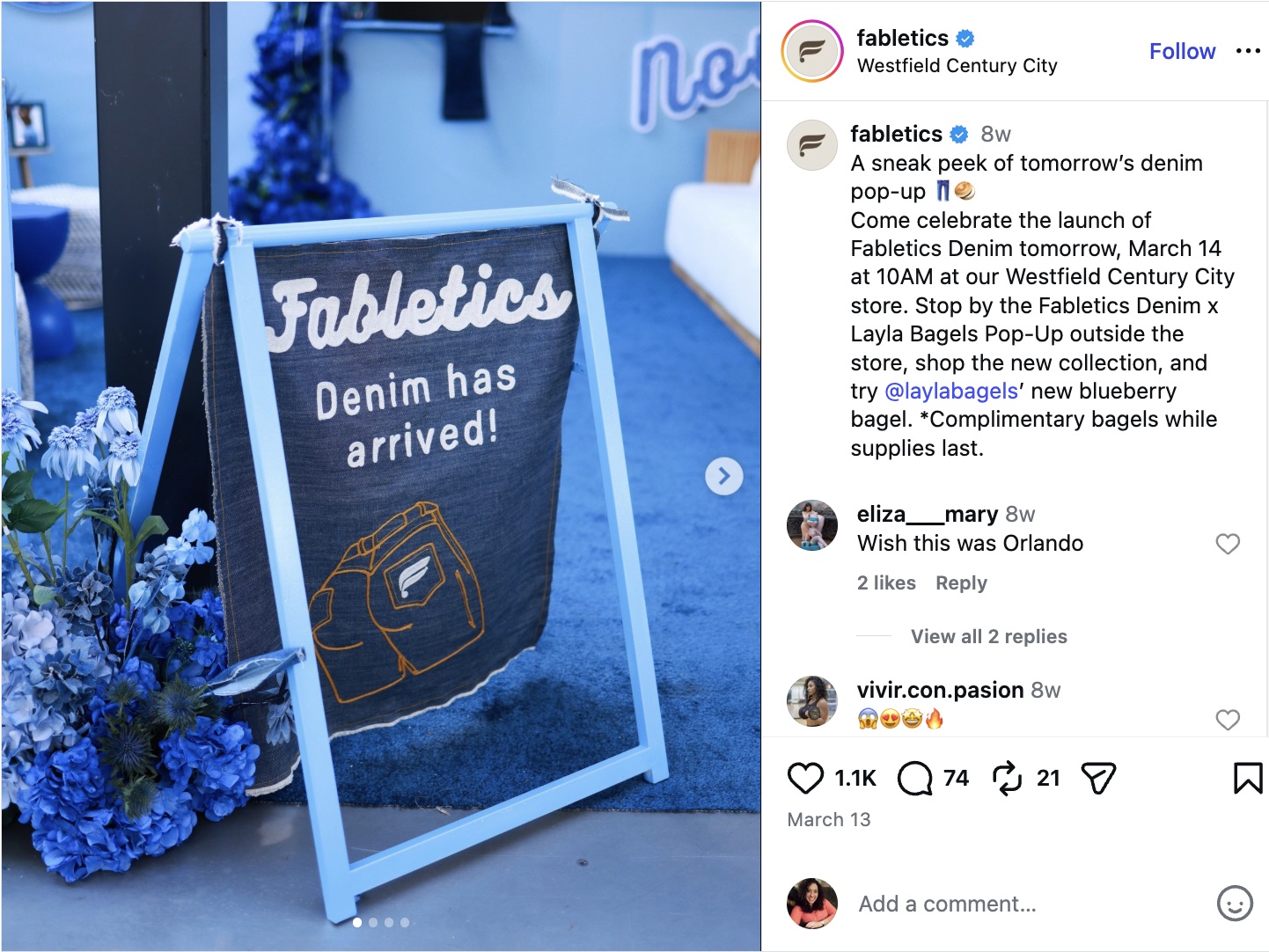
Fabletics Scrubs uses carousel posts to build anticipation before a product drop, posting teaser images that hint at an upcoming apparel and fabric. The result: customers arrive at launch day already excited and ready to buy.
Source: Instagram
5. Frank Body: Sharing a product routine
Frank Body uses a step-by-step carousel slide to walk customers through the brand’s suggested use of how to use several of its products, from shower to post-shower. Customers are walked through several products that they could incorporate into their skincare routines easily.

Source: Instagram
6. CLEARSTEM Skincare: Sharing a milestone
CLEARSTEM Skincare uses a carousel to revisit a milestone of when their smoothie first launched at Erewhon two years ago. The brand shared this milestone, listed the ingredients and benefits of the drink and also reminded followers that the smoothie is available. It’s a smart way to remind audiences the skincare lines collaboration and benefits available in more ways than one.

Source: Instagram
7. Dossier Perfumes: Asking customers to choose a scent of the season
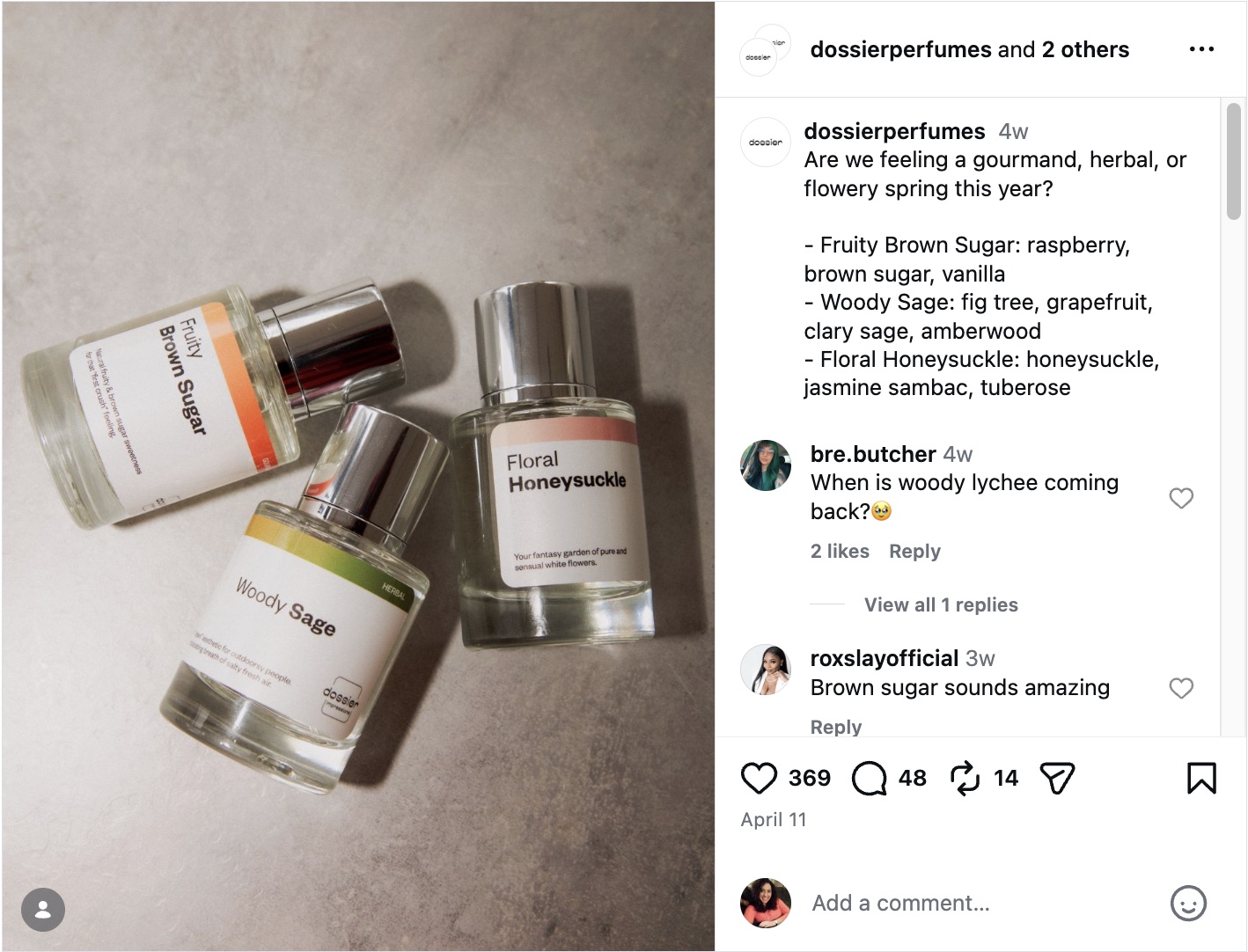
Dossier Perfumes curates themed perfumes across carousel slides, then asks followers to pick their spring scent of the day. The format showcases product variety and turns passive scrollers into active participants—a direct driver of Instagram engagement.
Source: Instagram
8. Miramonti Boutique Hotel: Mini property tour
Miramonti Boutique Hotel uses carousel posts to take prospective guests on a virtual tour of the property, dedicating each slide to a distinct feature like the mountain views, the interior lounge and the gardens. It’s a frictionless way to convert curiosity into bookings before a guest ever arrives.

Source: Instagram
How to schedule an Instagram carousel post
Scheduling Instagram carousel posts in advance keeps your publishing consistent without chaining you to a screen. Instagram’s native tool works, but it has real limitations. You schedule one post at a time and manage them through a buried settings menu.
Here’s how to schedule a carousel post directly in Instagram:
Step 1. After creating your carousel post, tap the More options button from the Share page.
Step 2. Toggle on Schedule this post.
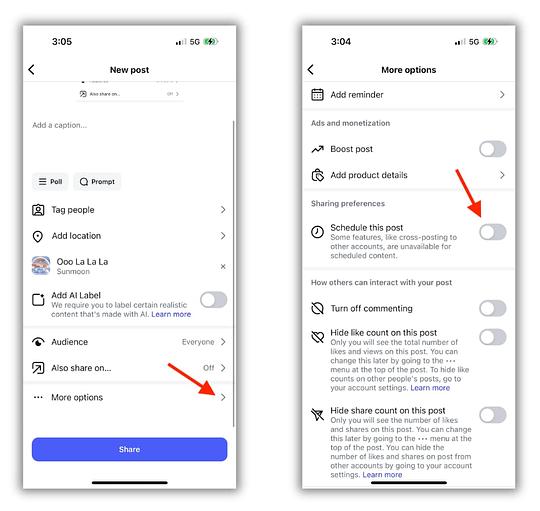
Step 3. Choose your date and time, then tap Done.
Step 4. Return to the Share page. Tap the Schedule button that now appears in place of Share.
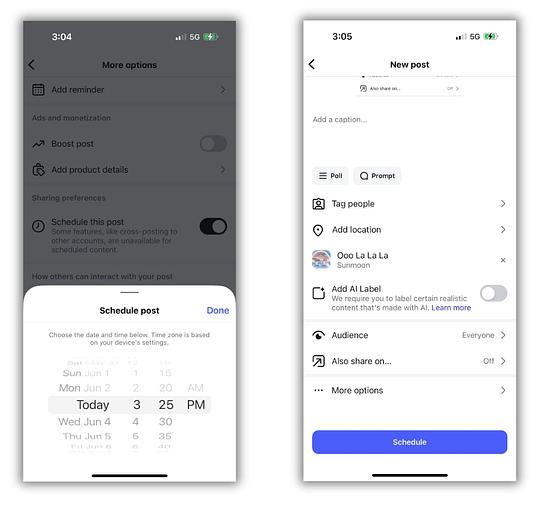
The native tool gets the job done for occasional posts. But if you’re managing a full content calendar, editing or deleting scheduled posts requires navigating to your profile’s Settings and activity menu every single time.
Sprout Social eliminates that friction. From a single visual content calendar, you can edit, reschedule or create new carousel posts without jumping between menus. Need to schedule in bulk? Sprout Social’s bulk scheduling feature handles hundreds of posts at once.
| Feature | Instagram native app | Meta Business Suite | Sprout Social |
|---|---|---|---|
| Schedule carousel posts | Yes, one at a time | Yes | Yes, including bulk scheduling |
| Visual content calendar | No | Yes | Yes |
| Edit or reschedule posts | Via Settings and activity menu | Yes | Directly from the calendar |
| Optimal send time suggestions | No | Yes | Yes, AI-powered |
| Multi-profile management | No | Yes | Yes |
How to create an Instagram carousel post on Sprout Social
Step 1. Open Compose in the Sprout Social desktop or mobile app.
Step 2.Select your Instagram Business Profile from the Profile Picker.
Step 3.Add your content for the Instagram post.
Step 4. Select up to 10 images to include in your post.
Step 5.Personalize your post using tags, hashtags, Instagram First Comment or post links.
Step 6.Click the drop-down menu next to When to post and choose your date and time, or select from AI-powered Optimal Send Time suggestions to maximize reach.
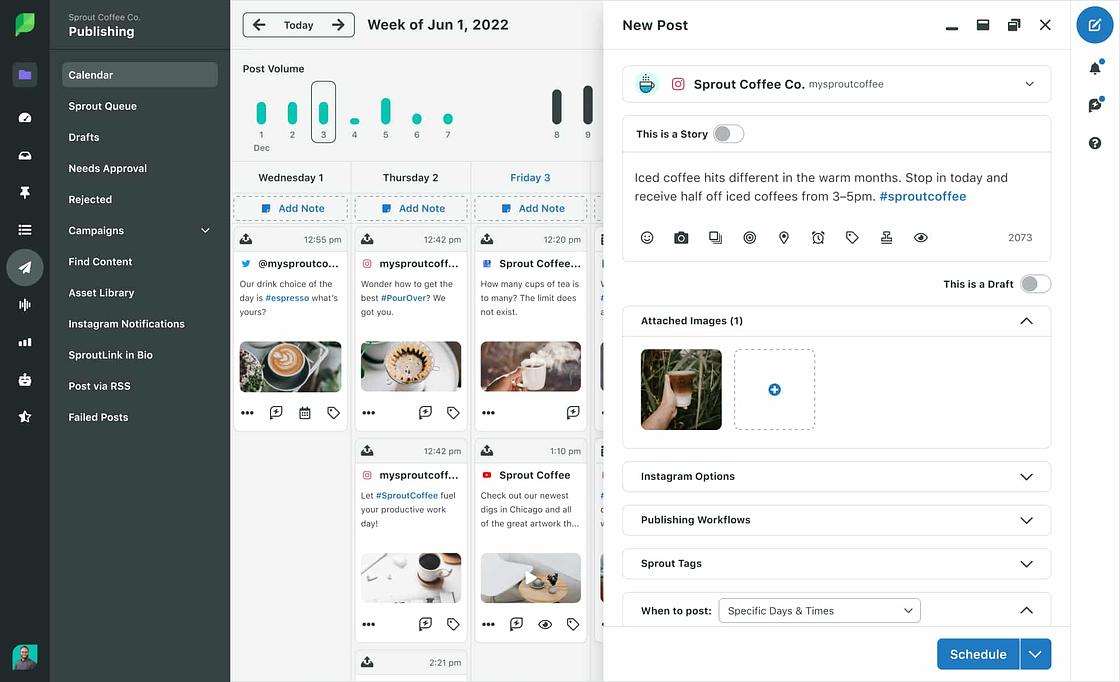
Step 7. Click Schedule to confirm.
For full details on publishing and scheduling Instagram carousel posts within Sprout Social, visit our Help Center.
Start building carousel posts that drive real results
Instagram carousels give you more than extra slides. They give you more ways to teach, sell, tell a story and hold attention longer than any single image. Used with intention, they’re one of the most flexible formats in your content mix.
Build a repeatable process for planning, designing, scheduling and reviewing performance. That’s how strong ideas become stronger results, consistently.
Sprout Social lets you plan, publish and measure Instagram carousel posts from one place, so your team moves faster without sacrificing quality. Start a free 30-day trial to see how Sprout Social fits into your Instagram workflow.
FAQs about Instagram carousels
How do I get the carousel feature on Instagram?
Every Instagram account already has it. Start a new post, tap the multiple select icon, choose your photos or videos, arrange them in order and publish.
How many slides should an Instagram carousel have?
Use as many slides as the story demands, then cut. Every frame must earn its place or it goes. You can have a maximum of 20 carousel slides.
Is it possible to mix photos and videos in an Instagram carousel?
Yes. Instagram supports mixed-media carousels natively. When publishing through Sprout Social, carousel publishing supports images only, so mixed-media posts require native creation in Instagram.
Do Instagram carousels perform better than Reels?
They serve different goals: Reels drive fast reach and discovery, while carousels excel at education, storytelling and content people save or share. Use both with purpose.
How do I track the performance of my Instagram carousel posts?
Focus on intent-driven signals—saves, shares, comments and profile actions—then compare patterns across your content. Sprout Social keeps your publishing and reporting in one intuitive platform, turning hours of analysis into minutes.





Share