YouTube SEO in 2026: Boost video visibility on YouTube and Google

Written by Emily Jenkins
Published on January 21, 2026
Reading time 11 minutes

Table of Contents
YouTube is the world’s second-largest search engine, used to find answers, learn new skills and compare products. For brands, it’s also one of the most powerful networks for building visibility and authority.
YouTube SEO increases visibility within YouTube’s search and recommendation feeds. And, the same signals that enhance visibility on YouTube, like watch time, click-through rate (CTR) and engagement, help videos surface in Google results as well.
As more people turn to social media search, YouTube SEO ensures you reach the right audience wherever they’re searching.
What is YouTube SEO and how does it work?
YouTube search engine optimization (SEO) is the practice of optimizing your video content and channel so the algorithm understands who your videos are for. Improving these key signals increases your chances of appearing in search, ranking higher and being recommended more often.
While including keywords in your titles and video descriptions still matters, YouTube prioritizes engagement signals. The network rewards videos people click on, watch in full and engage with.
YouTube SEO isn’t just about stuffing your video descriptions with keywords so they appear in more searches. It’s about aligning your video content with what your audience is actively seeking.
Audience intent is shifting. Viewers no longer come to YouTube solely for entertainment—they’re actively looking for answers. In fact, while entertainment still tops the list, Sprout Social’s Social Media Content Strategy Report shows that educational product information is the second most popular content type on the platform. This confirms that people use YouTube for answers, insights and product research, much like the do with Google.
To earn a spot in the results, you must create content your audience is interested in. Successful videos attract more clicks, longer watch times and stronger engagement. These signals are what push you higher in YouTube search and recommendations and they also help you rise in Google rankings.
Does YouTube SEO matter?
Social search is reshaping how people discover brands. According to Sprout Social’s Q2 2025 Pulse Survey, 41% of Gen Z now start their searches on social platforms instead of traditional search engines. It’s not just a Gen Z trend. The same study found more than a third of all consumers now look to social media first for product recommendations or reviews.
Investing in YouTube SEO means showing up where discovery is happening. Optimized videos earn visibility in both YouTube’s recommendations and Google search results, capturing intent from every angle.
YouTube SEO tactics that actually move the needle in 2025
Optimizing your videos for search looks a little different in 2025. YouTube’s algorithm now weighs engagement signals, like CTR, average view duration and retention, more heavily than keywords alone.
To stay visible, your YouTube SEO strategy must grab attention, keep it and inspire action. Here’s how to optimize your videos so they rank higher and keep audiences watching:
Perform keyword research
Strong SEO for YouTube starts with understanding what your target audience actually searches for. This is where keyword research comes in.
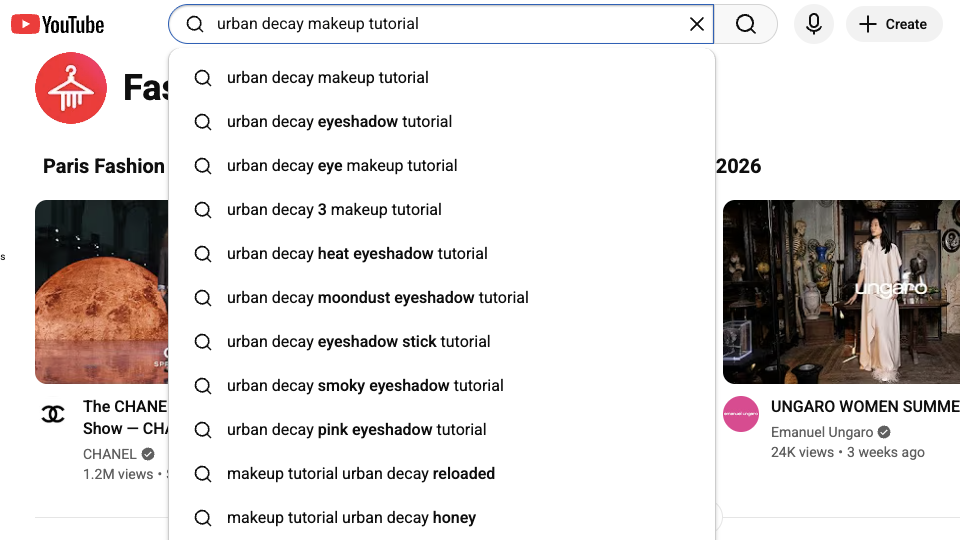
Start by typing a target keyword into the YouTube search bar and reviewing autocomplete suggestions. Those prompts reflect real viewer behavior and reveal how users phrase their searches.
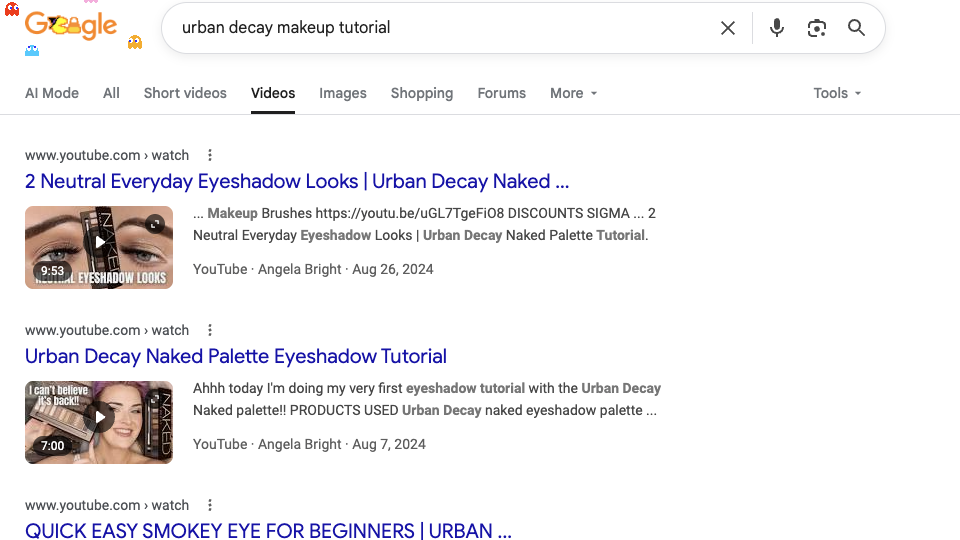
Next, cross-check those terms on Google to see which YouTube videos already rank in the relevant search engine results pages (SERPs). These top performers show what the algorithm favors in terms of video length, thumbnail design and title format.
Next, validate your keyword findings by using YouTube social listening to ensure your video topics align with real-time audience interests and recurring questions. These tools help you understand what people are discussing in real time, not just what they’ve searched for in the past. For instance, Sprout Social’s Listening tools add-on lets you track trending phrases and conversations as they emerge to confirm whether ideas for new videos match current audience interests.
Finally, tools like VidIQ, Ahrefs or AnswerThePublic allow you to uncover similar high-interest keywords, related questions and fresh angles your audience is actively searching for.
Using all these techniques together gives you a forward-looking SEO roadmap that blends proven demand with real-time interest.
Ideate your videos based on keyword intent
Once you know what people are searching for, shape your video ideas around that search intent.
Sure, any video can go viral randomly. However, when you align your content with what people are actively looking for, you develop a repeatable system for steady organic growth. For example, someone searching “how to edit YouTube Shorts” is likely wanting quick, actionable advice, not a 30-minute deep dive. But if they’re looking for “best YouTube SEO tools 2025,” they’ll probably want a comparison or recommendation.
Matching your content to keyword intent drives more clicks, longer watch times and stronger ranking signals. This sends a strong clear to the algorithm that your channel satisfies user intent–a key factor in YouTube channel SEO success.
Create compelling thumbnails and titles
Thumbnails might not be a direct ranking factor, but they’re essential for grabbing attention and driving clicks. Bold text overlays and high-contrast colors help videos stand out in crowded feeds.
In addition to looks, you also need to consider how and where people watch. According to Tubular Labs, 69% of YouTube views come from mobile devices, so thumbnail visuals must also hold up on small screens. That means opting for mobile-first framing by centering the subject and using large, readable text.
Thumbnails also help establish brand identity and give your channel a polished, professional look. Even if you’re not a design expert, you can create custom thumbnail images with help from the following template tools:
Just remember that YouTube tests different thumbnails for performance. To make sure you’re picking the best ones, carry out A/B testing through VidIQ or TubeBuddy to understand what drives higher CTR.
For video titles, aim to keep them under 75 characters so the full text shows in search results and suggested videos sections. It also helps to place your keyword near the front of the title and highlight the value your video offers. Titles like “How to Optimize YouTube SEO in 2025” or “Best YouTube SEO Tools Compared” make it clear what viewers will learn, which encourages clicks and improves rankings.
Create engagement-worthy videos
The first ten seconds are critical for retention. Hook your audience immediately: Ask a question, tease the outcome or start with a visual punch that sparks curiosity.
Once you have viewers’ attention, invite interaction. Add simple prompts to like, comment or subscribe. These actions deepen session time and drive return visits—two key YouTube SEO ranking factors.
Also, don’t limit yourself to YouTube. To capture more eyes, cross-post your videos across social media using Sprout’s Publishing tools. This helps drive early traffic and engagement signals that boost your position in YouTube’s recommendations.
Implement SEO techniques when publishing
Poor publishing habits cost momentum. Before hitting “Post,” ensure you’ve completed your YouTube SEO checklist. Here are the techniques to implement before publishing:
- Prioritize keyword-rich titles and descriptions written for people first.
- Keep titles short, under 75 characters, with clear value and front-loaded keywords
- Incorporate 2–3 relevant hashtags in your title or description to boost discoverability.
- Add timestamps and chapters that include natural keyword phrases for better navigation and search visibility.
- Share full transcripts to improve accessibility and help YouTube and Google index your content accurately.
- Add links back to your site or blog via Watch Pages to increase your brand’s visibility in Google search results.
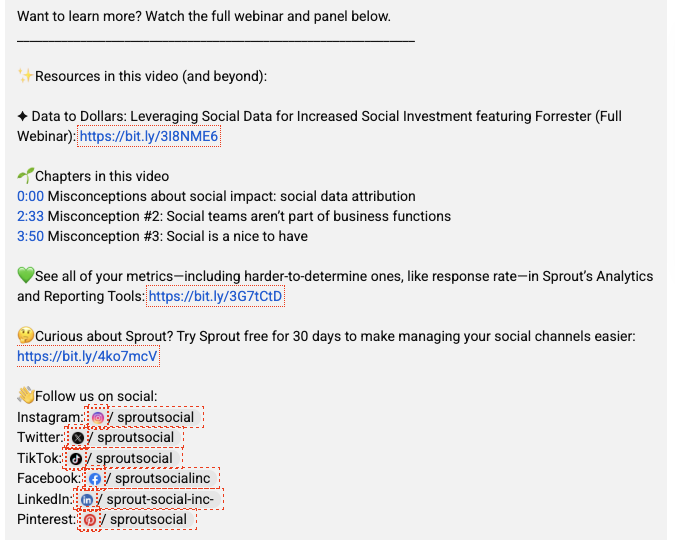
These practices help YouTube understand your content faster while signaling to Google that it’s worth ranking. That way, you’re optimizing for both platforms without doubling your workload.
Optimize your YouTube channel
Optimizing your YouTube channel is as critical as optimizing individual videos. Your channel page is your home base—it tells both viewers and algorithms who you are and why your content matters.
To optimize for search, ensure your name, profile image and banner align with your brand across all social networks. Complement this with a keyword-rich channel description that clearly explains your niche and includes links to your website or other social channels. This helps YouTube contextualize and rank your channel for relevant searches.
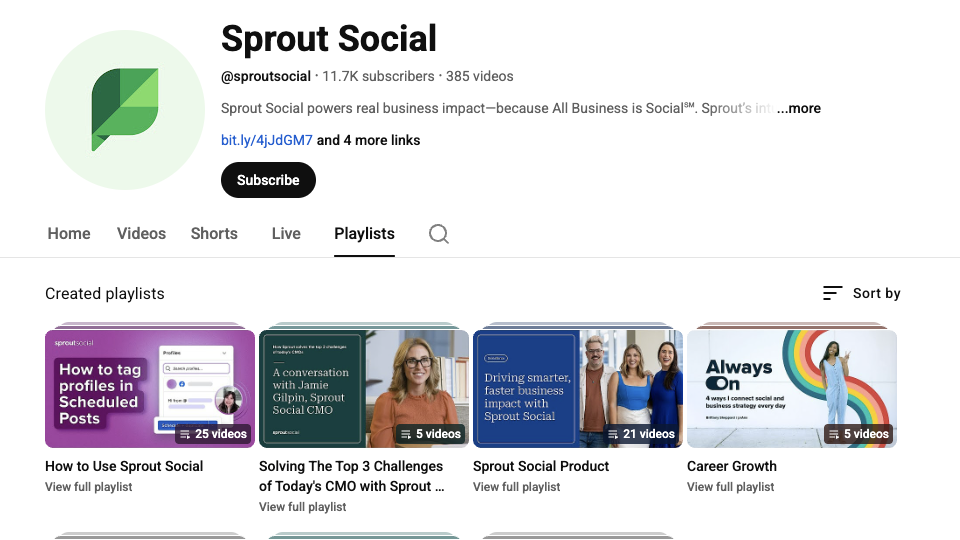
Next, organize your videos into keyword-optimized playlists that group related topics, such as “YouTube SEO Best Practices 2025” or “How to Do SEO for YouTube Shorts.” Playlists encourage viewers to watch multiple videos in one session, boosting total watch time and signaling authority to the algorithm.
You can see how Sprout organizes its content into playlists on its YouTube channel:
Finally, make consistency a priority. According to VidIQ, creators who upload 12 or more times a month increase their view rate 53% faster than those who post one to three times. Consistent posting trains both your audience and the algorithm to come back for more.
Leverage analytics to find what’s working
Analytics turn views into strategy. Use YouTube Studio to track retention curves, traffic sources and audience demographics to see how viewers interact with your content. Once you have that data, look for the videos with the highest click-through rate and watch time; these are SEO goldmines because they show which topics, formats and hooks drive real results.
Then, use Sprout Social’s Premium Analytics, an add-on to Sprout’s Reporting suite, to connect YouTube performance to broader marketing ROI. You’ll see how engagement and watch time contribute to conversions, not just vanity metrics.
Once you know what’s working, find patterns to replicate. By reinforcing the openings, topics and structures that drive results, you strengthen your content strategy, help the algorithm understand your niche and make your videos more likely to get recommended by the algorithm. At the same time, this consistency also builds audience trust.
Essential YouTube SEO tools
The right YouTube SEO tools turn guesswork into strategy. From keyword discovery to performance analytics, these platforms reveal what drives visibility and engagement so you can create content your audience actually finds and watches.
Here’s a breakdown of key tools and how they help support your strategy:
Sprout Social
Sprout Social is a social media management platform that offers a range of tools for publishing, analytics and YouTube management to help you simplify content planning and track business results.
The platform lets you seamlessly optimize your workflow and analyze metrics by connecting your publishing process across multiple channels. That connected process saves you time, keeps your brand consistent and helps you reach more viewers.
To truly master discoverability, Sprout’s social listening tools help you uncover trending keywords and audience conversations to inspire your video content so you can create videos people are actively searching for. Once you’ve created your videos, use Sprout’s scheduling capabilities to add optimized titles, descriptions and hashtags as you schedule videos for the best engagement windows.
For example, if Sprout Listening shows a spike in interest around matcha lattes, you could plan a quick video on the topic, then easily upload and schedule it through Sprout.
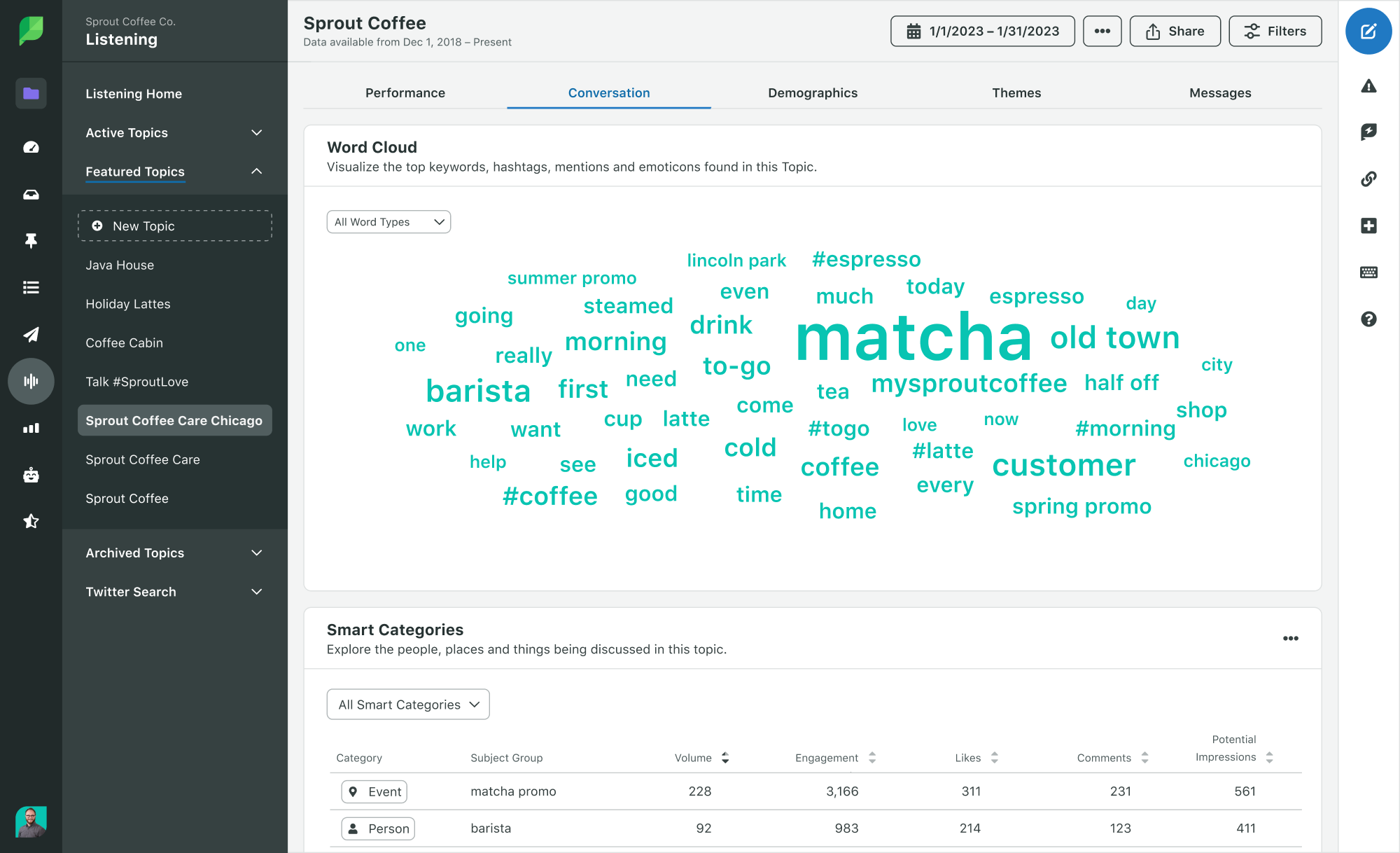
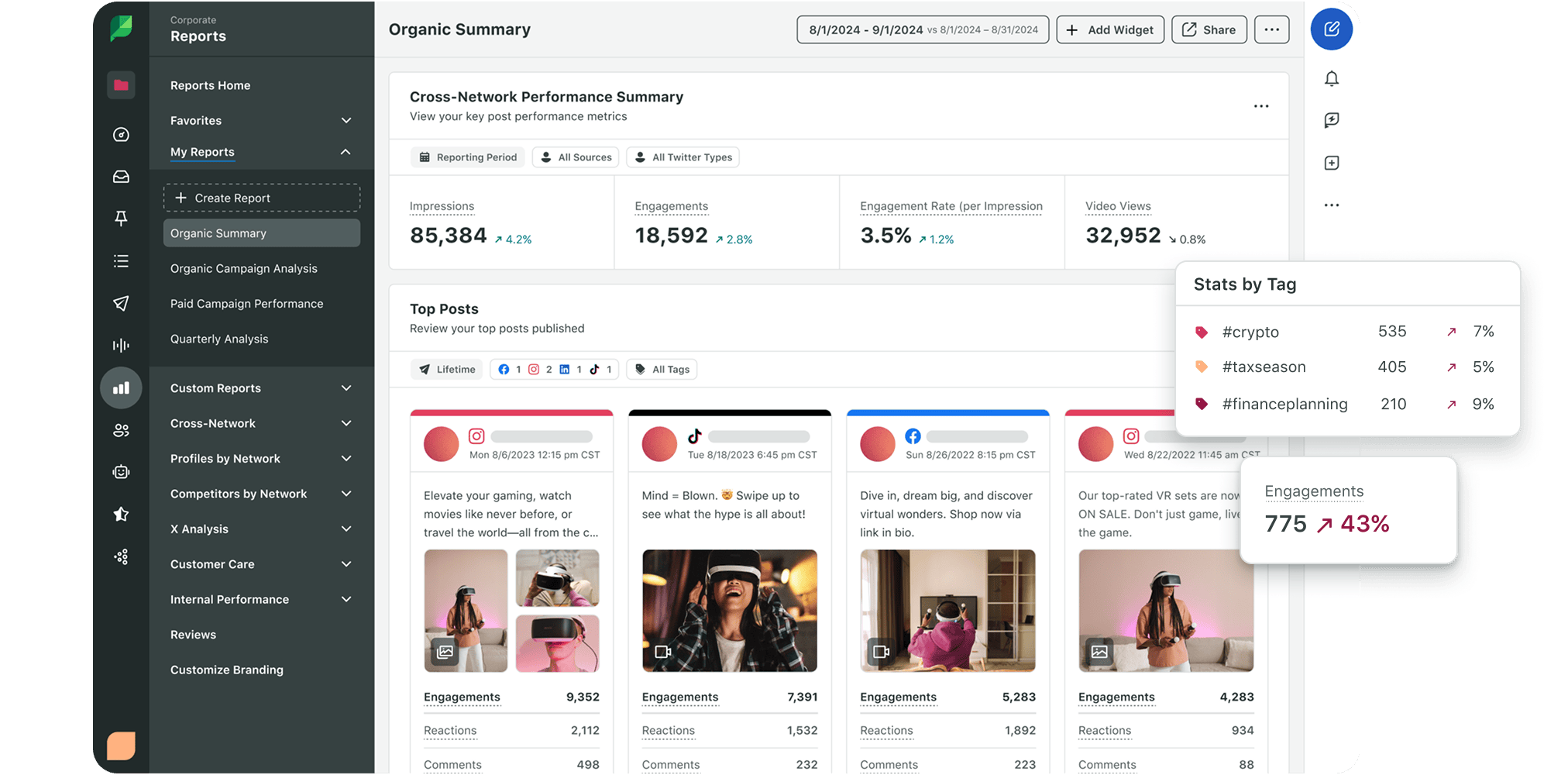
What’s more, with Sprout Social’s internal tagging, you can uncover how your YouTube SEO strategy is performing compared to other types of content strategies. By applying campaign tags to posts and videos driven by keyword research, you’ll be able to analyze their performance alongside content produced for brand awareness, thought leadership or engagement.
YouTube autocomplete
YouTube autocomplete is another way to help you uncover what your audience is actively searching for. Type a keyword in the YouTube search bar to view a list of suggested search terms. Since these suggestions come directly from what people are already searching, autocomplete helps you uncover audience intent.
For example, typing “WordPress,” might surface phrases like “tutorial for beginners,” “full course” or “website.” Each one tells you exactly what viewers want to know so you can frame your video to meet those needs.
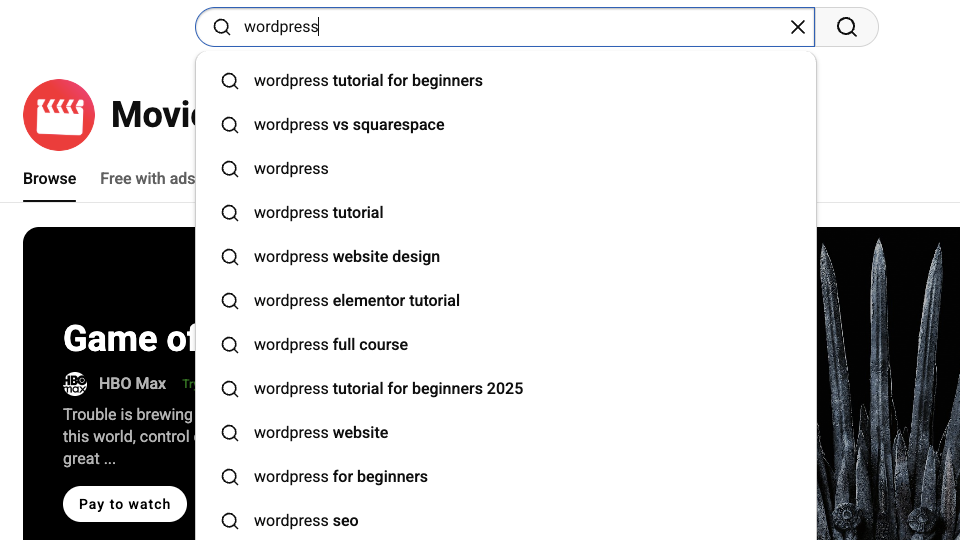
Shaping your video ideas, titles and descriptions around those real search queries helps your videos appear in more relevant results.
Ahrefs keyword research
Ahrefs validates and expands your keyword ideas, showing search volume, keyword difficulty and related terms so you can gauge which topics have traction and which might be too competitive to rank for.
This platform is excellent for finding crossover opportunities between YouTube and Google, as you can research top-performing keywords on both platforms. Since Google often surfaces YouTube videos in its results, identifying keywords that perform well in both places gives your videos twice the visibility potential.

(Source: Ahrefs)
You can also analyze the keywords driving traffic to competing videos and channels. These insights reveal what audiences already respond to in your niche, which helps you refine your own titles, descriptions and tags with terms that attract the right viewers.
VidIQ
VidIQ’s standout feature is its real-time YouTube SEO report, which evaluates your video as you upload it. The report analyzes elements like title keywords, description quality, tags and engagement potential, giving you instant insight into how well you’ve optimized your video.
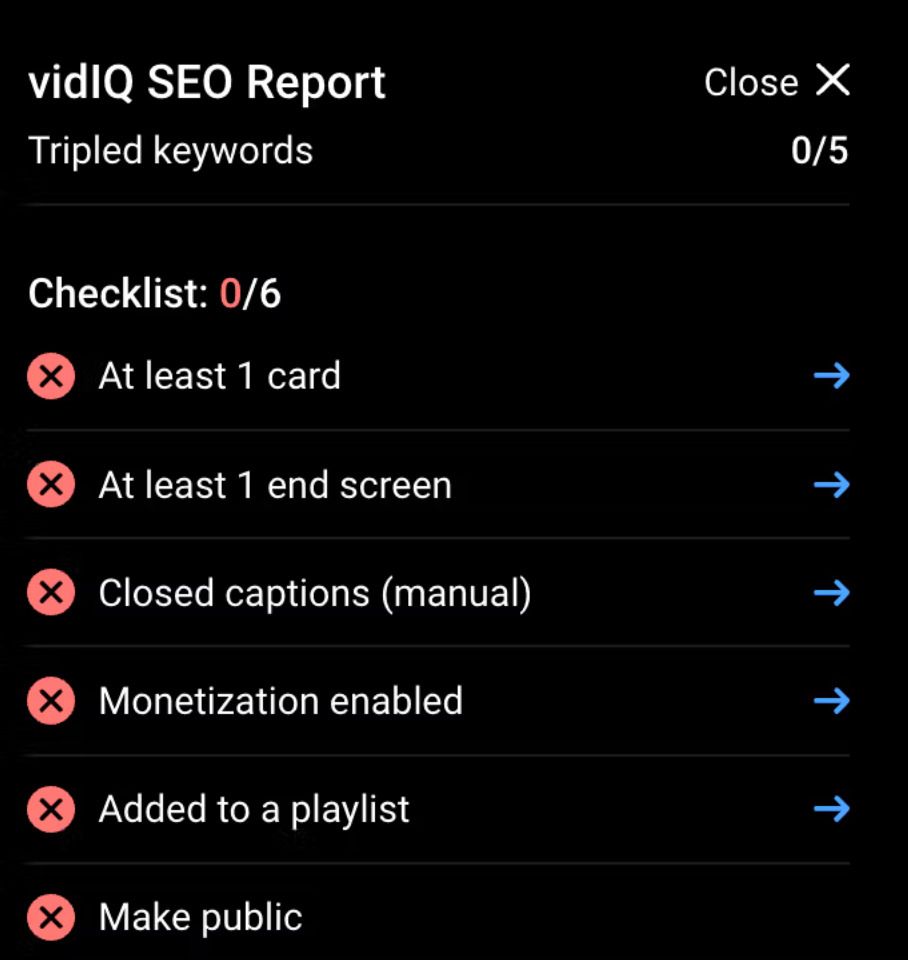
(Source: VidIQ)
That instant feedback helps you launch fully optimized videos that rank faster and perform better.
TubeBuddy
TubeBuddy helps you optimize faster and smarter. Its browser extension shows you the tags, titles and descriptions competitors use, revealing what’s working in your niche.
One of its most valuable features is the ability to bulk-edit end screens and video elements. This saves time when updating CTAs, playlists or thumbnails across multiple uploads.
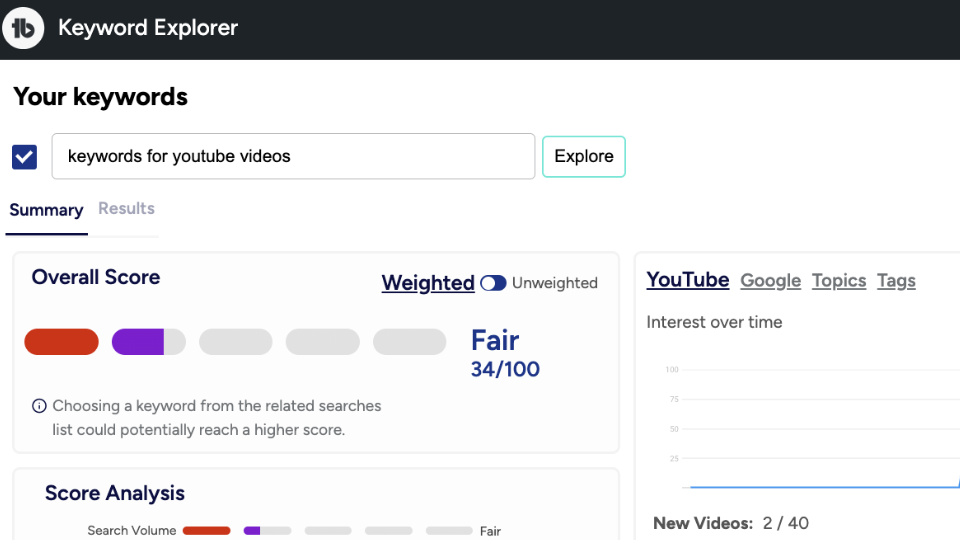
(Source: TubeBuddy)
TubeBuddy also lets you A/B test thumbnails to see which versions drive higher click-through rates.
AnswerThePublic
AnswerThePublic assists by taking your keyword research further by surfacing real questions people ask about a topic. It shows you phrases that begin with “what,” “why” and “how” to help you create videos that answer specific needs..
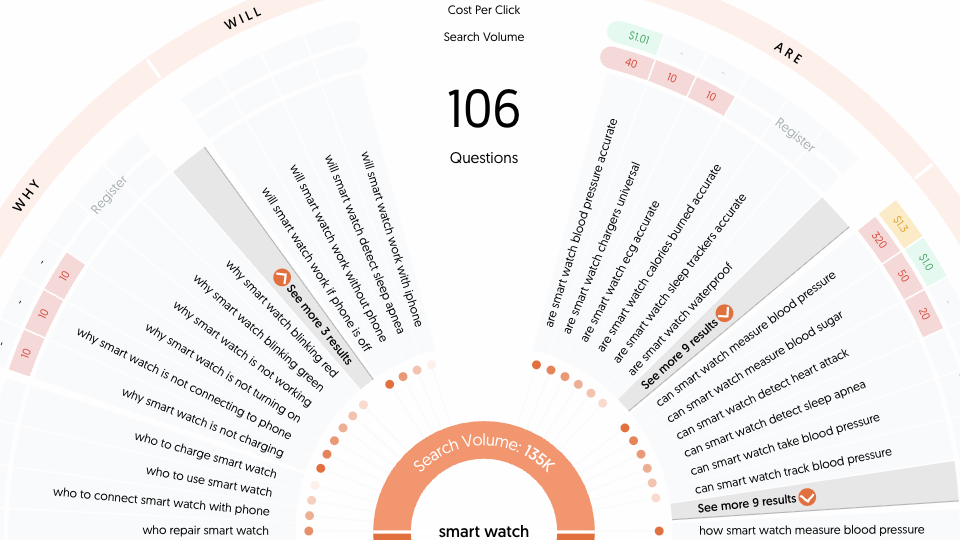
(Source: AnswerThePublic)
For example, instead of just telling you people search for “smart watch,” it might bring up “how smart watch works” or “how smart watch connects to phone.” This provides ready-made video ideas that make your content more relevant, discoverable and click-worthy.
Win discovery beyond search: Suggested, Browse and Shorts feeds
Ranking in search is just the start. The majority of views now come from the Suggested, Browse and Shorts feeds, where the algorithm recommends videos based on engagement. To maximize reach, your strategy must optimize for clicks and discovery.
Here are a few tips to help you feature in these three feeds:
Suggested
To show up more often in Suggested videos, you need to keep viewers watching longer. You can do this by using various YouTube features that guide them to your next video.
Here are a few ways to use YouTube’s features to guide viewers to more of your content:
- End screens: Add links to the final few seconds of a video to promote other videos or playlists and keep viewers watching.
- Cards: Insert clickable pop-ups during a video to guide viewers to related content without interrupting playback.
- Playlists: Group related videos to encourage continuous watching and improve your overall watch-time signals.
Browse
Performing well in Browse requires consistency and early engagement. Schedule uploads regularly and promote them across networks like LinkedIn, X and Instagram to spark momentum. Those early engagement signals show YouTube that your video resonates, prompting the algorithm to surface it more widely across Browse and homepage feeds.
Shorts
Shorts have become one of the most powerful discovery tools on YouTube. Their fast, vertical format makes them easy to watch and share, helping your content reach people who might not find it through search.
When viewers engage with your Shorts, even for a few seconds, that interaction signals to YouTube that your content is worth promoting more widely. And when Shorts perform well, they create a natural bridge to your long-form content, combining short bursts of discovery with deeper audience engagement.
How Sprout Social supports your YouTube SEO workflow
Sprout Social unites every stage of your YouTube SEO strategy, from planning and publishing to performance analysis. By managing video alongside your broader social efforts, you get a unified and actionable view of what drives engagement and results.
Sprout Listening uncovers trending topics and relevant keywords to shape your video content, while Publishing lets you schedule uploads for the best engagement windows and promote them across all your channels. And by connecting metrics like CTR, retention and traffic sources to measurable ROI with the Premium Analytics add-on, you can see what’s working to improve your future strategy.
According to Sprout’s 2025 Content Benchmarks Report, video is growing faster than any other content type. As audiences spend more time watching than scrolling, YouTube has become essential to every social strategy. Managing that presence through Sprout transforms each upload into a consistent driver of visibility, engagement and long-term growth.
Ready to put your YouTube SEO knowledge into action?
SEO for YouTube doesn’t have to be rocket science. If you stick to the tips and principles above, you’ll be way ahead of the curve when it comes to optimizing your videos for greater reach.
There’s no reason to make it harder than it needs to be. Sprout helps you optimize your YouTube videos and promote them across every channel to spark early engagement and expand your discoverability on YouTube.
Ready to see how it works? Book a personalized demo today.
YouTube SEO FAQs
How does YouTube SEO work?
SEO for YouTube works a bit differently from regular SEO. While search engines can’t exactly watch video content, they can crawl the text components of those videos. These include closed captions, transcripts, titles, descriptions and tags. Incorporating relevant keywords and phrases into these text components is an essential part of any YouTube SEO strategy.
How do I optimize YouTube Shorts for SEO?
To optimize your Shorts for SEO, use keyword-rich captions and titles, strong hooks in the first few seconds and engaging visuals. Also, remember to link Shorts to your longer videos to boost watch time across your channel.
How do likes, comments and watch time impact YouTube SEO?
These factors are key engagement signals. When viewers interact with and stay longer on your videos, YouTube sees your content as valuable and recommends it more widely.
Can YouTube SEO improve my Google rankings?
Yes, YouTube videos often appear in Google results, so optimizing titles, descriptions and transcripts helps your content surface across both platforms.





Share