Accessible technology: How Sprout Social is championing WCAG 2.1 AA compliance

Written by Annette Chacko
Published on April 20, 2026
Reading time 7 minutes

Table of Contents
Effective April 24, 2026, the US government mandate for WCAG 2.1 AA accessibility is a milestone we at Sprout Social view as a catalyst for our deep-seated commitment to inclusive design.
Our mission is to ensure every social media practitioner, regardless of their physical or cognitive abilities, has equal access to the powerful insights our platform provides.
The launch of our unified navigation serves as the cornerstone of this transition for Sprout Social accessibility. It provides the structural foundation and modernized technical framework required to support a truly accessible interface.
What is WCAG 2.1 AA compliance for accessible technology?
WCAG 2.1 AA compliance represents the global gold standard for digital accessibility in the functionality of web platforms. It comprises a rigorous set of guidelines developed by the World Wide Web Consortium (W3C). While Level A provides basic access, Level AA strikes a balance between sophisticated functionality and legal/ethical inclusivity in the modern digital landscape.
To meet the Level AA tier, software must comply with the POUR principles, i.e., be perceivable, operable, understandable and robust for users with a wide range of disabilities. These include visual, auditory, physical and cognitive impairments.
In practice, this requires technical features such as a minimum color contrast ratio of 4.5:1, full keyboard accessibility with consistent navigation elements and support for assistive technologies like screen readers.
Why is accessible technology important for certain industries that mandate compliance for software procurement?
For regulated industries, such as healthcare, finance and government, software accessibility is a legal requirement and is subject to strict mandates under Section 508 in North America and the European Accessibility Act (EAA).
Organizations in highly regulated sectors typically require a VPAT (Voluntary Product Accessibility Template) during the Request for Proposal (RFP) stage. Without an Accessibility Conformance Report (ACR) to prove that a software vendor meets these standards, the regulated entity is legally barred from purchasing the software, as this would violate their own compliance obligations.
Failing to meet these standards doesn’t just limit a brand’s market reach, it exposes companies to legal liability and financial penalties. Plus, there’s the risk of losing out on government and enterprise contracts.
While software accessibility is required in some industries, it should be a universal priority for brands across all sectors because it serves a full spectrum of users. Designing with accessibility leads to a more inclusive, user-friendly experience for everyone.
Why does software accessibility matter for brands?
Software accessibility is more than a prerequisite for business accessibility and compliance. It’s the foundation of brand equity and market reach. Accessibility signals a company’s ethical commitment to social responsibility and fosters trust and goodwill, which reflects loyalty among all consumers who value equity.
As Senior Staff Design Engineer, Bill Foehring, puts it, “Software accessibility matters because it creates an environment where everyone, regardless of device or ability, can not only use the product but have a great experience doing so, fostering a more inclusive experience for all.”
Accessible software results in a cleaner UI and more intuitive UX for every user, regardless of ability, leading to higher retention rates and lower bounce rates. Because let’s face it, in a digital-first economy that moves at the speed of social, a brand that is unreachable to some is losing out to a competitor.
The vision (and team) behind Sprout’s unified navigation
Apart from championing social media compliance, Sprout has always been forward-thinking as an accessibility partner. From enabling brands to create accessible content, to software accessibility on the Sprout platform, here are some of the ways we’re encompassing all communities.
Content accessibility
Sprout’s Generate Alt Text tool within AI Assist enables customers to add or edit alt text for Instagram and Pinterest image posts directly in Sprout, including using AI to generate accurate image descriptions.
Similarly, Generate Subtitles by AI Assist lets users quickly create subtitles for videos, making content more accessible from the start. And with Generate Translations by AI Assist, brands can break down language barriers and connect with global audiences faster. Users can seamlessly translate posts, compose outbound content and reply to incoming messages for polished multilingual interactions.
Other than the above tools for content accessibility, Sprout also enables users to upload SubRip Subtitle (SRT) files to ensure your videos are accessible to the Deaf and hard-of-hearing communities, as well as users watching with sound off.
Sprout’s community resources on social media best practice too heavily advocate for “CamelCase” i.e., capitalizing the first letter of each word in a hashtag, like #SocialMediaMarketing), which allows screen readers to distinguish individual words rather than reading them as a jumble.
Platform accessibility
From maintaining a VPAT to document our compliance for government, education and other regulated industries, to building accessibility directly into Sprout’s proprietary design system, our approach has always been intentional. With built-in checklists that guide everything from color contrast to responsive layouts and touch targets, accessibility is considered from the very start, ensuring every new feature is designed to be inclusive by default.
Our latest offering of unified navigation stems from a strategic evolution that focuses on creating a unified, multi-product ecosystem that balances cutting-edge innovation with universal usability.
By streamlining Sprout tools into a simplified navigation structure, the Sprout platform meets WCAG 2.1 AA standards while improving cross-device accessibility. It also builds a robust foundation for AI integrations like Sprout’s agentic AI, Trellis.
Ultimately, this modernized framework ensures a seamless, consistent experience across Sprout’s entire suite, including Core Sprout, Employee Advocacy and our predictive media intelligence tool, NewsWhip by Sprout Social. It enables users to transition between products within a cohesive, intuitively themed environment.
Though Sprout’s updated left navigation is the most visible change, a company-wide effort was made to overhaul the entire platform’s underlying code for WCAG 2.1 AA compliance. It was a foundational under-the-hood transformation that synchronized every team and feature to ensure the app is more inclusive, stable and future-ready.
“This project delivered a cross-product component ecosystem that balances shared efficiency with sub-brand identity. It also established the foundation for future scalability, identifying exactly where we can make our framework more product-agnostic as we continue to expand into different parts of our business,” Foehring notes.
How Sprout is delivering a more powerful user experience for all
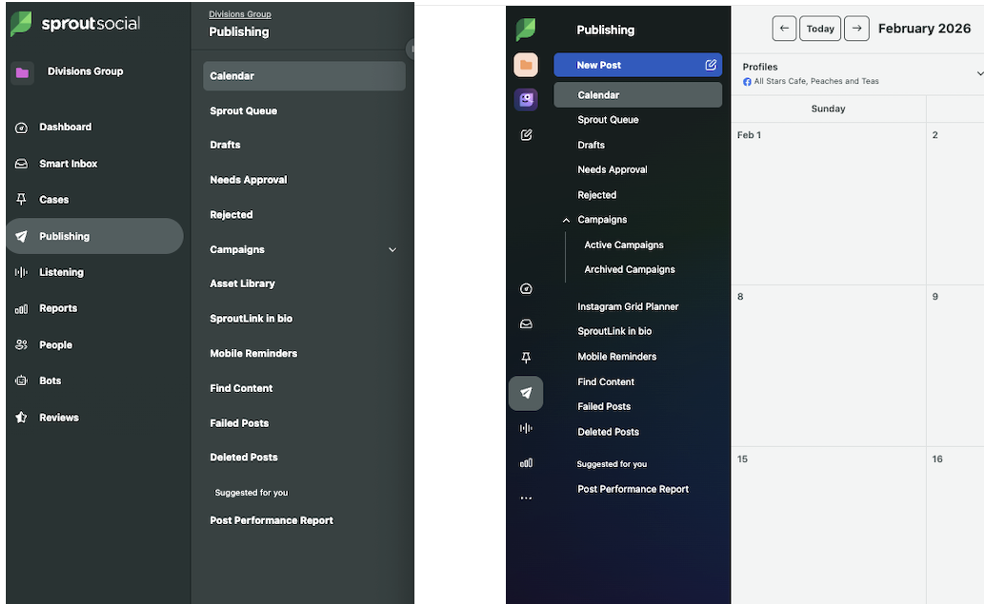
Sprout’s shift to a unified navigation aims to deliver a seamless user experience designed to streamline the user journey and reduce cognitive load. By housing all tools, including functions like Compose, Notifications, Team Conversations and the Resource Center, into a single, cohesive left sidebar, the Sprout interface has transformed into a unified command center.
Key accessibility features in action
The latest Sprout Social accessibility improvements feature a simplified layout, high-contrast themes and intuitive focus states for keyboard-only users. The redesign is more than just achieving WCAG 2.1 AA compliance, it’s also a technical upgrade that ensures the platform works perfectly on any screen size.
By modernizing the underlying code, Sprout has made the app faster to navigate via keyboard or screen reader while creating a flexible layout that automatically adjusts to the user’s workspace.
“The true value for our customers extends beyond the immediate improvements our new navigation provides, such as cohesive screen reader integration, intuitive placement and seamless keyboard navigation. This framework represents a significant evolution; rather than just a repositioning of navigation elements, it introduces modernized breakpoints and fully responsive content blocks and headers,” Mike Trumbell, Senior Engineering Manager at Sprout, explains.
Here are some key advantages that users will have with the unified left navigation.
- Centralized workflow: With persistent actions, such as Compose and Notifications, moved to the left bar, Sprout has aligned with standard F-pattern reading habits, making the most frequent actions the first things a user sees.
- Improved workflow with Trellis: Trellis will be usable alongside your primary workflows without blocking you from taking action.
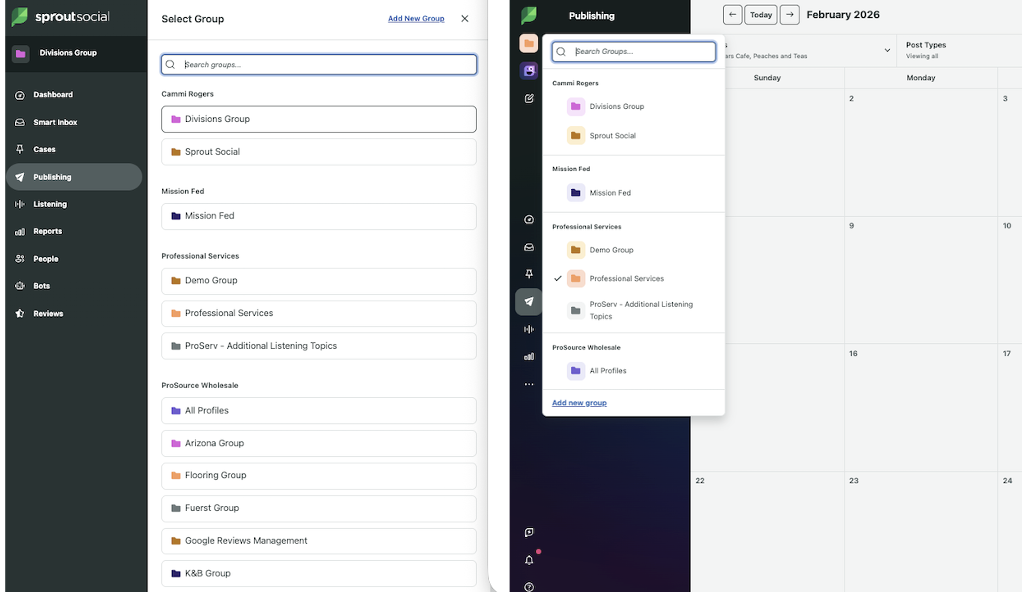
- Integrated user profile: The user profile and account settings, previously accessible only through separate menus, are now integrated at the bottom of the left navigation bar. This provides a single anchor point for identity and workspace switching.
- Increased workspace: Removing the right toolbar frees up horizontal space, critical for data-heavy features like the Smart Inbox and Listening dashboards. This provides more space within the product for viewing content and taking action.
- Product consistency: The new unified left navigation establishes a consistent look, feel and user experience across Sprout products.
- Mobile accessibility: The new experience is designed to extend seamlessly to mobile devices.
- Information architecture (IA) compression: The Sprout dashboard previously relied on a two-level hierarchy where a primary sidebar category would trigger a secondary, often fixed, sub-navigation. To flatten this without losing functionality, the Sprout engineering team implemented collapsible accordions and hover-to-reveal states within the left rail. This enables users to maintain a flat visual look while still having deep access to nested features like specific Report types or Inbox tags.
“Consequently, our content is more adaptable, providing users with a unified and cohesive application experience,” Trumbell adds.
Here’s a peek at the new dashboard design.
Before and Afters:
The future of Sprout Social accessibility
Beyond hitting current benchmarks, Sprout has integrated accessibility into its core development lifecycle to ensure every future innovation is inherently inclusive for all users.
“We’re approaching it not only to meet the current accessibility standards, but to set ourselves up so that we can bake accessibility into our design and development cycles to ensure that whatever we build now and into the future is always accessible for everyone who wants to use Sprout,” says Savy Lacombe, Director of Product Design at Sprout.
The Sprout engineering team is also actively working on solutions to consistently track and address accessibility gaps as new features are developed. This is to ensure we remain accessible and compliant with evolving needs.
A social suite for everyone
Sprout is dedicated to building a platform that empowers every social media professional to succeed. We believe a user’s ability to thrive should never be limited by how they interact with technology. By prioritizing inclusive design, we are removing barriers and creating an environment where all practitioners can access the insights they need with dignity and ease.
This transformation is an ongoing, evolving commitment to our users to ensure that as our technology advances, our promise of universal Sprout Social accessibility grows right alongside it.
Request a free trial to experience Sprout’s accessible platform for yourself.
Frequently asked questions about accessible technology
What is Sprout Social doing to improve platform accessibility?
Sprout underwent an under-the-hood transformation to meet WCAG 2.1 Level AA standards to ensure the platform is natively accessible to all practitioners ahead of the 2026 US government mandates. At the center of this effort is a new unified navigation that streamlines the interface into a single, responsive sidebar, reducing cognitive load and providing a consistent experience for keyboard and screen-reader users. This shift represents a long-term, evolving commitment to inclusive design, ensuring that as Sprout’s technology advances, it remains accessible to every social professional regardless of how they interact with technology.
Does Sprout Social support screen readers and keyboard navigation?
By modernizing the underlying code, Sprout has made the app faster to navigate via keyboard or screen reader while creating a flexible layout that automatically adjusts to the user’s workspace.
Why is the 2026 WCAG mandate important for social media software?
The April 2024 US Department of Justice (DOJ) ruling mandates that all state and local government entities, and the vendors they contract with, must conform to WCAG 2.1 Level AA standards by April 24, 2026.
For social media software, this means accessibility is no longer a feature but a legal prerequisite for SaaS procurement. Any platform that fails to meet these standards will be effectively barred from government contracts and regulated agency tech stacks, as these organizations are now legally prohibited from delegating away their Americans with Disabilities Act (ADA) obligations to non-compliant third-party tools.
What is WCAG vs. ADA?
The Americans with Disabilities Act (ADA) is a broad federal civil rights law that prohibits discrimination based on disability, serving as the legal mandate for equal access across all areas of public life. In contrast, the Web Content Accessibility Guidelines (WCAG) provide the specific, technical checklists and success criteria that developers use to ensure software actually meets those legal requirements. While the ADA creates the legal obligation to be inclusive, WCAG provides the technical blueprint for building the digital tools that fulfill it.
If a platform is WCAG 2.1 compliant, does it mean content created within it is automatically accessible?
No. Compliance with WCAG 2.1 applies to the platform itself and does not automatically guarantee that content created using the platform is fully accessible.
39 free social media strategy templates that will elevate your workflows
Published on August 20, 2026 Reading time 15 minutes









Share