LinkedIn social listening: Turn conversations into competitive advantage

Written by Emily Jenkins
Published on February 19, 2026
Reading time 12 minutes
Table of Contents
LinkedIn is where professionals shape industry conversations, share opinions and discuss their perception of brands. Every post or comment on this network offers a window into audience sentiment, yet many teams still miss the chance to capture it because they treat LinkedIn as a broadcast channel.
Social media listening on LinkedIn turns those interactions into measurable business intelligence and reveals what people say about your brand, competitors and industry. This gives you the context you need to make confident, data-driven decisions about your brand strategy.
Here’s how to use LinkedIn listening as a source of competitive intelligence to help your brand stay agile and responsive.
What is LinkedIn social listening?
LinkedIn social listening is the process of analyzing conversations and brand mentions regarding your Company Page on LinkedIn. This gives you insight into how and why users talk about your company, industry and competitors. It reveals sentiment shifts, trending topics and audience priorities that help you refine your messaging and adjust your campaigns.
In this respect, LinkedIn listening acts as a business intelligence function that gives you a competitive edge. When you know how people feel about your brand and content, you can determine what resonates and what needs attention. It also compares your visibility to competitors, which helps you understand your share of voice in key conversations. And as new topics start to trend, it highlights them early, giving you the chance to join in and shape the discussion before others do.
The difference between monitoring and listening on LinkedIn
At first glance, social media monitoring and listening seem like the same thing because both involve observing what people say about your brand. But their purpose and value are very different. Monitoring gives you visibility, while Listening gives you a much deeper understanding.
Here’s a more detailed explanation of their differences:
- Monitoring is reactive. It focuses on activity that directly involves your LinkedIn Company Page. It allows you to see comments, reactions and public posts that tag your Page. This way, you can respond to feedback, engage with followers and manage your brand reputation in real time. What you can’t monitor, though, are posts or keywords that don’t mention your Page and activity from private LinkedIn Groups or profiles.
- Listening is proactive and strategic. It analyzes public mentions and uses keywords or phrases to find valuable public conversations that are happening around your brand, even when people don’t tag your Page directly. This proactive view of how professionals discuss your brand and industry helps you anticipate trends and respond strategically.
It’s important to note that LinkedIn listening works a little differently. LinkedIn’s privacy rules limit what listening tools can access. Because of this, listening insights only include activity on your public Company Page and public posts that tag your Page. Tags from private accounts or restricted-audience posts aren’t visible. In this sense, LinkedIn listening only supports “owned listening” rather than full public listening.
How listening on LinkedIn is different
LinkedIn revolves around professional conversation, making it a rich source of industry insight. But listening on LinkedIn works differently than on open networks like X (formerly Twitter) or Reddit.
Because LinkedIn’s API prioritizes user privacy, you can only listen to public activity that involves your Company Page. This is called owned listening because you’re analyzing the conversations happening on properties you control. What you won’t see are private profiles, direct messages or private Group activity. On X (Twitter), you can search for a keyword like “coffee” and see almost every public post using that word globally. But you can’t do this on LinkedIn. The API doesn’t allow third-party tools to scan all global user profiles or posts for generic keywords unless the user explicitly tags your Company Page.
Instead, LinkedIn listening strategies focus on first-party data:
- What you can track: All public activity, comments on your owned posts, and posts that directly @mention your connected LinkedIn Company Pages
- The value: Because these users are actively engaging with your brand ecosystem, the data is higher intent and higher quality than keyword noise on other platforms.
Why LinkedIn social listening matters
LinkedIn social listening turns professional conversations into practical, data-driven insight. It moves you beyond vanity metrics such as likes and into strategic insights. It also helps you understand how your target audience perceives your brand, how competitors position themselves and where new opportunities are emerging.
With the right social media listening tools, you can see what drives engagement, identify themes in sentiment and use that knowledge to guide smarter content, sales and communication decisions.
Here’s why this process is so valuable to your business’s growth.
Benefit 1: Monitor your brand health and reputation on LinkedIn
Your brand reputation on LinkedIn shapes how potential customers and brand partners view your business. To help you see how strong that reputation is, social listening tracks sentiment analysis—positive, negative, or neutral—across all comments on your content and in public posts where people @mention your Page.
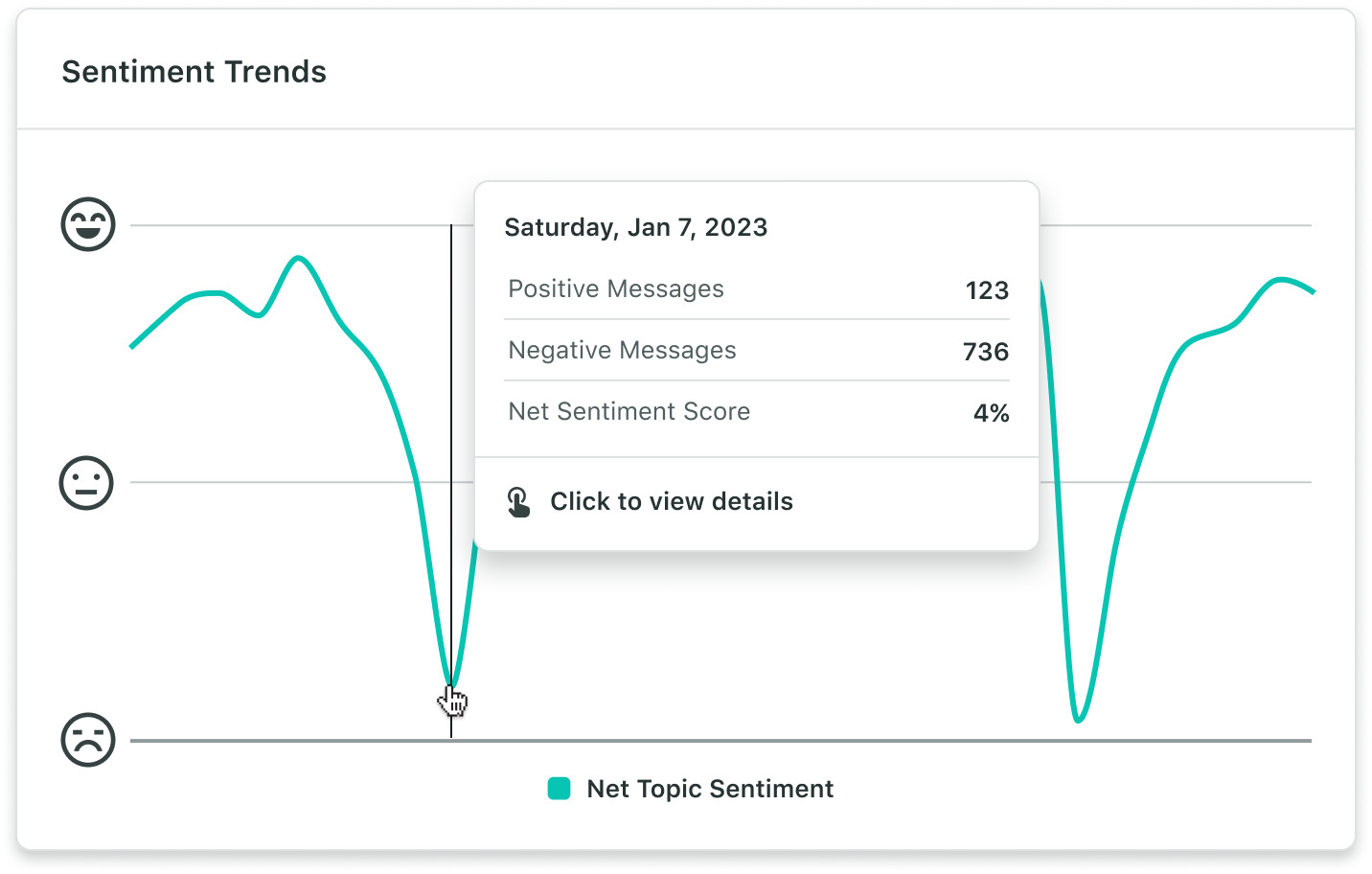
When you track these relevant conversations, you’ll notice when negative trends are forming so you can step in early and address them. In the same way, when positive feedback grows, you can spot it quickly and then amplify it.
This level of proactive brand health monitoring helps you build credibility, protect trust and stay aware of how professionals talk about your brand in real time.
Benefit 2: Identify engaged leads in your audience
LinkedIn is a top channel for lead generation. In fact, HubSpot found that it’s 277% more effective than Facebook or X.
LinkedIn listening helps you identify highly engaged, high-value leads by spotting the people who are asking smart questions, expressing intent or recommending your business to others.
Catching these leads early makes it easier for you to focus outreach since you can see who’s already engaging positively with your content while their interest is high. By spotting these engaged individuals with social listening tools, your team can prioritize outreach to warm leads and strengthen relationships.
Benefit 3: Optimize your LinkedIn content strategy
Every comment and reaction provides a clue about what your audience values. Social listening organizes scattered comments into clear themes.
Once you can see those patterns, refining your LinkedIn content marketing strategy becomes much simpler. For instance, you might find that customer success stories spark deeper conversations, while people scroll past generic corporate updates. Listening data allows you to see the most popular topics so you can double down on what actually drives value for your audience.
Benefit 4: Discover audience pain points and content gaps
Your audience often tells you what they need in the comments.
LinkedIn social listening tools solve this problem by analyzing questions and feedback, you can identify gaps in your product or content.
These insights provide a direct pipeline of customer pain points and spark ideas for new marketing content, customer service strategies or product features.
How to build a LinkedIn listening strategy that drives results
Building an effective LinkedIn listening strategy starts with understanding how LinkedIn data works. Unlike networks with open public data, LinkedIn supports owned listening, which means your insights come from the conversations happening on your Company Page and posts where your Page is tagged.
That doesn’t limit your strategy, though. It simply shifts your focus to the audiences already engaging with you, helping you extract clearer patterns and stronger signals from the data you can access.
With Sprout Social Listening, your strategy comes to life in four steps: setting objectives, structuring your Listening Topics, analyzing the engagement patterns that emerge and turning those insights into action.
Here’s how those steps work in practice:
Step 1: Define your listening objectives
Before you set up LinkedIn listening, it helps to take a step back and think about what you are actually trying to learn. With clear goals, you ensure that your listening efforts deliver answers to the right business questions.
Because LinkedIn focuses on first-party data, which are conversations happening directly with your brand, your listening goals here will look different than they do for X (formerly Twitter) or Reddit. You won’t be scanning the entire internet; you’ll be analyzing the specific voice of your professional community.
Common objectives for LinkedIn listening look like:
- Tracking brand sentiment and health: Track the sentiment of the comments directly on your posts and direct @mentions to generate a sentiment score for your comment section.
- Analyzing audience themes: Identify the keywords and themes appearing inside your own comment section. If your followers keep asking about “pricing” in your comments, Sprout’s Word Cloud or Topic Analysis will catch that.
- Audience analysis: Which job titles are engaging most with our ‘Future of Work’ campaign or in-person event campaign?
- Monitoring conversations: Are customers tagging us to ask for specific features we haven’t built yet?
- Analyzing campaign performance: Go beyond vanity metrics to capture the full qualitative feedback around marketing campaigns or product launches, ensuring you understand why a campaign succeeded.
- Improving customer experience: Uncover hidden consumer insights in comment threads to detect early signs of dissatisfaction and address issues proactively before they escalate.
By defining these objectives early, you ensure that you aren’t just collecting notifications but are actually gathering intelligence on how your brand is perceived. Sprout gathers those insights automatically and turns them into clear, visual dashboards. That way, it’s easy for you to measure your progress against your goals and adjust your strategy as you go.
Step 2: Build and structure your Listening Topics
Once your objectives are clear, you need a way to filter out the noise. Create Listening Topics around the focus areas that are relevant to those goals, such as your brand name or campaigns.
It’s important to remember that LinkedIn works differently from other networks: the data you have the most access to is from your own ecosystem. Sprout’s Listening tool automatically pulls in the public mentions of your connected Company Page. This means you are analyzing the high-value conversations where people are actively trying to talk to (or about) you.
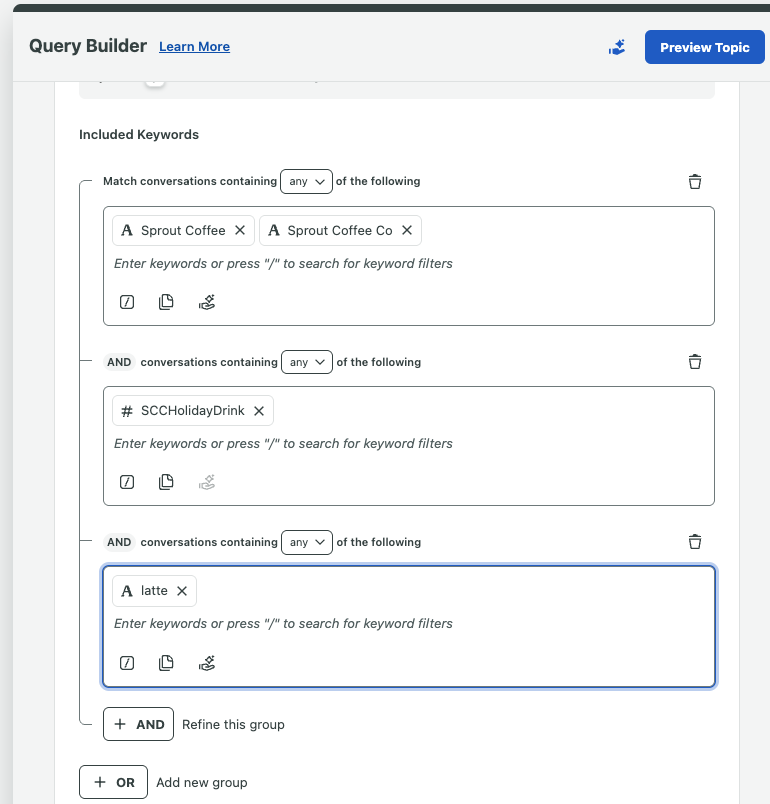
You can then use the Topic Builder to segment these mentions using keywords. For example, you might build one Topic to capture every time a user tags you and uses the word “Help” or “Support,” and a separate Topic for when users tag you alongside words like “Love” or “Great.”
Don’t worry if you’re unsure about the exact topics you should concentrate on. Sprout’s intuitive Listening Query Builder and Recommend by AI Assist simplifies the processes by automatically suggesting brand keywords to include or irrelevant terms to exclude and organizing results into categories for clean, focused insights.
Step 3: Analyze patterns and surface insights
This is the stage where raw data transforms into business intelligence. Once your Topics are running, you can dive into Sprout’s Listening dashboards to see what the conversations actually look like.
In Sprout, dashboards turn data into clarity by visualizing keyword frequency, sentiment trends and topic clusters across your LinkedIn conversations. That way, you can quickly see which themes are on the rise, which aspects need attention and how sentiment changes over time.
- Word Cloud: Immediately spot the most frequently used words in your comments. Are people constantly using words like “expensive” and “complicated,” or “helpful” and “fast”? The Word Cloud surfaces these adjectives instantly, so you don’t have to hunt for them.
- Sentiment analysis: It is one thing to know people are talking; it is another to know how they feel. Sprout automatically assigns a “Positive,” “Neutral” or “Negative” score to incoming data. You can view the overall sentiment to gauge your brand health at a glance, or drill down by message to understand exactly why a specific post triggered a negative reaction.
- Themes: Sprout Listening automatically groups related keywords into Themes so you can see how specific categories perform against each other. For example, you could track how often people mention “Customer Service” versus “Product Quality” to see which side of your business is driving the most conversation on LinkedIn.
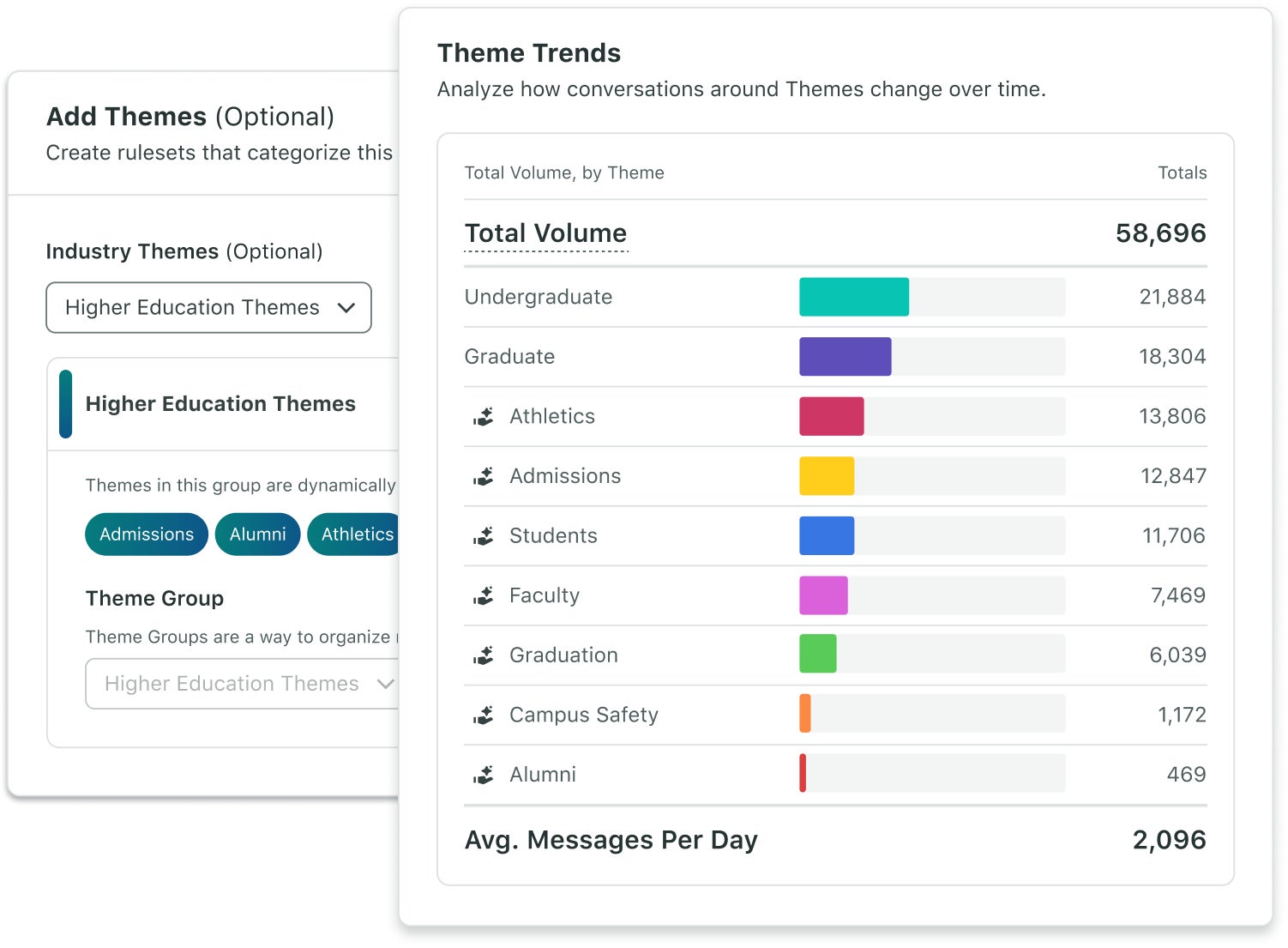
The key benefit here is that Sprout’s AI and automation remove the manual work. That means you don’t need to sort through endless comments by hand. Instead, Listening will pinpoint where your brand perception is shifting or which industries and job roles engage most with your content.
When you compare these LinkedIn insights with data from other networks in Premium Analytics, you’ll get a complete, full-funnel perspective of how social engagement drives results, from first impression to conversion.
Step 4: Turn insights into action
The real impact of Listening comes when insights directly improve your workflows. Data is only valuable if it changes how you work.
If you spot a rising trend or a recurring question in your listening data, Sprout helps you bridge the gap between “knowing” and “doing.” You’re able to connect those insights to publishing, engagement and reporting so you can create more effective content, respond faster and measure real impact.
You can connect insights from Sprout’s core tools:
- Publishing: Social listening data lets your team create and schedule content that aligns with audience sentiment and emerging trends.
- Smart Inbox: You can tag or assign relevant mentions from the Listening dashboard to the right team so follow-up happens quickly.
- Reporting: For Listening and Premium Analytics customers, Listening data flows directly into Analytics to show the full-picture impact of LinkedIn engagement.
Because you can manage everything in a single platform, you won’t need manual exports or disconnected reports. Instead, you’ll be able to move seamlessly from insight to action.
4 best LinkedIn listening tools
Choosing the right LinkedIn social listening tools depends on which tools would help you accomplish your goals most efficiently. Some tools, for instance, specialize in content trends, while others excel at large-scale LinkedIn analytics.
Here’s a breakdown of how these top tools each help you capture and use LinkedIn insights:
1. Sprout Social
Sprout Social is an all-in-one social media management and listening platform that turns LinkedIn conversations into strategy. Because LinkedIn prioritizes user privacy, Sprout focuses on maximizing the value of your owned conversations.
Every direct mention and comment on your Company Page flows into Sprout’s Smart Inbox, where AI and automation help you analyze sentiment, detect themes and identify the topics that are resonating with your specific professional audience.
But Sprout’s true strength lies in turning insight into workflow. Trellis, Sprout’s AI Agent, is the game-changing strategic teammate that can turn that data overload into strategic business intelligence, cutting through the noise to deliver clear, actionable answers directly to your fingertips.
With its specialized Social Listening capabilities, Trellis allows you to move beyond manual filtering. You can ask questions in plain language—such as “What themes drove engagement this quarter?”—to get direct, contextual answers without sorting through dashboards. It also proactively monitors for sentiment spikes and viral trends.
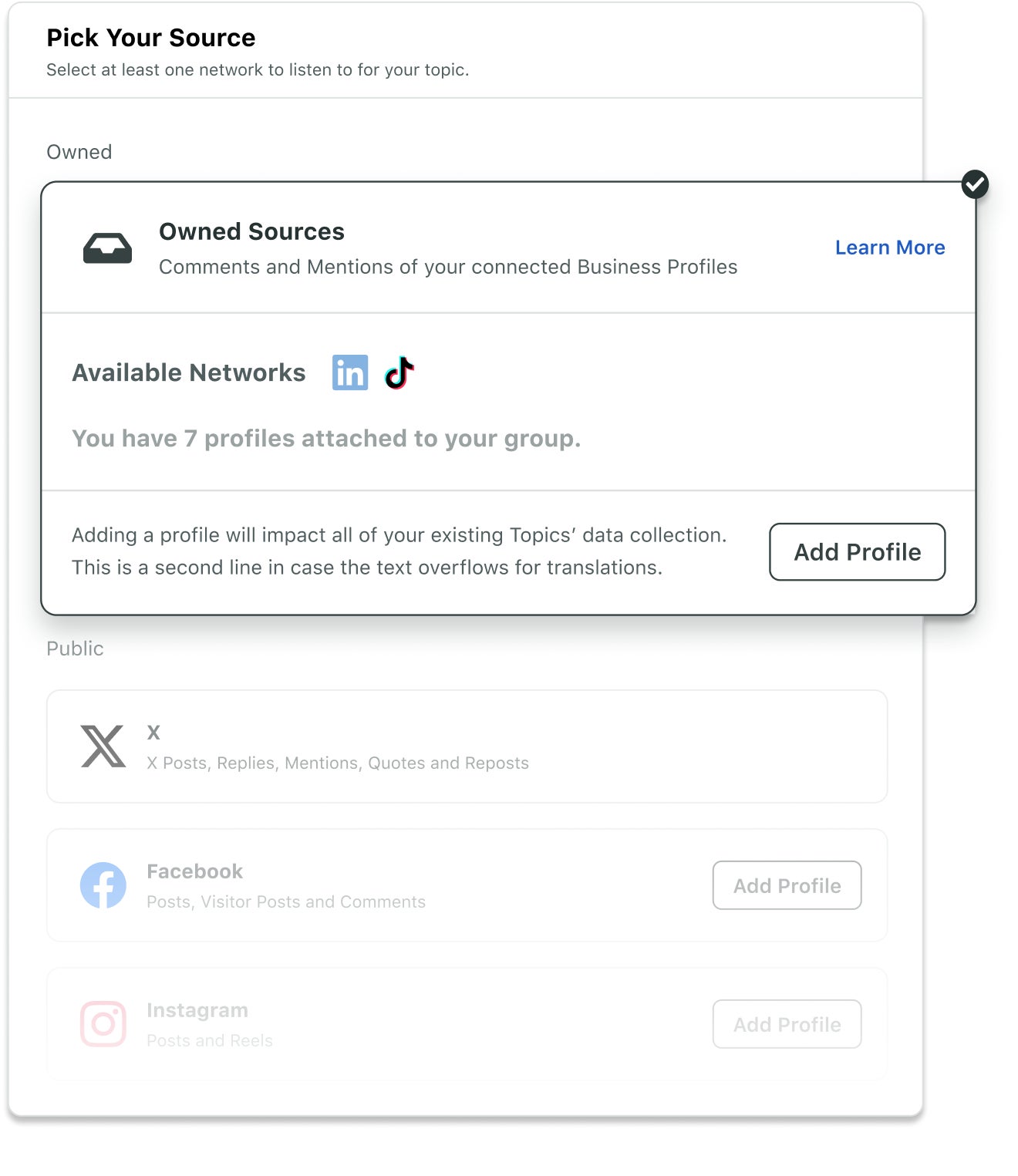
Unlike standalone listening tools that simply display data, Sprout bridges the gap between analysis and action. From the Smart Inbox, you can reply to comments, use Tagging to flag messages for customer support teams, or pivot to the Publishing suite to schedule new content based on what is driving engagement. This seamless connection between listening, publishing and reporting makes Sprout uniquely effective for agile strategy refinement.
When you pair this functionality with Premium Analytics, you can perform deep competitive benchmarking to see how your growth and engagement rates compare to industry peers, giving you a full picture of where you stand in the market.
Best for: Teams that want to move from insight to action. Sprout centralizes your LinkedIn presence, allowing you to analyze sentiment, reply to engagement and schedule content all from one platform.
2. Brandwatch
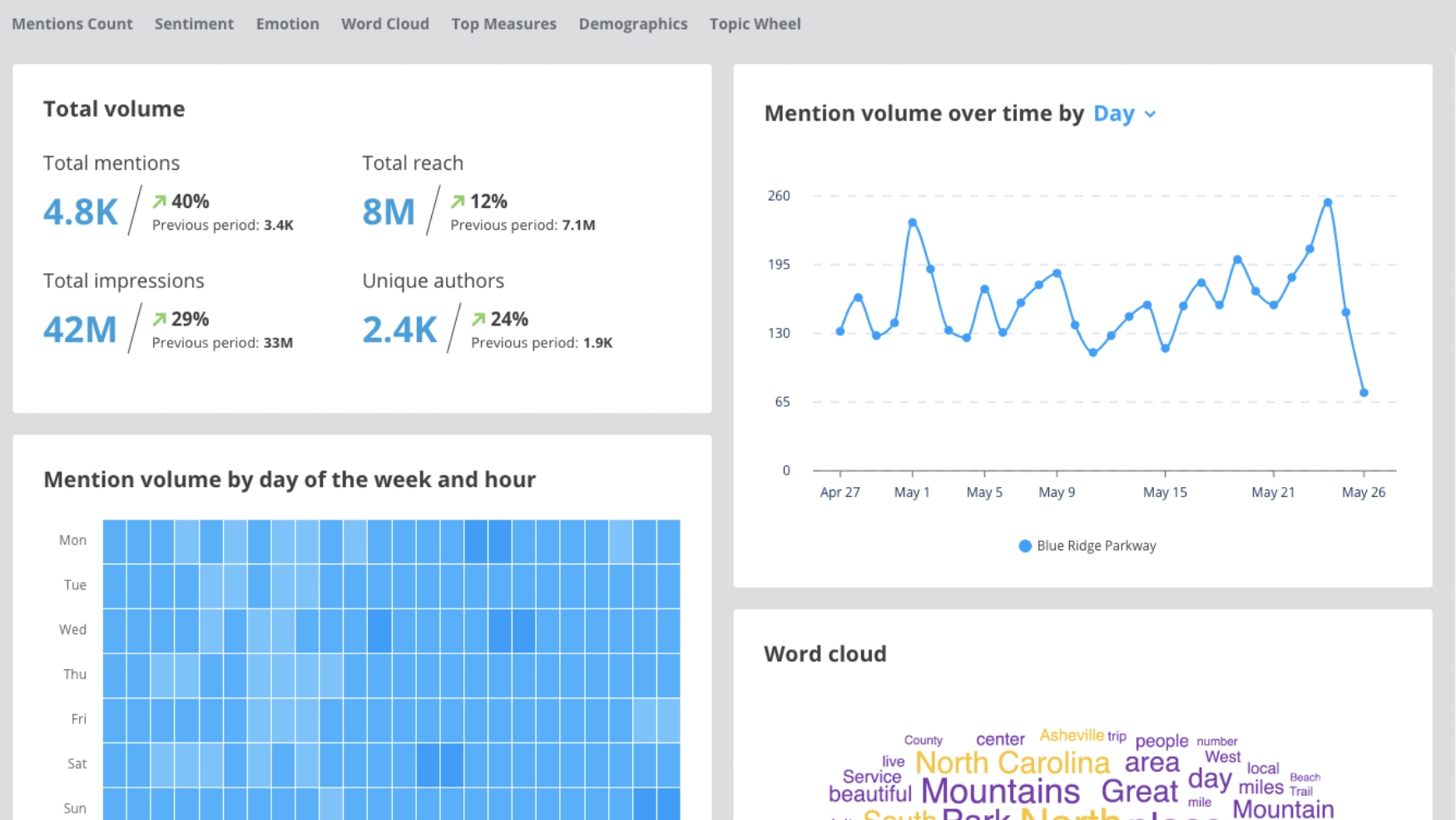
Brandwatch delivers primarily on quantitative analytics and owned metrics rather than broad social listening for LinkedIn. Through its LinkedIn API integration, it provides insights into owned Company Page performance, audience demographics and engagement trends.
(Source: Brandwatch)
The platform allows users to aggregate data to compare specific regions or campaigns over time. Its custom dashboards also let you dig into the details without getting lost in the data. Brandwatch relies heavily on Boolean search logic, which can be difficult and time-consuming for non-technical users to set up quickly.
Best for: Data analysts who need granular, historical comparisons of regions or campaigns over long periods but have the technical expertise to manage complex query setups..
3. BuzzSumo
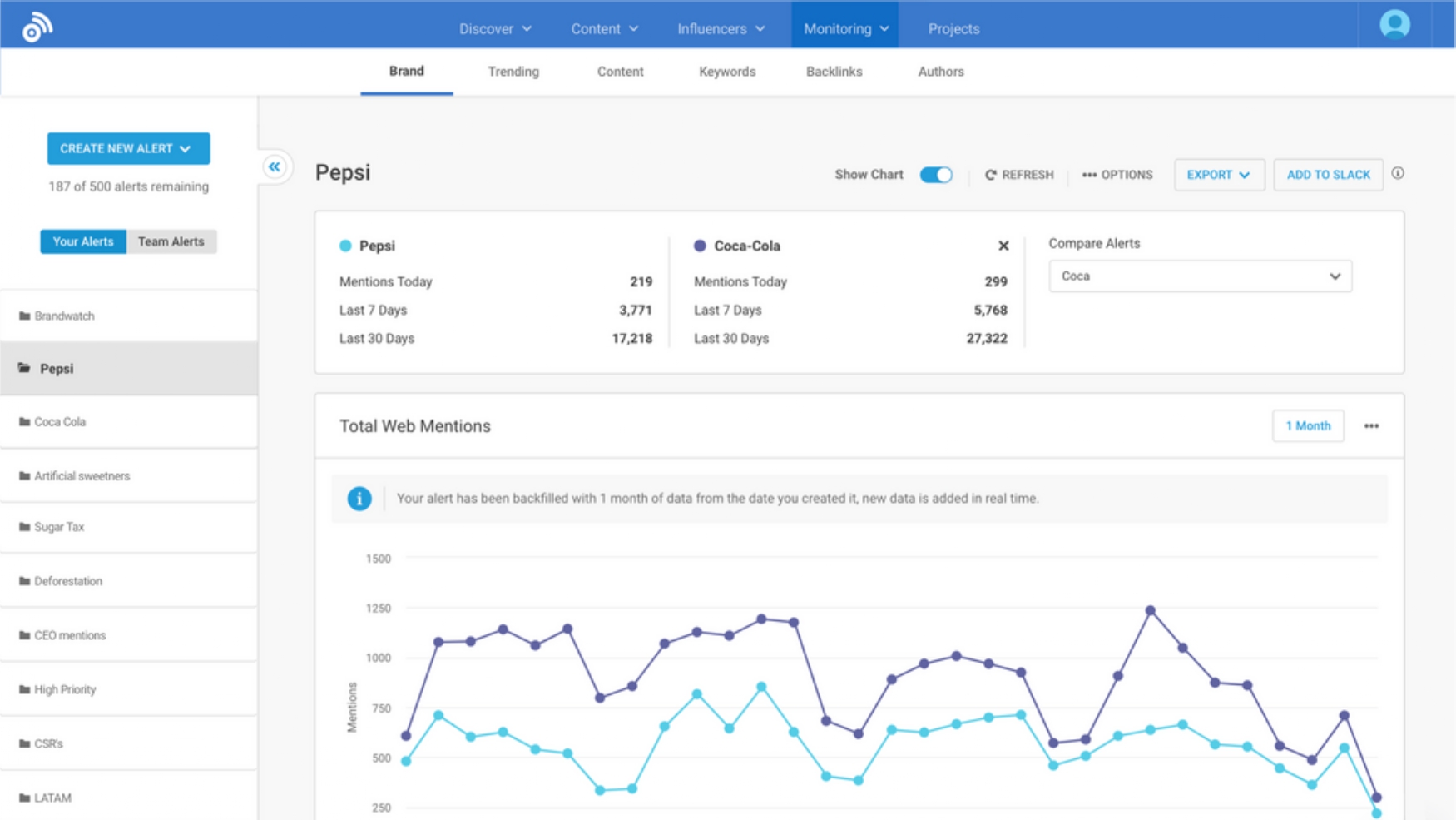
BuzzSumo focuses on content intelligence to give marketers visibility into which external articles, news stories and link-based formats are generating the most shares on LinkedIn. Its trend detection tools also surface high-performing content and industry themes, helping brands identify what is resonating with professional audiences.
(Source: BuzzSumo)
The platform is particularly useful for content teams looking to reverse-engineer success. By analyzing who is sharing top-performing content, you can identify key influencers and voices worth collaborating with.
Best for: Content teams looking for topic inspiration and viral news trends rather than deep reputation management or monitoring native user conversations.
4. Sprinklr
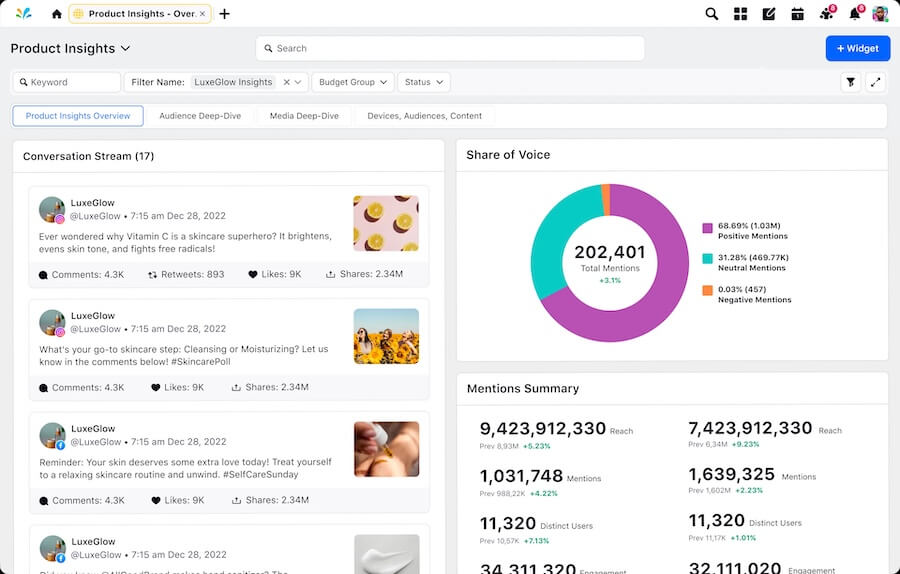
Sprinklr is a customer experience management (CXM) platform that offers social listening capabilities as part of its Sprinklr Insights suite. It is designed for large enterprises that need to ingest massive amounts of data across various digital channels, not just social.
(Source: Sprinklr)
Sprinklr’s complexity can require significant time and training to navigate effectively. Additionally, if a topic goes viral or you need to track a broad industry conversation, you could hit data limits or face overage costs—limiting your ability to listen freely.
Best for: Large enterprises with dedicated data analyst teams who have the time and budget to manage a complex, custom-built environment.
Make LinkedIn listening your growth advantage
LinkedIn listening is more than just checking notifications—it turns everyday conversation into competitive intelligence. By analyzing the sentiment and themes behind your mentions, you can pivot your strategy faster than the competition. But to truly make use of these insights, you’ll also need tools that connect the dots between these discussions.
Sprout Social connects those dots for you, revealing the patterns behind them and turning insight into action. With Listening Topics, you can visualize trends and apply insights directly across your publishing and engagement workflows.
Ready to turn conversations into competitive intelligence? Book a demo of Sprout Social today.
39 free social media strategy templates that will elevate your workflows
Published on August 20, 2026 Reading time 15 minutes








Share