LinkedIn hashtags: The complete guide for 2026

Written by Sam Kendall
Published on May 12, 2026
Reading time 10 minutes
Table of Contents
With over 1 billion members, LinkedIn is the world’s largest professional platform. It’s also the most powerful tool for B2B growth, brand visibility and industry authority. LinkedIn marketing drives real business results—but only when the right people see your content.
That’s where hashtags come in. The right LinkedIn hashtags inject your posts into active conversations, expand your reach beyond your existing followers and position your brand in front of decision-makers searching for your exact expertise.
This guide covers how to use LinkedIn hashtags across posts, comments, articles and your business profile. We also include 70+ of the best LinkedIn hashtags by industry so you’ll find the right tags for your content and start building momentum.
What are LinkedIn hashtags?
LinkedIn hashtags are keywords or phrases that categorize content, making it easier for users to discover and engage with topics relevant to their interests or industry. You can add them to posts, comments, articles, profiles and pages on the platform.
Hashtags help your content engage with larger conversations already happening on LinkedIn. They increase post visibility, attract audiences with shared interests and position your brand inside trending industry discussions.
According to the 2026 Social Media Content Strategy Report, a combined 48% of LinkedIn users want brands to share educational product information and updates from company leadership. Strategic hashtag use is a direct path to the audiences who want exactly what you’re publishing.
Try Sprout Social free for 30 days
How LinkedIn hashtags work
LinkedIn hashtags act as topic signals: they tell the algorithm what your post is about and connect it to relevant searches, feeds and conversations across the platform.
Hashtags work when they match the actual topic of your post and reinforce the keywords already in your copy. Use them with intention or don’t use them at all.
- LinkedIn sorts content by topic and intent. When you add a hashtag, LinkedIn categorizes your post and surfaces it to people following or searching that topic. The match between your hashtag and your content drives relevance, not the hashtag alone.
- Broad hashtags bring volume, niche hashtags bring precision. A hashtag like #marketing reaches a massive audience, but your post competes with enormous content volume. A hashtag like #B2BContentMarketing reaches a smaller, more focused audience—one far more likely to engage with what you’re saying.
- Hashtags amplify strong copy—they don’t rescue weak copy. When your post already communicates a clear topic, hashtags sharpen that signal. When your copy is vague, no hashtag fixes it.
The brands winning on LinkedIn in 2026 treat hashtags as a precision tool, not a reach hack. The next section shows you exactly how to use them that way.
Are LinkedIn hashtags still effective in 2026?
Yes, LinkedIn hashtags are still effective in 2026 when paired with a strong keyword strategy and high-quality content. Their role has shifted from simple categorization to strategic amplification within LinkedIn’s keyword-driven algorithm.
Recent platform updates repositioned hashtags as SEO signals rather than standalone discovery tools. LinkedIn removed hashtag following, eliminated hashtags from profile displays and stopped surfacing them in the dropdown search bar. The result: hashtags now reward strategic use, not volume.
The brands winning on LinkedIn combine hashtags with LinkedIn SEO best practices across their entire presence. That integrated approach drives targeted reach and separates high-quality content from generic posts.
How to use hashtags on LinkedIn
LinkedIn hashtags work across posts, articles, comments and your business page, and each placement serves a distinct purpose for visibility and reach. Here’s exactly how to use them in each location.
How to add hashtags to your LinkedIn business page
Building an effective LinkedIn business page starts with making it discoverable. LinkedIn renamed business page hashtags to “Specialisms” in late 2024.
To add them, navigate to your business page, select Edit page, then choose Details from the About section in the sidebar. Scroll to the bottom to find Specialisms and add up to 20 keyword phrases.
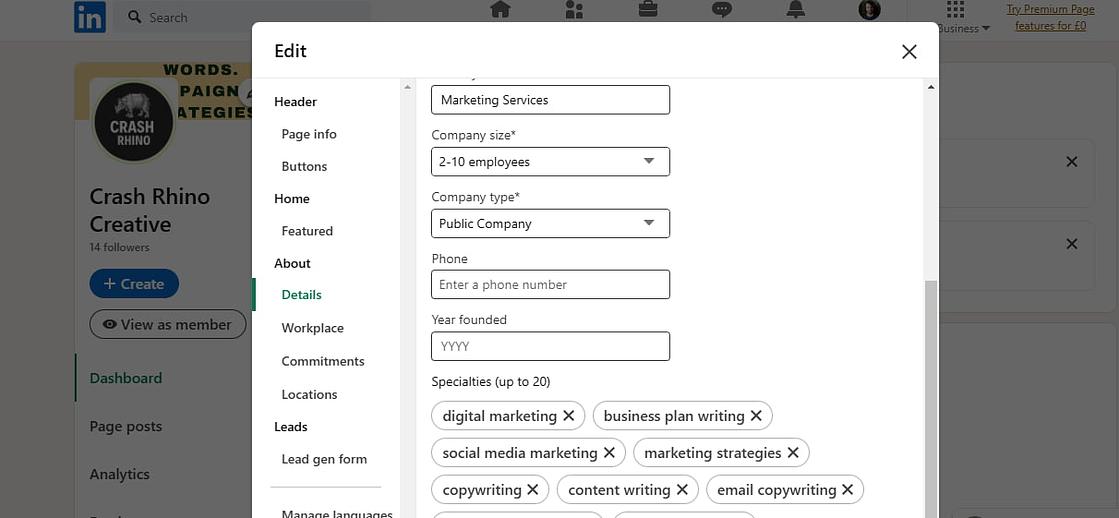
These phrases function exactly like hashtags, with no # symbol required, and surface your page in relevant searches. For a marketing brand, add specialisms like “social media marketing,” “brand design” or “social media content.”
On personal profiles, the equivalent feature is called Skills. Click Add profile section on your personal profile, then select Add skills to get started.
How to add hashtags to your LinkedIn posts
Adding LinkedIn hashtags to posts is straightforward. Click Start a post at the top of your homepage, then press the # key and type your chosen hashtag directly in the text.
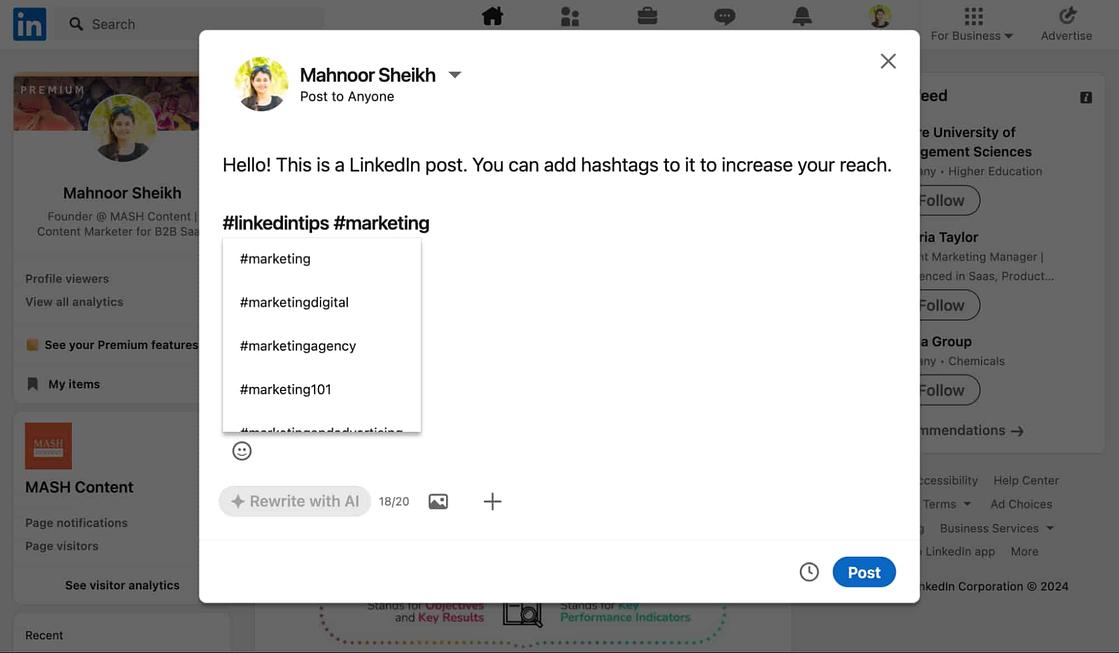
Use a LinkedIn post scheduler to plan hashtag placement in advance—weave them naturally into your copy or group them at the end to keep your message clean.
How to add hashtags to your LinkedIn articles
To write an article, click Write article at the top of your homepage and use the # key to insert hashtags anywhere in the body. Grouping them at the end preserves the reading flow without sacrificing discoverability.
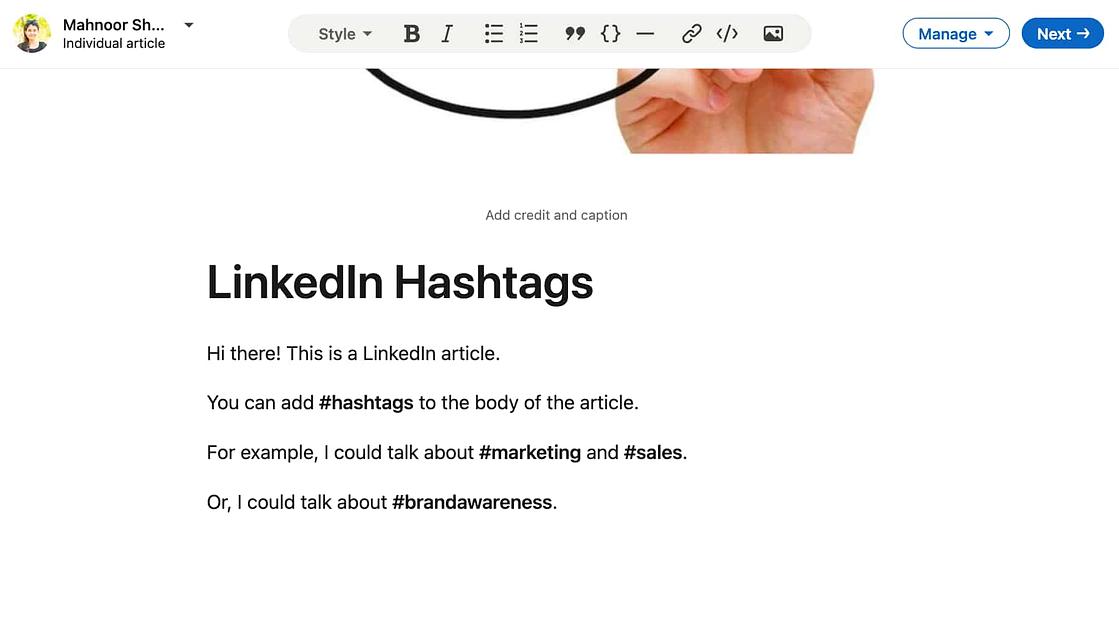
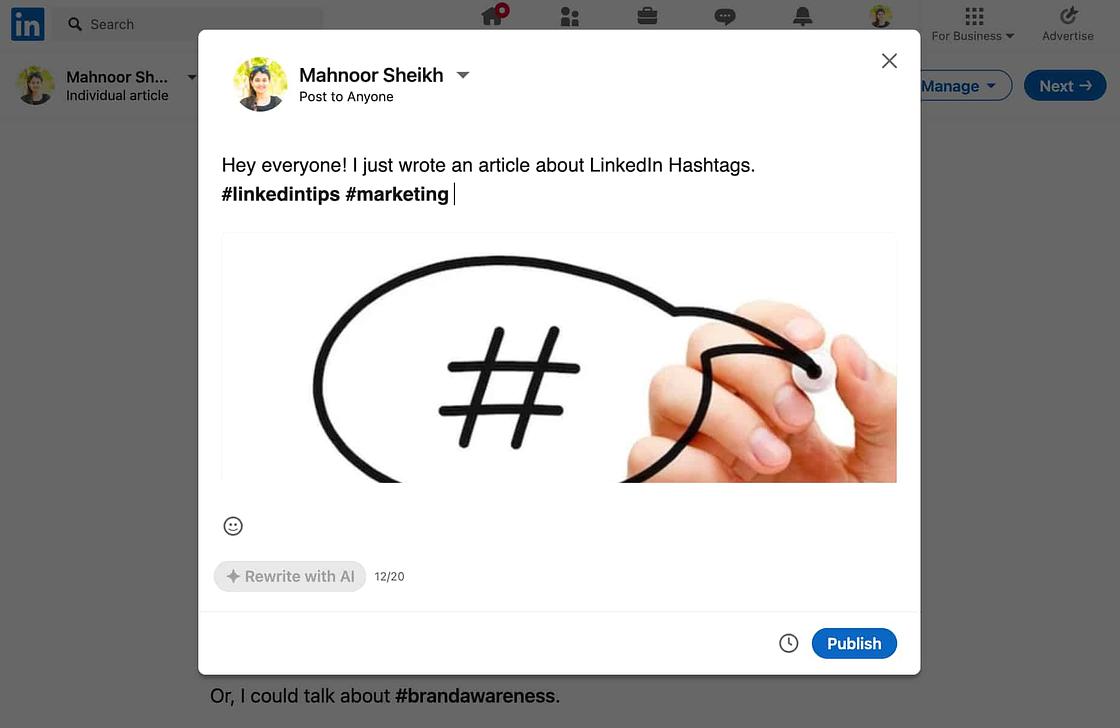
When you share the article as a post, add hashtags there too. This doubles your reach by targeting both article readers and feed browsers.
How to add hashtags to your LinkedIn comments
Hashtags in comments extend your visibility into active conversations already gaining traction on the platform. Use them only when they’re directly relevant to the topic because irrelevant hashtags read as spam and damage your credibility.

Keep comment hashtags sparse. One or two well-chosen tags outperform a string of loosely related ones every time.
How to find the right LinkedIn hashtags
Finding the right LinkedIn hashtags requires a combination of platform search, social listening and manual research. Each method surfaces different opportunities, so use all three to build a well-rounded hashtag strategy.
Use the LinkedIn search bar
Search for hashtags directly in LinkedIn’s search bar to see recent posts using that tag. LinkedIn no longer recommends hashtags in the search dropdown, but relevant content still surfaces when you search.
Here’s an example below of a recent search for #SocialMedia:
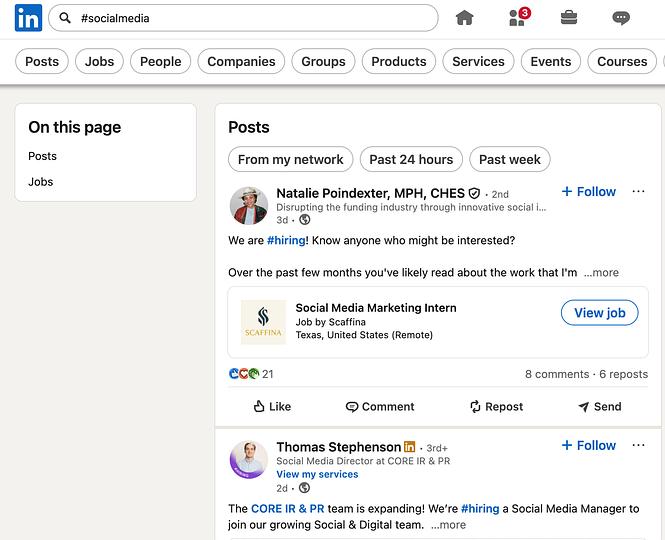
Manual research gives you a quick pulse on a hashtag’s activity, but it won’t tell you which tags actually drive business-critical insights or revenue. That’s where Sprout’s Social Listening comes in.
Use social listening to identify trending hashtags
Social listening surfaces the hashtags your industry uses—not just the ones that seem popular. Monitor conversations from thought leaders and high-performing accounts to spot which tags consistently appear in top-performing content.
For example, if listening data shows top posts in your industry frequently talking about employee advocacy or using #EmployeeAdvocacy, that’s a signal to test that hashtag in your content strategy. Sprout’s Social Listening makes this process systematic and scalable.
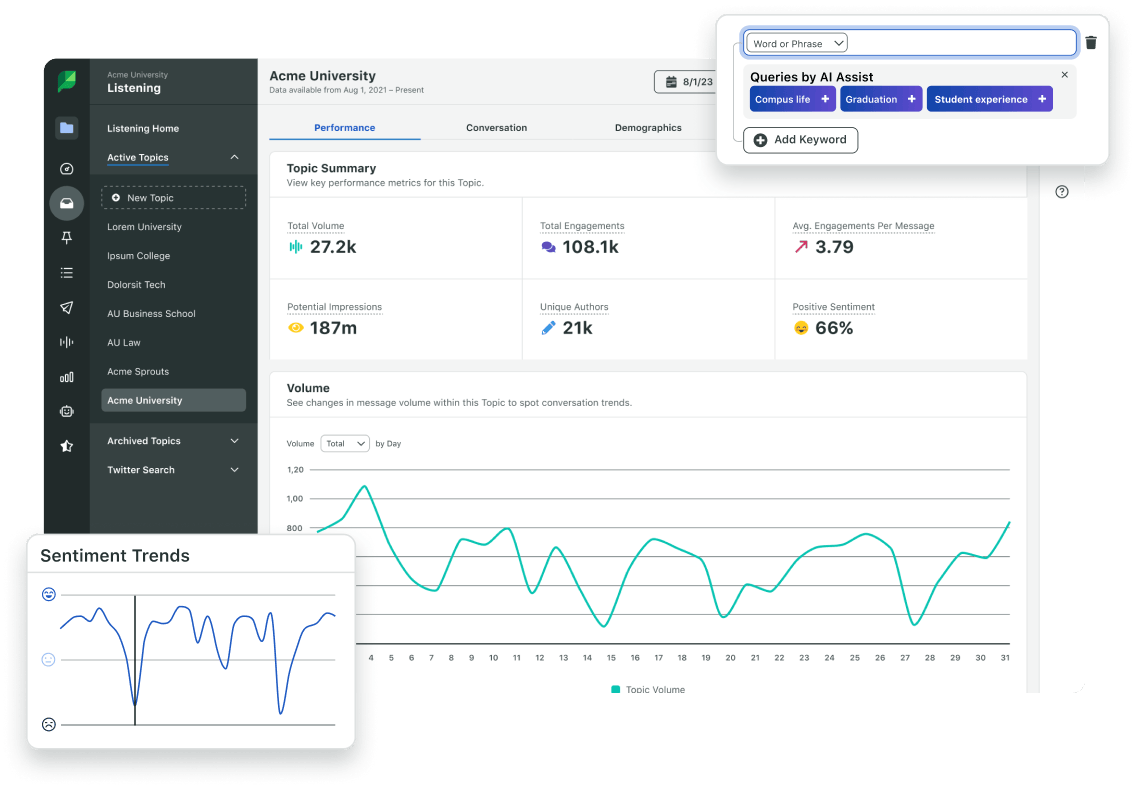
Sprout Social aggregates mention data from your connected LinkedIn accounts and collects listening data on comments across those profiles. Sprout’s conversation-tracking capabilities uncover the keywords and hashtags appearing throughout those comments, giving you a direct line to what your audience is already discussing. Find full details on Sprout Social’s LinkedIn listening capabilities on our help page.
Conduct manual research and competitor analysis
Manual research uncovers hashtag opportunities that automated tools miss. Focus on these three approaches:
- Competitor analysis: Track hashtags used by industry leaders on their highest-performing content to identify what resonates with your shared audience.
- LinkedIn Groups: Monitor discussions in relevant professional groups to discover emerging terminology and niche hashtags.
- Thought leader content: Follow industry influencers and note which hashtags consistently appear in their most engaging posts.
Use third-party hashtag research tools
Standalone hashtag generators analyze trending terms and surface popular tags based on keyword inputs. They’re a useful starting point for discovery, but they work with static data and won’t tell you which hashtags drive engagement for your specific audience.
pair any generator output with Sprout’s analytics and conversation-tracking features. While standalone generators surface what’s broadly popular, Sprout Social lets you validate those trends against your actual audience. By uncovering the keywords and hashtags your followers naturally use when mentioning your brand or commenting on your posts, you close the gap between generic popularity and proven relevance for your specific community. That’s the difference between guessing what works and knowing it.
When evaluating any hashtag research tool, look for:
- Engagement data, not just volume. A hashtag with 10 million posts isn’t useful if none of them get engagement.
- LinkedIn-specific data. Hashtag behavior differs by platform. Tools that generalize across all networks won’t reflect LinkedIn’s keyword-driven algorithm.
- Competitive context. The most valuable insight is knowing which hashtags your competitors use on their best-performing posts, not just which tags are generically popular.
The best LinkedIn hashtags by industry in 2026
The best LinkedIn hashtags for your brand depend on your audience, topic and goal, not someone else’s strategy. Mix broad hashtags, niche hashtags and branded hashtags rather than copying the same list into every post.
Use the categories below as a starting point. Pick what fits the post, not what looks like a complete set.
General professional and business hashtags
These broad hashtags work across industries and give your content a baseline of discoverability. Use them as a foundation, not a fallback for every post.
- #Business
- #Entrepreneurship
- #Leadership
- #Innovation
- #Strategy
- #Growth
- #Networking
- #FutureOfWork
- #SmallBusiness
- #Startups
Marketing and social media hashtags
For marketers, content strategists and brand builders, these hashtags connect your posts to active professional conversations around campaigns, content and digital strategy.
- #Marketing
- #ContentMarketing
- #SocialMediaMarketing
- #DigitalMarketing
- #BrandStrategy
- #ContentStrategy
- #SEO
- #CampaignManagement
- #SocialMedia
- #MarketingStrategy
Technology and SaaS hashtags
Tech brands, product teams and software companies use these hashtags to reach audiences interested in AI, data, innovation and the future of software.
- #Technology
- #SaaS
- #ArtificialIntelligence
- #AI
- #DataAnalytics
- #ProductManagement
- #CloudComputing
- #TechInnovation
- #Cybersecurity
- #DigitalTransformation
Finance and investing hashtags
Finance professionals, fintech brands and market commentators use these hashtags to engage audiences around investing, accounting and business finance.
- #Finance
- #Fintech
- #Investing
- #PersonalFinance
- #Accounting
- #WealthManagement
- #Banking
- #FinancialPlanning
- #Markets
- #BusinessFinance
Human resources and recruiting hashtags
HR professionals, talent acquisition teams and employer brand managers use these hashtags to reach candidates, peers and leaders focused on people and culture.
- #HumanResources
- #Recruiting
- #TalentAcquisition
- #EmployerBrand
- #WorkplaceCulture
- #EmployeeExperience
- #HRTech
- #Hiring
- #DiversityAndInclusion
- #PeopleAndCulture
Leadership and professional development hashtags
These hashtags connect executives, managers and career-focused professionals to conversations around growth, productivity and thought leadership.
- #ProfessionalDevelopment
- #CareerGrowth
- #ExecutiveLeadership
- #Mindset
- #Productivity
- #Management
- #Coaching
- #ThoughtLeadership
- #LearningAndDevelopment
- #CareerAdvice
Sustainability and social impact hashtags
Mission-driven brands, ESG-focused teams and corporate responsibility leaders use these hashtags to reach audiences who care about climate, community and purpose-led business.
- #Sustainability
- #ESG
- #ClimateAction
- #CorporateResponsibility
- #SocialImpact
- #GreenBusiness
- #NetZero
- #ImpactInvesting
- #CircularEconomy
- #PurposeDriven
The rule that holds across every industry: Choose hashtags that match the post topic first, then consider the audience you want to reach. A hyper-relevant hashtag will always outperform a superficially popular one.
Tips to optimize your LinkedIn hashtag strategy
Strategic hashtag use on LinkedIn means combining relevant tags with a strong keyword strategy, not chasing volume. These techniques increase your visibility and build authentic engagement with your target audience.
Combine hashtags with an effective keyword strategy
LinkedIn’s 2024 updates shifted the platform further toward keyword-driven discovery. LinkedIn removed features like hashtag following, profile hashtag listings and dropdown hashtag search.
Pair your hashtags with social search best practices and optimize every section of your business page with industry-relevant keywords. Sections like your Featured page carry more weight in search results—prioritize those.
Use LinkedIn analytics to refine your hashtag strategy
LinkedIn hashtags still function as a useful analytics signal. Track which hashtags drive visibility and engagement, then adjust your choices for future content.
LinkedIn’s native analytics no longer tracks hashtag performance at the post level. Use Sprout Social for in-depth hashtag data, visual reporting and cross-channel performance comparisons. Start a free 30-day Sprout Social trial to explore it firsthand.
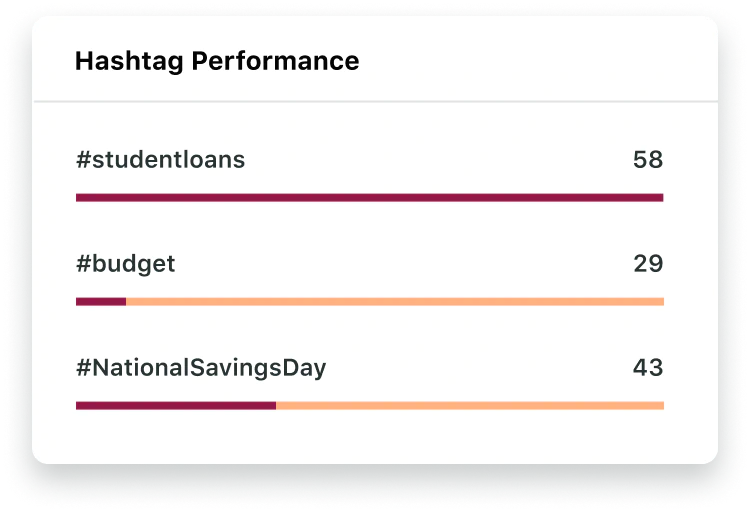
Based on hashtag analytics, you may find that #DigitalMarketingTips outperforms #MarketingTips with your audience—or that certain hashtags increase reach while others drive deeper engagement. That distinction shapes smarter content decisions.
Build a branded hashtag strategy for your campaigns
Branded hashtags give your campaigns, events and content series a dedicated home on LinkedIn. When you consistently use a branded hashtag, you train your audience to find and follow your content, and you create a searchable archive of everything published under that campaign.
A strong branded hashtag strategy follows three principles:
- Keep it short and specific. A hashtag like #SproutSocialIndex is more memorable and searchable than a generic phrase. It names the brand and the content type in one tag.
- Use it consistently across every post in a campaign. One-off usage dilutes the value. The tag only builds equity when it appears on every piece of content tied to that campaign or event.
- Pair it with one or two niche industry hashtags. Your branded hashtag reaches your existing audience. Niche hashtags reach new ones. Use both on every campaign post to maximize reach without sacrificing relevance.
Track how your branded hashtags perform over time using Sprout Social’s Tag Report. You’ll see which campaigns build the most momentum and which tags to carry forward into future content.
Use hashtags sparingly and strategically
Aim for three to five highly relevant hashtags per post. Specificity outperforms volume because tags that connect directly to your content theme and audience interests consistently deliver stronger results.
Here’s an example from a recent Sprout Social post. It uses a single hashtag, #CreatorEconomyLive, tied directly to the event being promoted.
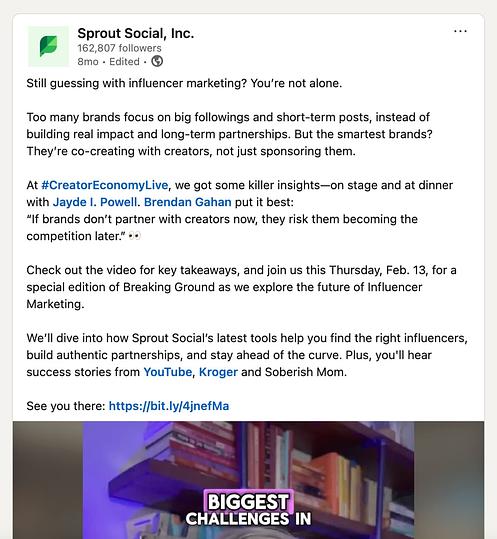
This rule doesn’t apply to keyword-rich profile sections like Specialisms; add every relevant industry keyword there.
Write your hashtags for accessibility
Capitalize each word in multi-word hashtags, such as #SocialMediaMarketing or #LinkedInMarketing. This improves readability for all users, including those relying on screen readers.
Combine this practice with broader social media accessibility strategies so your content reaches every member of your audience.
Experiment with your hashtags
If LinkedIn lead generation is a priority, continuous hashtag testing is non-negotiable. Swap broad tags like #Finance for niche alternatives like #FintechInnovation or #WealthManagementTips on posts where those themes apply.
Testing surfaces hashtags that resonate with specific audience segments and eliminates underperformers, freeing space for tags that actually move the needle.
Track your competition
Competitive monitoring reveals which hashtags drive engagement for brands in your space and surfaces trending topics worth incorporating into your own strategy.
When analyzing competitors, look for:
- Which hashtags consistently appear on their highest-performing posts
- How they balance popular and niche hashtag combinations
- Whether they use branded hashtags for events or recurring content themes
The goal is not to copy, but to identify patterns to adapt and own within your content strategy.
Take your LinkedIn hashtag strategy further
LinkedIn hashtags put your content in front of the right audiences and drive meaningful engagement, but only when you treat them as a precision tool, not an afterthought. Place them strategically across your posts, articles and business page to join the conversations your industry is already having and reach the decision-makers actively searching for your expertise.
Use Sprout Social’s LinkedIn management tools to plan your content calendar, track hashtag performance and grow your reach—all from one platform. Start a free 30-day trial or request a demo to see how Sprout Social transforms your LinkedIn strategy.
FAQs about LinkedIn hashtags
How many hashtags should I use on LinkedIn?
Limit yourself to three to five hashtags per post. Precision beats volume on LinkedIn—choose hashtags that match your post’s topic and your audience’s search intent.
What is the 3-3-3 hashtag rule and does it apply to LinkedIn?
The 3-3-3 hashtag rule is an Instagram-originated framework that recommends using three broad hashtags, three medium-sized hashtags and three niche hashtags per post to balance reach with relevance. It was designed for Instagram’s hashtag-following and discovery feed mechanics.
Leave that rule on Instagram. LinkedIn’s algorithm is keyword-driven, not hashtag-volume-driven, and the platform removed hashtag following entirely. On LinkedIn, three to five highly relevant hashtags aligned to your post topic outperform any formula built for a different platform.
Can I use the same LinkedIn hashtags for every post?
Don’t repeat the same hashtags across every post; this limits your discoverability. Tailor your hashtags to each topic because a post about leadership strategy and a post about product launches serve different audiences and need different tags to reach them.
How do I measure LinkedIn hashtag performance without native analytics?
LinkedIn’s native analytics removed post-level hashtag tracking. While Sprout Social doesn’t offer a dedicated, automated LinkedIn Hashtag Performance report, it eliminates the need for manual spreadsheets by offering three systematic ways to track your hashtag strategy:
- 1. The Tag Report (Best for aggregate tracking)
Instead of relying on native hashtag tracking, map your hashtags to Sprout’s internal tagging system. When drafting a LinkedIn post, apply an internal “Tag” that matches your hashtag (e.g., tag the post #DataAnalytics). You can then run the Tag Report to measure aggregate impressions, reach and engagement across all posts that used that tag to see what drives results. - 2. The Post Performance Report (Best for spotting trends)
Filter this report for your LinkedIn Company Page and sort your content by top metrics like Impressions, Reach or Engagement Rate. By reviewing your most successful posts side-by-side, you can easily spot patterns and see which hashtag combinations consistently appear in your top-performing content. - 3. Social Listening (Best for analyzing campaign engagement)
If you are running a specific campaign or want to measure how your audience responds to a branded hashtag, you can use Sprout’s LinkedIn listening capabilities to analyze mentions of your Company Page and comments on your posts. This allows you to track the volume, sentiment and related keywords your audience uses when engaging with your campaign content. It provides deeper qualitative insights into how your community reacts to your tags, giving you the context that standard engagement metrics miss.
Patterns across multiple posts reveal which hashtag combinations work, and Sprout Social makes finding those patterns systematic so you can easily identify which tags to keep and which ones to cut. Start a free 30-day trial to see it in action.






Share