How to strengthen support with customer service automation

Written by John Paul Hernandez
Published on January 9, 2026
Reading time 14 minutes

Table of Contents
Scaling customer care without sacrificing quality is one of a care teams’ biggest challenges.
Today’s customers expect fast, thoughtful support across every social network—and according to the 2025 Sprout Social Index™, 73% say they’ll buy elsewhere if they don’t get it. That makes automation a necessity, not a luxury.
But meeting customers everywhere they are isn’t realistic without the right tools. With helpful software and a clear strategy, you can deliver consistent service that drives loyalty and retention.
Discover how to implement customer service automation that scales across channels so you can strengthen brand reputation and keep customers happy.
What is customer service automation?
Customer service automation uses technology—ranging from rule-based systems to advanced artificial intelligence (AI) and social media management platforms—to manage and resolve customer support tasks that once required human intervention. Automation gives teams faster, smarter ways to serve customers.
This technology can include AI-driven chatbots for instant answers, automated ticket routing to get issues to the right experts and intelligent auto-responders. The goal isn’t to eliminate human support, but to empower teams to deliver faster, smarter and more efficient service 24/7.
According to Zendesk’s CX Trends 2024 report, CX leaders expect generative AI to significantly influence chat support, email communications, search functionality and voice-based interactions in the next couple of years.
Zendesk’s 2025 report reinforces the growing importance of AI solutions, noting that 70% of customers already recognize a significant difference in the quality of experience between companies that use AI effectively and those that do not.
Why is customer service automation important for support teams?
Customer service automation is a necessary part of customer care, especially as the Index reveals that consumers view personalized service as companies’ top social media priority in 2025. Overcoming the bottlenecks that prevent teams from delivering high-quality support is essential for anticipating and meeting customer needs.
According to McKinsey, one of the main challenges to care is rising call volumes. On top of that, forward-leaning companies are already adopting the latest digital technologies, which raises the bar for everyone and puts increasing pressure on staff and leadership at other companies.
With expectations climbing and ticket volumes mounting, automation and conversational AI are becoming vital for reducing strain and keeping pace. As customers demand more personalized and timely support (especially through social channels), customer care teams and social media marketers must continue to adapt.
With the best customer service automation tools, teams can do more than streamline taks—they can provide a connected experience across platforms that delivers the seamless service customers expect.
Key customer service automation benefits
Customer service automation delivers ROI that fuels growth by creating positive customer experiences, timely support and a tight feedback loop. Here are some of the biggest benefits you can expect:
24/7 availability and faster response times
According to the Q2 2025 Sprout Social Pulse Survey, when social users reach out to a brand and don’t get a response, only 49% try again via traditional channels and 19% don’t try again at all. These missed opportunities often lead to churn, frustration and negative experiences.
By building chatbots and rule-based automation systems, you can assist customers wherever they are, on their schedules. Faster responses and helpful prompts improve customer experiences and boost retention by addressing issues immediately.
For example, with a social media management tool like Sprout Social, you can respond to customers across channels from a centralized inbox. Sprout’s automation capabilities identify the most urgent messages so your team can respond right away, either via chatbot or manually. After the interaction, the customer can provide real-time feedback, which helps you continuously improve your automation and the overall customer experience (CX).
Here’s an example of how to use Sprout Social to automate feedback:
Significant cost savings
Automation helps you achieve significant cost savings by handling repetitive, low-level tasks, such as password resets or order status checks, without requiring agent intervention. This directly deflects a significant portion of inbound tickets that would otherwise go to an agent’s queue. By filtering out these simple requests, automation helps free up your team to focus their expertise on complex issues, reducing the overall cost-per-resolution.
Automation also helps lessen agent burnout and decrease costly employee turnover. It achieves this by reducing the volume of manual, repetitive tasks that clog an agent’s day.
Equipping agents with better tools and streamlined workflows helps them work more efficiently, leading to higher job satisfaction. These operational savings free up resources you can put toward scalability and future growth.
Sprout tip: Track savings by comparing cost-per-resolution before and after automation to prove ROI to leadership.
Improved customer satisfaction (CSAT)
Faster responses often increase customer satisfaction, and personalization enhances those positive experiences. Fortunately, personalization doesn’t have to be time-consuming or hard to scale.
Automation makes it easier to deliver customized experiences efficiently. For example, AI Assist lets you quickly tailor responses to engage authentically with more customers in less time.
Enhanced agent productivity
Automating routine customer service tasks like copy-pasting responses, routing tickets and updating systems gives teams more time for meaningful customer interactions.
Integrating your customer relationship management (CRM) platform with a social media management solution provides the context needed for faster, more personal support. With Sprout’s Salesforce integration, social conversations and customer records live in one place. Your agents can instantly access past purchases, interactions and support cases, cutting down on repetitive questions and manual searches so they can concentrate on resolving issues.
Greater accuracy and consistency
Automation ensures consistent customer experiences across channels while allowing human agents to provide the nuanced care only people can deliver. By pairing the two, you can offer faster, more accurate and reliable responses that drive satisfaction.
For example, Sprout’s Saved Replies automates responses to common questions, enabling your team to quickly send vetted replies to save time without sacrificing quality.
In the image below, you can see how an agent uses Sprout to provide relevant responses on X:
Proactive customer support
According to HelpLama’s customer service survey, 83% of buyers want brands to reach out about issues before they do—showing how much customers value proactive service. With automation and social listening, you can catch small issues before they become bigger problems.
Sprout Listening, for example, lets you track brand mentions and industry keywords so you never miss important customer moments. If someone complains about a product on Facebook or Instagram, you can spot it though mentions or keywords, then respond directly by messaging or commenting to resolve the concern. You can also use Listening to identify broader service trends or frustrations and use those insights to improve your product or business.
Scalability
Automation can help you grow on budget without lessening quality. It’s not about replacing people but about empowering your team to use AI to expand support capabilities.
This approach allows you to hear and resolve every customer concern across social. As your brand grows, automation keeps you connected without losing that essential human touch. It helps you stay ahead of customer conversations, engage consistently and build a loyal community through genuine connections.
10 key customer service processes you can automate
Here are 10 ways you can use customer service automation in your current support processes:
1. AI chatbots for instant answers
Customer service agents can usually name the top few questions they get without hesitation. For example, a fast food restaurant worker knows most phone calls are about directions, business hours, catering or an order gone wrong.
While complex tasks still require a human touch, AI chatbots can easily handle common questions by pulling from your database of documents, web pages and uploaded instructions to assist customers.
Here’s an example from 1-800-Flowers. Not only does the chatbot answer questions, it also guides website visitors through the customer journey with prompts like “Where’s my order?” or “Change my order:”
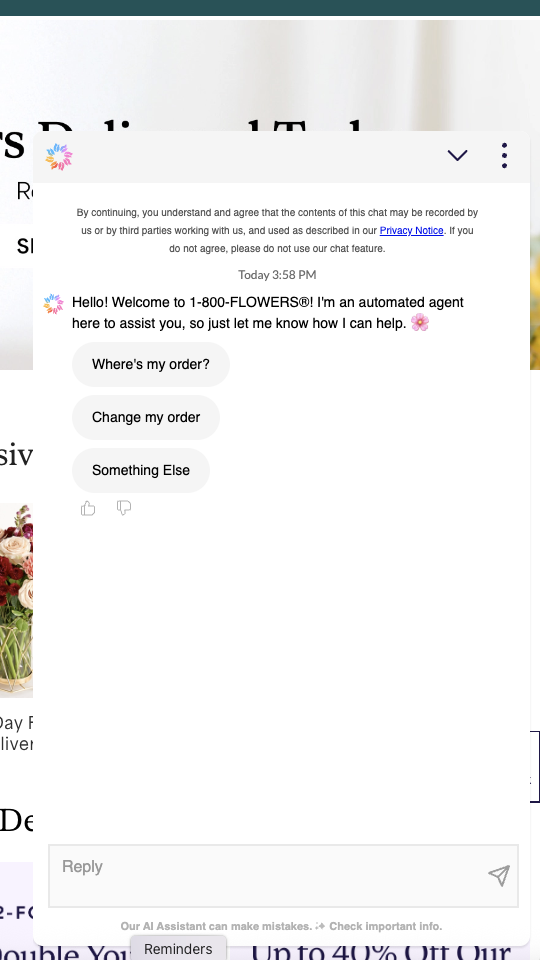
(Source: 1-800-Flowers)
Effective chatbots should be convenient and helpful, not a barrier to human contact. Bots should also always include an option to connect with a live agent if the customer needs more help.
2. Automated ticket routing and triage
In high-volume social support, manually routing every message wastes time and slows responses. Automated triage solves this by using rules or AI to sort social requests and assign them to the right team. For instance, an urgent X (formerly Twitter) DM about a product issue can be routed directly to the care team, while an Instagram comment asking about a partnership can be sent to the marketing queue.
Advanced systems can even factor in history, sentiment and agent capacity to balance workloads. With Sprout automations, you can control your social message workflow and integrate with your customer service tools to see all your messages across every channel.
3. Automated message classification and prioritization
When message volume is high, it’s easy for urgent issues to get lost. Instead of just sending a basic “we received your message” auto-reply (which is often limited by network), a smarter approach is to automatically identify what needs follow-up and what doesn’t.
Sprout’s automated tools use machine learning to classify messages so agents can quickly spot which need immediate attention and which can wait, ensuring no concerns slip through the cracks.
4. Self-service knowledge base suggestions
You’ll also want your customer service automation to include relevant responses from your knowledge base. For example, if a user sends a message to a chatbot or DMs your brand account, you can provide automatic responses with links to additional resources and help. Providing these enriched, targeted responses guides customers through their journey and gives them the in-depth support they need to get the most out of your product or service.
For instance, when someone messages 1-800-Flowers on Facebook asking for gift ideas, the brand replies instantly with a prepared response and a direct link to its catalog:
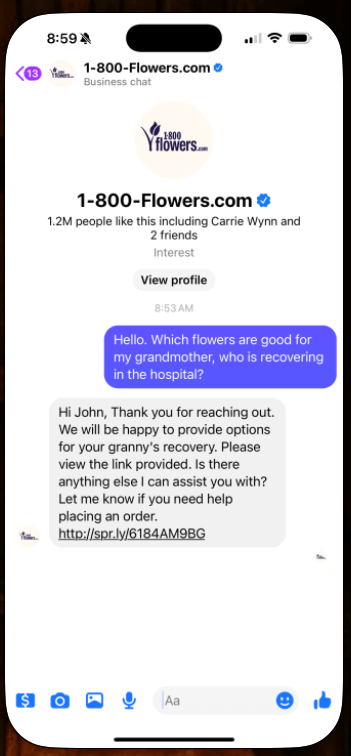
(Source: Facebook)
5. Automated customer feedback surveys
To improve customer service, you need to measure it, and surveys are one of the best ways to gather feedback.
By automating survey requests, you can present them to customers quickly and consistently, increasing the chances they’ll respond right away. This boosts response rates and the quality of your data over time. Plus, automation saves your team time by handling survey distribution.
For example, after a customer called Amazon support about a stroller dispute, they immediately received a feedback survey. This quick turnaround made sending a response more likely since the experience was still fresh:
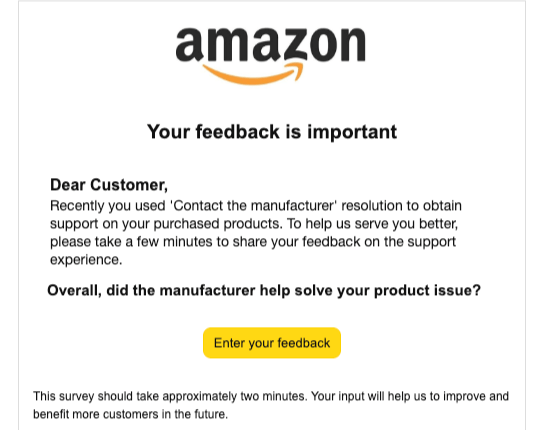
(Source: Amazon)
6. Intelligent voice response (IVR) systems
When your customers call a support line, IVR can add a warm, automatic touch to their interaction. Instead of standards like “Press 1 for billing,” AI-powered IVR systems uses speech recognition to handle common requests more naturally,
For example, the system might say, “Briefly tell me what you need help with,” and then route callers to the right place based on the response. This approach improves routing accuracy and speeds up the customer support process.
7. Proactive support messaging and outreach
Automating proactive messaging means setting up systems that notify or engage customers based on certain events or data insights. For example, if your product monitoring team detects an outage or glitch, the system automatically sends an email or text to impacted users acknowledging the issue and providing a resolution timeframe.
Combining continuous monitoring with social listening helps you spot issues early so you can address them before the DMs flood in. Sprout Listening makes it easy to monitor keywords and brand mentions, helping you quickly identify these opportunities.
8. Automated onboarding and welcome series
First impressions matter, especially for customer experience. For example, delivering a welcome series through emails, app messages or chatbot guides can help users fully understand your product or service. Automating these experiences guarantees consistent, reliable experiences across every touchpoint.
9. Order status and relevant information lookups
It’s common for customers to try to find answers on their own rather than contacting you right away. By automating troubleshooting, you save them time, increase satisfaction and free up your support team. Whether through your website, a chatbot or automated emails, you can provide your customers with the tools they need to access order updates, fix an issue or learn more about how your product works.
10. Social media comment moderation and routing
Managing high volumes of social media comments, mentions and DMs can overwhelm teams. Automation helps by moderating and routing these interactions efficiently.
For example, you can set rules to flag or hide inappropriate comments rather than having your team manually weed them out. For comments you do want to address, you can create Cases in Sprout and connect your CRM or customer service solutions like Zendesk, HubSpot and Salesforce to route messages to the right team members.
How to implement customer service automation effectively
Here’s how to get started implementing customer service automation today:
Step 1: Audit your current processes and identify bottlenecks
Before you adopt new tools or processes, begin by assessing your current performance. To do this, review your support tickets to identify the most repetitive, time-consuming questions.
For example, a brick-and-mortar small business with online ordering and a subscription service might encounter frequently asked questions like:
- How do I place an order? A chatbot could automatically provide a phone number and a direct link.
- What’s your return, exchange or refund policy? Your social media management tool could instantly send a link to a help article.
- Do you offer discounts for bulk orders or returning customers? Your customer service agent can automatically use a pre-determined response with a link to your resource hub.
- Why hasn’t my shipment arrived yet? A chatbot can send a tracking number with more information.
- Can you help me change or cancel my subscription? You can develop a response workflow that provides instructions and asks for more information to reduce future churn.
- What’s the difference between product A and product B? Your support agent could auto-reply with comparison content from your asset library.
- Is there a warranty or guarantee for this item? Your chatbot can ask a series of questions to get purchase details to provide a quick answer.
Step 2: Set clear customer automation goals and KPIs
Success looks different for every company and industry. While benchmarks are useful, the most important metrics reflect your own challenges.
To set relevant KPIs, start by analyzing baseline performance for support and social media metrics like response times, CSAT, feedback survey ratings and first contact resolution. Then, define clear goals, such as:
- Reduce first response time by 30%
- Deflect 25% of tier-1 tickets via automation
- Cut support costs by 15% in 3 months
- Improve CSAT by 5 points
Step 3: Choose the right customer service automation tools
The right customer service tools will integrate with your existing CRM platform and unify all your customer touchpoints to achieve a true omnichannel strategy. Not force you to build from scratch. This enhances your scalability, facilitates holistic analytics, improves security and promotes a more comprehensive approach to high-quality customer service.
- Seamless integration: Select a customer service automation tool that connects to your existing systems, like Salesforce, Zendesk or HubSpot. This prevents data silos and ensures agents have a 360-degree view of the customer.
- Omnichannel support: Today’s customer journey isn’t linear. Look for a customer support tool that can manage inquiries across all your channels—especially email, social media and live chat—from a unified inbox so your team can stay consistent and responsive.
- Scalability: Pick a solution that grows with you and handle increased message volume without a drop in performance.
- Analytics and reporting: You can’t improve what you don’t measure. Seek out automation software with robust analytic capabilities that can track the KPIs you set in Step 2 to prove ROI.
- Security and compliance: Choose a partner that meets global standards, like GDPR compliance and SOC 2 certifications, to protect your customer data.
- User-friendly interface: Select a platform that’s intuitive and enjoyable for your customer service team to use.
Customer Care by Sprout Social supports all your customer service needs across social channels while also offering integrations that keep the customer journey connected.
Step 4: Implement, test and avoid common challenges
AI can transform support, but without the right approach, it can also create fragmented and impersonal experiences. Over-automation often results in poor data integration and disjointed systems that frustrate customers instead of helping them.
As you roll out your automation, be prepared to test, iterate, and avoid these common challenges:
- The Challenge: Over-automation. Customers can tell when they’re in a “chatbot jail” and can’t reach a human.
- The Solution: Use automation to augment your team, not replace it. Automate repetitive tasks (ticket routing, common questions) but always provide a clear, easy path to a live agent for complex or sensitive issues.
- The Challenge: Poor integration and data silos. Your chatbot doesn’t know what a customer just emailed support about, forcing the customer to repeat themselves.
- The Solution: Prioritize tools that integrate. When data flows freely between your social platform and your CRM, agents have the full context to personalize support.
- The Challenge: No testing or iteration. Your automation rules are based on assumptions, not real-world data, and they quickly become outdated.
- The Solution: Continuously analyze performance. Use your tool’s analytics to find trends, spot where customers get “stuck” in a bot flow, and refine your rules based on real feedback.
Avoiding these issues while taking an AI-powered approach to customer service means prioritizing tools that enhance human interactions rather than replacing them. All-in-one social media management tools like Sprout use AI and automation to help agents respond faster and deliver more personalized, connected support at scale.
How to measure automated customer support success
To drive measurable results, you need to track performance and iterate based on what you learn. While the following KPIs are standard in customer support, they’re particularly helpful for comparing the performance of automated workflows to those handled by human agents.
Use these key metrics to quantify the impact of your customer service automation:
Efficiency metrics
These metrics help you evaluate how timely and effective your communication and resolution processes are with automation in place:
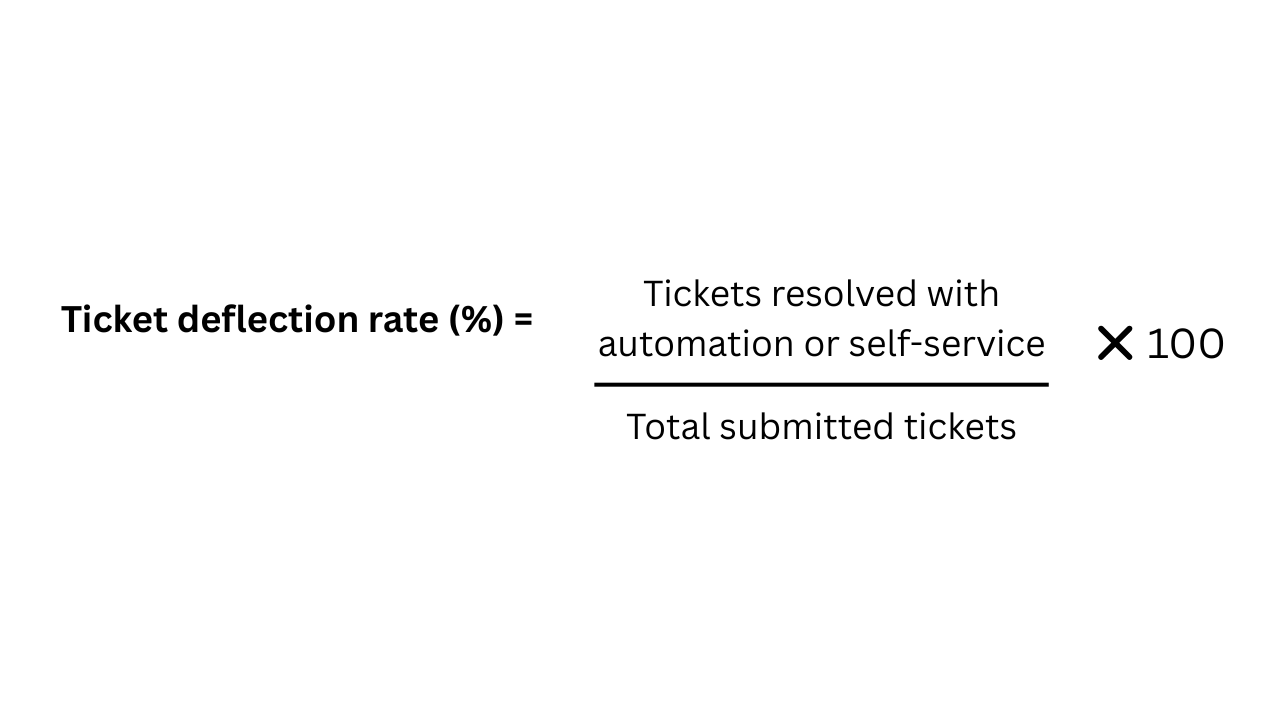
- Ticket deflection rate: The percentage of customer issues resolved through self-service, bots or automated workflows without the need for a human agent
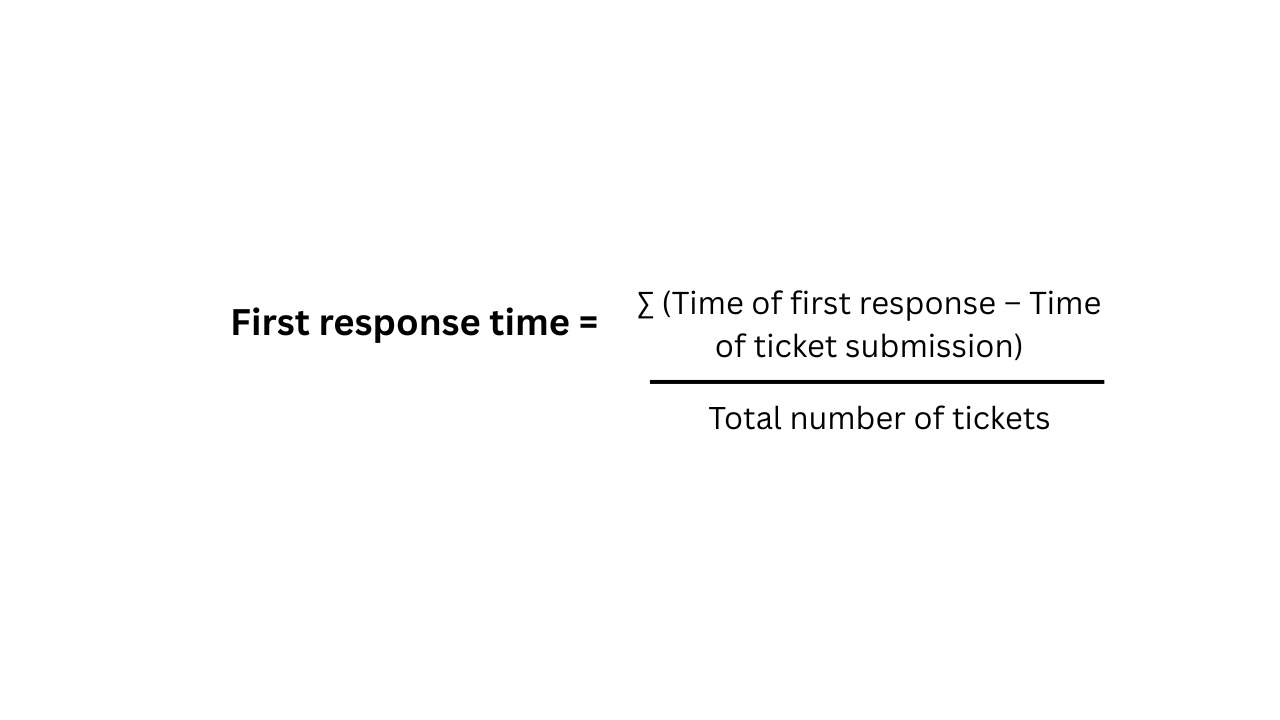
- First response time: How quickly a customer receives an initial reply from either an automated system or a live agent
- Average resolution time: The average amount of time it takes to fully resolve a customer issue
![Average resolution time = (Σ[Resolution time − Submission time]) ÷ Total tickets resolved](https://media.sproutsocial.com/uploads/2025/12/Average-Resolution-Time-ART.png)
Cost metrics
These KPIs help quantify the operational impact of automation:
- Cost per resolution: The average cost to resolve a support ticket

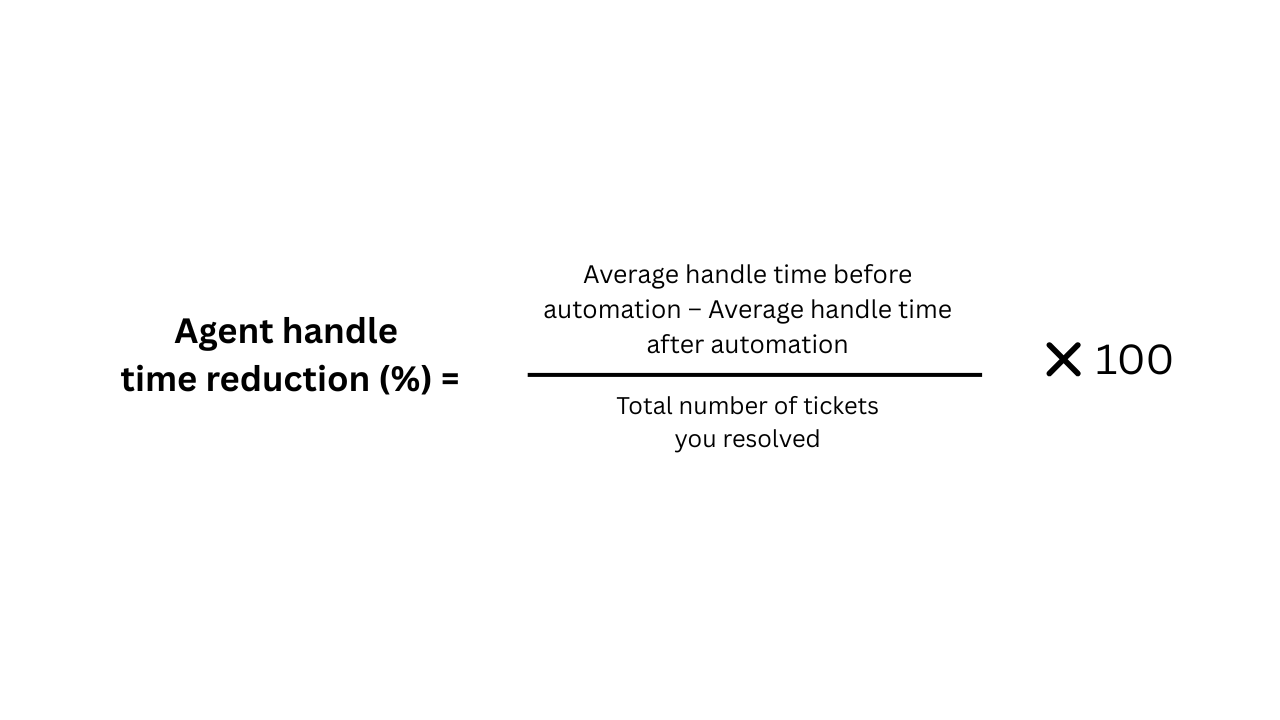
- Agent handle time reduction: The decrease in time for agents to handle an issue after automation
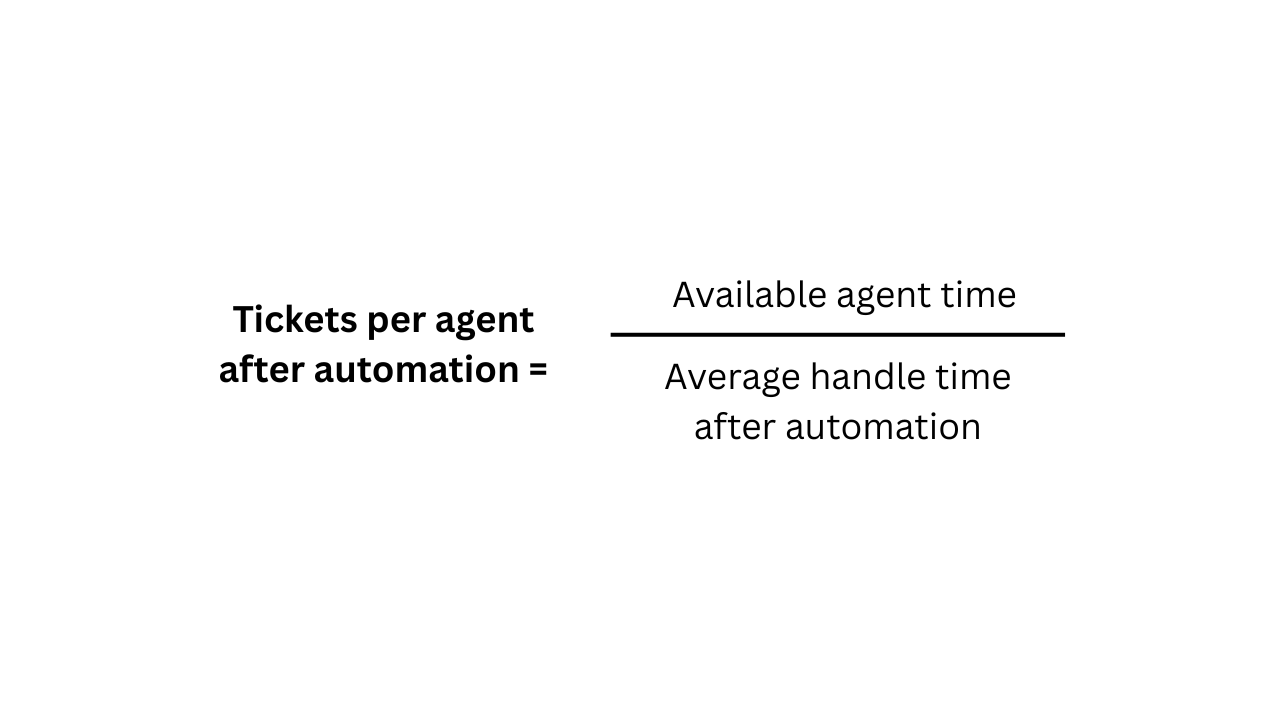
- Agent workload: The increase in ticket volume each agent can manage with automation support
Customer satisfaction metrics
These metrics measure how automation affects the overall customer experience:
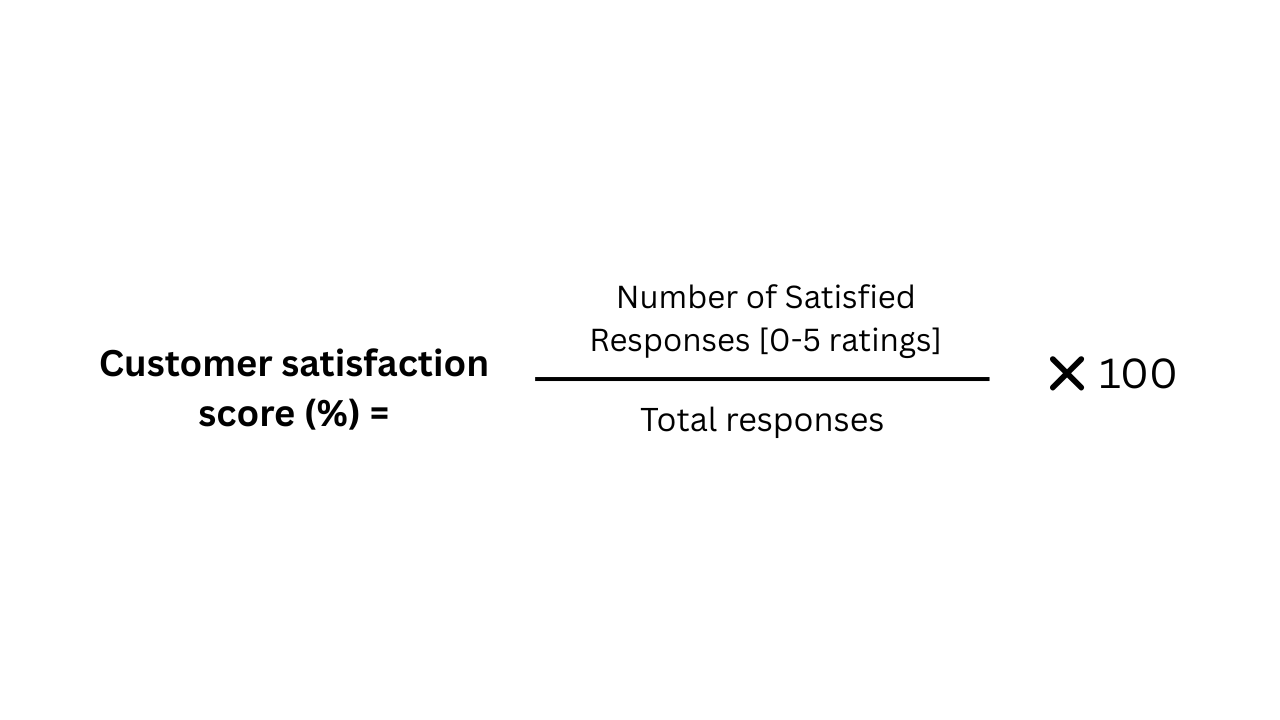
- Customer satisfaction score (CSAT): How satisfied your customers are with pre- and post-automation support
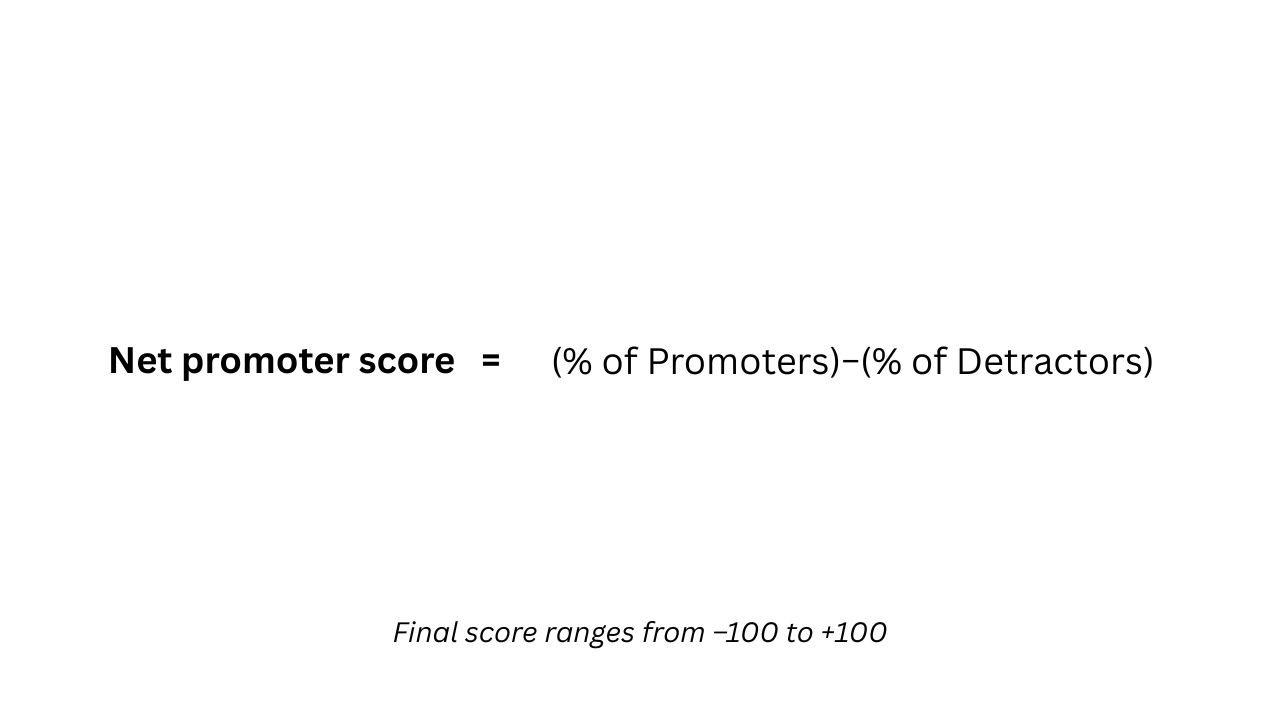
- Net promoter score (NPS): The likelihood that a customer will recommend you to others
Sprout tip: Evaluate your NPS responses on a 1–10 scale using these categories:
- Promoters: 9–10
- Passives: 7–8
- Detractors: 0–6
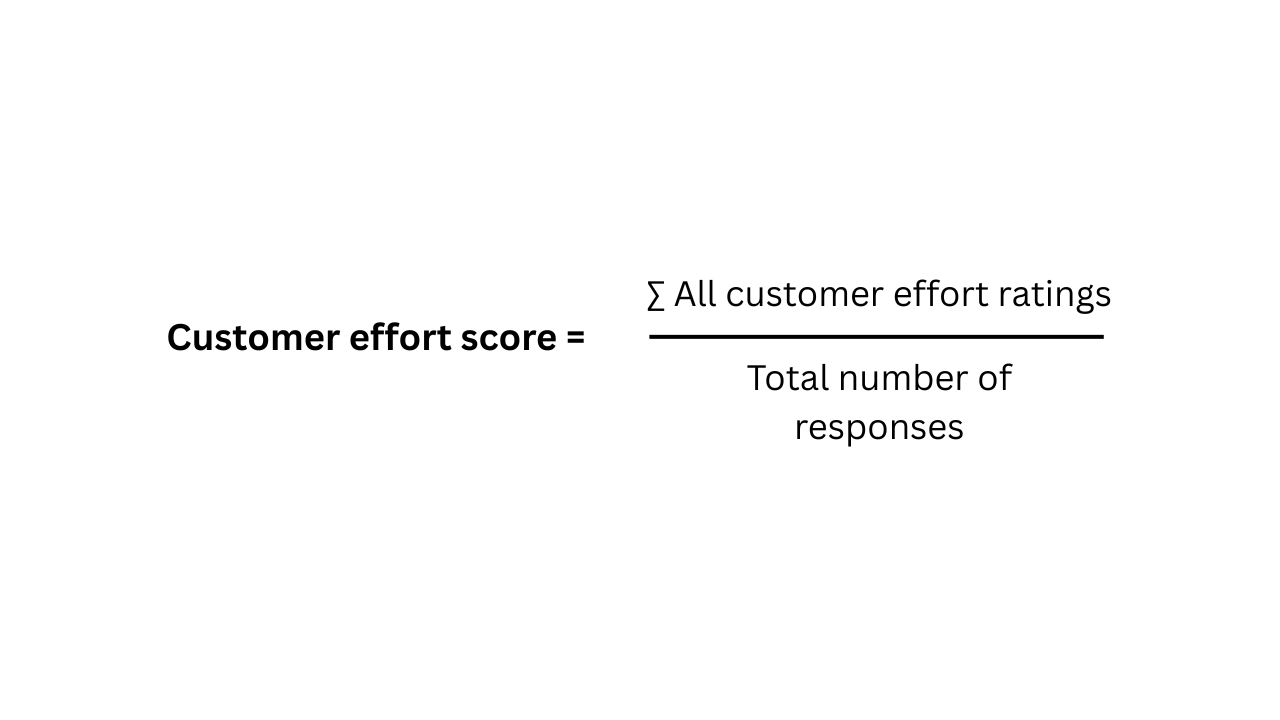
- Customer effort scores: How easily customers resolve their issues using your support system (rated on a scale from 1–10, where 1 = very difficult and 10 = very easy)
These metrics help you assess the success of your customer service automation strategy. But gathering the data, evaluating it and creating reports tying your efforts to ROI requires the right tools.
Sprout Social’s platform, for example, offers built-in analytics and reporting capabilities designed to measure these metrics. This allows teams to see how their automation and analytics are working together to drive consistent, meaningful customer care.
The future is human and AI partnerships
Effective customer service automation isn’t about replacing humans. It’s about combining AI and human strengths to deliver faster, more empathetic support. Taking a hybrid approach allows automation to resolve routine requests while making space for people to step in at the moments that matter most.
By combining efficiency with human connection, you don’t just meet expectations, you exceed them. You build loyalty, increase satisfaction and turn customer care into a competitive advantage.
With Sprout, you can support customers quickly, authentically and at scale. Sign up for a Social Customer Care by Sprout demo today to see how you can improve customer service and increase satisfaction across social.
FAQs about customer service automation
How can customer care teams successfully implement customer service automation without losing the human touch?
Automate repetitive tasks, such as responding to the most common questions or routing social media DMs to your CRM. Then, let your human agents focus on resolving complex issues and building relationships.
How does customer service automation impact agent workload and customer satisfaction?
Automation provides faster response times and gives customers access to immediate help, which increases satisfaction. It also frees up your team to work on more nuanced cases, reducing burnout and improving overall service quality.
What is the difference between a chatbot and customer service automation?
A chatbot is one tool within a larger automation strategy. Customer service automation includes chatbots, ticket routing, auto-responders and more, all working together to improve efficiency and consistency.
What are the first steps to getting started with customer service automation?
Start small by identifying the top three to five most common and straightforward customer questions. Automate responses to those first, measure the impact and expand from there.
37 free social media strategy templates that will elevate your workflows
Published on December 5, 2025 Reading time 15 minutes







Share