Pinterest audit: A step-by-step guide to driving long-term ROI

Written by Kimberly Steele
Published on March 2, 2026
Reading time 9 minutes

Table of Contents
Pinterest is more than a visual discovery engine; it’s a long-term traffic driver. Unlike other social platforms where content disappears in hours, a single Pin can drive results for months or even years. However, maintaining that momentum requires more than just beautiful imagery.
A Pinterest audit helps you align your creative strategy with search intent and technical best practices. By incorporating this into your regular social media audit routine, you can turn vanity metrics into meaningful ROI.
What is a Pinterest audit?
A Pinterest audit is a strategic performance review of your profile, Pins, boards and keywords to see what’s working. It is a deep dive into your account health that goes beyond surface-level aesthetics to ensure every element of your presence serves a specific business goal.
Unlike other platforms where content has a short shelf life, Pinterest content is evergreen. An audit also ensures your foundation is strong enough to support long-term discovery.
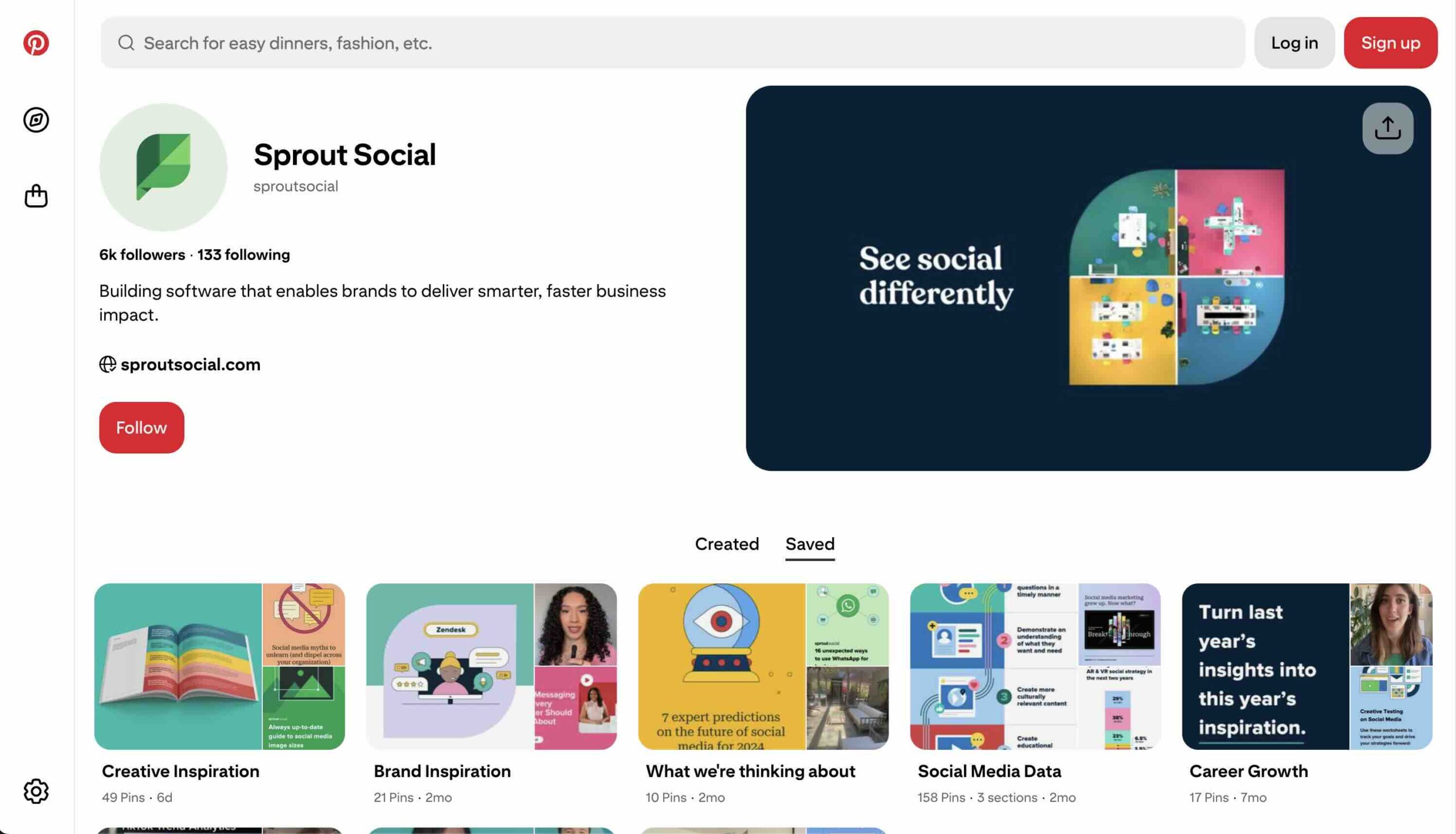
(Source: Pinterest)
A thorough audit, additionally, acts as a competitive benchmark, helping you understand how your presence stacks up against industry leaders.
By examining your historical data, you identify which content pillars drive sustainable growth and which ones are merely cluttering your profile. This way, you move away from vanity metrics and toward a strategy that prioritizes user intent, ensuring every Pin acts as a high-performing entry point to your brand’s ecosystem.
Conducting a regular audit provides several core benefits, including:
- Stronger Pinterest SEO: Ensure the right users find your content with optimized metadata and Pinterest SEO best practices.
- Improved brand consistency: Verify your “visual storefront” matches your brand identity across all digital marketing channels.
- Higher-quality traffic: You identify which Pins drive actual clicks and conversions rather than just empty impressions, allowing you to refine your Pinterest marketing strategy.
- Evergreen performance: You pinpoint content that continues to drive value months after posting, which is essential for bloggers and e-commerce brands.
- Clearer ROI: You prove the value of your Pinterest efforts by tying performance to specific KPIs.
Ultimately, this process uncovers what resonates with your audience and highlights the highest-impact opportunities for growth within the social media platform.
How to do a Pinterest audit: A step-by-step guide
A manual audit allows you to get hands-on with your data and understand the nuances of your Pinterest account’s brand presence. Follow these steps to evaluate your performance from the ground up and build a better action plan.
Beyond the technical checklist, a manual audit forces you to look at your profile through the eyes of a first-time visitor. This perspective is vital for identifying friction points in the user journey, such as broken links or confusing board structures. By taking the time to manually review your assets, you develop a more intuitive understanding of the creative styles and messaging that your specific community prefers, which no automated tool can fully replace.
Prepare for your Pinterest audit
Success starts with strategy. Before you change a single Pin description or board title, you must establish what you are looking for. This “Step 0” prevents you from getting lost in the weeds of Pinterest analytics.
1. Set your Pinterest audit goals
Define what success looks like for your brand. Are you seeking traffic growth, higher Pin saves, greater product discovery or audience expansion? Your goals shape your entire audit approach.
For instance, the objectives for a global corporation will differ significantly from the specialized tactics used in Pinterest for small business marketing, where the focus often leans toward localized discovery and building a niche community. For example, a small business might focus on brand awareness, while a Shopify merchant prioritizes driving traffic goals and conversion.
2. Define your key metrics
Tie your KPIs directly to your goals to ensure your audit remains objective. Pinterest’s internal algorithm prioritizes different metrics based on user-friendly engagement:
- Traffic goals: Focus on outbound clicks and saves.
- Awareness goals: Prioritize impressions and saves to see how far your content travels.
- Engagement goals: Track closeups, saves and video views.
- E-commerce goals: Monitor product tag clicks and direct Shopify or Shopify-linked sales.
Note that Pinterest operates on seasonal cycles. Compare 30-day and 90-day windows to account for these fluctuations and ensure your content strategy is balanced.
3. Gather your tools
Collect essential resources like a Pinterest audit checklist, tracking spreadsheet, brand guidelines, current keyword lists and competitor profiles for benchmarking. You may also want to use tools like Canva for quick design updates. Pull your baseline data now so you can measure the impact of your changes later.
Audit your Pinterest profile and settings
Your Pinterest profile is your digital storefront. It must be professional, branded and optimized for discovery by both users and the Pinterest search engine.
4. Check your business account status
Confirm you are using a Pinterest business account. This is the only way to unlock analytics and Pinterest ads and features like Rich Pins. If you are still using a personal account, a first actionable step post-audit is a migration.
5. Claim your website and other social accounts
Claiming your website improves brand attribution and unlocks more detailed analytics regarding how people pin directly from your site. It also strengthens your profile authority. According to Pinterest’s own creator guidelines, claimed accounts see better distribution in the algorithm.
6. Optimize your profile name and bio
Your profile name must include a primary keyword related to your industry (e.g., “Jane Doe | Interior Design Tips”). Check that your bio clearly communicates your value proposition and includes secondary keywords. Ensure your profile picture is a clear, high-resolution headshot for influencers or a recognizable logo for brands.
7. Review your profile photo and cover image
Assess your profile for brand consistency, starting with your most visible assets. Your profile photo and cover image are the first things a visitor sees; ensure they use high-quality imagery that aligns with your current brand guidelines and color palette.
Beyond the visuals, verify your category, region and language settings to ensure your content reaches the correct demographics. If you haven’t already, enable Rich Pins to add extra detail and branding to your content, which makes it more user-friendly for beginners and seasoned pinners alike.
Audit your Pinterest content and strategy
Analyze your entire content ecosystem, from high-level board organization to the specific design of individual Pins and your overall pinning strategy.
8. Analyze your Pinterest boards
Pinterest boards act as thematic SEO containers. To optimize them:
- Audit board names for keyword clarity; avoid “cutesy” names that users don’t commonly search for.
- Update board descriptions with natural, keyword-rich language.
- Ensure every board has a high-quality, relevant cover Pin that reflects the board’s aesthetic.
- Reorder boards so your most strategic priorities or seasonal content appear first.
- Identify underperforming or irrelevant boards to merge, archive or delete.
9. Evaluate your individual Pins
This is the granular core of your audit. Review your Pins for design quality and Pinterest statistics performance:
- Design: Check for clarity, high contrast and a clear text hierarchy.
- Ratios: Ensure you are using the recommended 2:3 vertical ratios; horizontal Pins often get buried.
- Keywords: Verify that titles and descriptions contain your target terms without “keyword stuffing.”
- CTAs: Look for strong, action-oriented text on the images themselves.
- Accuracy: Confirm all links are active and lead to the correct destination.
- Video Pins: Incorporate video Pins to capture attention in the feed, ensuring you include captions for accessibility and sound-off viewing.
- Content types: Analyze the performance of evergreen vs seasonal content to balance long-term traffic drivers with timely, trending engagement.
- Freshness: Identify duplicate content issues and prioritize the use of “fresh Pins”—new images or videos Pinterest hasn’t seen before—to satisfy the platform’s current algorithm.

(Source: Pinterest)
10. Assess your content mix, pinning frequency and cadence
Evaluate whether your mix of Static, Video and Idea Pins supports your goals. Pinterest favors a steady, “always-on” frequency rather than sporadic posting. Look for opportunities to repurpose top-performing content and map your upcoming output to search trends. Successful Pinterest management requires staying 60 days ahead of major holidays or seasonal events.
Audit your Pinterest analytics and performance
Strategic interpretation of data is key to long-term growth. Don’t just look at the numbers; look for patterns in your Pinterest business account. Focus on:
- Impression trends: This measures your overall search visibility and how well you’re playing with the algorithm.
- Saves and closeups: These indicate how much value users find in your content and whether it’s worth a “second look.”
- Outbound clicks: This is your primary measure of traffic-driven ROI and social media success.
- Pin longevity: Identify evergreen patterns where Pins continue to perform over time.
- Seasonal performance changes: Pinterest is a high-intent, aspirational platform where users plan months in advance. Audit your year-over-year data to identify when seasonal interest peaks so you can align your publishing calendar with user intent.
- Content type comparisons: Evaluate how different formats—like standard Pins, video Pins and carousels—stack up against one another. Identifying which format drives the most saves versus outbound clicks helps you tailor your creative strategy to your specific business goals.
Top 3 Pinterest audit tools
While manual audits are valuable, tools can automate the process and provide deeper, in-depth insights into your digital marketing performance.
Using the right tools reduces the margin for error and allows for more frequent, data-backed adjustments. In the fast-moving world of social media, having a tool that can aggregate your data and highlight anomalies is a massive competitive advantage. These tools help you move from a reactive state—where you’re constantly trying to figure out why traffic dropped—to a proactive state where you can predict and capitalize on upcoming trends.
1. Sprout Social
Sprout Social moves you from a manual audit to an automated, cross-network strategic review. It provides the depth needed for professional social media practitioners to prove ROI and refine their strategy. Unlike basic tools, Sprout integrates your Pinterest data with your entire social presence.
Sprout’s automation allows you to schedule audits more frequently without adding to your workload. Use Sprout’s presentation-ready reports to share findings with stakeholders. For teams managing complex campaigns, Sprout acts as a central source of truth, ensuring everyone is aligned on the latest performance data and strategic shifts.
See the big picture
The Pinterest Profiles Report in Sprout consolidates performance data across all your connected profiles. You can track high-level metrics over time, benchmark your profiles against each other and determine the overall impact of your Pinterest activity. This is essential for agencies handling multiple clients or e-commerce brands with various regional accounts.
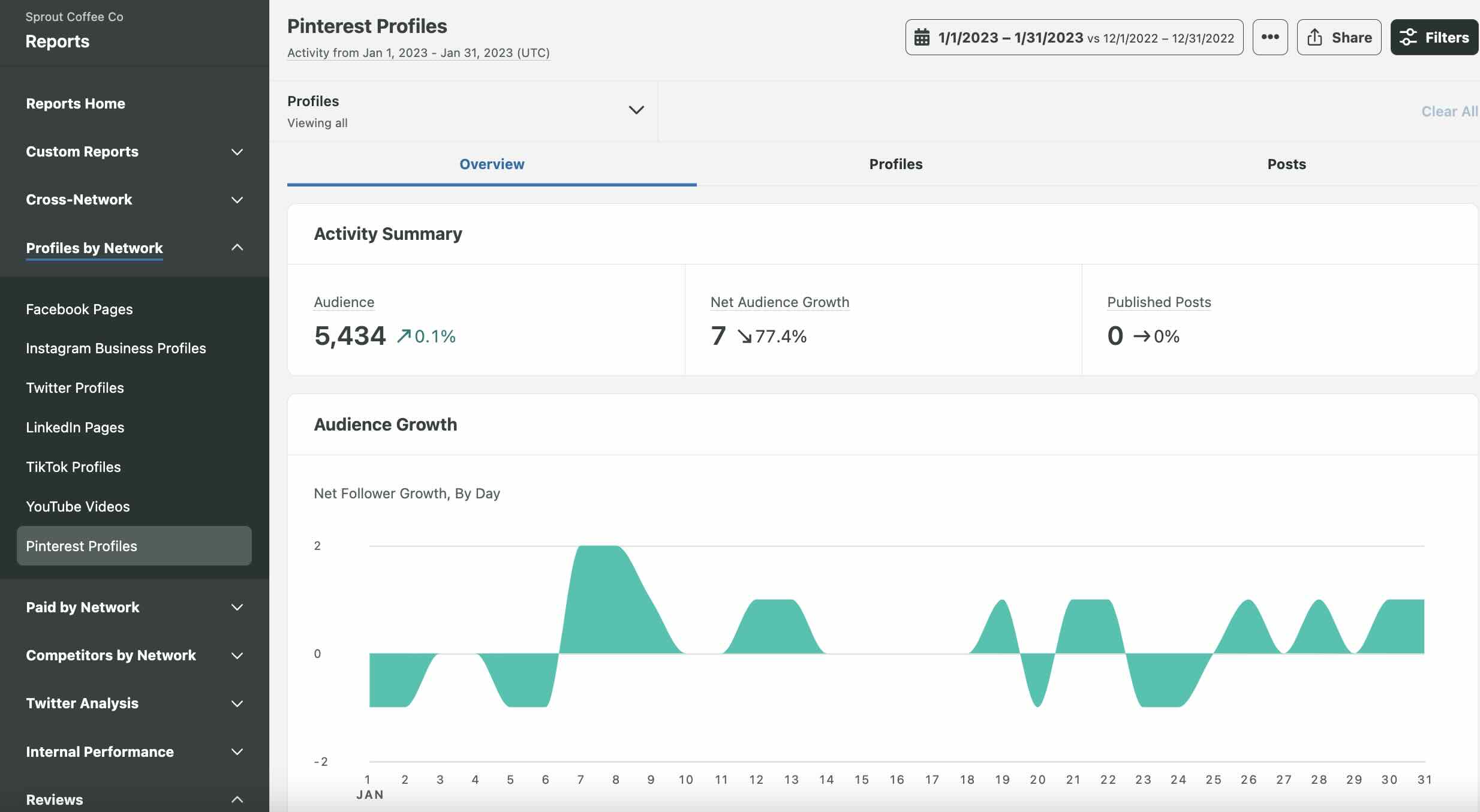
This high-level view is crucial for identifying “halo effects,” where success on one profile might be influencing growth on another. By comparing multiple profiles side-by-side, you can identify best practices from your top-performing accounts and apply them to those that are lagging. This bird’s-eye perspective ensures your overall Pinterest strategy is cohesive and that you are maximizing your brand’s reach across every connected profile.
Track your strategy
The Post Performance Report helps you analyze individual Pin performance with precision. You can quickly sort by outbound clicks, saves or engagement rate.
Additionally, Sprout’s tagging feature allows you to use the Tag Performance Report to aggregate data for specific initiatives, such as a “Summer Campaign” or “Video Content” series. This makes it easy to prove the ROI of specific creative directions and adjust your strategy in real time.
By utilizing Sprout’s tagging capabilities, you can also perform “A/B testing” at scale. For example, you can tag Pins with different design styles or CTA copy and then use the Tag Performance Report to see which category drives the most clicks. This level of granular insight allows you to refine your creative brief with data-backed evidence, ensuring that every new asset you produce is optimized for the highest possible engagement and conversion.
Ready to see it for yourself?
2. Pinterest Analytics
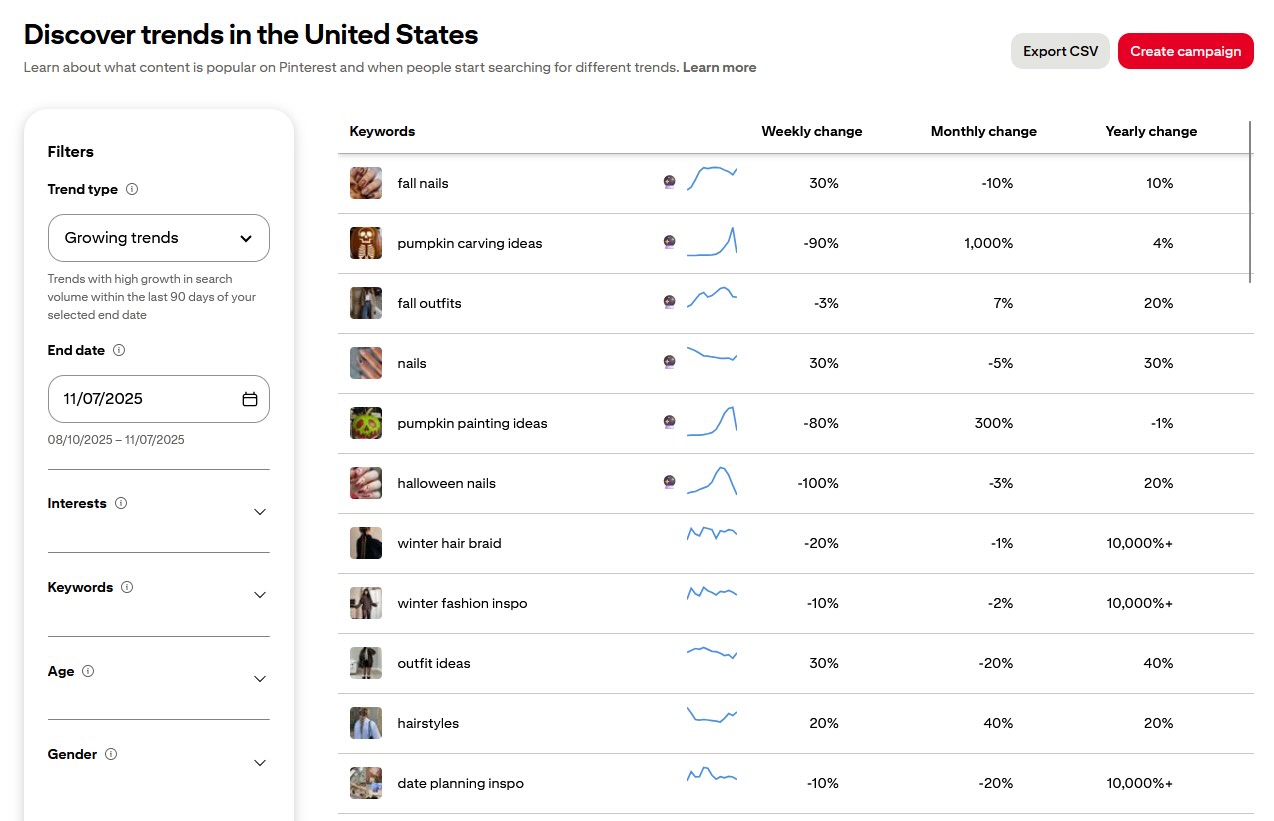
Pinterest Analytics is the native tool built into every business account. It provides essential data on your top Pins, audience demographics and how users interact with your claimed website. It is an excellent starting point for baseline data, but it may require manual exporting for more complex reporting. It is particularly helpful for identifying which of the best brands on Pinterest are gaining traction.
The native tool is also great for real-time monitoring of trending topics within your specific niche. By checking the “Trends” tab, you can see what keywords are currently gaining momentum, allowing you to pivot your content strategy to catch the wave of seasonal interest. While it lacks the advanced cross-platform integration of Sprout, it remains a vital part of the auditor’s toolkit for validating search volume and understanding basic audience shifts.
3. Tailwind
Tailwind is a specialized tool that focuses on scheduling and basic performance tracking. It offers features like “SmartLoop” for resharing evergreen content and “Communities” to help increase reach. While it provides helpful scheduling insights, it lacks the broader cross-channel reporting and advanced tagging capabilities found in a comprehensive platform like Sprout Social.
Tailwind’s focus is primarily on the logistics of pinning, making it a favorite for solo bloggers or very small businesses. Its “Ghostwriter” AI feature can help generate initial drafts for Pin descriptions, which can save time during the optimization phase of your audit. However, for a truly strategic, data-driven audit that informs a larger business strategy, you will likely need to supplement its data with more robust analytics from a full-suite management platform.
Start your Pinterest audit with a clear plan
A manual audit is a great first step, but a data-driven audit with Sprout is what separates professional marketers from the rest. By automating your data collection and using advanced reporting features, you spend less time in spreadsheets and more time creating content that converts. A successful audit is not a one-time event but a recurring part of a healthy social media audit routine.
See how Sprout Social’s powerful analytics and publishing tools can help you simplify your audit and execute a winning Pinterest strategy. Schedule your personalized demo today.
Pinterest audit FAQs
How often should you do a Pinterest audit?
You should conduct a comprehensive audit at least once per quarter. However, a light monthly check-in on your key metrics ensures you stay ahead of seasonal shifts and algorithm changes. This regular cadence allows you to catch underperforming content before it negatively impacts your overall reach.
What are the most important metrics on Pinterest?
The most important metrics depend on your goals, but generally, outbound clicks (for traffic), saves (for intent) and impressions (for reach) are the top indicators of success. You should also keep a close eye on your “save-to-click” ratio to determine how effectively your Pins inspire action.
What is a good engagement rate on Pinterest?
Engagement rates vary by industry, but most brands should focus on maintaining a consistent growth trend in saves and closeups rather than a single static percentage. Comparing your engagement against your own historical benchmarks is often more valuable than trying to hit a generic industry average.
How do I know if my Pinterest strategy is working?
Your strategy is working if you see a steady increase in outbound clicks and if your content continues to gain impressions and saves long after the initial Pin date, proving its evergreen value. If your traffic remains flat despite high engagement, it’s a sign that your CTAs or landing pages need optimization.
What seasonal cycles should I plan content around?
Pinterest users plan early. According to Pinterest Business trends, you should begin pinning seasonal content roughly 45 to 60 days before an event so the engine can index your Pins. This lead time is crucial for ensuring your Pins are at the top of search results when users are in their peak “buying” or “planning” phase.
39 free social media strategy templates that will elevate your workflows
Published on August 20, 2026 Reading time 15 minutes










Share