Instagram Stories: The complete brand playbook

Written by McCall Lanman
Published on May 26, 2026
Reading time 12 minutes

Table of Contents
Instagram Stories position your brand directly at the top of the feed, granting immediate access to your highest-intent audience. While traditional feeds require fighting unpredictable algorithms, Stories offer a direct line to raw, unedited community building.
This playbook outlines the exact framework you need to turn temporary, 24-hour visual content into a reliable engine for traffic, customer loyalty and measurable business growth as part of your broader Instagram marketing strategy.
What are Instagram Stories
Instagram Stories are temporary, full-screen visual posts that disappear after 24 hours and appear at the top of followers’ home screens, separate from the main feed. They give brands a dedicated space to share timely, authentic content without cluttering their permanent profile grid.
Key Story specifications:
- Duration: Photos display for seven seconds, videos up to 60 seconds without splitting them into fragments
- Visibility: Pinned to the top of followers’ Instagram home screens
- Lifespan: Automatically disappear after 24 hours (unless saved to Highlights)
When you publish a new Story, a purple and orange ring appears around your profile picture, signaling to followers that fresh content is waiting. Save your best Stories as Highlights, which live permanently on your profile just above your feed.

Stories support two-way engagement: followers reply via DMs or engage through polls, question stickers and emoji sliders. Custom captions, overlays and music make every Story distinctly yours. Stories give you a direct, high-visibility channel to push that number higher with your most engaged audience.
Why use Instagram Stories
Instagram Stories deliver measurable business impact by placing your brand at the top of every follower’s feed, creating direct paths to purchase and opening two-way conversations that deepen audience relationships.
- Algorithm alternative: Stories appear above the fold on the Instagram home screen, independent of feed algorithm changes
- Purchase influence: Stories drive direct website traffic and conversions through interactive links and product tags
- Engagement amplification: Interactive features create real conversations between your brand and your audience
IG Stories put you front-and-center in followers’ feeds
Every time you post a new Story, your brand jumps to the top of your followers’ Instagram home screen, above the fold, before anything else. Consistent Stories publishing keeps your brand visible without fighting for feed placement. That’s prime real estate.
Stories are the fastest way to humanize your brand
Instagram Stories thrive on authenticity. While your main feed showcases polished content, Stories give you space to share your team, your voice and your personality in real time. Data from our 2025 Sprout Social Index™ shows consumers ranked authenticity and relatability as the most important traits in brand content, and Stories deliver exactly that.
Insta Stories offer endless opportunities to engage
The interactive features built into Stories turn passive viewers into active participants. Polls, quizzes, custom stickers, music, hashtags and @mentions all give your audience a reason to tap, respond and come back.
With the right creative approach, Stories turn a single tap into a brand conversation and brand conversations into lasting loyalty.
How to make an Instagram Story
Creating an Instagram Story takes seconds, but creating one that stops the scroll takes strategy. Start with the basics, then build from there.
Step 1: From your Instagram home page, tap the “+” hovering over your profile picture at the top left corner (it should say “Your story” beneath it) to open the option to add to your Story.
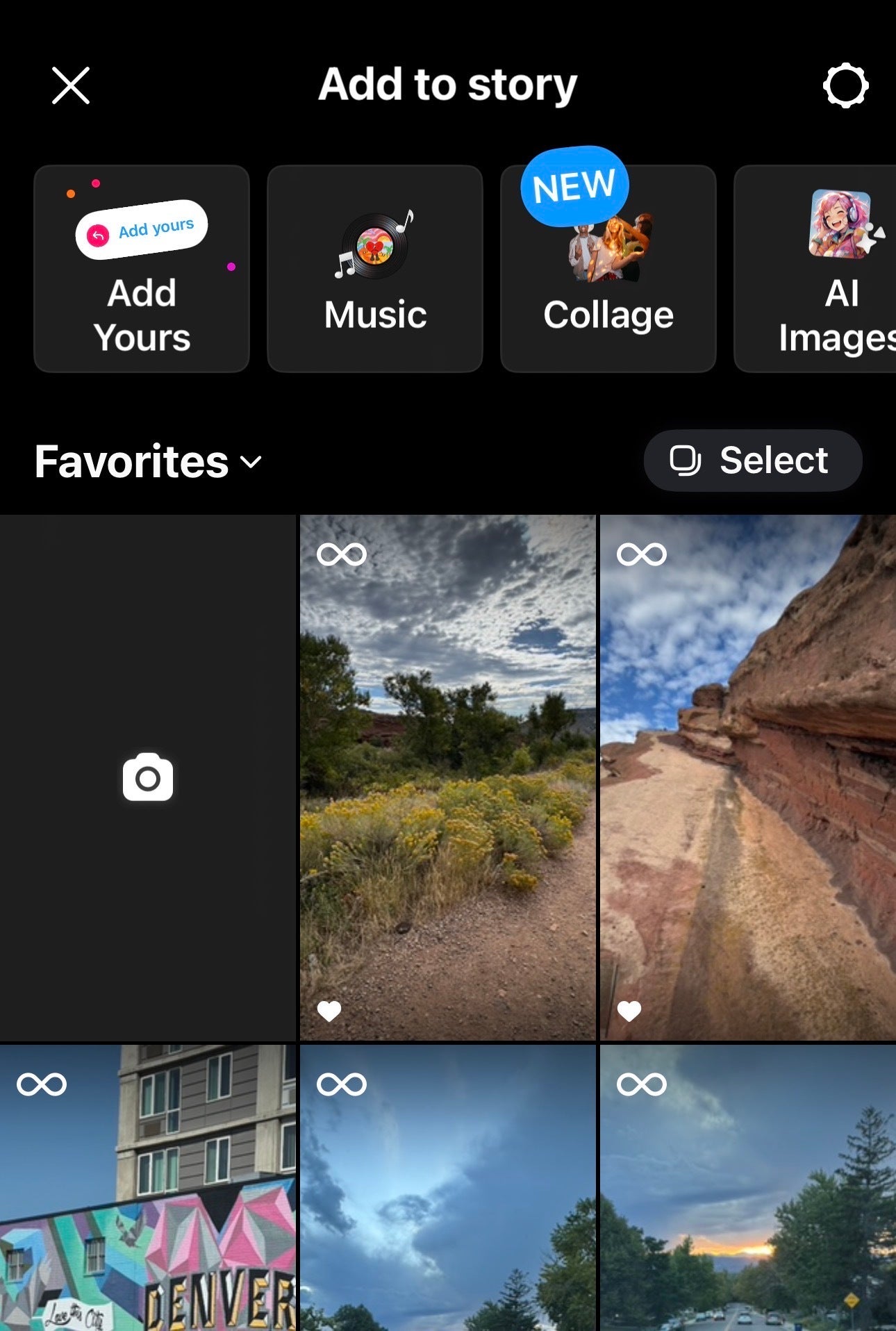
Step 2: Tap the Camera button in the “Add to Story” window to create a new Story or choose an image or video from your camera roll. Also, swipe right from your home screen to open the Instagram camera directly.
Step 3: Choose a filter and capture mode at the left of the screen before taking your photo or recording your video.
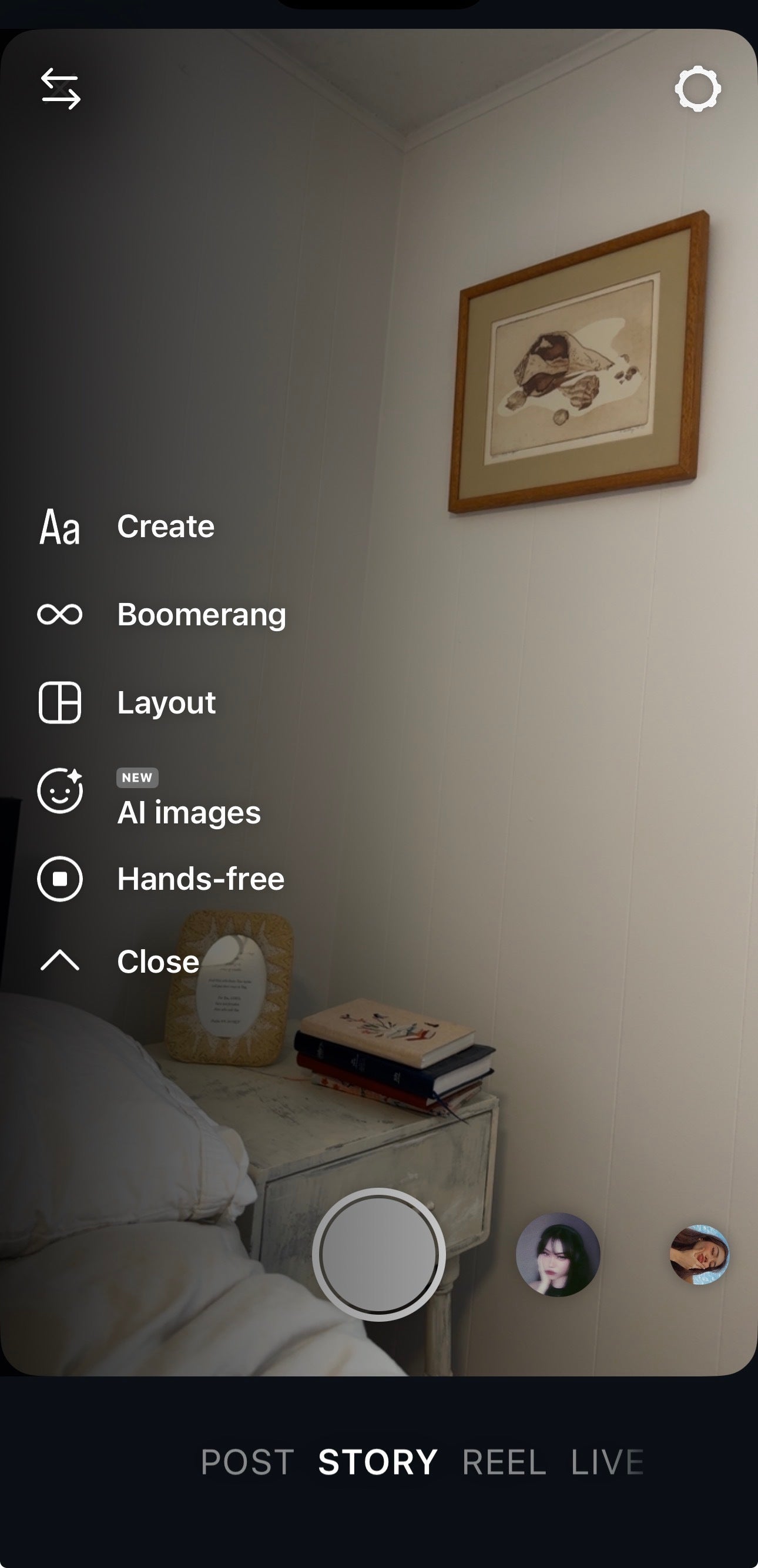
Step 4: Tap the camera button to take a photo. Tap and hold to record a video.
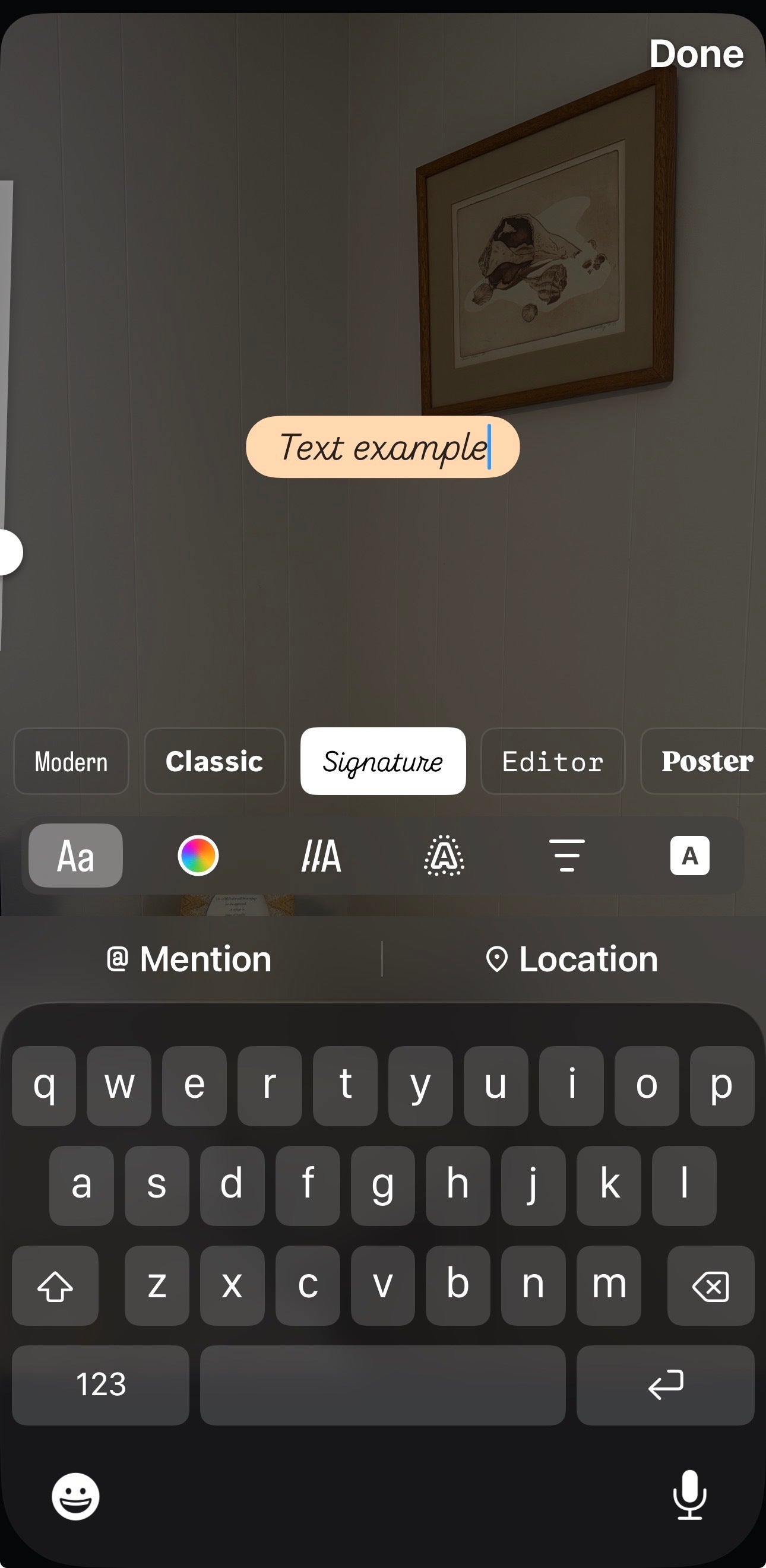
Step 5: Tap the text icon at the top right to add a text overlay to your Story. Type your message and it appears directly on the content.
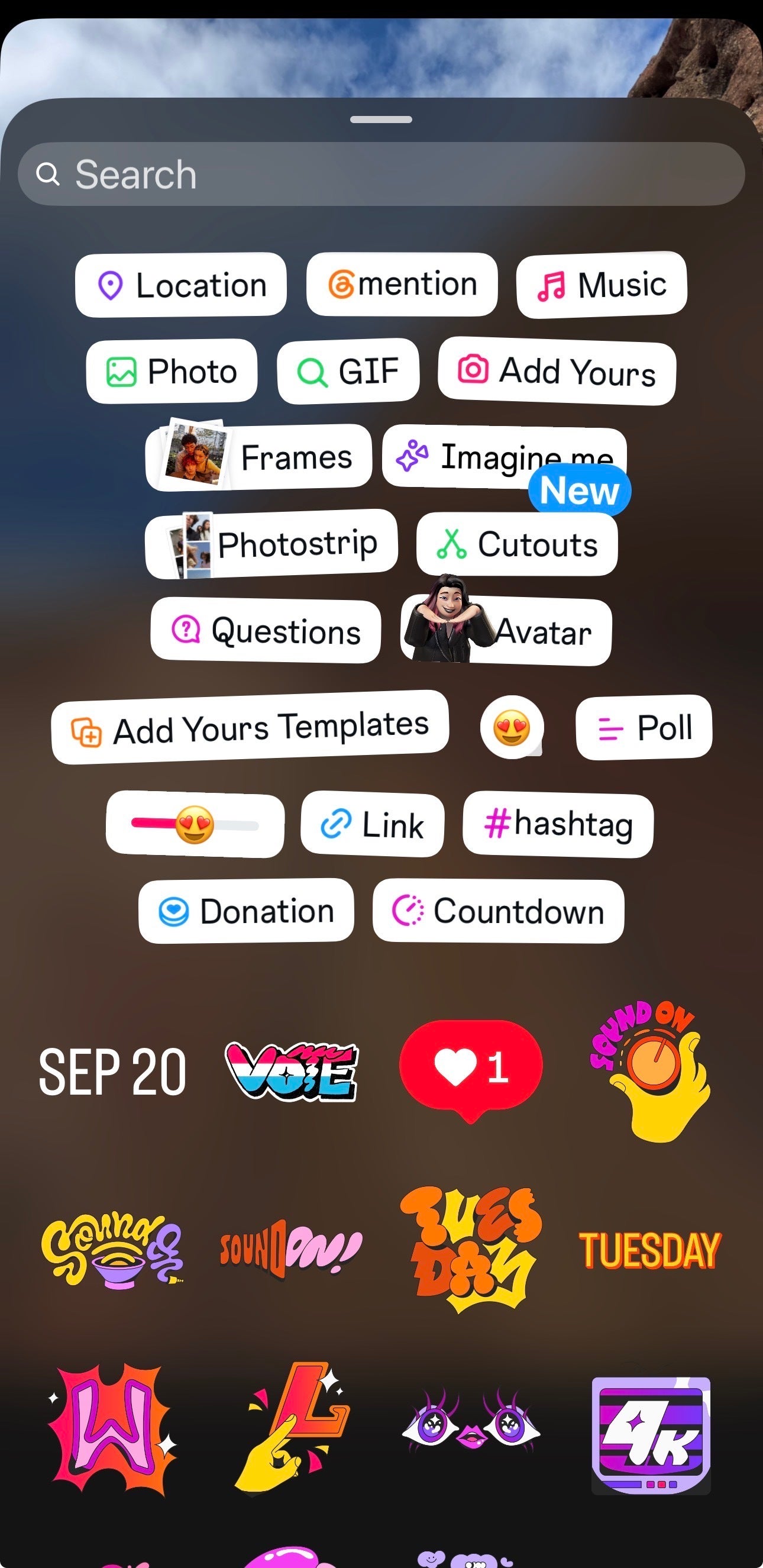
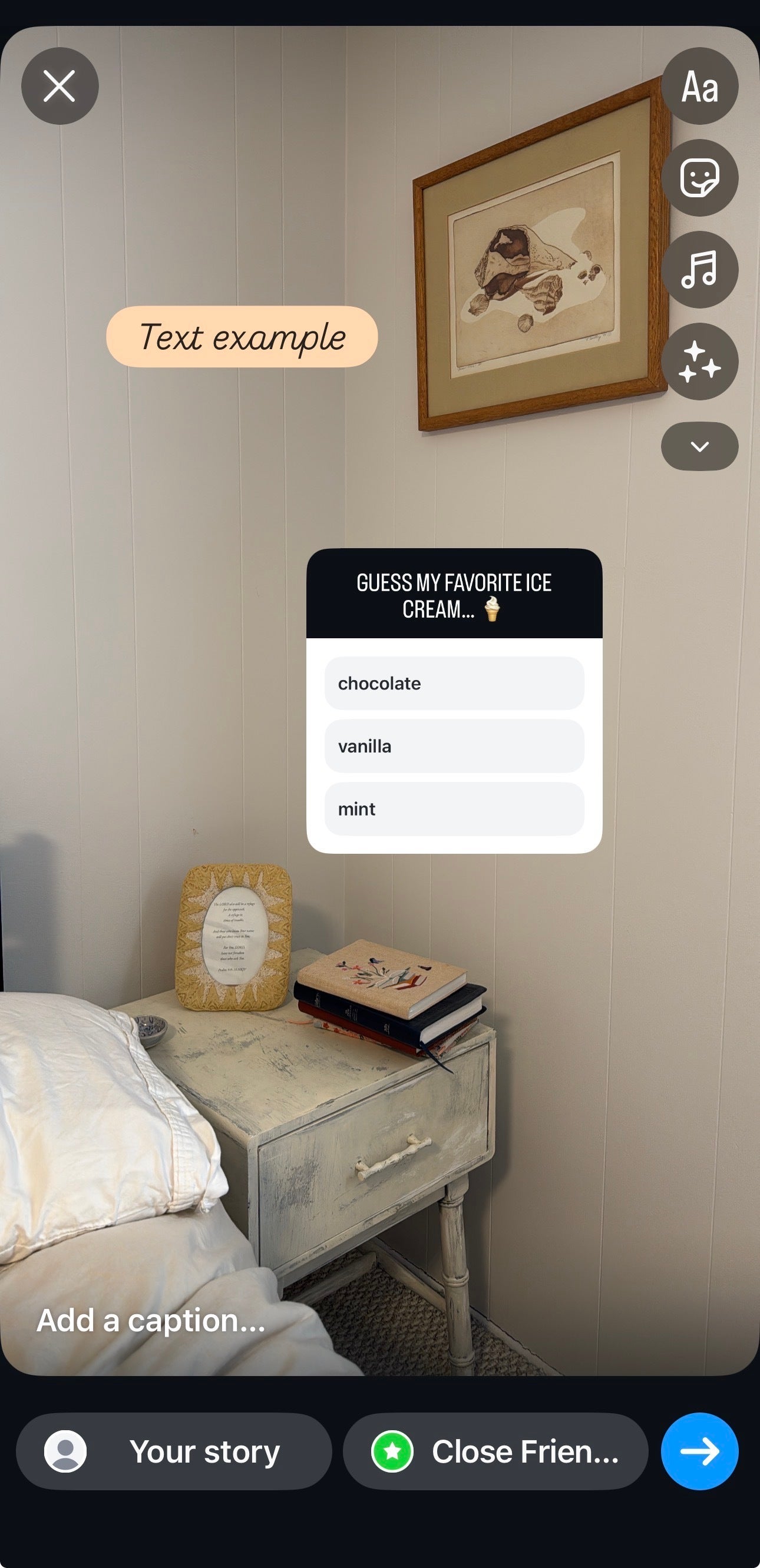
Step 6: Tap the sticker icon to add interactive elements. From the sticker dashboard, add:
- Location tags
- Mention tags
- Music
- Polls
- Links
- Hashtags
- Countdown timers
Step 7: Tap the arrow button at the bottom of the screen and select Your Story to publish.
Instagram Stories design best practices
Strategic design transforms Instagram Stories from casual updates into brand-building assets. Every frame is a micro-moment: design it to communicate instantly and reinforce your brand identity.
Essential design elements:
- Brand consistency: Apply your color palette and typography across all Stories
- Visual hierarchy: Prioritize key messages through size and placement
- Content balance: Mix text, imagery and video without overwhelming viewers
- Instant clarity: Design each Story to communicate its message within two to three seconds
Implementation framework:
- Create templates: Develop three to five reusable Story layouts that reflect your brand identity
- Establish guidelines: Define color codes, font sizes and spacing rules your team follows every time
- Test readability: Confirm text stays legible on mobile screens before publishing
- Maintain simplicity: Limit each Story to one primary message
Instagram Stories features
Instagram Stories gives your brand a full toolkit to drive engagement, build community and convert viewers into customers, all within a 24-hour window.
Interactive features to drive engagement:
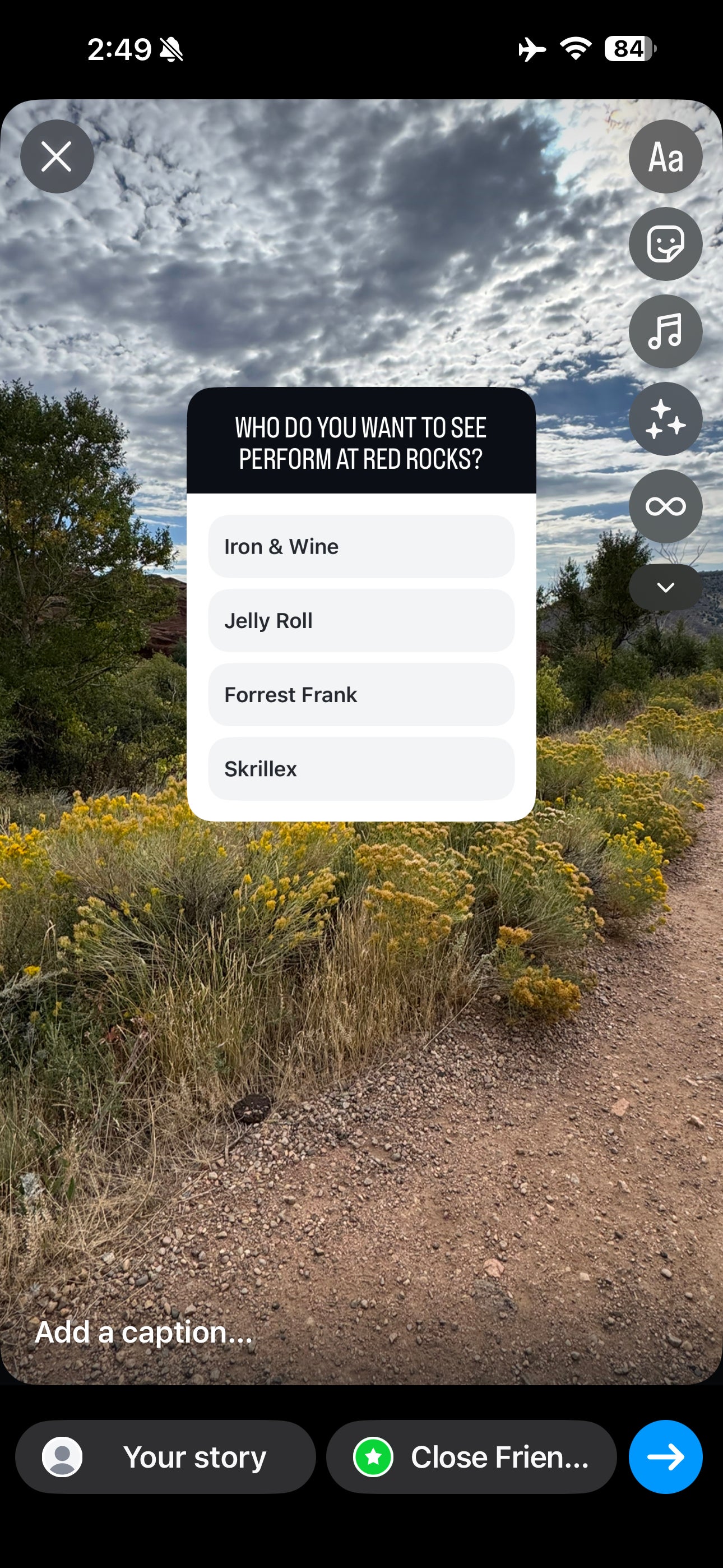
- Polls: Gather audience opinions with up to four answer options
- Quizzes: Test follower knowledge with correct and incorrect answers
- Q&A stickers: Collect and answer follower questions in real time
- Emoji sliders: Measure audience sentiment on any topic instantly
Creative features to enhance your content:
- Music library: Add trending audio tracks from Instagram’s database
- GIF integration: Insert animated graphics to increase visual interest
- Custom filters: Apply brand-consistent visual effects across every frame
- Drawing tools: Highlight content with custom colors and shapes
Business features to drive conversion:
- Link stickers: Drive traffic directly to your website or landing page
- Product tags: Turn Stories into a shoppable storefront
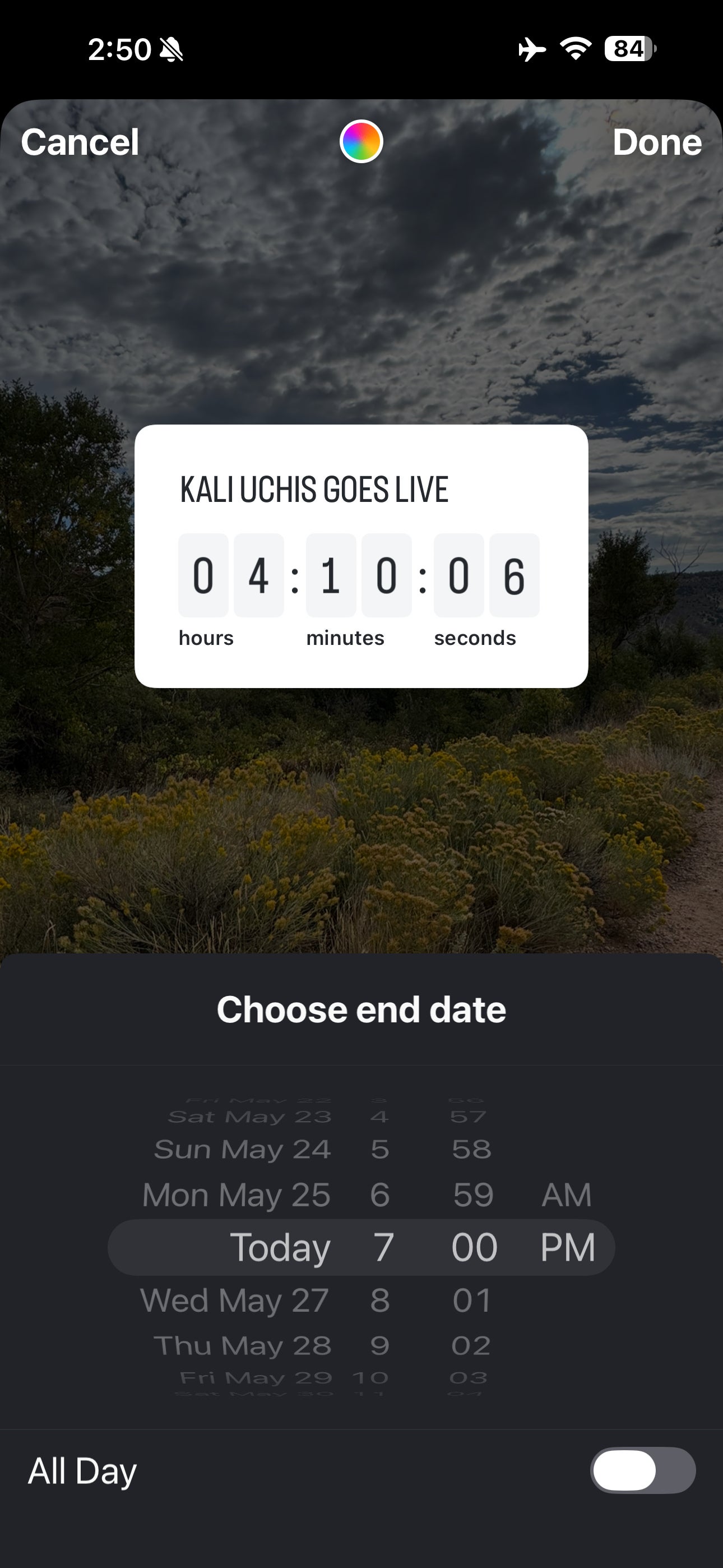
- Countdown timers: Build urgency around launches, sales and events
| Feature | Primary goal | Best use case |
|---|---|---|
| Polls & quizzes | Audience engagement | Product feedback, content preferences |
| Q&A stickers | Community building | AMAs, customer support, brand transparency |
| Emoji sliders | Sentiment tracking | Campaign testing, product reveals |
| Link stickers | Traffic generation | Blog posts, product pages, sign-ups |
| Product tags | Social commerce | Direct product discovery and purchase |
| Countdown timers | Conversion urgency | Limited-time offers, event countdowns |
Instagram Stories vs. Reels: Which format should you use?
Stories and Reels both live on Instagram, but they serve different strategic purposes. Here’s the core distinction:
| Feature | Instagram Stories | Instagram Reels |
|---|---|---|
| Lifespan | Disappears after 24 hours | Lives permanently on your profile |
| Discoverability | Visible to existing followers only | Discoverable to new audiences via the Reels tab and Explore |
| Primary purpose | Timely updates, engagement, direct conversation | Brand awareness, reach, entertainment |
| Interactive tools | Polls, quizzes, Q&A, emoji sliders, countdown timers | Limited—comments and shares only |
| Best for | Nurturing your existing audience | Reaching new audiences at scale |
The smartest brands use both. Reels expand your reach while Stories deepen the relationship. Use Instagram Reels to attract new followers, then convert them into loyal community members through consistent, authentic Stories.
How to use Instagram Stories as a brand
Instagram Stories belong at the center of your brand strategy, not as an afterthought. The format rewards consistency, creativity and direct audience engagement in ways feed posts can’t match. Every tactic below serves a distinct business purpose: from tracking Stories analytics to running Instagram Story ads, adding links and finding fresh Instagram Story ideas for your brand. Here’s how to use each one strategically.
Educate your audience with how-to’s and tutorials
Instagram Stories’ sequential format is perfect for step-by-step content. From recipes to product tutorials, deliver bite-sized educational content that drives real engagement and keeps viewers coming back for more.
Go back and forth with polls, quizzes and questions
Stories are your brand’s most direct line to audience conversation. Polls, quizzes and question stickers turn passive viewers into active participants.
Benefit Cosmetics regularly uses polls, quizzes, questions and voting stickers in its Stories, creating a fun, frictionless way to engage its audience and gather real-time feedback.

Make announcements and break your own news
Stories give your brand a direct channel to break news before it travels anywhere else. Use them to keep followers informed about launches, updates and milestones, on your terms and your timeline.
Highlight the latest posts in your main feed
Use Stories to drive traffic to your best feed content and cut through algorithm noise. Share your latest blog posts, press releases and product pages using the link feature, available to every Instagram account, to extend your reach beyond the feed.
Post teasers of upcoming content or products
Build anticipation before you drop anything new. Whether you’re launching a new product or announcing a collaboration, countdown stickers and creative teaser frames turn your audience into an eager waiting room.
Promote time-sensitive offers and deals
The 24-hour lifespan of Stories makes them the ideal format for flash sales, limited-time offers and exclusive deals. The built-in urgency does the heavy lifting for you.
Share user-generated content and customer photos
Dedicate Stories to your customers’ user-generated content—it’s one of the most credible forms of social proof your brand has. Reposting content into Stories is fast and the authenticity it signals to your audience is worth far more than any polished campaign asset.
Take your followers behind the scenes
Instagram Stories don’t require production budgets; they require authenticity. Post event coverage, day-in-the-life content and unfiltered moments that show the real people and processes behind your brand. That transparency builds the kind of trust that drives long-term loyalty.
Instagram Stories tips
These Instagram Stories tips turn passive viewers into active participants and active participants into customers.
1. Use stickers to drive interaction
Instagram stickers transform Stories from one-way broadcasts into two-way conversations. Each sticker type serves a distinct engagement purpose:
- Location – Tag a place to increase discoverability. Tap the sticker icon and search for the location you want to add.
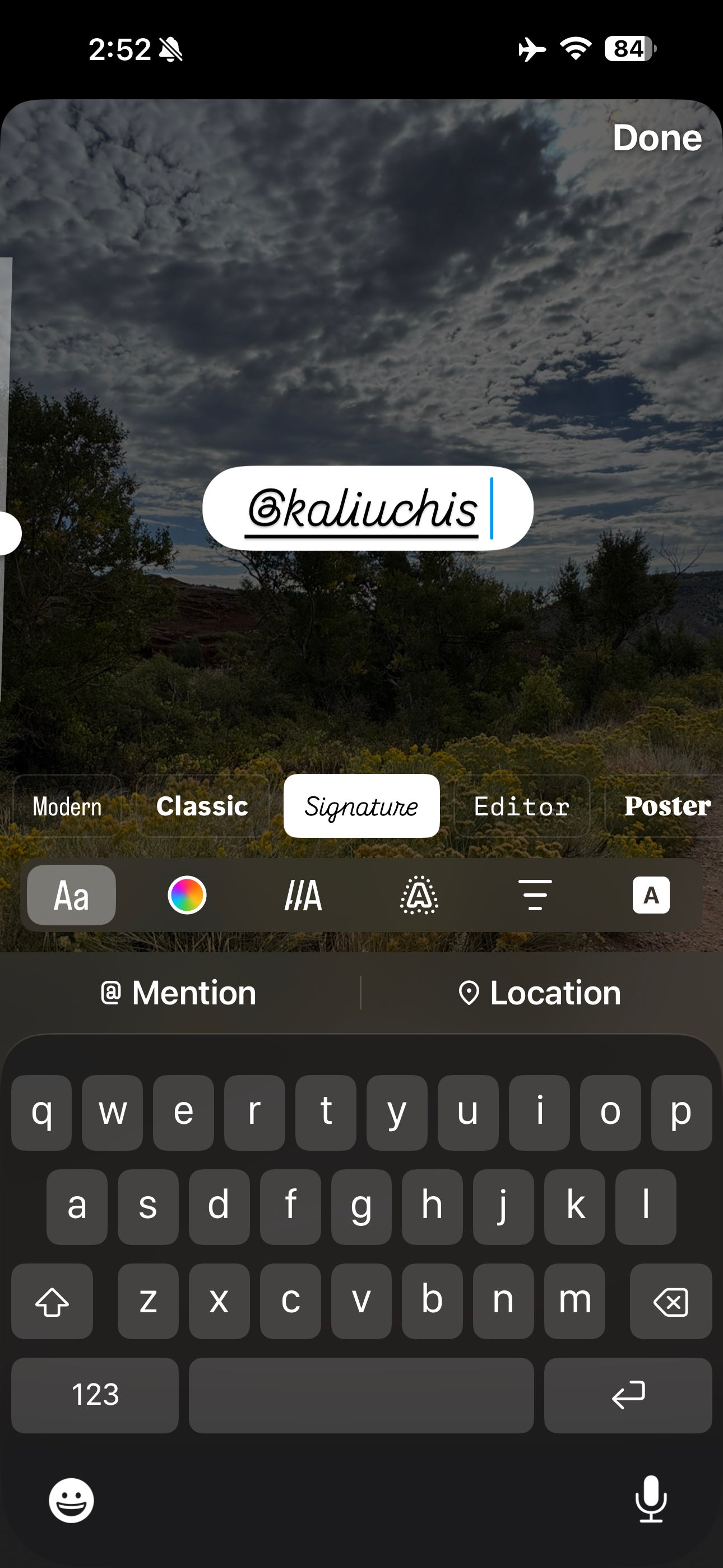
- @Mention – Tag other accounts directly in your Story. Select the sticker and enter the username to notify them instantly.
- Add Yours – Create a prompt that invites followers to contribute their own photo, turning your Story into a community thread.
- Questions – Collect open-ended responses from your audience or crowdsource answers to a question you pose.
- Music – Add audio tracks from the Instagram music library to set the tone and keep viewers watching longer.
- Poll – Present up to four answer options and let followers vote—instant feedback with zero friction.
- Quiz – Set one correct answer and challenge your audience. It’s a proven format for increasing engagement through Stories.
- Emoji slider – Post a prompt and let users drag an emoji to express their reaction on a spectrum.
- Link – Add any external URL directly to your Story. Tap the icon, enter the link and it appears as a tappable element.
- #Hashtag – Add a tappable hashtag sticker that functions exactly like a hashtag in feed posts.
- Countdown – Name your countdown, set an end date and time and build anticipation for a launch, sale or event.

2. Mention and engage with other users in your Story
Tagging other accounts, including influencers, customers, employees or partner brands, puts your Story in front of their audiences too. Use the @Mention sticker from your sticker dashboard or tap anywhere on the Story and type “@” to pull up the mention field.
When tagged accounts reshare your Story to their own followers, your reach compounds without any additional spend.
3. Allow users to share your Story
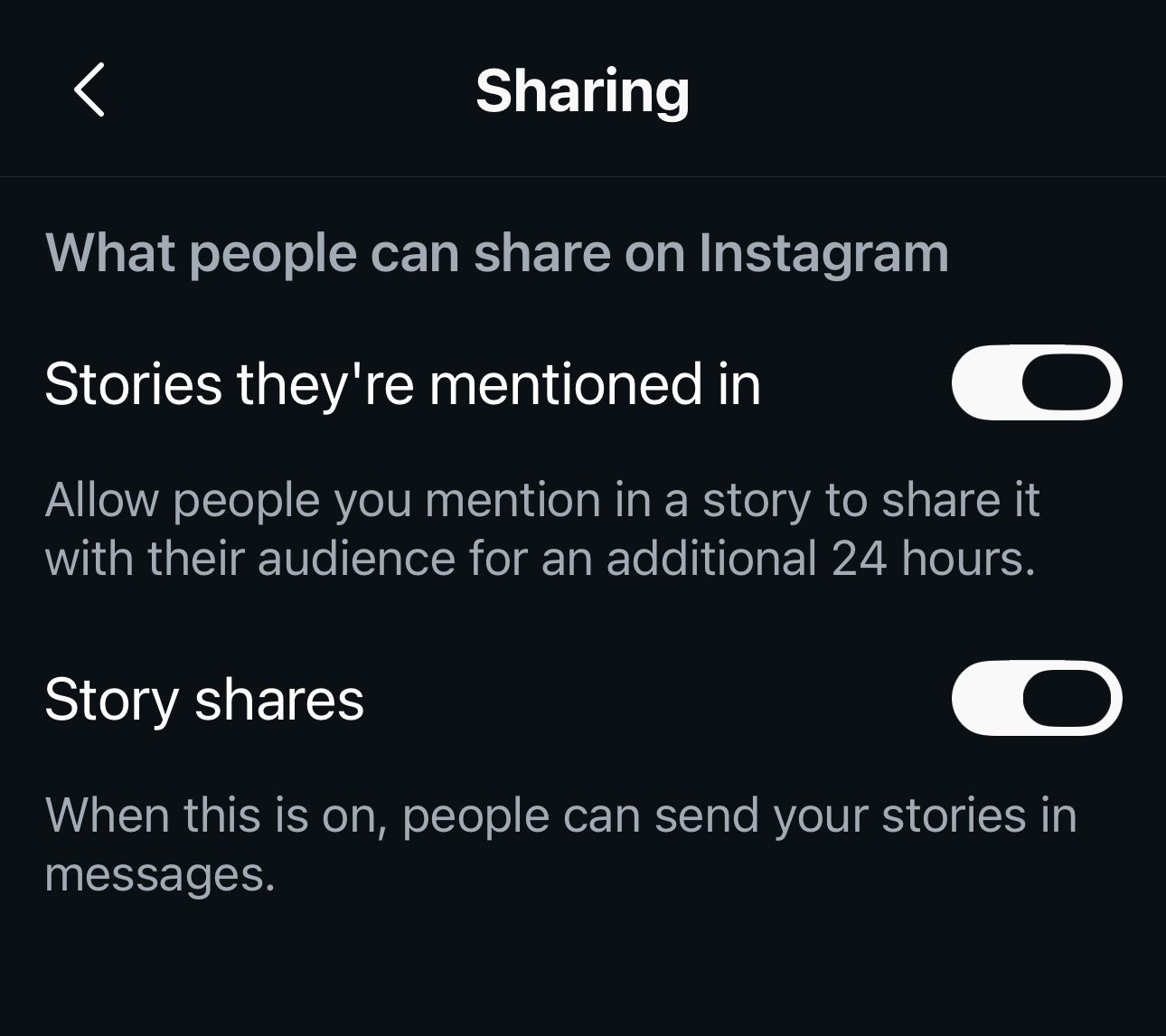
Give followers the ability to forward your Story via DMs and your content travels further than your own follower count. Go to your Privacy settings, select “Story,” and under “Sharing,” enable the option to allow sharing to Messages.
4. Get creative with Instagram Story features
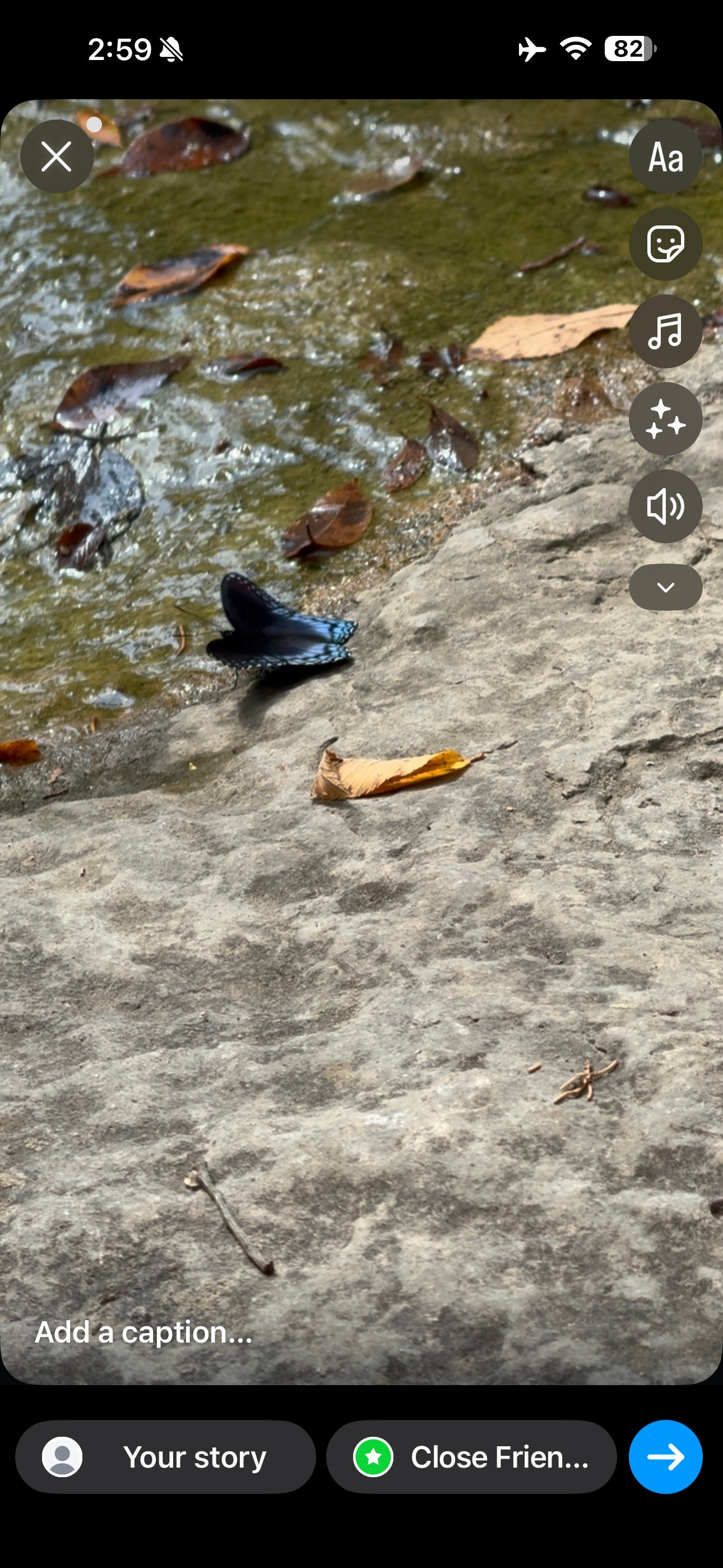
Instagram lets you use preset filters and trending audio tracks to give your Stories a theme song.
To apply a filter over your photo or video, tap the three floating star symbol. To discover audio tracks to play over your content, tap the music note symbol to try a few different songs or sounds to fit your content.

5. Prioritize consistent cadence over volume
Posting for the sake of posting only creates noise. In a crowded digital space, data reveals that audiences reward brands prioritizing original, human-centric interactions over sheer content volume. Chasing generic posting benchmarks strains your team’s creative resources, leads to burnout and fails to move the needle on meaningful business outcomes. Shift your strategy from content volume to content value by implementing a structured, sustainable publishing schedule.
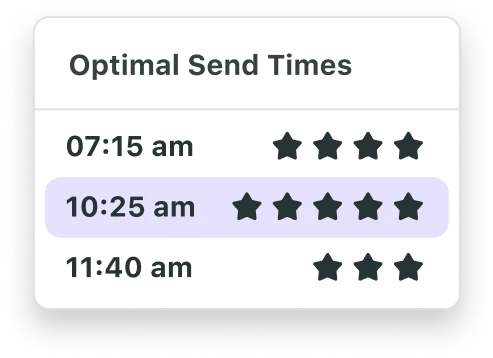
Instead of guessing when to publish, utilize Sprout’s Optimal Send Times—powered by patented ViralPost® technology —to automatically pinpoint when your specific audience is most active and ready to engage. This data-driven approach maximizes immediate frame visibility, eliminates strategic guesswork and ensures your brand remains top-of-mind without over-saturating your followers’ feeds.
While temporary Story frames allow for a slightly higher posting frequency than the permanent grid, establishing a reliable, predictable rhythm is what ultimately fosters deep community trust and long-term brand loyalty.
6. Stay current with new Story formats and features
Instagram continuously rolls out new Stories capabilities, and brands that adopt them early earn algorithmic and audience advantages. Adding trending audio and cross-posting Instagram Reels to Stories are two high-impact tactics available right now.
Watch for new interactive formats as Instagram expands its creator tools in 2026. Early adoption signals relevance to both the algorithm and your audience.
7. Track your Instagram Stories analytics
Stories analytics reveal which formats drive views, which prompts generate replies and how your Stories audience compares to your overall follower base. These are the three metrics that matter most:
- Which Story types earn the most views, replies and engagement
- How often to publish based on your own audience data, not industry averages
- How engaged your Stories viewers are relative to your total audience
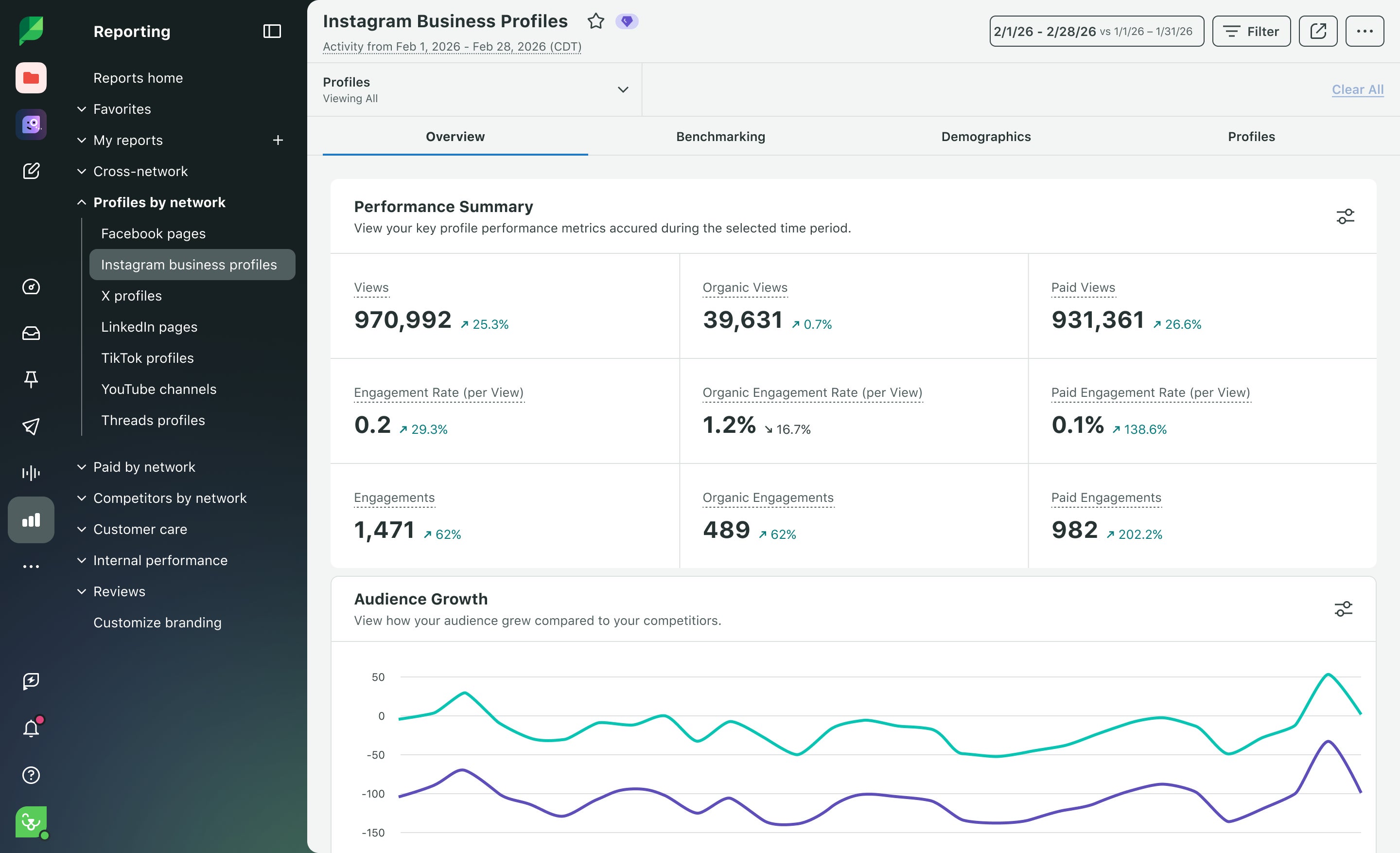
Sprout Social’s Instagram Business Profiles Report surfaces all of this in one presentation-ready view—tracking reach, views, taps forward, taps back, exits and replies across your Stories so you spot what’s working without manually pulling data from Instagram Insights.
Instagram Stories analytics
Tracking Instagram Stories analytics turns guesswork into strategy. The right metrics reveal what holds attention, what loses it and what drives people to act, so every Story you publish works harder than the last.
How to see who viewed your Instagram Story
Open your Story and swipe up to see the viewer list while it’s live. Instagram shows this data for the full 24-hour window that your Story is active. After 24 hours, the Story disappears and viewer data is no longer accessible natively, which makes real-time monitoring during the active window important.
Use the viewer list alongside engagement metrics like replies, taps forward, taps back and exits to build a comprehensive picture of how your Story performed. A long viewer list with no replies or link taps tells a different story than a shorter list with strong interaction.
Key Instagram Stories metrics to track
- Reach: The number of unique accounts that viewed your Story.
- Views: The total number of times your Story was displayed on screen.
- Taps forward: Frames people skip past—a signal to tighten your creative.
- Taps back: Frames people revisit—a signal you created something worth a second look.
- Replies: Direct engagement that opens a real conversation.
- Link taps and sticker taps: Proof that your Story drove action, not just views.
- Exits: The exact moment people left—so you know where to fix the drop-off.
Together, these metrics show what grabs attention, what kills momentum and what converts viewers into customers.
How to track Instagram Stories performance with Sprout Social
Native Instagram Insights give you a quick snapshot. Sprout Social gives you a comprehensive, extended performance picture. The Instagram Business Profiles Report tracks Story results alongside your broader Instagram content, so you identify patterns across weeks and months—not just the last 24 hours. Share exportable reports directly with stakeholders and build a data-backed case for your Stories investment.
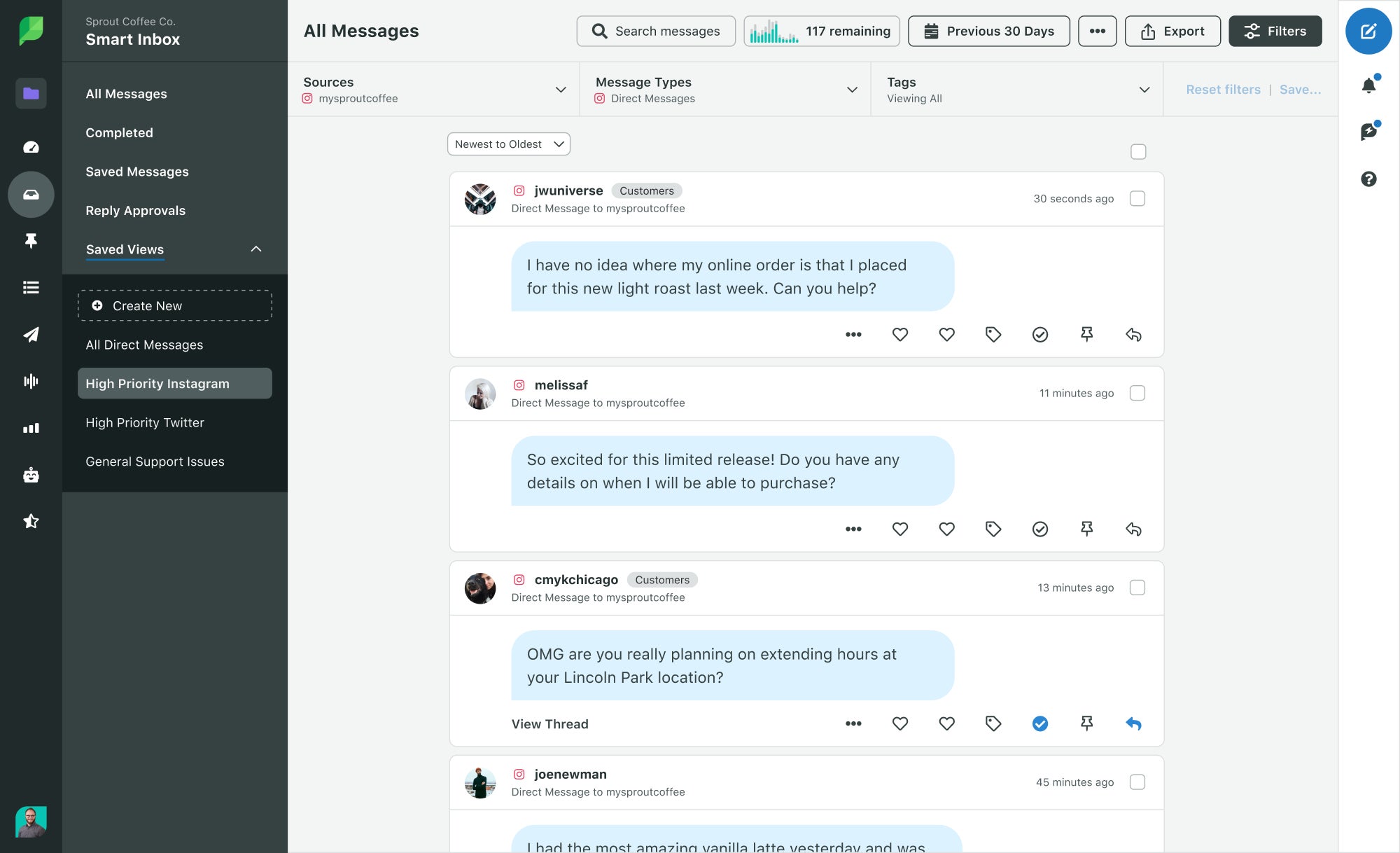
Add Smart Inbox to the mix and Story replies live alongside every other social message your brand receives—no more tab-switching to catch responses before they expire. When publishing, engagement and reporting share one workflow, your team stops chasing data and starts acting on it.
Maximize your Instagram Stories strategy with the right tools
Creating compelling Instagram Stories is just the beginning. Driving real business impact requires a strategy that’s repeatable, measurable and built to scale without burning out your team.
Manually juggling content creation, scheduling, engagement and reporting fragments your workflow and kills momentum. Sprout Social centralizes every step of your Instagram Stories strategy in one platform, so your team spends less time on logistics and more time building content that moves the needle.
Sprout Social‘s Instagram Stories capabilities:
- Scheduling with Optimal Send Times: Schedule Stories in advance with Optimal Send Times—powered by Sprout’s patented ViralPost® technology—which analyzes your audience’s engagement patterns to recommend the best times to publish.
- Smart Inbox: Manage Story replies alongside every other social message in one unified dashboard—no expired DMs, no missed conversations
- Instagram Business Profiles Report: Track reach, views, taps forward/back, exits and replies with detailed, exportable reporting built for stakeholder presentations.
- Asset Library: Store approved Story templates and brand elements so every team member publishes on-brand content every time.
- Approval workflows: Assign Story creation, review and approval across multiple team members without losing a single draft in someone’s inbox
Sprout Social is the AI-powered social media management platform that centralizes every step of your Instagram Stories strategy—turning real-time social conversations into clear, actionable insights your entire team can act on. Spend less time on logistics and more time building content that drives measurable business impact.
Start a free 30-day trial or request a demo to see how Sprout Social turns your Instagram Stories into a growth engine.
Instagram Stories FAQs
How long do Instagram Stories last?
Instagram Stories automatically disappear after 24 hours, though you can save them to display them permanently as Highlights on your profile.
Can you see who viewed your Instagram Story?
Yes. While your Story is live, open it and swipe up to see the full viewer list. Every account that has watched that Story appears there. Instagram shows this data for the full 24-hour window that your Story is active.
After 24 hours, the Story disappears and viewer data is no longer accessible natively, which makes real-time monitoring during the active window important. Use the viewer list alongside engagement metrics like replies, taps forward, taps back and exits to build a comprehensive picture of how your Story performed. A long viewer list with no replies or link taps tells a different story than a shorter list with strong interaction.
How many Instagram Stories should I post per day?
Start with 1-3 Stories daily and increase based on engagement metrics. Monitor your analytics to identify when your audience is most active and adjust frequency accordingly.
Do Instagram Stories help with engagement?
Absolutely. Stories are designed for interaction. Features like polls, quizzes and question stickers directly invite audience participation, making them one of the most effective formats for building a community and driving conversations.
What's the difference between Instagram Stories and Instagram Reels?
Stories are temporary (24-hour) content for existing followers, while Reels are permanent videos designed to attract new audiences through Instagram’s discovery algorithm.
How do Instagram Stories work?
Instagram Stories are vertical, full-screen photos or videos that appear at the top of the Instagram app, above the main feed, and automatically disappear after 24 hours. Here’s how the mechanics work:
- Publishing: Tap your profile picture at the top of the Instagram home screen or swipe right to open the camera. Capture or upload a photo or video, add stickers, text or links, then share it to your Story.
- Visibility: A colored ring appears around your profile picture when you have an active Story, signaling to followers that new content is waiting.
- Engagement: Viewers reply via DMs or engage with interactive stickers—polls, quizzes, question boxes and emoji sliders—directly within the Story.
- Lifespan: Stories disappear after 24 hours unless you save them to your profile as Highlights, where they live permanently above your feed.
For brands, Stories offer a direct, high-visibility channel that sits outside the main feed algorithm, making them one of the most reliable ways to reach your most engaged followers consistently.
39 free social media strategy templates that will elevate your workflows
Published on August 20, 2026 Reading time 15 minutes








Share