Like Instagram comments and media without leaving Sprout’s Smart Inbox

Written by Nader Nekvasil
Published on August 7, 2026
Reading time 2 minutes

Every comment on your Instagram post is a tiny decision point: reply, ignore or acknowledge. The double-tap is the fastest way to say “we see you,” and now your team doesn’t have to leave Sprout’s Smart Inbox to do it.
Sprout Social’s new Instagram Liking feature lets you like and unlike Instagram comments, replies, feed posts and Reels directly inside the Smart Inbox. No more toggling between Sprout and native Instagram to close the loop on your community’s social media engagement. One tap, one place one workflow.
It’s a small addition with a bigger implication: liking is no longer a throwaway action you handle separately from the rest of your inbox work. It’s part of the same flow as replying, tagging and resolving.
What Instagram Liking in the Smart Inbox does
Instagram Liking is live now on the Standard plan and above for any brand with a connected Instagram Business or Creator profile and Smart Inbox access. Once it’s on, your team can:
- Like and unlike comments on your own feed posts and Reels
- Like and unlike replies to comments on your own posts
- Like and unlike your own comments on other threads
- Like and unlike Instagram ad comments on your sponsored content
All from the same inbox where you already triage DMs, mentions and customer care requests.
How to like Instagram comments and media in Sprout
Liking a comment takes four steps:
- Open the Smart Inbox and filter to show Instagram messages.
- Open a thread with Instagram comments or media from a connected profile.
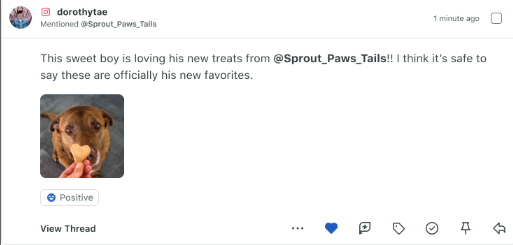
- Find the heart icon in the message action bar beneath the message.
- Click it. The heart fills in to confirm the like. Click it again to unlike.
If you don’t see the heart icon on an eligible message, reconnect your Instagram profile from Settings → Users & Social Profiles to refresh your permissions.
Why liking still matters for your Instagram strategy
Why build a feature around liking? Because a like isn’t just an algorithm signal, it’s a relationship signal. When someone tags your brand, shares a photo with your product or leaves a supportive comment, a like tells them you noticed, without demanding a full reply from your team.
It’s the social media equivalent of a nod across the room: small, fast and still meaningful.
Liking comments and mentions builds a habit of acknowledgment that scales. Your team can’t write a thoughtful reply to every comment on every post, but you can like nearly all of them.
That consistency is what turns casual followers into people who feel seen by your brand, one of the biggest drivers of the authenticity audiences say they want on social media.
Bring liking into your Instagram workflow today
Instagram Liking is available now for Standard plan customers and above with a connected Instagram Business or Creator profile. If your team already lives in the Smart Inbox for DMs and comments, this closes one of the last gaps between Sprout and native Instagram.
Start a free trial to see how a faster, more consistent engagement workflow can carry your Instagram strategy forward.
39 free social media strategy templates that will elevate your workflows
Published on August 20, 2026 Reading time 15 minutes








Share