Hashtag analytics: Your complete guide to tracking hashtag performance

Written by Jamia Kenan
Published on August 5, 2026
Reading time 18 minutes

Table of Contents
Summary
- Hashtag analytics is the practice of collecting and analyzing performance metrics for hashtags across social media platforms to measure reach, engagement, sentiment and campaign impact.
- Hashtag tracking captures the raw data. Hashtag analytics interprets it. The difference decides whether you report numbers or drive decisions.
- The five metrics that matter most: popularity, reach, engagement, users and sentiment.
- Native platform tools show aggregated hashtag data on one platform at a time. They can't isolate individual hashtag performance or surface conversations you didn't publish.
- Competitive benchmarking and stakeholder reporting turn hashtag data into strategy instead of just a recap.
- Sprout Social unifies hashtag tracking, sentiment analysis, competitive benchmarking and reporting in one platform.
Hashtag analytics takes the guesswork out of your tagging strategy, showing which tags expand your reach, spark conversation and prove campaign ROI. Social platforms now weigh discovery signals like watch time, saves and shares alongside keyword search, but hashtags still categorize content, connect brands to communities and track performance across every campaign.
Hashtag strategy isn’t one-size-fits-all. Each social media platform rewards different signals and understanding them separates brands that get discovered from brands that get buried. Regular hashtag research keeps your tags aligned with these shifting platform rules instead of relying on outdated best practices.
- LinkedIn: Discovery runs on relevance, expertise and network engagement. A small set of targeted hashtags categorizes your content, but strong commentary and topic authority drive the bulk of your reach.
- X (formerly known as Twitter): Hashtags anchor real-time conversations and live events, rewarding brands that show up as moments unfold.
- Instagram: Content surfaces based on user behavior, so your hashtags need to match your audience’s actual interests, not just your industry’s buzzwords.
Master these platform nuances and your hashtags do real work: driving people to your content and getting them talking about your brand. Finding the right tags demands a dual approach: sharp research paired with continuous hashtag analytics that tell you what’s working now.
This guide breaks down everything you need to build a hashtag analytics practice for 2026 and beyond. Use it to expand your brand’s reach and drive stronger engagement across social media.
What is hashtag analytics?
Hashtag analytics means collecting and analyzing performance metrics for hashtags across social media platforms like X, Instagram and YouTube. It’s a core piece of any social media analytics strategy. Brands rely on hashtag analytics to track campaign performance, spot emerging trends and gauge audience sentiment in real time.
This real-time visibility turns hashtag tracking into a launchpad for faster, sharper, data-driven decisions. As social conversations move quicker every year, brands that skip hashtag analytics risk missing the signals that shape tomorrow’s strategy.
Hashtag tracking vs. hashtag analytics: What’s the difference?
Marketers use these terms interchangeably. They shouldn’t. The distinction decides whether you deliver a report or a decision.
- Hashtag tracking captures the raw data: how many times a hashtag appeared, who used it and where it showed up.
- Hashtag analytics interprets that data: which tags drove reach, which sparked conversation, which shifted sentiment and which earned volume without earning attention.
Tracking tells you what happened. Analytics tells you what to do about it. Brands that stop at tracking end up with a spreadsheet. Brands that push into analytics end up with a strategy.
Key metrics for your hashtag analytics
Hashtag analytics reveal whether your tags are driving real results or just adding noise to your feed. Tracking these metrics moves your team beyond vanity numbers and into strategic business impact. Here are the social media metrics that define hashtag success.
Five metrics carry the weight:
- Popularity: How often a hashtag gets used and searched across a platform.
- Reach: How many people saw content carrying your hashtag.
- Engagement and interactions: Likes, shares, replies and comment sentiment tied to hashtagged content.
- Users: Who is posting with and engaging around your hashtag.
- Sentiment: Whether the conversation around a hashtag skews positive, negative or neutral
Popularity
Popular hashtags earn more searches, so build your strategy around tags with proven traction. Avoid spamming followers with irrelevant trending tags just to chase visibility. When your campaign hashtag gains traction with your target audience, that’s proof it resonates.
Reach
Reach measures how many people see your hashtagged content. Low reach signals your hashtags aren’t connecting with the right audience, so swap in tags that align with your strategy and your audience’s interests.
Engagement and interactions
Seeing and using your hashtags isn’t enough; track whether people interact with them too. Content that sparks shares extends your campaign’s reach organically. Engagement metrics prove the real impact of your hashtag strategy.
Different interaction types reveal different insights:
- Likes: Track basic engagement with your hashtagged content.
- Shares: Measure how willing your audience is to spread your hashtagged topics with others.
- Replies: Show how well a hashtag sparks conversation.
- Comment sentiment: Reveal whether the conversation skews positive or negative.
Users
Identify who’s using your hashtags. Confirm your target audience is searching for and engaging with the same tags in your posts so your message resonates.
Sentiment
Hashtags represent specific interests and communities. Tracking hashtag sentiment reveals what your audience cares about, loves or rejects. Use sentiment analysis to identify hashtags that strengthen brand perception and optimize campaigns in real time.
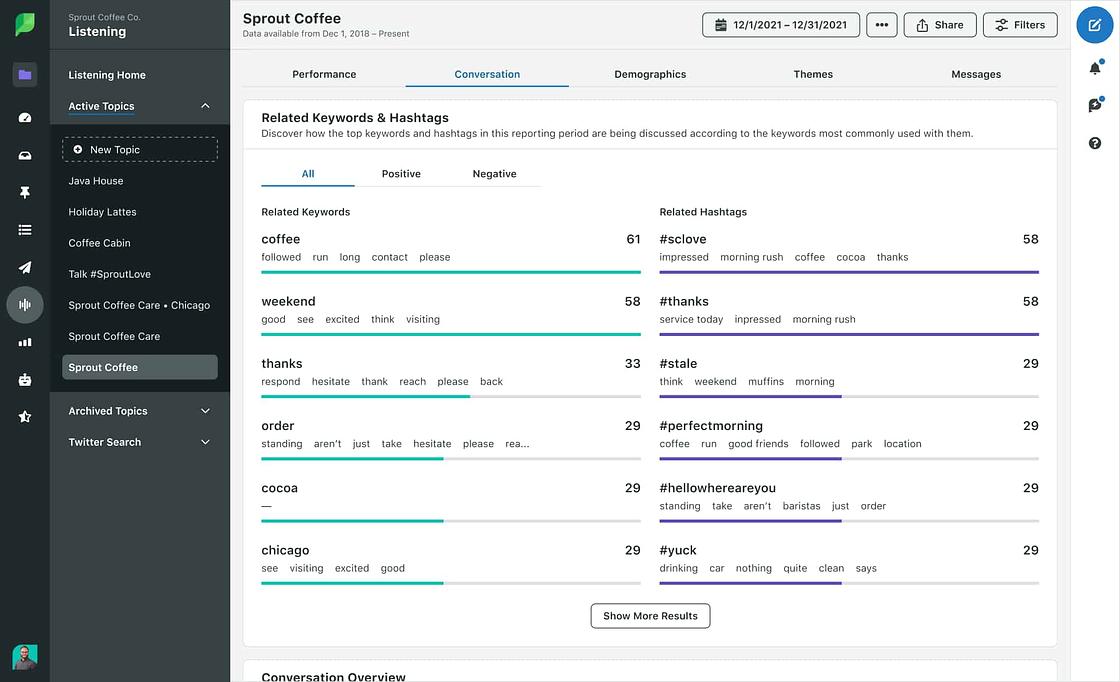
With Sprout Social’s Listening tools, track hashtag sentiment instantly. Analyze conversations around a topic and filter related hashtags by positive, negative or neutral for immediate insight into audience perception.
How to track hashtags
Native features on platforms like X or Instagram let you track hashtags, but they cap your hashtag analytics. For deeper insights and a more efficient workflow, a social media management platform like Sprout Social is the superior approach. We break down both approaches below.
How to natively track hashtags on X
Use X analytics to measure your engagements, impressions, replies, shares and other important metrics. Most advanced native hashtag analytics tools now sit behind X Premium.
If you don’t have X Premium, track hashtags manually with these methods:
- Search: Use X’s search bar to find popular posts using a specific hashtag.
- Trending list: Check X’s Trending list to see which topics are generating conversation, then click into each one to surface popular posts and related hashtags.
- Lists: Use X’s Lists feature to follow industry experts and track the hashtags they use most.
With many of X’s hashtag analytics tools locked behind the X Premium paywall, native tracking has become more limited. Manual tracking is free but time-intensive. A comprehensive social media management tool like Sprout Social tracks hashtags across X, Instagram and other platforms from a single unified dashboard.
How to natively track hashtags on Instagram
Monitor your Instagram hashtags natively using Post Insights, available only in Instagram Business accounts.
To access Post Insights, select the post you want to track, then select the View Insights button. Instagram surfaces engagement data for that post, including likes, comments and shares.
Scroll down to find impressions attributed to hashtags within your post insights. Instagram has reduced the visibility of some hashtag-specific metrics in recent updates, but these insights still reveal how hashtags contribute to discovery. Look beyond one-off impressions and track how your tags drive long-term community engagement.
This shows how effectively your hashtags performed. Track this data in a spreadsheet over time to spot patterns and adjust your strategy.
This native data aggregates all your hashtags together. You’ll see total impressions “From Hashtags,” but you can’t isolate individual hashtag performance. A dedicated social media management tool delivers the full range of hashtag analytics Instagram won’t show you natively.
How to natively track hashtags on TikTok
TikTok Studio shows performance for individual videos, including which hashtags appeared on your top posts. For discovery data, TikTok’s Creative Center reveals which hashtags are climbing across the app and in your category. Neither view isolates the reach a single hashtag delivered, so pair native data with a dedicated tool if you need hashtag-level attribution. Our comprehensive guide to TikTok hashtags breaks down which tags earn attention.
How to natively track hashtags on LinkedIn
LinkedIn surfaces hashtag follower counts directly on hashtag pages and Page Analytics shows post-level impressions and engagement. What LinkedIn won’t give you is hashtag-level attribution, which makes tracking a small consistent set of tags the smarter play. LinkedIn hashtags function differently than other platforms, so understanding which tags drive professional engagement matters more than chasing volume.
How to natively track hashtags on YouTube
YouTube Studio reports traffic sources and search terms, which reveals whether people found your video through hashtags or search. Hashtags on YouTube function closer to keywords than conversation anchors, so track them alongside your search data to understand which tags drive discovery. YouTube hashtags behave differently than other platforms, rewarding search intent over trending moments.
How to track hashtags using Sprout Social
Sprout Social tracks hashtag performance through its advanced social listening tools.
Every hashtag conversation carries a signal about your audience. Sprout Social turns those signals into decision-ready insight, so your team acts on hashtag data instead of just collecting it.
Sprout’s Conversation Breakdown widget within Social Listening visualizes the leading conversations around your current Listening topics and lets you search for hashtags directly within it.
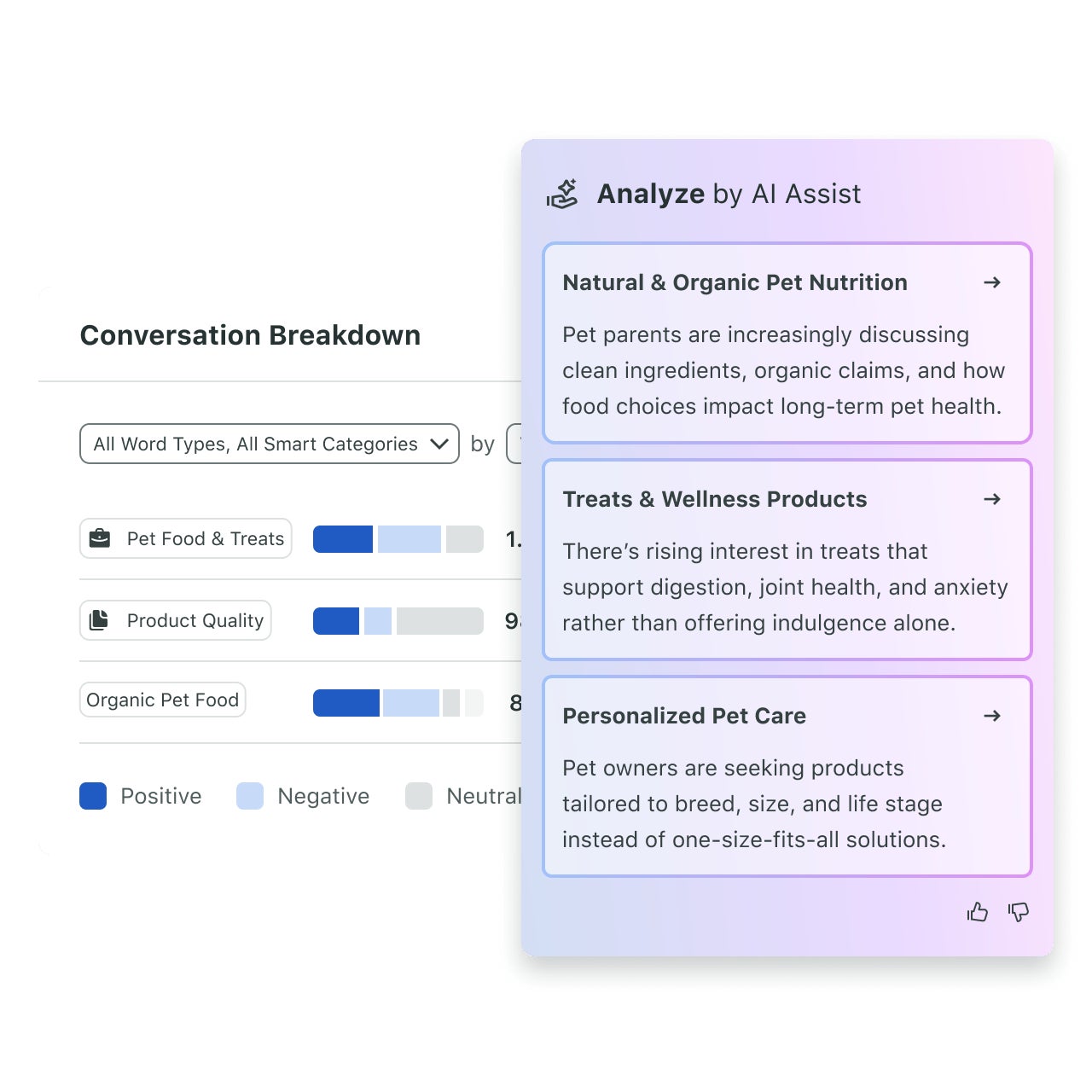
This shows you the top hashtags your followers are using in real time. Track trending hashtags within specific conversations—like seasonal Halloween hashtags—and run a detailed hashtag analysis to understand their sentiment. Sentiment analysis categorizes conversations as positive, neutral or negative, revealing how your audience perceives your brand and campaigns.
Consumers already give brands credit for keeping up with online culture. According to The 2025 Sprout Social Index™, 94% of consumers say brands do a good job keeping up with online culture. Real-time hashtag signals help you maintain that reputation and catch a shift in sentiment while you still have time to respond to it.
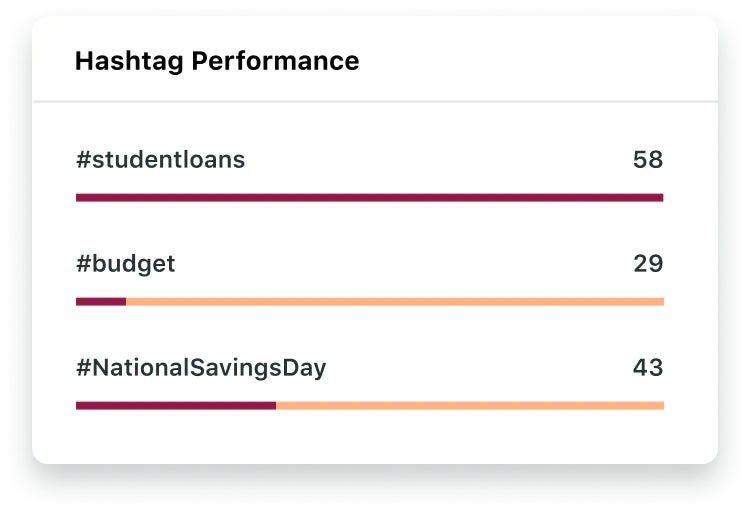
Break down your hashtag analytics further by volume or engagement. This reveals both the most-used hashtags around a topic and the ones that drive the most interaction. Tracking both gives you a strategic mix of tags for future content.
Sprout unifies your hashtag tracking across platforms. This gives you a comprehensive overview of hashtag performance from a single dashboard, saving you from constant platform switching.
Three capabilities do the heavy lifting:
- Query Builder: Build precise hashtag Topics with keywords, exclusions, and and/or logic, so you capture the conversation you want and skip the noise you don’t.
- Trellis: Ask questions about your hashtag data in plain language. No Boolean syntax, no query training, no waiting on an analyst.
- Spike Alerts: Get notified the moment hashtag volume, impressions, engagement or sentiment shifts, so you act on a trend instead of reading about it later.
This combined data helps you build an overarching hashtag strategy alongside platform-specific approaches, saving time across every account you track.
How to track hashtags on social media content and messages using Sprout Social
Use Tags to tag any scheduled social messages across all of your profiles with a unique hashtag. Once published, use Sprout Social analytics and reporting to see how your content performs.
Real-time audience insights fuel smarter content strategy decisions. Sprout’s reporting tools put this data at your fingertips, so you pivot your strategy at the speed of social.
This lets you track the performance of individual campaigns, events, content categories and more.
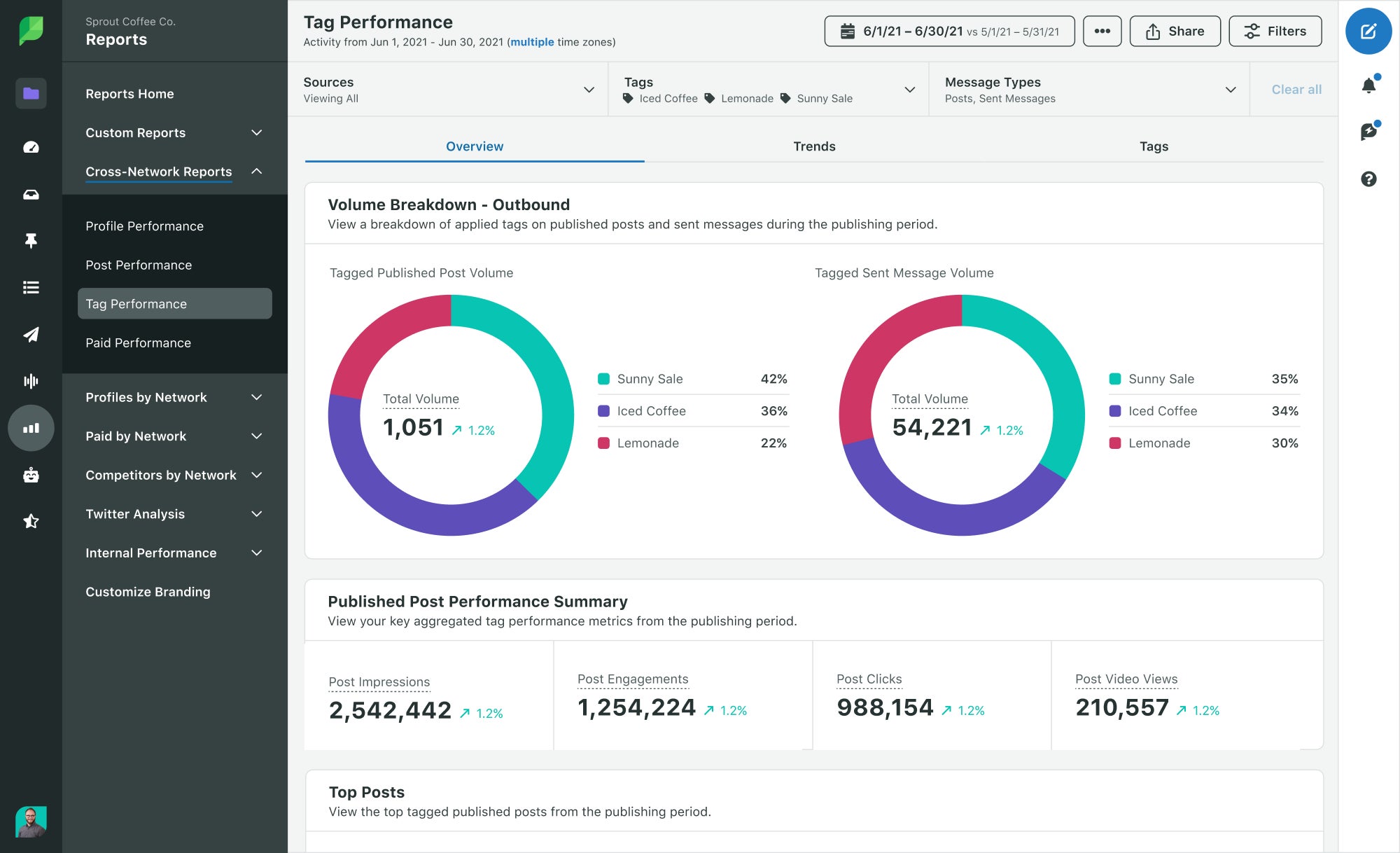
Also use Tags to group inbound messages that contain the same hashtag. This gives you a clear view of how your audience uses hashtags to communicate directly with your brand. For example, during a UGC (user-generated content) campaign, you can track your unique hashtag to measure participation and engagement.
See Sprout Social hashtag tracking in action
How to benchmark hashtag performance against competitors
Tracking your own hashtag performance tells half the story. The other half lives in the conversation surrounding your competitors, your category and every campaign competing for the same attention. Hashtag analytics without competitive context only measures you against yourself.
Benchmarking gives you the full picture. It shows you where your hashtag strategy leads, where it lags and where your next opportunity is hiding in plain sight.
Start with the right comparison set
A fair benchmark starts with comparing hashtags that serve the same purpose, not just hashtags that look similar on the surface.
- Branded hashtags: Compare them against other branded hashtags.
- Campaign hashtags: Compare them against campaign hashtags tied to similar launches or moments.
- Product and category hashtags: Compare them to understand broader market interest.
- Owned vs. community-driven hashtags: Separate them so your analysis stays clean.
Mixing these categories muddies your results. A branded hashtag will never behave like a trending category hashtag and pretending otherwise skews your conclusions from the start.
Measure the signals that matter
Once you’ve built your comparison set, focus on the metrics that reveal competitive position.
- Conversation volume
- Engagement around each hashtag
- Reach and visibility trends
- Sentiment shifts
- Top creators or accounts driving traction
- Speed of conversation growth
These signals move beyond vanity numbers. They tell you not just who’s talking, but who’s listening, who’s amplifying and how fast a conversation is building momentum.
Look for gaps not just winners
It’s tempting to stop at admiring a competitor’s hashtag success. Don’t. The real value comes from identifying what they’re capturing that you’re missing.
- Which themes show up in their hashtag conversation but not yours?
- Which audience groups engage with their hashtag more often?
- Which moments create spikes for them?
- Which hashtags earn attention but fail to earn positive sentiment?
These gaps are where your strategy gets sharper. A theme your competitor owns but you don’t is your next opening and it’s worth testing before they double down.
Turn the benchmark into action
Benchmarking only matters if it changes what you do next. Use your findings to shape content planning, sharpen campaign messaging, guide creator partnerships and inform how your team shows up in community conversations.
This is social intelligence in action: finding the signal in competitive hashtag conversations, interpreting what it means and acting on it before the moment passes. Sprout’s AI-powered Social Intelligence Platform brings hashtag analytics, competitor benchmarking and sentiment tracking into one workspace, so your team spends less time piecing together scattered data and more time acting on what it reveals.
Hashtags are one input into a bigger picture. Fold them into a full social media competitive analysis and you move from comparing tags to understanding share of voice across your entire category.
The different types of hashtags to track
Six hashtag types shape your social media strategy: location, event, branded, campaign, trending and product hashtags. Track each type to uncover distinct audience insights and conversation patterns that sharpen your hashtag analytics.
Location hashtags
Location hashtags connect your brand with geographically-relevant conversations and local audiences. A London-based restaurant using #LondonRestaurants taps into a massive city-specific conversation on Instagram. Track these tags to sharpen your targeting in specific markets.

Event hashtags
Event hashtags work when your brand hosts an event, attends a conference or comments on a major cultural moment like a big sporting event. Live-posting with these tags builds traction and drives real-time reach and engagement. Time your hashtag strategy in two phases:
- Pre-event hashtags: Launch these a month or so before the event to build anticipation and hype.
- Live event hashtags: Use these on the day for frequent real-time posts that let participants react, engage and collaborate.
During Oscars season, Sprout used #Oscars on our Instagram account to spotlight the talking points trending throughout the event.

Branded hashtags
Branded hashtags encourage customers to tag your brand directly by featuring your brand name, product or service. Barbour, a UK clothing brand since 1894, built #BarbourWayOfLife to invite customers to tag themselves for a shot at being featured on Barbour’s social channels.

Track branded hashtags, especially campaign-specific ones, to measure how many people talk about your brand directly.
Campaign or ad hashtags
A campaign or ad hashtag is a tag your brand creates for a specific campaign, launch or digital advertisement. It generates buzz around one specific initiative your brand is running.
To promote its new seasons, shows and films, Max runs a multi-channel social strategy that drives community engagement and discovery. By deploying campaign hashtags across platforms like Instagram and TikTok, the brand turns passive viewers into active advocates who fuel the cultural conversation.
This approach builds more than buzz. It surfaces social intelligence that reveals what audiences want to consume next.
Shifting from posting at your audience to listening to them through these campaign touchpoints builds the long-term loyalty that keeps brands relevant as social evolves in 2026 and beyond.

Campaign hashtags are ideal for tracking because they stay specific to each initiative, unlike recurring brand or content hashtags. Use social listening to monitor how well your campaign hashtags catch on with your audience.
Trending hashtags
Review trending hashtags natively on X and Instagram’s Explore pages, on desktop or mobile, by tapping the magnifying glass icon. Instagram’s Explore page surfaces trending topics and related content, while X highlights trending conversations in real time. Reviewing these trends helps you identify hashtags that align with timely conversations and your audience’s interests.
Not every trending tag fits your brand or industry, but analyzing them reveals the best tags for your strategy or campaign. Trending hashtags tied to cultural moments, viral trends or industry events extend your reach when they align with your brand voice. Compare your analytics to see how trending hashtags perform against your other tags.
Product and service hashtags
A product- or service-specific hashtag promotes a particular offering and tracks the social conversations tied to it, whether generic (#makeup) or branded (#DuoChromeEyeShadow). Analyzing engagement around these hashtags reveals customer perceptions, surfaces emerging trends and supports you in getting ahead of crises.
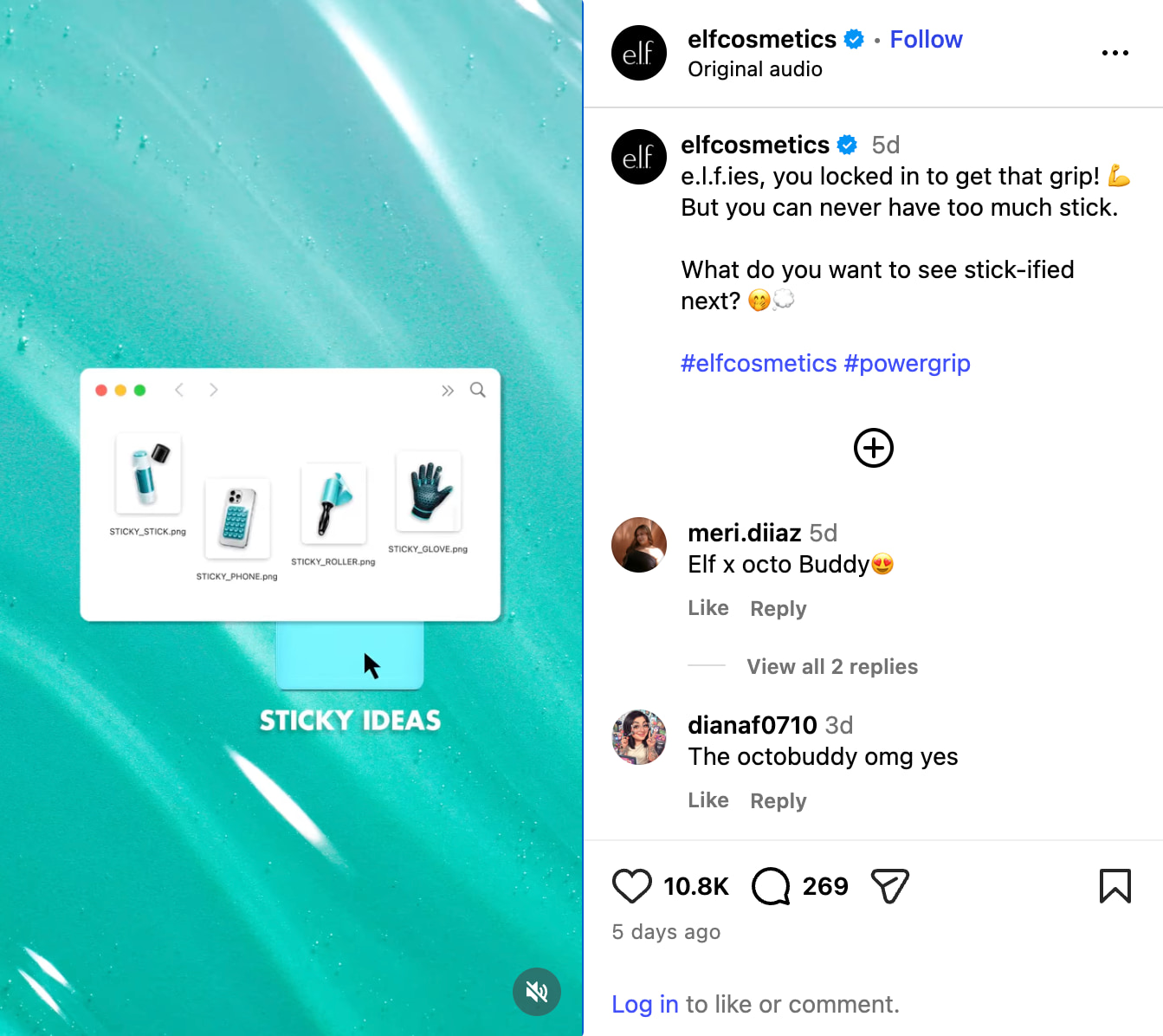
e.l.f. Cosmetics’ UK Instagram account uses branded product-specific hashtags like #PowerGrip for its powergrip collection.
By centralizing conversations under one dedicated tag, e.l.f. taps into real-time social intelligence that shows how its community uses the products. This approach moves beyond basic reach, arming the brand with trend and sentiment data that informs product development and sharpens marketing agility.
Why hashtag analytics is critical for your business
Hashtag analytics shapes far more than campaign performance. It drives audience insight, competitive strategy and brand growth across your entire organization. Here are five reasons hashtag analytics deserves a permanent seat in your social strategy.
- Understand your audience: Hashtags act as signals that draw specific people to your content. Monitor who engages with your hashtags to confirm they align with your target market, then use those insights to build sharper personas and extend your reach through the right tags.
- Prove business impact: Hashtag data connects campaign activity to outcomes leadership cares about, from launch visibility to community participation. Translate those results into a clear recap and you turn a tactical metric into a case for more budget and more autonomy.
- Analyze sentiment: Hashtags reveal how your audience feels about specific topics and brands in real time. Use these insights to tailor content that resonates and get ahead of emerging issues before they escalate.
- Stay relevant: Track emerging and trending hashtags tied to your industry and audience interests, then align your content and campaigns accordingly. Treat hashtag research as an ongoing practice, not a one-time task, since trends shift fast.
- Find influencers and advocates: Use hashtag research to identify the creators and customers already posting influential content about your brand. Collaborate with these advocates to increase visibility, build credibility and deepen brand loyalty.
What are the best practices for tracking hashtags?
Hashtag analytics turns scattered engagement data into a clear signal for what resonates with your audience. Tracking performance gives you a direct line into audience engagement, emerging trends and brand amplification. Follow these best practices to transform raw data into insights that drive reach and resonance.
- Monitor influencers and competitors: Analyze the hashtags used by competitors and relevant influencers to understand their engagement strategies and keywords.
- Identify trending hashtags: Use hashtag tracking tools to spot trending hashtags relevant to your content, so your posts gain visibility fast.
- Find related hashtags: Explore specific related hashtags through platform search bars to connect with a more targeted audience.
- Analyze past post performance: Track successful hashtags from previous posts to identify patterns and carry high-performing tags into future content.
- Use social listening and hashtag analytics tools: Sprout’s Social Listening surfaces the hashtags driving conversation in your industry, so you build a hashtag analytics strategy grounded in real data instead of guesswork.
Put these best practices to work with in-depth guides for the platforms that drive your strategy:
- How to use TikTok hashtags
- Guide to LinkedIn hashtags
- How to use hashtags on Twitter
- Complete guide to YouTube hashtags
- How to find the best hashtags for Instagram
- How hashtags work on Facebook
- Hashtags for Holidays
How to report hashtag results to stakeholders
Hashtag data alone proves nothing to your leadership team. A long list of metrics won’t win their trust. A sharp story will. Translate your hashtag analytics into a narrative stakeholders can act on immediately.
Start with the business question
Anchor your report to one clear question before you show a single number. Stakeholders don’t want a data dump. They want an answer.
- Did this hashtag expand campaign visibility?
- Did it drive stronger engagement from the right audience?
- Did it increase conversation around a launch, event or product?
- Did it improve brand sentiment or community participation?
Pick the question that matches your original goal. Every other data point in the report should support that answer.
Build a simple recap structure
Give your stakeholders a repeatable format they can scan in seconds and trust every time.
- State the goal of the hashtag.
- Summarize the headline outcome.
- Show the core metrics that support the result.
- Highlight what drove performance.
- Call out what should change next time.
Structure keeps you honest. It forces you to connect every metric back to a goal instead of reporting numbers for the sake of reporting them.
Match the report to the audience
Not every stakeholder needs the same level of detail. Tailor the report to who’s reading it.
- Leadership needs the headline, the impact and the recommendation. Nothing more.
- Social teams need the content patterns, audience behavior and execution takeaways they can apply to the next campaign.
- Cross-functional partners need the insights that affect campaigns, customer care or product messaging in their world.
Respect your audience’s time and they’ll pay closer attention to what you send them next.
Keep reporting fast and repeatable
Manual recaps eat hours you don’t have and rarely follow the same format twice. That inconsistency erodes trust over time. Sprout Social’s reporting tools make it easy to track and present your content performance by tag, channel or campaign so you spend your time on insight instead of spreadsheet cleanup.
Set reports to run on a cadence so the recap builds itself. Compare time periods side by side, pull hashtag performance through the Tag Performance Report and send findings to stakeholders through external share links that need no login. For teams running social data alongside the rest of the business, BI connectors and the Analytics API push hashtag performance straight into your existing dashboards.
Turn a one-off recap into a system your whole organization relies on and you build the executive support your social strategy needs to grow.
End with a recommendation
Every strong hashtag report closes with a proposal, not a summary. Tell your stakeholders what to scale, what to stop and what to test next.
A report without a recommendation is just a slide deck. A report with one is a decision your business can act on now.
Hashtag analytics tools to streamline your research
The right hashtag analytics tool turns hours of manual guesswork into minutes of actionable insight. Here are the tools that help you track, compare and sharpen your hashtag strategy in 2026.
| Tool | Best for | Key feature | Free or paid |
|---|---|---|---|
| Sprout Social | End-to-end hashtag analytics and social intelligence | Listening tool, automated reports and word cloud insights | Paid, with a 30-day free trial |
| RiteTag | Real-time hashtag suggestions | Live hashtag comparison | Paid |
| Display Purposes | Instagram-specific hashtag targeting | Profile and keyword-based suggestions | Free |
| Meta Hashtags | Instagram hashtag research | Related keywords and competitor tracking on paid plans | Free tier, paid plans for advanced analytics |
| Keyword Tool | Multi-platform keyword and hashtag research | Negative keyword filter | Free tier, paid for volume data |
Sprout Social
Sprout Social‘s hashtag analytics tools and automated reports turn scattered mentions into decision-ready insight, supporting you as you track performance and grow your reach with more speed and confidence.
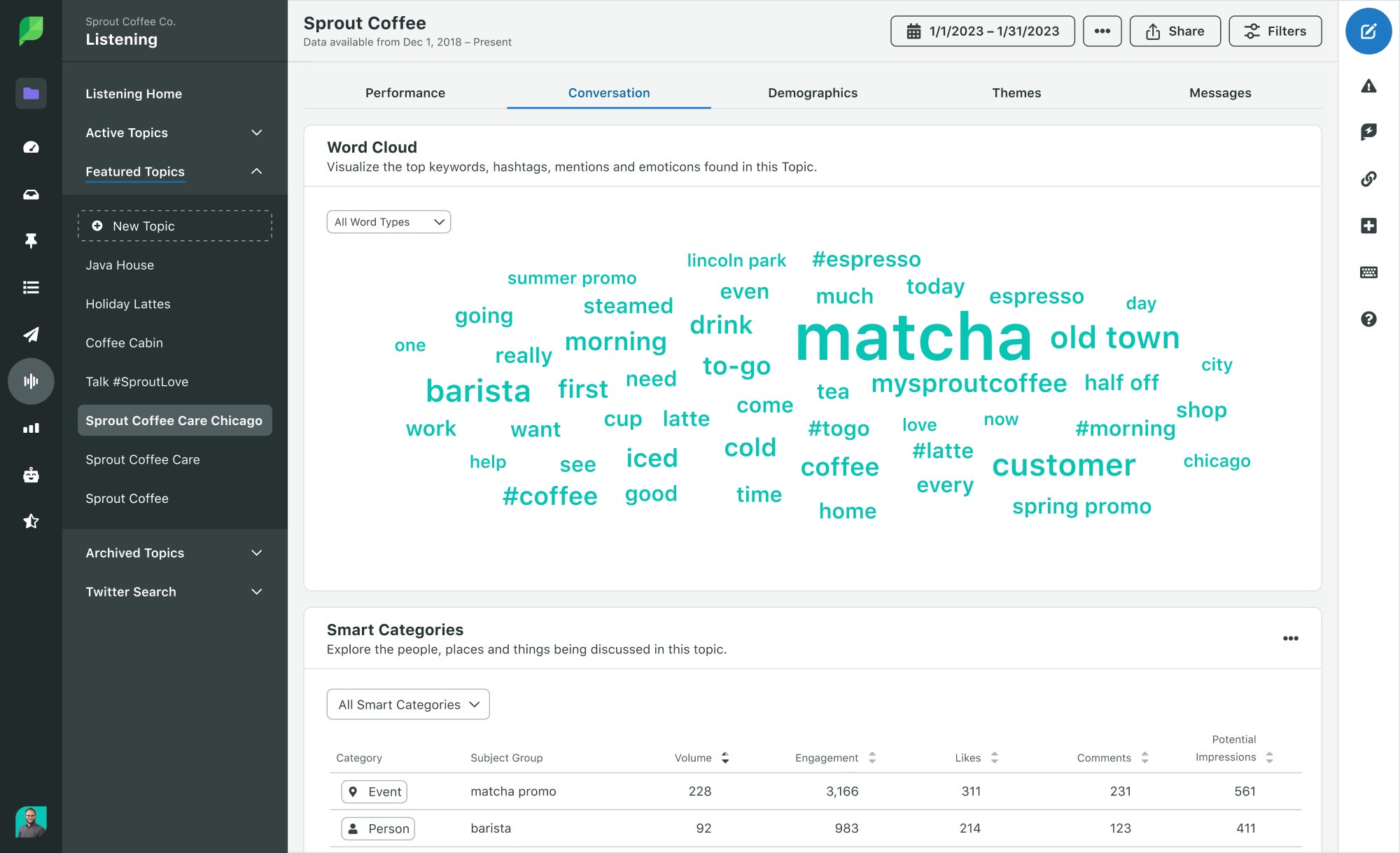
Dig deeper with Listening: Sprout’s Listening tool surfaces the conversations happening around specific hashtags and keywords, revealing the sentiment and engagement driving your brand, competitors and industry. This intelligence builds the foundation of a hashtag strategy that works.
Use Sprout to uncover the most popular hashtags across every platform you manage, plus leading hashtags relevant to your market or industry. Pull detailed reports to see which hashtags drive reach and engagement, then apply those insights to sharpen your hashtag strategy and outpace the competition.
RiteTag
RiteTag delivers real-time hashtag suggestions for images and text across social media platforms, plus a hashtag comparison feature that pits hashtag performance head-to-head.
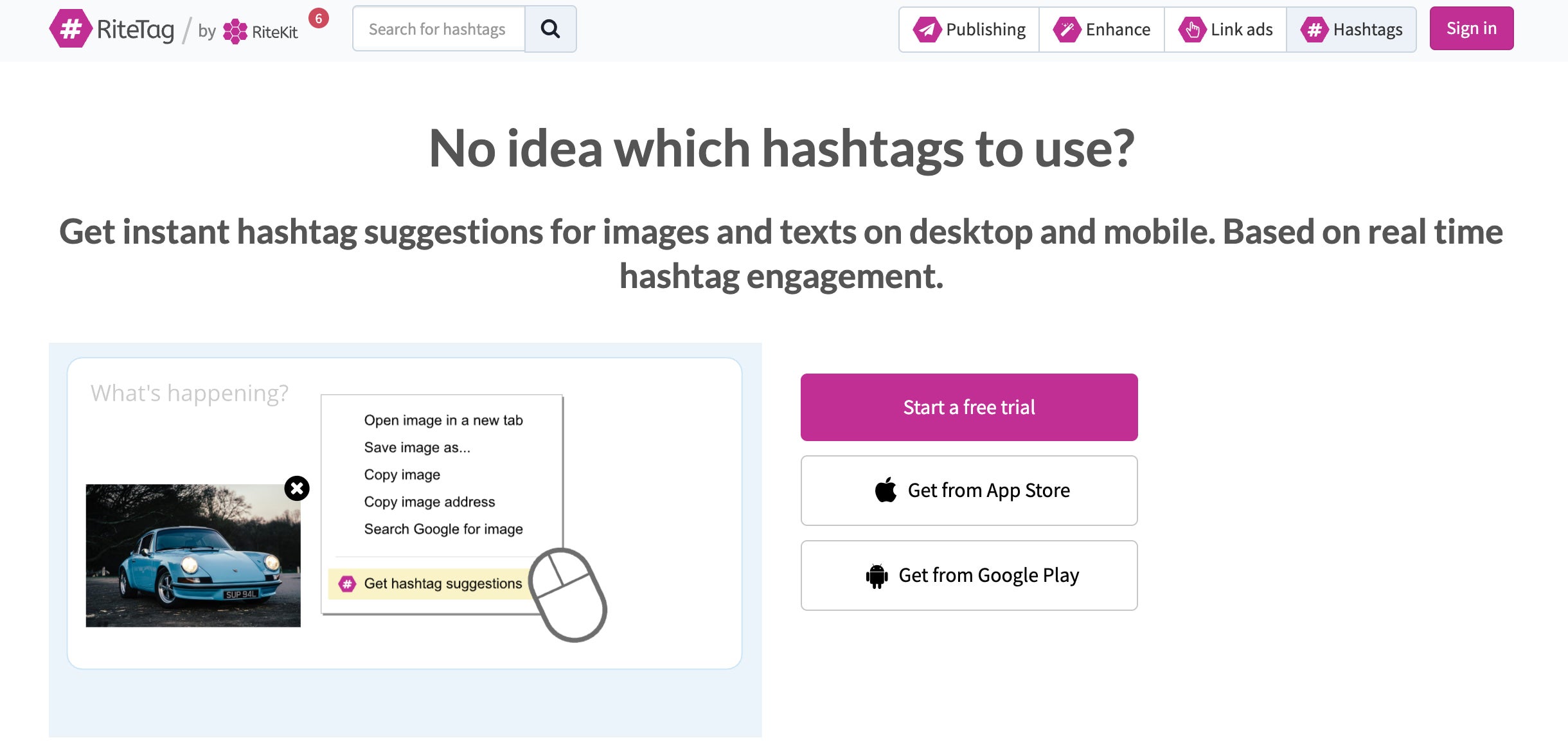
RiteTag analyzes hashtag performance in real time and serves data-driven suggestions for optimal reach and engagement. Spot trending hashtags the moment they take off and get your content in front of a wider audience before the moment passes.
Display Purposes
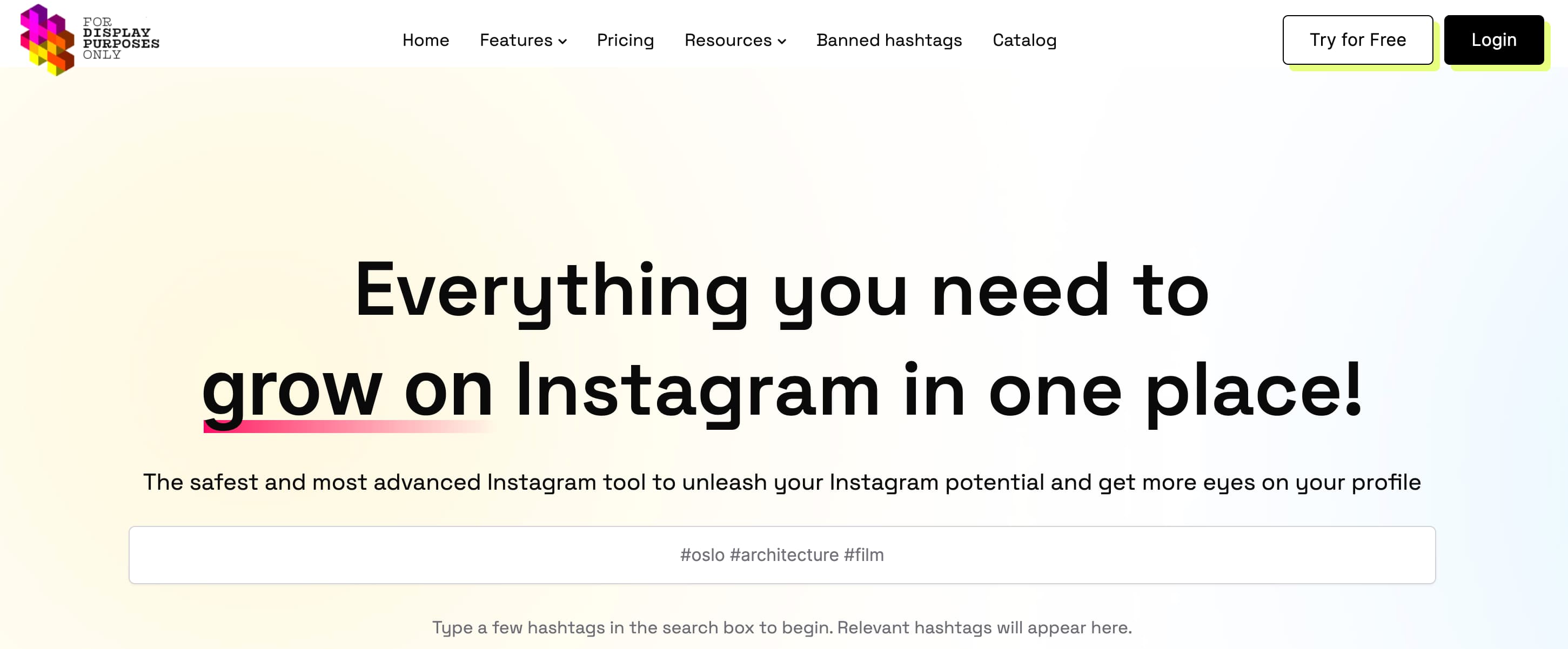
Display Purposes takes your brand’s specific needs into account when researching hashtags. By analyzing your Instagram profile and the keywords you provide, it generates hashtag suggestions that are relevant to your content and target audience. This ensures you’re reaching the right people and increasing your chances of engagement.
Meta Hashtags
Meta Hashtags is used to research and analyze hashtags across Instagram. When you search for a specific hashtag, you’ll be given several more relevant keywords as well as data on how the hashtag is used. You also navigate directly to examples of content using a hashtag, so you see how the content appears on Instagram itself.
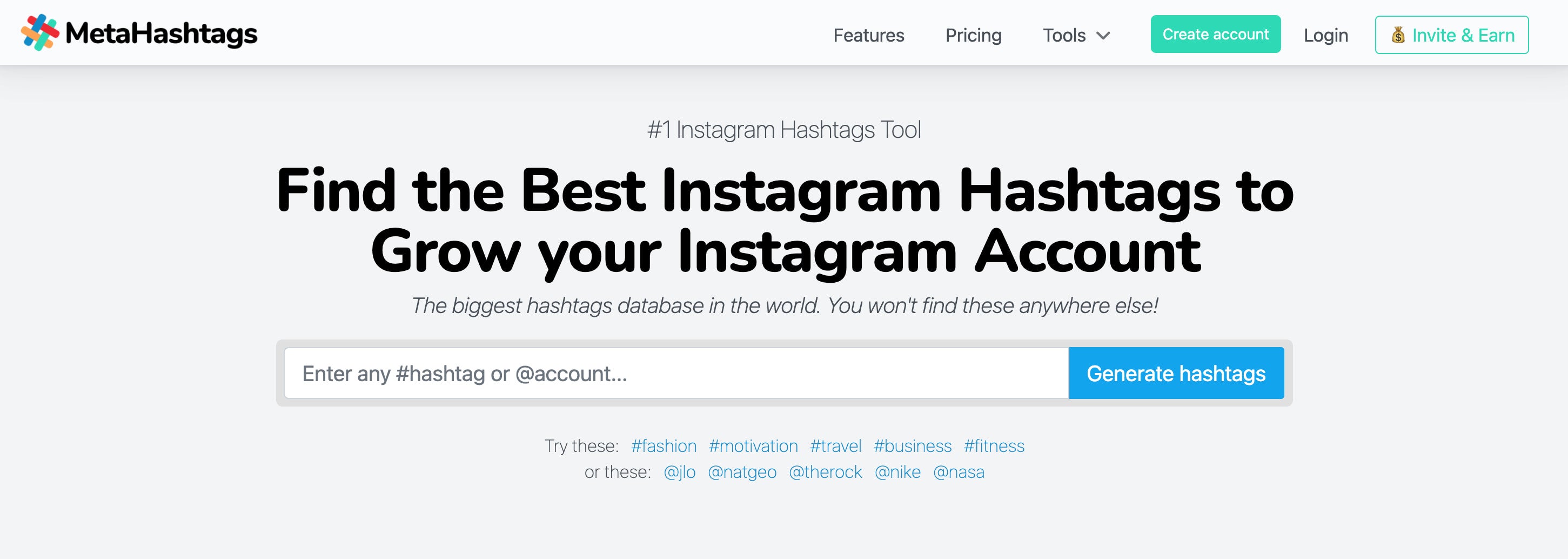
Meta Hashtags offers more advanced analytics and features for Instagram hashtags on its paid plans. These include being able to perform more advanced searches with more filters, and being able to track your competitor’s hashtag use.
Keyword Tool
Though it’s mainly used for keyword strategies, you also use Keyword Tool to research hashtags. Keyword Tool assists with hashtag research across YouTube, X, Instagram, Pinterest and TikTok.
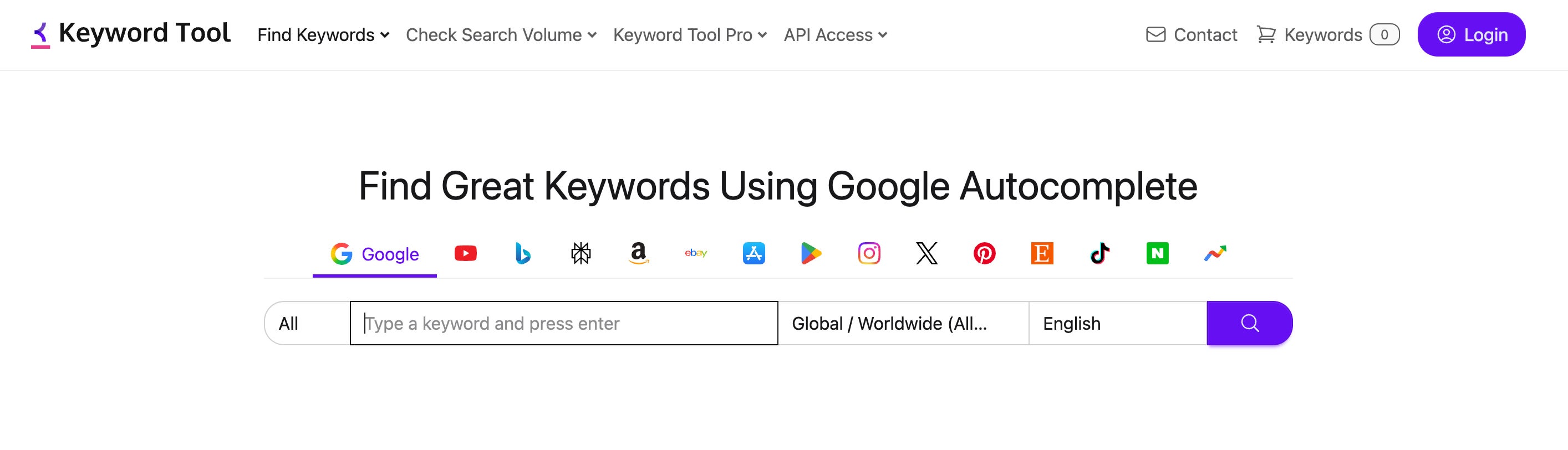
When you search for a related keyword, the tool will also provide you with suggested hashtags. You can go one step further by using its “negative keyword” filter to remove any hashtags or keywords that you don’t want to appear. This is useful to remove any keywords that have negative connotations or which are directly linked to your competition.
Uncover insights with hashtag analytics
Hashtag analytics separates brands that guess from brands that grow. Sprout Social unifies hashtag tracking, sentiment analysis, competitive benchmarking and campaign reporting in one platform, so your team acts on insight instead of chasing it across scattered tools. Surface trending conversations with Listening, prove campaign impact with Tag Performance Reports and catch sentiment shifts before they escalate with real-time sentiment analysis.
Turn hashtag data into a strategic advantage your stakeholders trust and your competitors can’t ignore. Start your free 30-day trial and deliver smarter, faster business impact from social.






Share